2OM-1075-002.pdf - 第134页
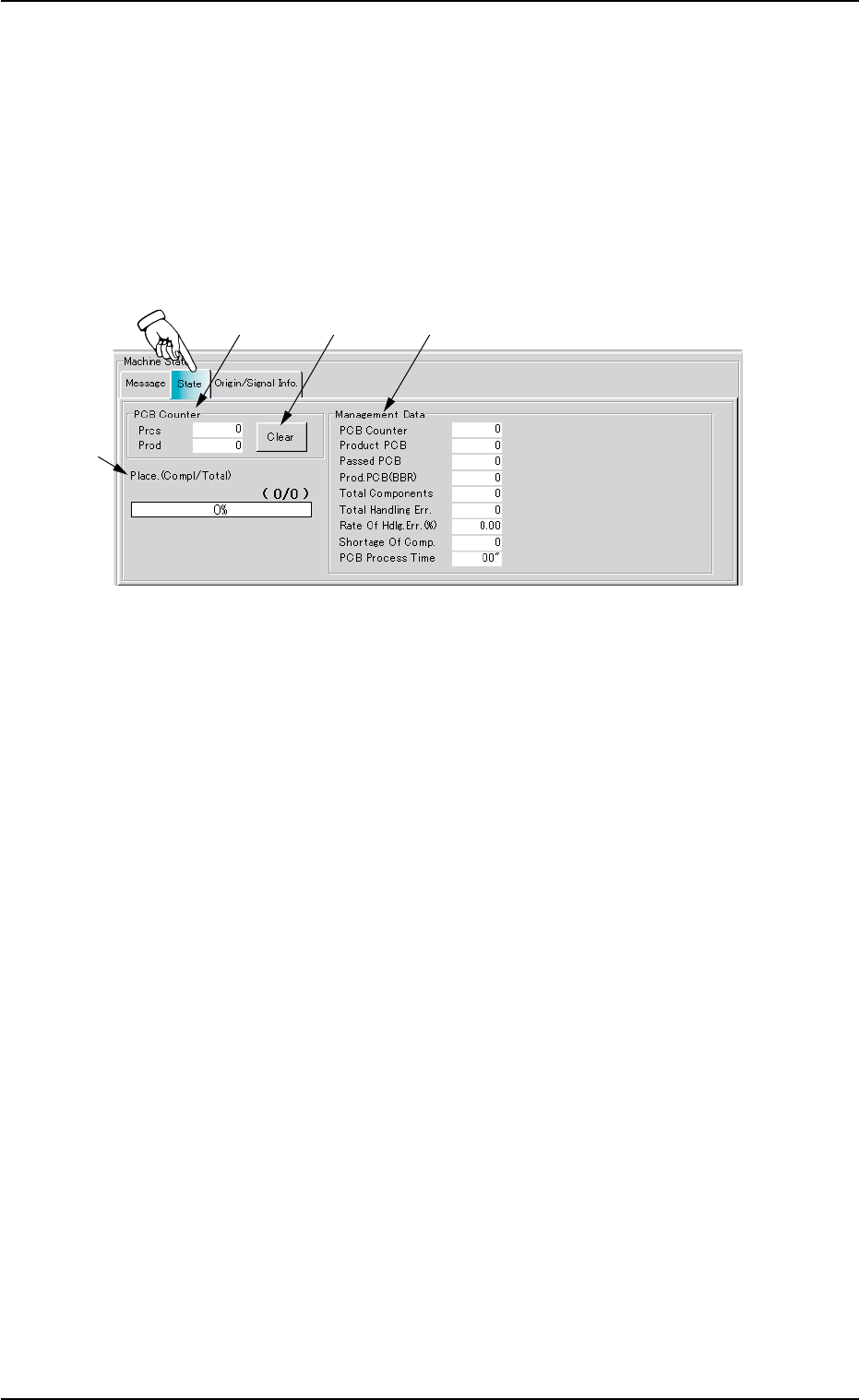
AHB01ESPP *4 Management Data Displayed is the following management data related to the current program (model). PCB Counter : Displayed is the number of processed P .C.B.’s (single P .C.B.’ s). Product PCB : Displayed is…
AHB01ESPP
2.3 "State" Tab
The corresponding tab sheet displays the number of processed P.C.B.’s
and the management data.
••
••
• Sheet Layout
When the "State" tab is pressed in the "AUTO OPN." window (submenu),
the following tab sheet appears inside the window.
Fig. 2E5 "State" Tab Sheet
••
••
• Sheet Composition
*1 PCB Counter
Displayed in the "Prcs" and "Prod" text boxes are the number of
processed P.C.B.’s (single and unit board).
Prcs : Displayed is the number of all processed P.C.B.’s.
Prod : Displayed is the number of all processed P.C.B.’s (single
boards converted as unit ones.)
*2 [Clear] Button
Pressing this button clears the number of processed P.C.B.’s to "0"
(zero).
*3 Place. (Compl/Total)
The fraction and the percentages are displayed, representing the
current state of component placement.
2.3 "State" Tab
*1
*2 *4
*3
01 12-002 5-8

AHB01ESPP
*4 Management Data
Displayed is the following management data related to the current
program (model).
PCB Counter : Displayed is the number of processed
P.C.B.’s (single P.C.B.’s).
Product PCB : Displayed is the number of processed unit
P.C.B.’s.
Passed PCB : Displayed is the number of passed
P.C.B.’s without component placement.
Prod. PCB (BBR) : Displayed is the number of Unit P.C.B’s
(BBR).
Total Components : Displayed is the number of picked com-
ponents.
Total Handling Err : Displayed is the total number of pick er-
ror-caused components.
Rate Of Hdlg. Err (%) : Displayed is the percentage of total han-
dling errors per total number of picked
components.
Shortage Of Comp. : Displayed is the number of component
shortage errors.
PCB Process Time : Displayed is the time required to finish one
P.C.B. excluding the P.C.B. in the middle
of process.
This is the total time from the P.C.B. trans-
fer start until the X/Y beam is zeroed after
the final component placement.
01 12-002 5-9
2.3 "State" Tab
AHB01ESPP
2.4 "Origin/Signal Info." Tab
The corresponding tab sheet displays the origin information on each
device and the real-time signal exchange condition (ON/OFF).
••
••
• Sheet Layout
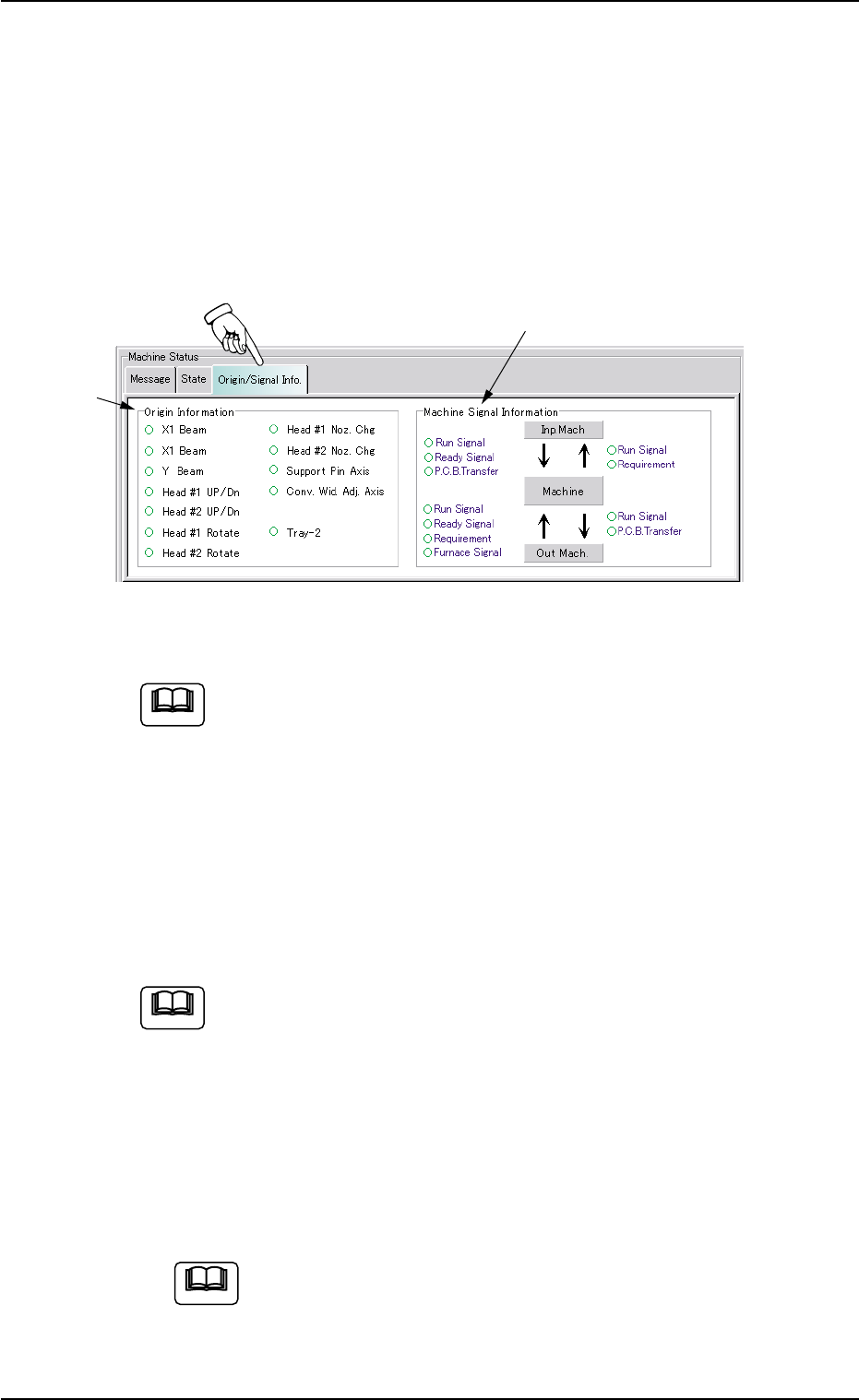
When the "Origin/Signal Info." tab is pressed in the "AUTO OPN." win-
dow (submenu), the following tab sheet appears inside the window.
Fig. 2E6 "Origin/Signal Info." Tab Sheet (Provided with Multi-Layer Tray Feeder 2)
The tab sheet may look different, depending on which options
are selected.
••
••
• Sheet Composition
*1 Origin Information
It is indicated whether or not each device is zeroed.
The devices located at their origins are marked with "z".
The origin information is not displayed while the machine is running.
When zeroing operation is started, this tab sheet appears auto-
matically.
*2 Machine Signal Information
Signal exchanges (ON/OFF status) between the main and input/
output machines are displayed at real time.
When the signal is ON, the corresponding signal name is marked
with "z".
When the signal system for system connection is checked,
this tab sheet appears.
2.4 "Origin/Signal Info." Tab
*2
*1
Note
0206-003 5-10
Note
Note