2OM-1075-002.pdf - 第136页
AHB01ESPP 3. "OPN. MODE" Window (Submenu) • • • • • Window Layout When the [OPN. MODE] button on the "AUTO OPN" submenu bar is pressed, the following window (submenu) opens. Fig. 2E7 "OPN. MODE&q…
AHB01ESPP
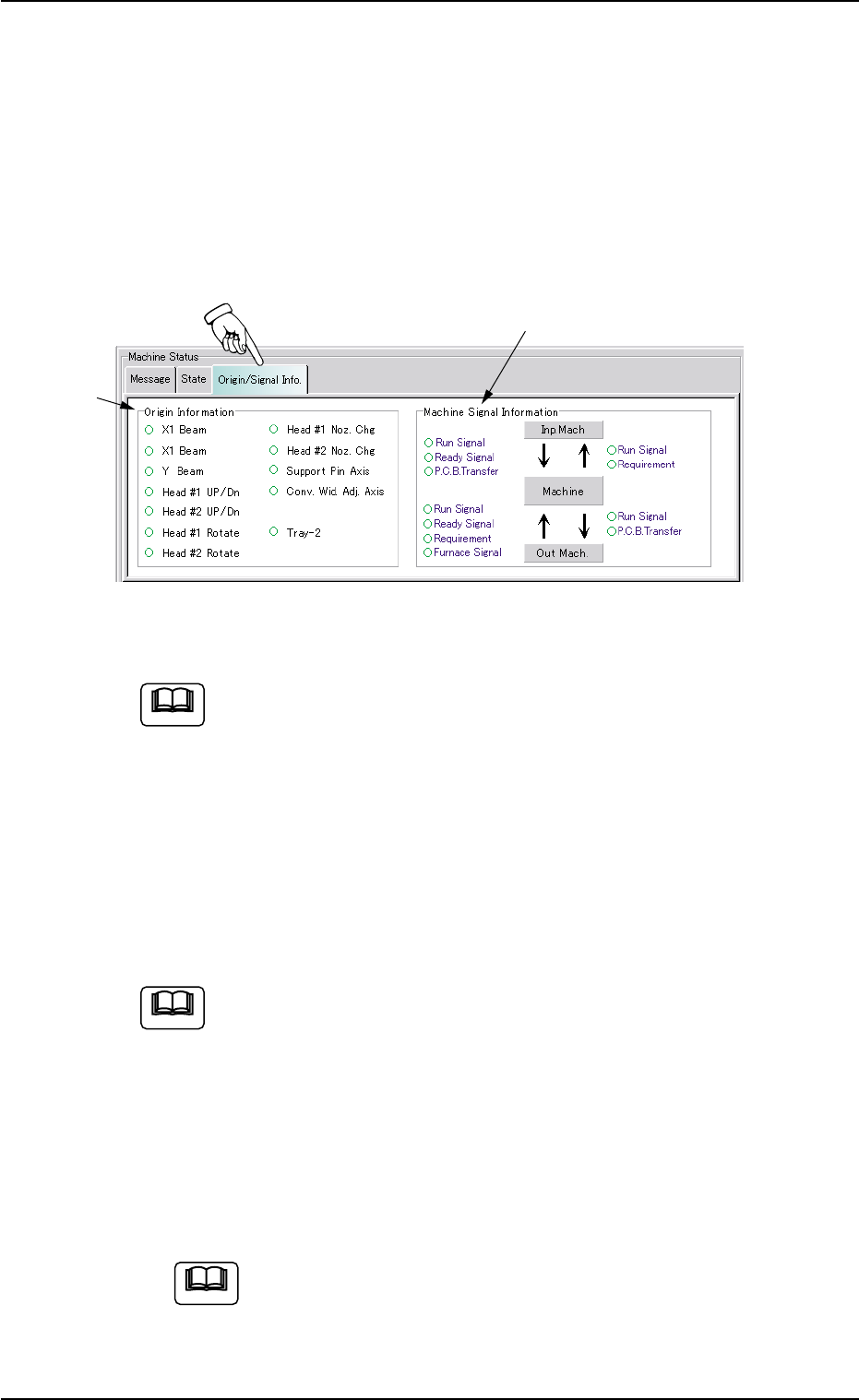
2.4 "Origin/Signal Info." Tab
The corresponding tab sheet displays the origin information on each
device and the real-time signal exchange condition (ON/OFF).
••
••
• Sheet Layout
When the "Origin/Signal Info." tab is pressed in the "AUTO OPN." win-
dow (submenu), the following tab sheet appears inside the window.
Fig. 2E6 "Origin/Signal Info." Tab Sheet (Provided with Multi-Layer Tray Feeder 2)
The tab sheet may look different, depending on which options
are selected.
••
••
• Sheet Composition
*1 Origin Information
It is indicated whether or not each device is zeroed.
The devices located at their origins are marked with "z".
The origin information is not displayed while the machine is running.
When zeroing operation is started, this tab sheet appears auto-
matically.
*2 Machine Signal Information
Signal exchanges (ON/OFF status) between the main and input/
output machines are displayed at real time.
When the signal is ON, the corresponding signal name is marked
with "z".
When the signal system for system connection is checked,
this tab sheet appears.
2.4 "Origin/Signal Info." Tab
*2
*1
Note
0206-003 5-10
Note
Note
AHB01ESPP
3. "OPN. MODE" Window (Submenu)
••
••
• Window Layout
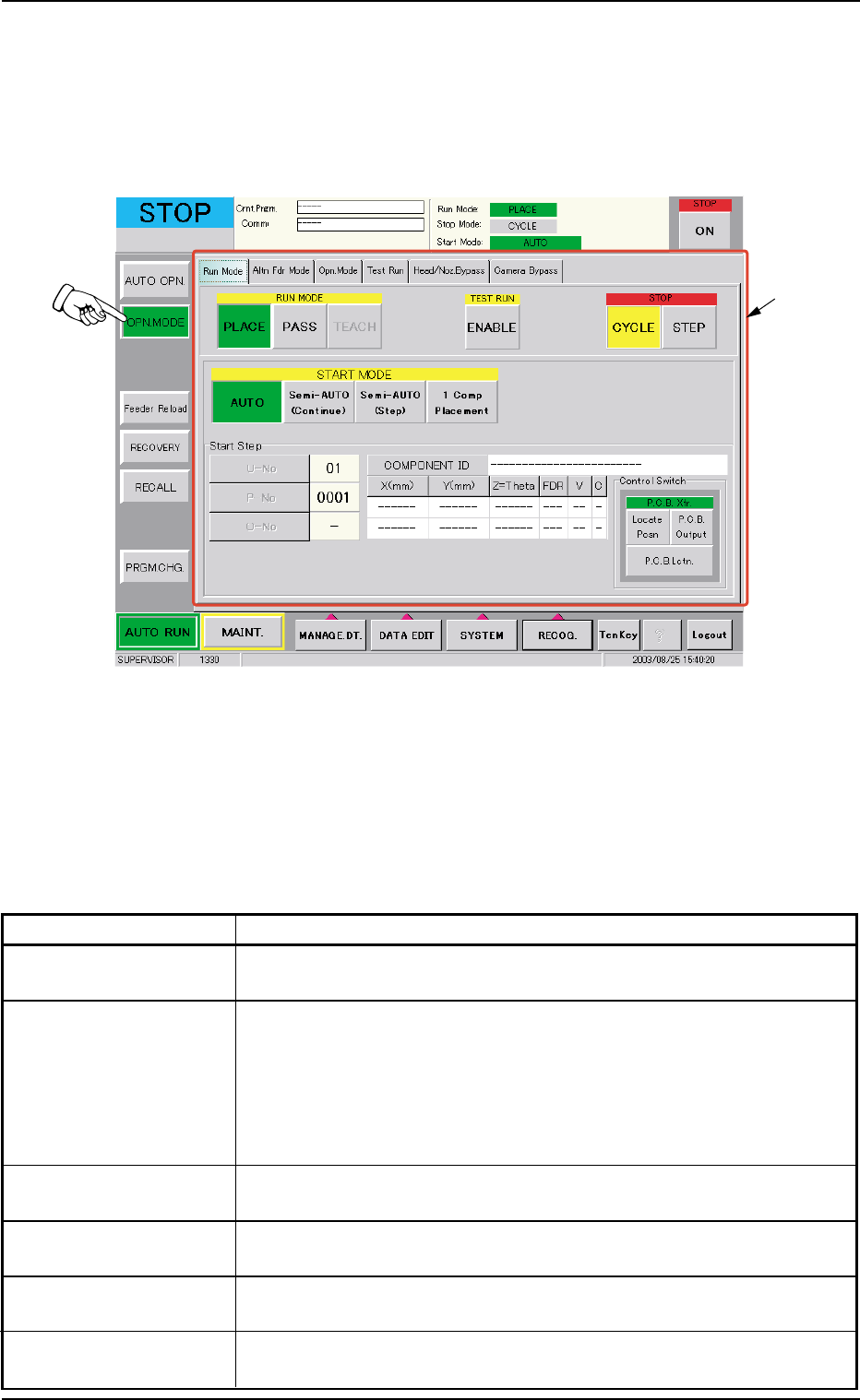
When the [OPN. MODE] button on the "AUTO OPN" submenu bar is
pressed, the following window (submenu) opens.
Fig. 2E7 "OPN. MODE" Window (submenu)
••
••
• Window Composition
*1 Tabs and Tab Sheets
The "OPN. MODE" window (submenu) is provided with the follow-
ing 6 tabs. When a tab is pressed, the corresponding tab sheet
appears inside the window.
Table 2E2
Tabs Description
Run Mode The corresponding tab sheet enables the operator to change the
operation mode and specify the stop and start methods.
Altn Fdr Mode The corresponding tab sheet enables the operator to set the
feeder alternate mode.
When "Enable" is specified for the alternate feeder mode, it be-
comes possible to check how the alternate feeder function is
working (feeder status) and issue a command that indicates the
completion of component replenishment for the related feeder.
Opn. Mode The corresponding tab sheet enables the operator to specify vari-
ous modes such as "Recovery Mode", "Auto. Fdr. Axis Set", etc.
Test Run The corresponding tab sheet enables the operator to specify a test
pattern.
Head/Noz. Bypass The corresponding tab sheet enables the operator to operate the
machine without using the specified head(s) or nozzle(s).
Camera Bypass The corresponding tab sheet enables the operator to operate the
machine without using the specified camera(s).
3. "OPN. MODE" Window (Submenu)
0308-004 5-11
*1
AHB01ESPP
3.1 "Run Mode" Tab
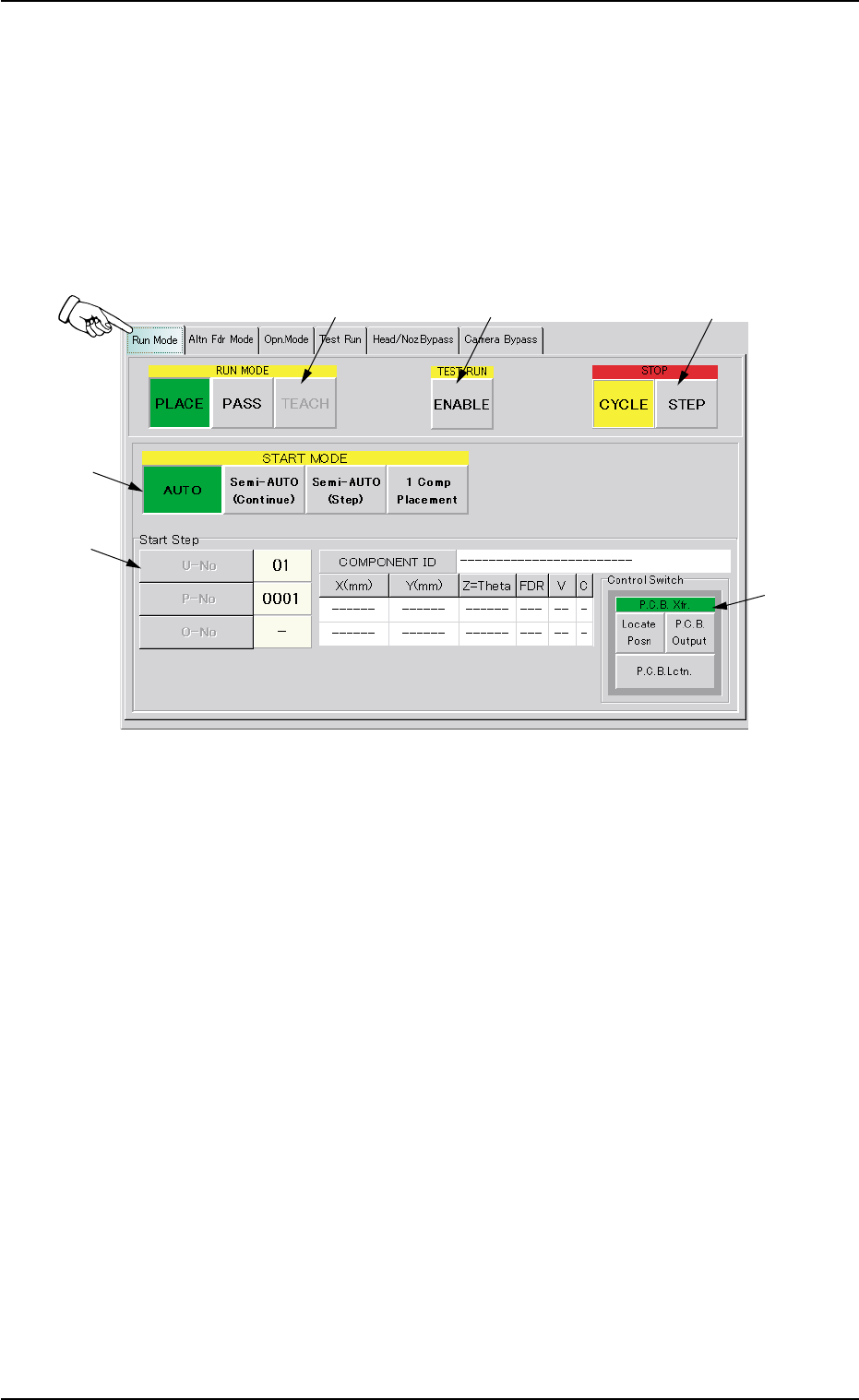
The corresponding tab sheet enables the operator to change the opera-
tion mode, the test run mode, the stop mode, and the start mode.
••
••
• Sheet Layout
When the "Run Mode" tab is pressed in the "OPN. MODE" window
(submenu), the following tab sheet appears inside the window.
Fig. 2E8 "Run Mode" Tab Sheet
••
••
• Sheet Composition
*1 RUN MODE ([AUTO], [PASS], and [TEACH] Buttons)
Press one of the following buttons to change the current running
mode.
[PLACE] Button : Press this button to perform the automatic op-
eration.
[PASS] Button : Press this button to perform the pass opera-
tion.
[TEACH] Button : Press this button to perform the teaching op-
eration.
The selected running mode is displayed at the upper right field of
the "AUTO OPN." window (status bar).
3.1 "Run Mode" Tab
0308-004 5-12
*1
*2
*3
*4
*5
*6