2OM-1075-002.pdf - 第146页
AHB01ESPP *3 PCB Counter Stop Mode (Not Available) "PCB Counter Stop Mode" "Enable" or "Disable" can be selected to determine whether or not the "PCB Counter Stop Mode" should be u…

AHB01ESPP
*2 Auto. Fdr. Axis Set
This function is used to correct the feeder offset data through statis-
tical processing of the difference between the nozzle and compo-
nent center positions calculated during component recognition ac-
cording to the parameters specified as "Auto feeder axis adjust-
ment set" in the "Auto Operation Setup" tab sheet in the "Machine
System Data" window.
"Enable" or "Disable" can be selected to determine whether or not
the "Auto. Fdr. Axis Set" function should be used.
Each parameter ("Enable" or "Disable" for "Auto. Fdr. Axis Set" func-
tion) can be set separately for X and Y directions.
(1) (X) Dir
[Disable] Button
When this button is pressed, the automatic feeder axis set-
ting function is not used for "X Dir".
[Enable] Button
When this button is pressed, the automatic feeder axis set-
ting function is used for "X Dir".
(2) (Y) Dir
[Disable] Button
When this button is pressed, the automatic feeder axis set-
ting function is not used for "Y Dir".
[Enable] Button
When this button is pressed, the automatic feeder axis set-
ting function is used for "Y Dir".
(a) In normal cases, press the [Enable] button.
(b) The "Auto Operation Setup" tab sheet can be opened
through the operation sequence - "[SYSTEM] Button on
Main Menu Bar Æ "SYSTEM SEL." Menu Æ [SYS DATA]
Button Æ "Machine System Data" Window Æ "Auto Op-
eration Setup" Tab Sheet".
(c) The designation of the automatic feeder axis setting func-
tion for a specific feeder can be canceled in the compo-
nent library data.
(d) When the machine is set in the "RUN" or the "WAIT" mode,
the data save operation (saving of changed settings) can-
not be performed.
0206-003 5-17
3.3 "Opn. Mode" Tab
Note
AHB01ESPP
*3 PCB Counter Stop Mode
(Not Available)
"PCB Counter Stop Mode"
"Enable" or "Disable" can be selected to determine whether or not
the "PCB Counter Stop Mode" should be used.
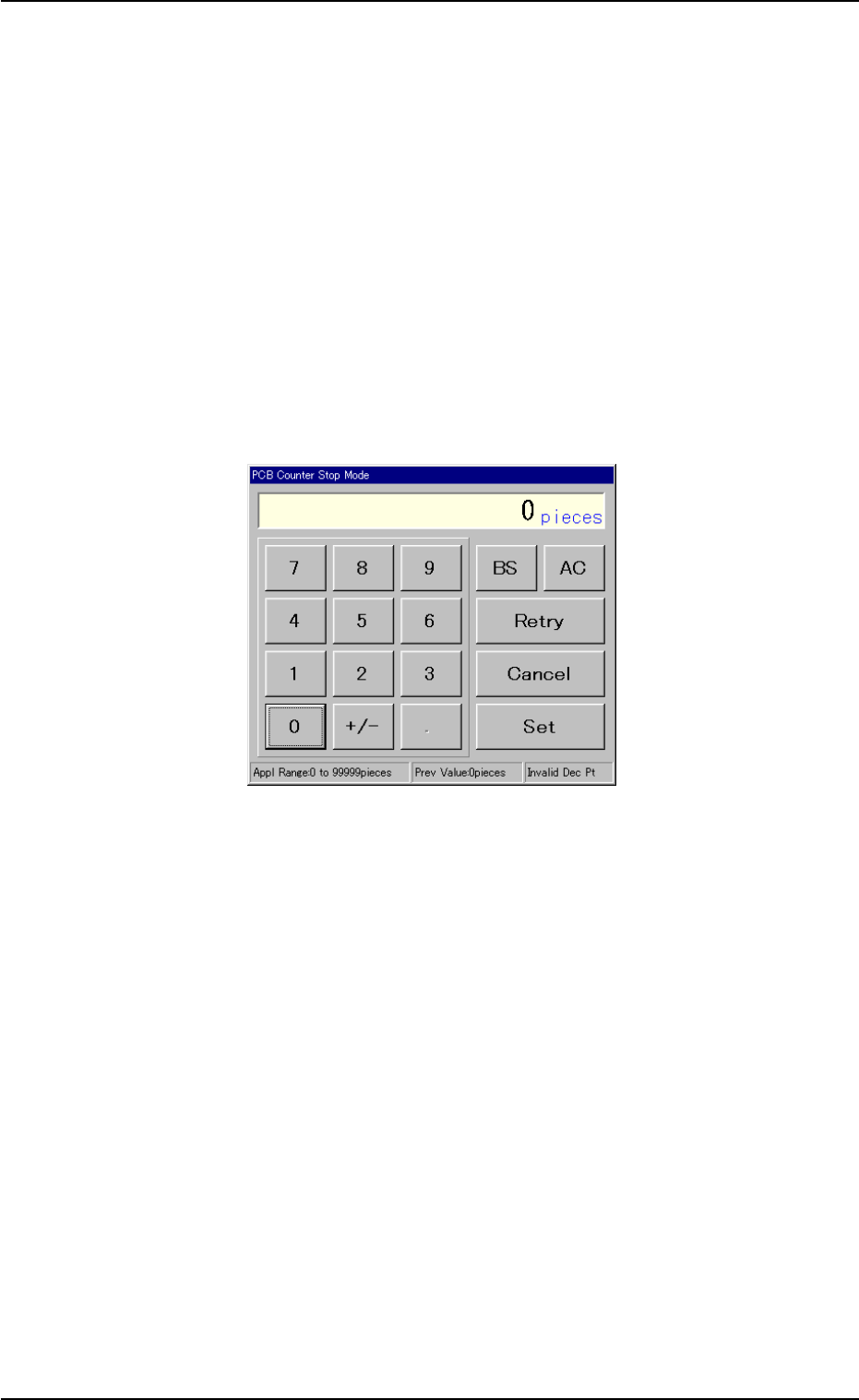
[Count] Button
When the [Enable] button is selected and the [Count] button is
pressed, the "PCB Counter Stop Mode" edit window opens. Enter
the number of P.C.B.’s in the data entry field and press the [Set]
button. When the number of produced P.C.B.’s reaches the entered
value, the machine stops running.
Fig. 2E12-1 "PCB Counter Stop Mode" Edit Window
0206-003 5-18
3.3 "Opn. Mode" Tab

AHB01ESPP
*4 Over Tact-Time Reduction
Press one of the following buttons to determine whether or not the
upper limit of the speed should be specified for the working speed of
each device (rate of speed reduction based on the highest speed)
specified in the component library data.
[No Designate] Button
When this button is pressed, the reduction rate of the tact time is
not designated.
[Designate] Button
When this button is pressed, the reduction rate of the tact time is
designated. In this case, as the following buttons become avail-
able, set the rate of each speed reduction.
[X/Y Beam] Button
When this button is pressed, the "X/Y Beam" edit window opens.
Set the rate of speed reduction in the data entry field for the X/Y
beam (Beams A and B).
[Pick-Up Descent] Button
When this button is pressed, the "Pick-Up Descent" edit window
opens. Set the rate of speed reduction in the data entry field for
the descending movement of the nozzle (nozzle movement to
pick up a component from the feeder).
[Pick-Up Ascent] Button
When this button is pressed, the "Pick-Up Ascent" edit window
opens. Set the rate of speed reduction in the data entry field for
the ascending movement of the nozzle (nozzle movement after
the nozzle has picked up a component from the feeder).
[Place Descent] Button
When this button is pressed, the "Place Descent" edit window
opens. Set the rate of speed reduction in the data entry field for
the descending movement of the nozzle (nozzle movement to
place a component on the P.C.B.).
[Place Ascent] Button
When this button is pressed, the "Place Ascent" edit window
opens. Set the rate of speed reduction in the data entry field for
the ascending movement of the nozzle (nozzle movement after
the nozzle has placed a component on the P.C.B.).
0206-003 5-19
3.3 "Opn. Mode" Tab