2OM-1075-002.pdf - 第151页
AHB01ESPP *8 "Nozzle Polarity Mode" Group Box When the same library data is used for both Sides A and B, it can be determined whether or not the polarity nozzles should be used. [Enable] Button: Production beco…

AHB01ESPP
"CAMERA" : It is required to specify a camera ID.
When the [CAMERA] button is selected, the
[CAMERA ID] button appears under the se-
lected button.
Every time the [CAMERA ID] button is pressed,
the label of the right button changes in scroll-
ing such as "CAM-A1" Æ "CAM-B1" Æ "CAM-
A2" Æ "CAM-B2" Æ "CAM-M1" Æ "CAM-M2".
"PARTS" : It is required to specify a component ID.
When the [PARTS] button is selected, the
[PARTS ID] button appears under the selected
button.
When the [PARTS ID] button is pressed, the
"PARTS ID" edit window opens. Enter the com-
ponent ID to be specified.
"FEEDER" : It is required to specify a feeder No.
When the [FEEDER] button is selected, the
[FEEDER No.] button appears under the se-
lected button.
When the [FEEDER No.] button is pressed,
the "FEEDER No." edit window opens. Enter
the feeder No. to be specified.
Display Mode
Set the condition to display the recognition results of the compo-
nent recognition.
Every time the right button is pressed, the label changes in scroll-
ing such as "NON" Æ "+LINE" Æ "+LINE + RESULT".
[NON] : Only the outline of the recognized component is
displayed.
[+LINE] : The outline of the recognized component and a
crosshair are displayed.
[+LINE+RESULT] : The outline of the recognized component, a
crosshair, and the result of the recognition (the
coordinates of the crosshair center) are dis-
played.
3.3 "OPN. Mode" Tab
0308-004 5-22
AHB01ESPP
*8 "Nozzle Polarity Mode" Group Box
When the same library data is used for both Sides A and B, it can be
determined whether or not the polarity nozzles should be used.
[Enable] Button: Production becomes possible, using the same
library data.
[Disable] Button: Production becomes impossible, using the same
library data.
It is required to create the library data separately
and use the data for each production.
Default: [Disable] Button Selected
(a) When the polarity nozzles are used and the same com-
ponents are arranged on both Sides A (Rear Beam)
and B (Front Beam) through component picks, the
same library data may not be used without any modi-
fication. Therefore, it is required to select this nozzle
polarity mode.
(b) Actions taken to pick up a polarity component from
the rear side
A component is picked up after the Z axis of the head
is rotated 180 degrees and it is recognized and placed
as "Component to be recognized with the movable
camera Æ Component picked up from the front side
(the head rotated back by 180 degrees after the
pickup)" or "Component to be recognized with the fixed
camera Æ Component picked up from the rear side".
*9 "Pickup level for embossed Calculation Method" Group Box
The [Ix mode] or the [TIM5000 mode (Standard)] button can be se-
lected to determine the calculation method of the embossed pickup
level.
[Ix mode] Button: The calculation method for TIM-X100 is used.
[TIM5000 mode (Standard)] Button:
The calculation method for the TIM-5000 series
is used.
Default: [Ix mode] Button Selected
There is a difference in the pickup actions (the descending
positions at component picks) for the components (Thick-
ness T
=
Thickness (t)) on the embossed tape between
TIM-X100 and TIM-5000 series.
Therefore, an error such as "excessive pushing" occurs
when the descending position is not specified according to
the selected data.
3.3 "OPN. Mode" Tab
0308-001 5-22-1
Note
Note
AHB01ESPP
Pickup Level for TIM-5000 Series
Because the distance between the reference level of the em-
bossing and the pickup surface must be entered, it is required
to make the manual calculation (Principal Pickup Level + Com-
ponent Thickness (T) - Component Thickness (t)) and enter
the result of the calculation as a pickup level.
Pickup Level for TIM-X100
The distance between the reference level of embossing and
the uppermost surface of the component must be entered.
The component pickup surface (Principal Pickup Level + Com-
ponent Thickness (T) - Component Thickness (t)) is automati-
cally calculated.
*10 "Short Nozzle Mode" Group Box
"Disable" or "Enable" can be selected to determine whether or not
the short nozzles should be handled.
[Disable] Button: Only the standard nozzles can be used.
[Enable] Burron: The short nozzles can be used.
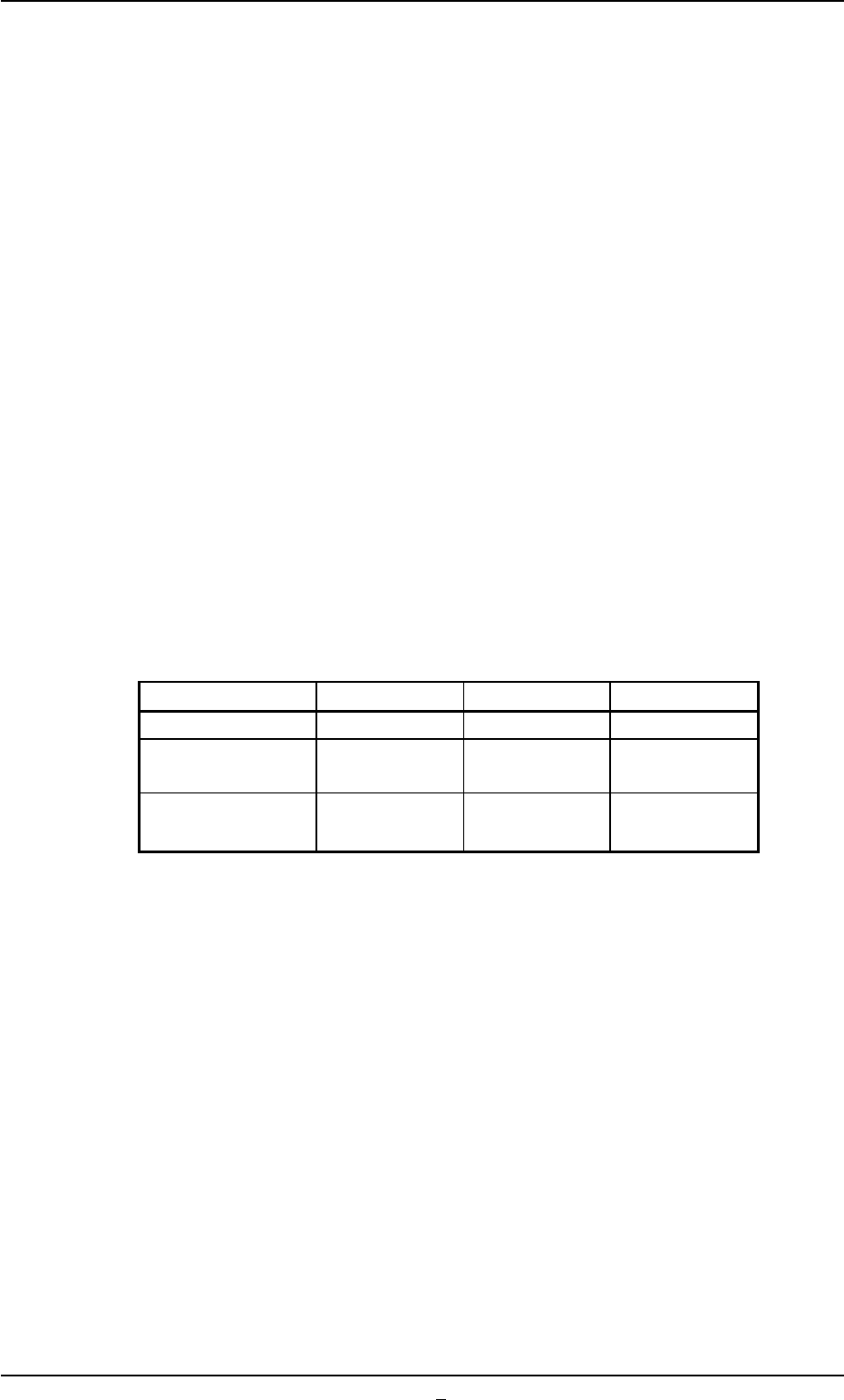
Table 2E2-1
Nozzle Types Standard Short 1 Short 2
Nozzle Length: L 19.0 13.0 11.0
Applicable Thickness 0 to 5.0 5.0 to 11.0 7.0 to 13.0
of Component
Nozzle ID E*** D*** C***
(Example: EA06) (Example: DA06) (Example: CA06)
*11 [Prev] Button
When pressed, this button opens the first page.
3.3 "OPN. Mode" Tab
0308-001 5-22-2