2OM-1075-002.pdf - 第168页
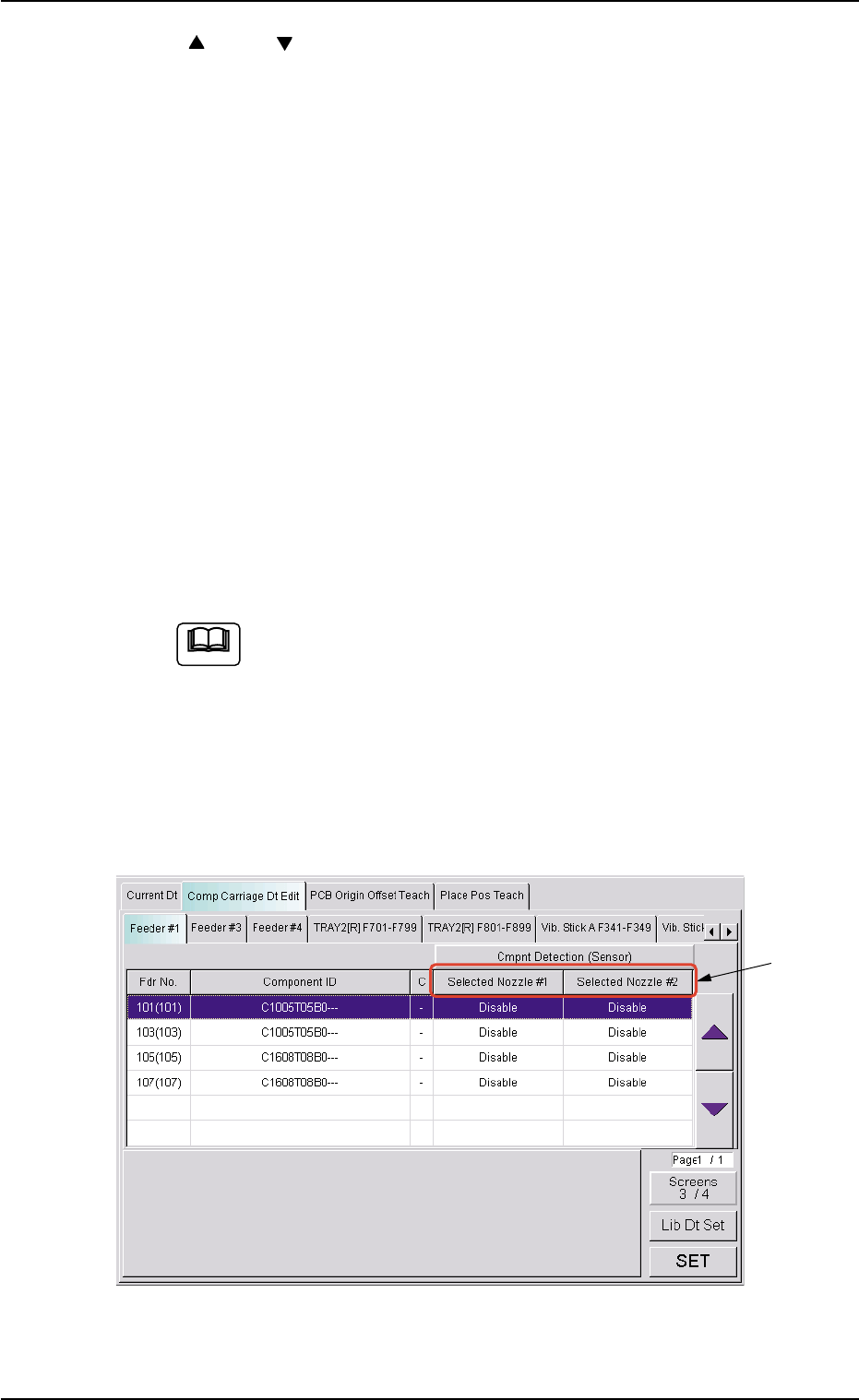
AHB01ESPP *7 "Selected Nozzle #1 and #2" Group Box Select the [Disable] or the [Enable] button to determine whether the component detection function should be used or not. When one of the following requirements…
AHB01ESPP
*3 [ ] and [ ] Buttons
Select the component for which the component carriage data should
be changed.
When the registered components occupy more than 1 page, use
the scroll bar (up and down arrows) on the right edge of the tab
sheet to scroll up or down the list of components.
The "Direction (*4)", "Type (*5)", "X (*6)", "Y (*6)", "Selected Nozzle
#1 (*7)", "Selected Nozzle #2 (*7)", "Pickup Level (*8)", and "Place-
ment Level (*9)" group boxes appear at the lower area of the tab
sheet according to the listed items.
*4 "Direction" Group Box
Select one of the [+0 deg], [+90 deg], [+180 deg], and [+270 deg]
buttons as a direction.
*5 "Type" Group Box
Select one of the [Paper], [Embossed], and [Adhesive] buttons as a
component packaging type.
To change the selection in the "X", the "Y", the "Selected
Nozzle #1", "Selected Nozzle #2", the "Pickup Level" or the
"Placement Level" group box, press the [Screens #/4] (*2)
to open the subsequent pages.
*6 "X" and "Y" Group Boxes
Select the [Enable] or the [Disable] button to determine whether the
pickup position correction function should be used or not.
Fig. 2E22 "Comp Carriage Dt Edit" Tab Sheet (3/4)
5.2 "Comp Carriage Dt Edit" Tab
0308-003 5-25-7
*7
Note
AHB01ESPP
*7 "Selected Nozzle #1 and #2" Group Box
Select the [Disable] or the [Enable] button to determine whether the
component detection function should be used or not.
When one of the following requirements is met, the component
detection becomes unavailable.
Table 2E5
Item Requirements Remarks
Nozzle ID EC** Mechanical Chuck Nozzle
EE** Mechanical Chuck Nozzle
Pickup Hole Areas Less than 0.7854 mm
2
Total of Pickup Hole Areas
Fig. 2E23 "Comp Carriage Dt Edit" Tab Sheet (4/4)
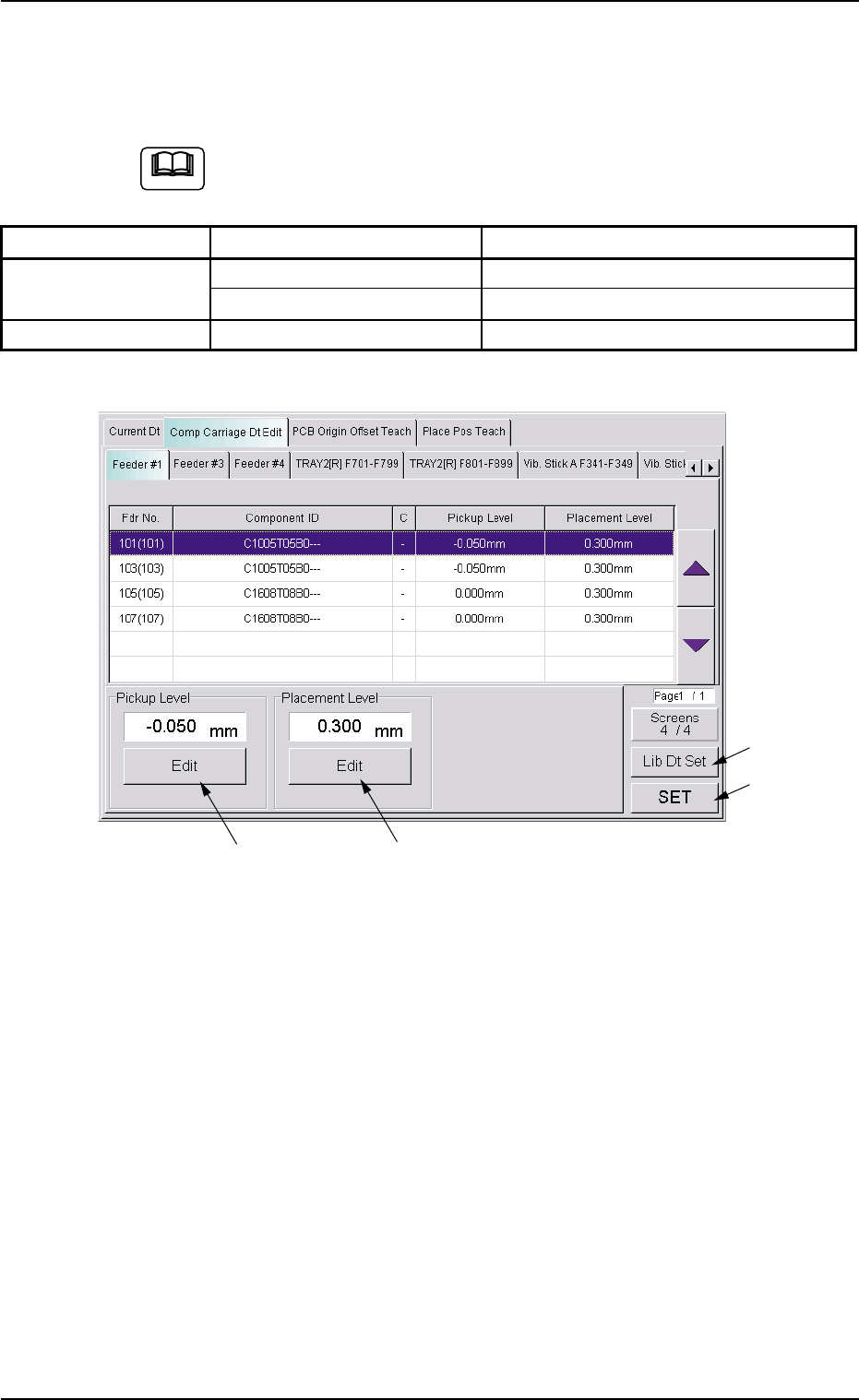
*8 "Pickup Level" Group Box
The current pickup level is indicated in the text box.
To change the pickup level, press the [Edit] button. A "TenKey" edit
window opens. Enter the desired level with the ten-key pad and press
the [Set] button.
*9 "Placement Level" Group Box
The current placement level is indicated in the text box.
To change the placement level, press the [Edit] button. A "TenKey"
edit window opens. Enter the desired level with the ten-key pad and
press the [Set] button.
0308-003 5-25-8
5.2 "Comp Carriage Dt Edit" Tab
*8
*9
*10
*11
Note

AHB01ESPP
*10 [Lib Dt Set] Button
When this button is pressed, the simply changed packaging style of
the components is fed back to the library.
*11 [SET] Button
When this button is pressed, the changed value are set and the
frames of the changed items in the "List of Component Carriage
Data" (*3) are changed to be kept in blank.
0308-002 5-25-9
5.2 "Comp Carriage Dt Edit" Tab