2OM-1075-002.pdf - 第174页
AHB01ESPP *4 "Select Head" Group Box Select one of the following options (heads to be used for the teach- ing operation). [X1 Head] and [X2 Head] Buttons *5 "Operation Mode" Group Box When an operatio…
AHB01ESPP
••
••
• Sheet Composition
*1 "Test Mode" Group Box
One of the following options is selected to determine how to teach
the offsets for P.E.C. recognition.
[P.E.C. Pos] Button
When the global P.E.C. recognition function is used, the P.C.B. ori-
gin offsets are taught, using the first fiducial mark.
[Place Pos] Button
The P.C.B. origin offsets are taught, using the first point (first place-
ment coordinates) or arbitrary placement coordinates.
(a) The option "P.E.C. Pos" or "Place Pos" is automatically
selected according to the contents of the pattern program.
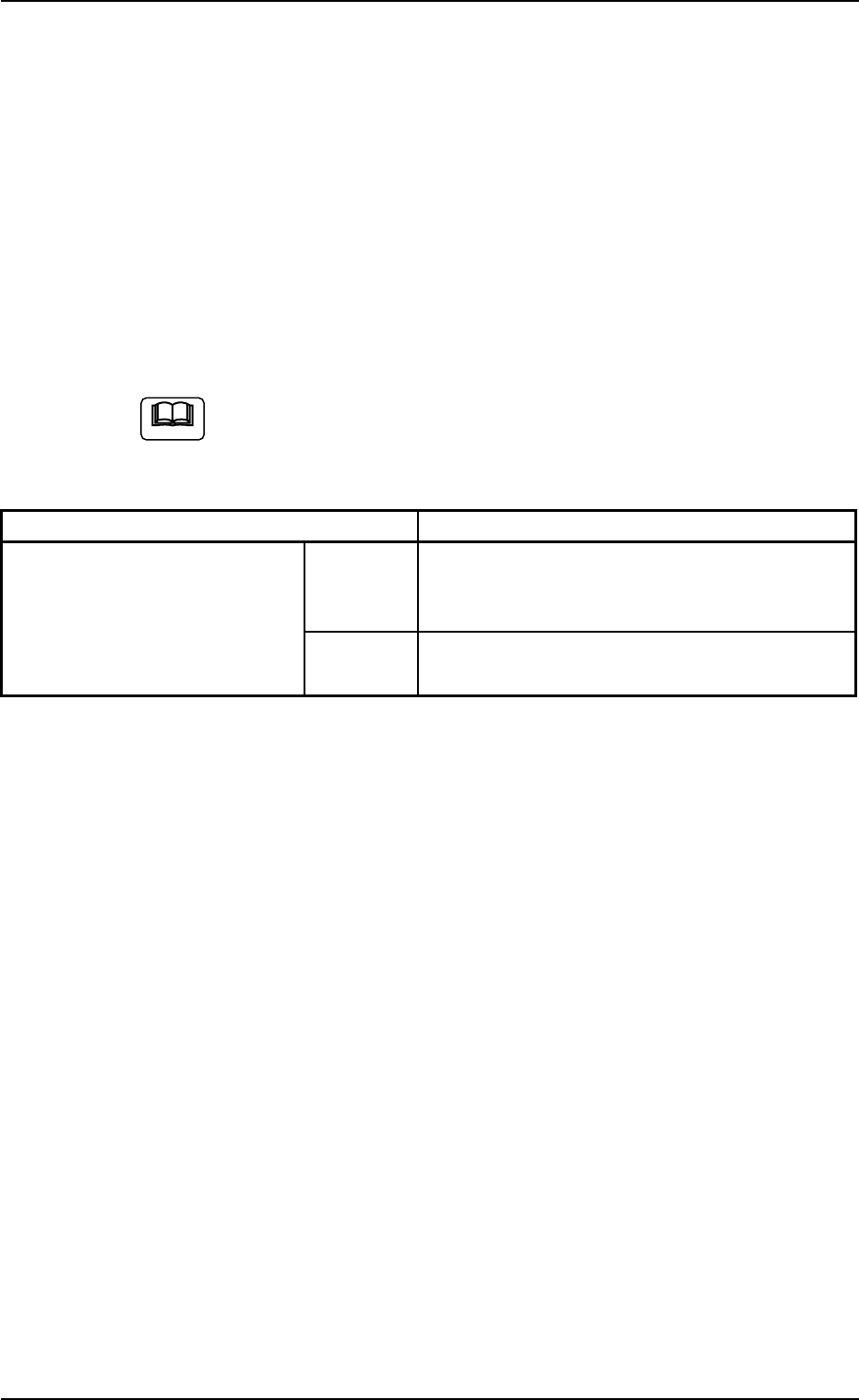
Table 2E6
Contents of Pattern Program Teaching Point
P.E.C. recognition mode Global Enable 1 Point (global P.E.C. recognition) or Specified
Placement Coordinates (Default: Fiducial mark
#1 (Placement Coordinates))
Disable Specified Placement Coordinates (Default: Fi-
ducial mark #1 (Placement Coordinates))
(b) When the global P.E.C. recognition function is used, the
first point (1 Point for "P.E.C. recognition mode Global") is
the teaching point. However, when the teaching is impos-
sible due to deterioration of the fiducial mark on the objec-
tive P.C.B., "Place Pos" must be selected.
(c) When the global P.E.C. recognition function is not used,
the first placement coordinates point is regarded as a
teaching point.
When the teaching operation cannot be performed
smoothly, try to select other placement coordinates.
*2 Indication of Coordinates
Indicated are the coordinates in the currently referred pattern pro-
gram and the teaching results (coordinates).
*3 [Temp Entry] Button
When pressed, this button registers the currently taught coordinates
temporarily.
0308-002 5-25-13
5.3 "PCB Origin Offset Teach" Tab
Note

AHB01ESPP
*4 "Select Head" Group Box
Select one of the following options (heads to be used for the teach-
ing operation).
[X1 Head] and [X2 Head] Buttons
*5 "Operation Mode" Group Box
When an operation mode is selected and the [ON] button (entitled
"MOVE") is pressed, the head moves to the specified position.
[Move to Teach Pt] Button
When selected, this button moves the head to the position specified
by the P.E.C. recognition offsets.
[1 Cycle Check (No P.E.C. Recog)] Button
When this button is selected, the machine performs its continuous
operation.
*6 [TEACH] Button
When this button is selected, a teaching operation is performed at
the current position.
*7 [P.C.B. Transfer Manual Mode] Button
When this button is pressed, the "P.C.B. Transfer Manual Mode"
sheet appears.
Refer to "4.1.1 "P.C.B. Transfer Adj." Tab" in "Section 6" for details.
*8 [Cancel] Button
When pressed, this button cancels the taught data that is saved
temporarily.
*9 [End] Button
When pressed, this button ends the P.C.B. origin offset teaching
session.
Before the session ends, it can be determined whether the teaching
results must be saved or not.
*10 "MOVE" [ON] Button
When the [ENABLE] button on the operation panel is pressed in 2
seconds after the [ON] button (entitled "MOVE"), the machine is
activated.
0308-002 5-25-14
5.3 "PCB Origin Offset Teach" Tab

AHB01ESPP
*11 Contents of Pattern Program
The following items are displayed.
Total Step (#)
Displayed is the total number of steps in the pattern program.
[U], [P], and [O] Buttons
Displayed are the currently referred steps in the pattern program.
Placement Data X (mm) and Y (mm), Z (deg), Fdr, and Com-
ponent ID
Displayed is the current placement data.
[Desig Step] Button
When pressed, this button displays the arbitrarily selected steps.
*12 "Teach Point" Group Box
Select one of the following options to determine how to teach the
objective step for teaching.
[1-Pt] Button
Select this button when the teaching operation must be based on
the center of the component.
[2-Pt] Button
Select this button when the objective component for teaching ex-
ceeds the display range of the P.E.C. recognition camera.
••
••
• Operation Procedure
(1) Press the [Move to Teach Pt] button (*5) and the [ON] button (*10
entitled "MOVE"). In 2 seconds, press the [ENABLE] button on the
operation panel.
The head moves to the teaching point determined automatically ac-
cording to the pattern program and the fiducial mark or the outline
and land are displayed in the recognition window.
(2) Check how the fiducial mark or the component outline and land are
captured in the recognition window.
(3) When the fiducial mark is regarded as a teaching point, press the
[ENABLE] button on the operation panel in 2 seconds after the
[TEACH] button (*6). The P.E.C. recognition is executed. When the
recognition is completed normally, new P.C.B. origin offsets X and Y
are displayed in the "Teach Result" text boxes.
0308-002 5-25-15
5.3 "PCB Origin Offset Teach" Tab