2OM-1075-002.pdf - 第205页
AHB01ESPP *4 [All] and [Search] Buttons When pressed, this button makes it possible to search a program name. When some characters are entered in the text box under the [Search] button and the [Search] button is pressed,…
AHB01ESPP
7.1 "Program Change" Tab
The corresponding tab sheet enables the operator to select a pattern
program as a current one (model) for automatic operation.
••
••
• Sheet Layout
When the "Program Change" tab is pressed in the "PRGM. CHG." win-
dow (submenu), the following tab sheet appears inside the window.
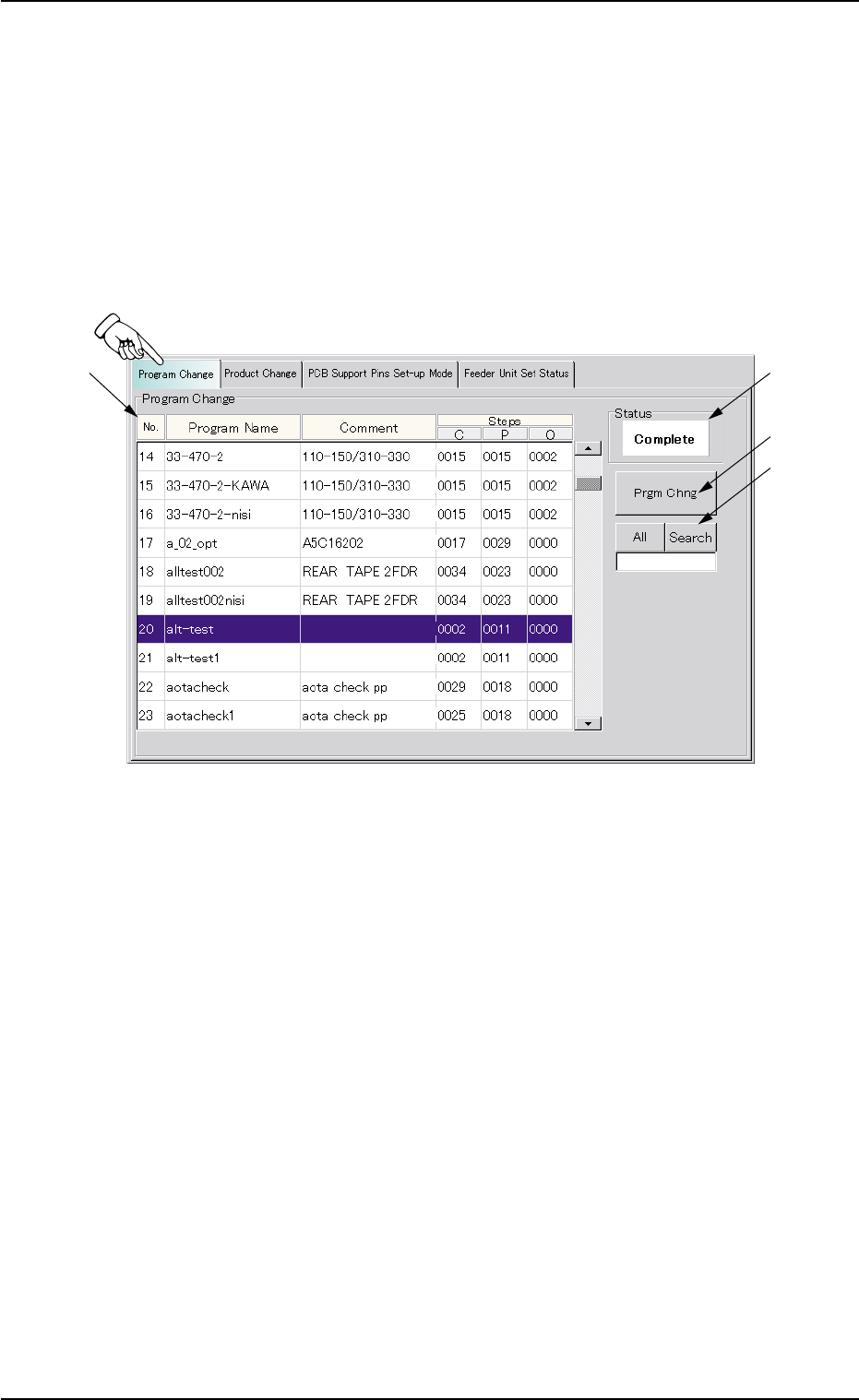
Fig. 2E36 "Program Change" Tab Sheet
••
••
• Sheet Composition
*1 List of Model Names
Listed are the registered model names (pattern program names).
*2 Status
Displayed is the result of implemented program change operation.
*3 [Prgm Chng] Button
When this button is pressed, the current model (pattern program) is
changed to another one.
7.1 "Program Change" Tab
0308-004 5-42

AHB01ESPP
*4 [All] and [Search] Buttons
When pressed, this button makes it possible to search a program
name.
When some characters are entered in the text box under the [Search]
button and the [Search] button is pressed, only the program names
which start with the entered characters are displayed in the "List of
Model Names".
When the [All] button is pressed, all program names appear.
"*" (asterisk) and "?" (question mark) can be used as wild
cards.
abc* : The search function retrieves the program names
which start with "abc"
a?c : The search function retrieves the program names
which start with "a" and contain "c" as the third char-
acter.
••
••
• Procedure for Program Change Operation
(1) Select the program name desired to be the current one in the list
(*1). The background color turns blue.
(2) When the [Prgm Chng] button (*3) is pressed, "OK" appears in the
"Status" text box (*2) and the selected program is set as a current
one.
When the selected pattern program has an error, "NG" appears in
the "Status" text box (*2) and the program change operation is not
implemented. In such a case, correct the pattern program and re-
implement the program change operation.
7.1 "Program Change" Tab
0308-002 5-43
Note
AHB01ESPP
7.2 "Product Change" Tab
The corresponding tab sheet enables the operator to perform overall
setup operations or manual setup operations on each device.
••
••
• Sheet Layout
When the "Product Change" tab is pressed in the "PRGM. CHG." win-
dow (submenu), the following tab sheet appears inside the window.
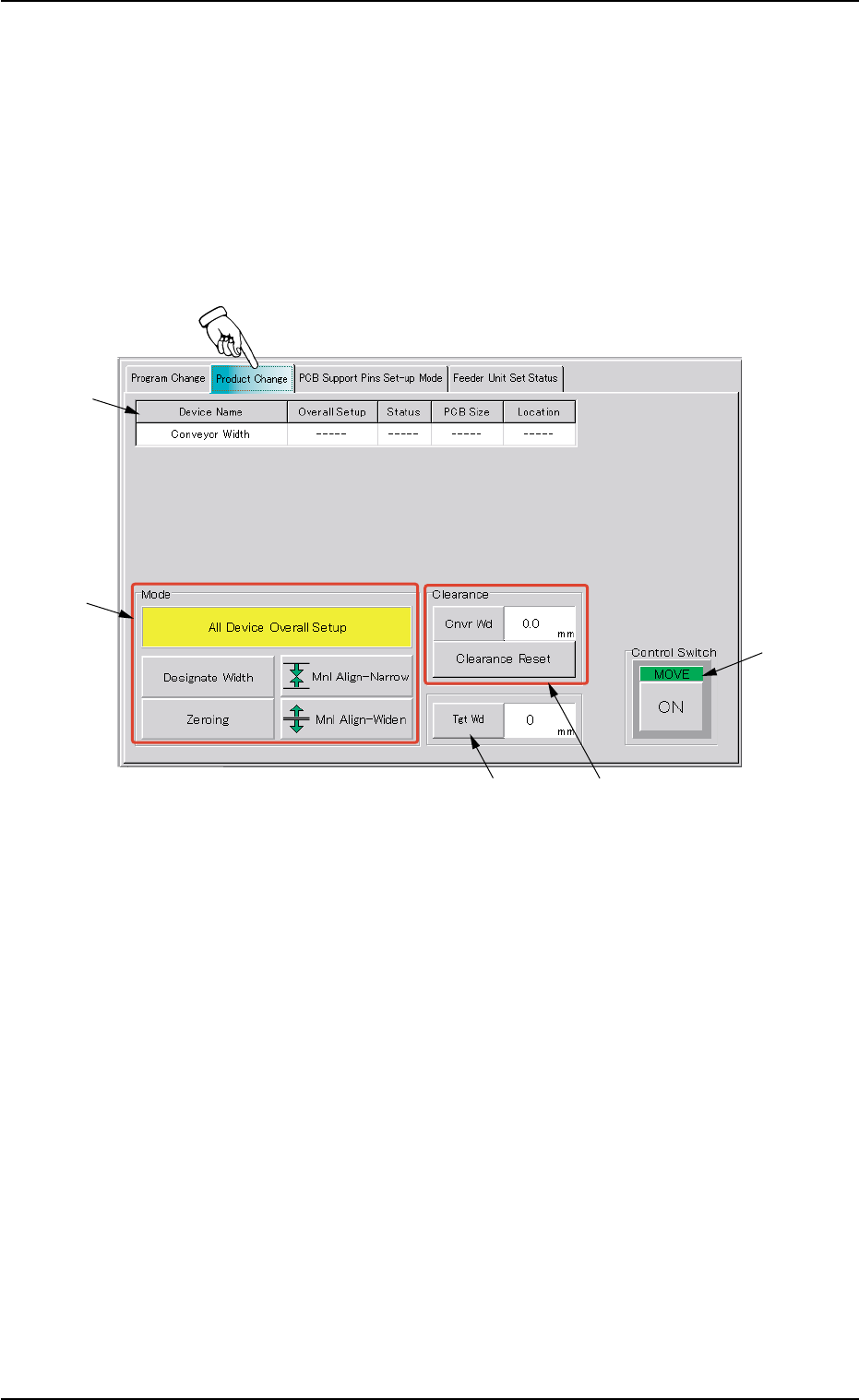
Fig. 2E37 "Product Change" Tab Sheet
••
••
• Sheet Composition
*1 Device Information
Device Name : The following name represents the item that can
be set up.
Conveyor Width
Overall Setup : "On" or "Off" appears in the text box.
7.2 "Product Change" Tab
*1
*2
*4
*3
*5
0206-003 5-44