2OM-1075-002.pdf - 第229页
AHB01ESPP 0107-001 6- B

AHB01ESPP
Section 6
Menus for Maintenance
This section describes the functions and operations in each
window (window which opens after a menu button is
pressed at the “MAINT.” window).
0308-002 6-A

AHB01ESPP
0107-001 6-B
AHB01ESPP
1. Outline of "MAINT." Window (Main Menu)
1.1 Composition of Menus for Maintenance
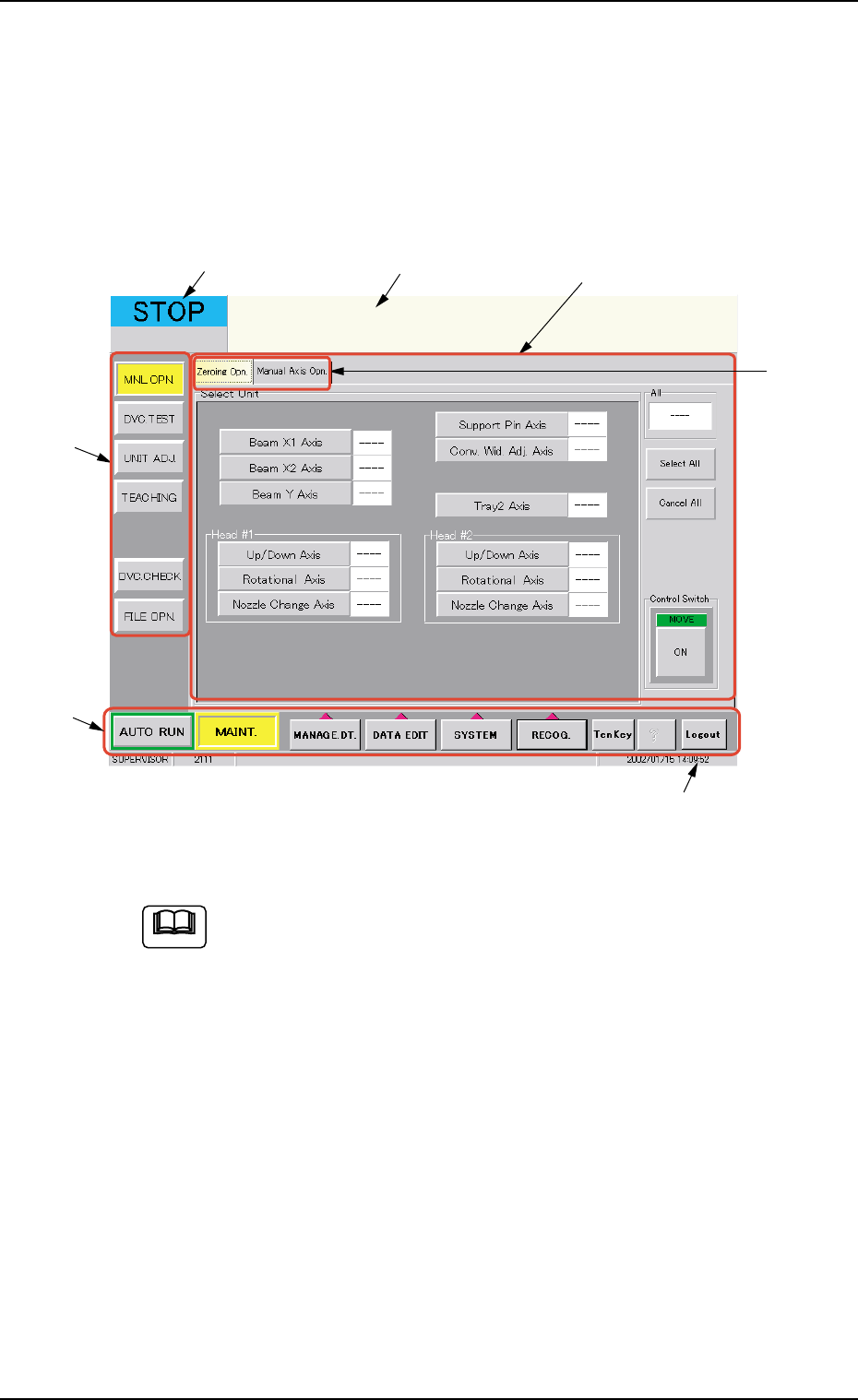
When the [MAINT.] button on the main menu bar is pressed, the "MAINT."
window opens on the touch screen.
Fig. 2F1 "MAINT." Window (Main Menu) (Provided with Multi-Layer Tray Feeder 2)
The tab sheet may look different, depending on which options
are selected.
• Window Composition
*1 Main Menu Bar
The bar can be used commonly for all windows and is provided with
selection buttons for main menus.
*2 Submenu Bar
This bar is treated as part of the "MAINT." window and has the but-
tons to select the submenus.
When a button is selected, the corresponding window (submenu)
opens.
01 12-002 6 - 1
1. Outline of "MAINT." Window (Main Menu)
*4
*5
*6
*7
*1
*2
*3
Note