2OM-1075-002.pdf - 第230页
AHB01ESPP 1. Outline of "MAINT ." Window (Main Menu) 1 . 1 Composition of Menus for Maintenance When the [MAINT .] button on the main menu bar is pressed, the "MAINT ." window opens on the touch scree…

AHB01ESPP
0107-001 6-B
AHB01ESPP
1. Outline of "MAINT." Window (Main Menu)
1.1 Composition of Menus for Maintenance
When the [MAINT.] button on the main menu bar is pressed, the "MAINT."
window opens on the touch screen.
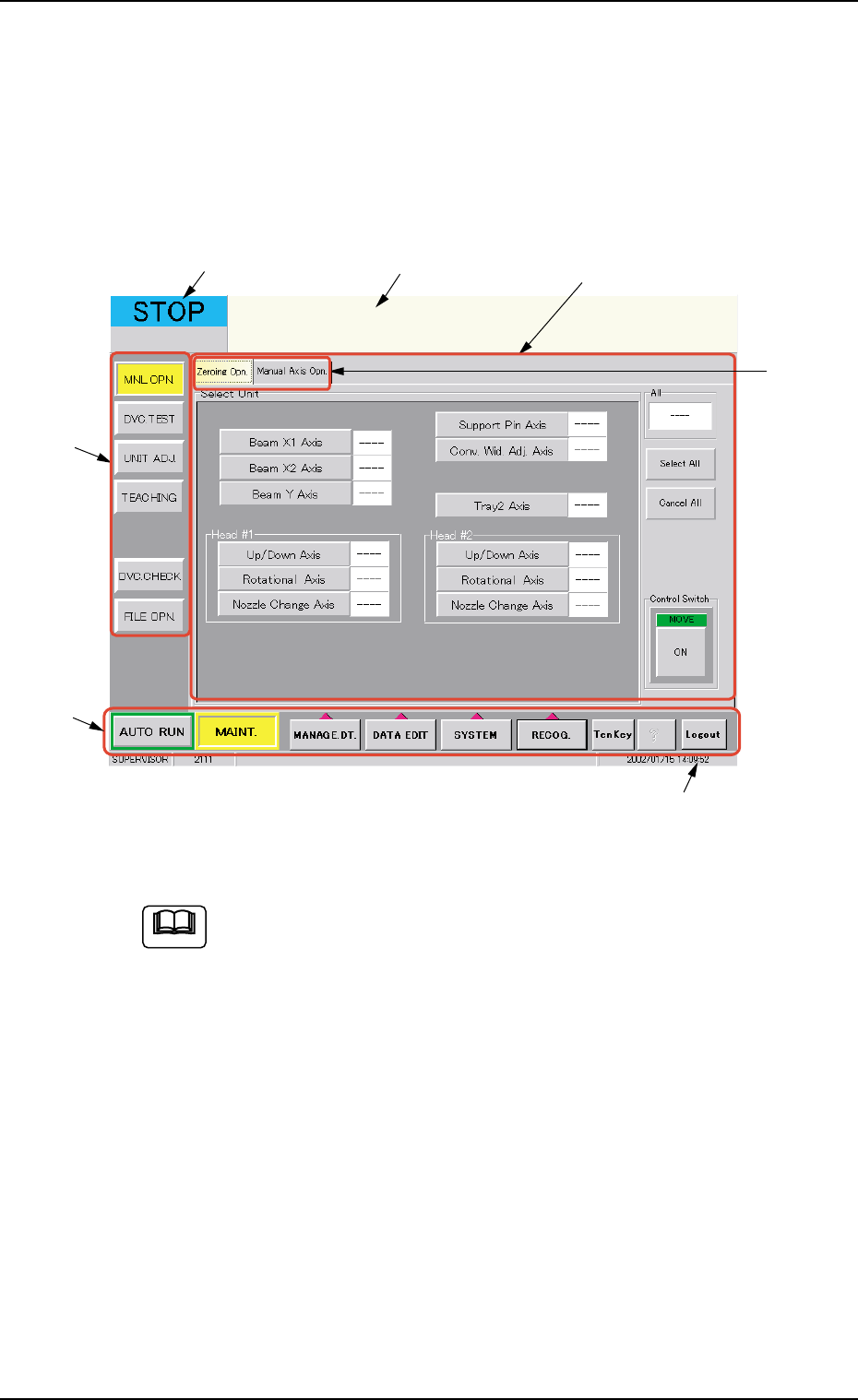
Fig. 2F1 "MAINT." Window (Main Menu) (Provided with Multi-Layer Tray Feeder 2)
The tab sheet may look different, depending on which options
are selected.
• Window Composition
*1 Main Menu Bar
The bar can be used commonly for all windows and is provided with
selection buttons for main menus.
*2 Submenu Bar
This bar is treated as part of the "MAINT." window and has the but-
tons to select the submenus.
When a button is selected, the corresponding window (submenu)
opens.
01 12-002 6 - 1
1. Outline of "MAINT." Window (Main Menu)
*4
*5
*6
*7
*1
*2
*3
Note

AHB01ESPP
*3 Current Mode
The current mode of the machine is displayed.
There are seven modes - "RUN", "PAUSE", "STOP", "WAIT",
"TEACH", "MOVE", and "TEST".
*4 Operation Guide
The operating condition and results will be displayed.
*5 Submenu Window
When a button on the submenu bar is pressed, the corresponding
window (submenu) opens.
*6 Tabs
When a submenu window is composed of several sheets, all the
sheets are provided with extensions called "Tabs" and laid on top of
each other so that the tab of each is visible.
When a tab is pressed, the corresponding tab sheet is brought to
the front.
When a submenu window has only one sheet, the sheet is not pro-
vided with a tab.
*7 Status Bar
The status bar at the bottom provides additional information such
as page No., time, etc.
01 12-002 6 - 2
1.1 Composition of Menus for Maintenance