2OM-1075-002.pdf - 第278页
AHB01ESPP • • • • • Procedure for Automatic T est (1) Press the [Auto] button under the title "T est" (*1). The window changes as follows. Fig. 2F37 "T est" Sheet (2) When the [ENABLE] button on the o…

AHB01ESPP
*2 Speed Data
When the [Manual] button is selected as a test mode, it is required
to set speed reduction rate (%) of the beam (X/Y) and the nozzle
rotation.
*3 Hysteresis Test
Set the number of hysteresis tests to be made when the [Manual]
button is selected as a test mode.
*4 Test Mode
Select the [Bm & Noz], the [Beam], the [Hd. Rot], or the [Noz Rot]
button.
*5 "Result of Hysteresis Test" Group Box
Displayed are the results of a hysteresis test.
*6 "Control SW" Group Box
When the [ENABLE] button on the operation panel is pressed in 2
seconds after the [ON] button (entitled "MOVE"), a hysteresis test is
conducted.
*7 [Return] Button
When this button is pressed, the "Cmpnt Recog Test" tab sheet
resumes.
••
••
• Procedure for Manual Test
(1) Press the [Manual] button under the title "Test" (*1).
(2) When the [Beam] or the [Noz Rot] button is pressed, the corre-
sponding edit window opens, enabling you to set the speed reduc-
tion rate for the test.
(3) When the [Hysteresis Test] button is pressed, the "Hysteresis Test"
edit window opens, enabling you to set the number of hysteresis
tests to be made.
(4) Select the desired test pattern.
Press the [Bm & Noz], the [Beam], the [Hd. Rot], or the [Noz. Rot]
button.
(5) When the [ENABLE] button on the operation panel is pressed in 2
seconds after the [ON] button (entitled "MOVE"), the hysteresis test
is conducted and the results of the test are displayed.
(6) When the [Return] button is pressed, the "Cmpnt Recog Test" tab
sheet resumes.
3.3 "Cmpnt Recog Test" Tab
0206-003 6-45
AHB01ESPP
••
••
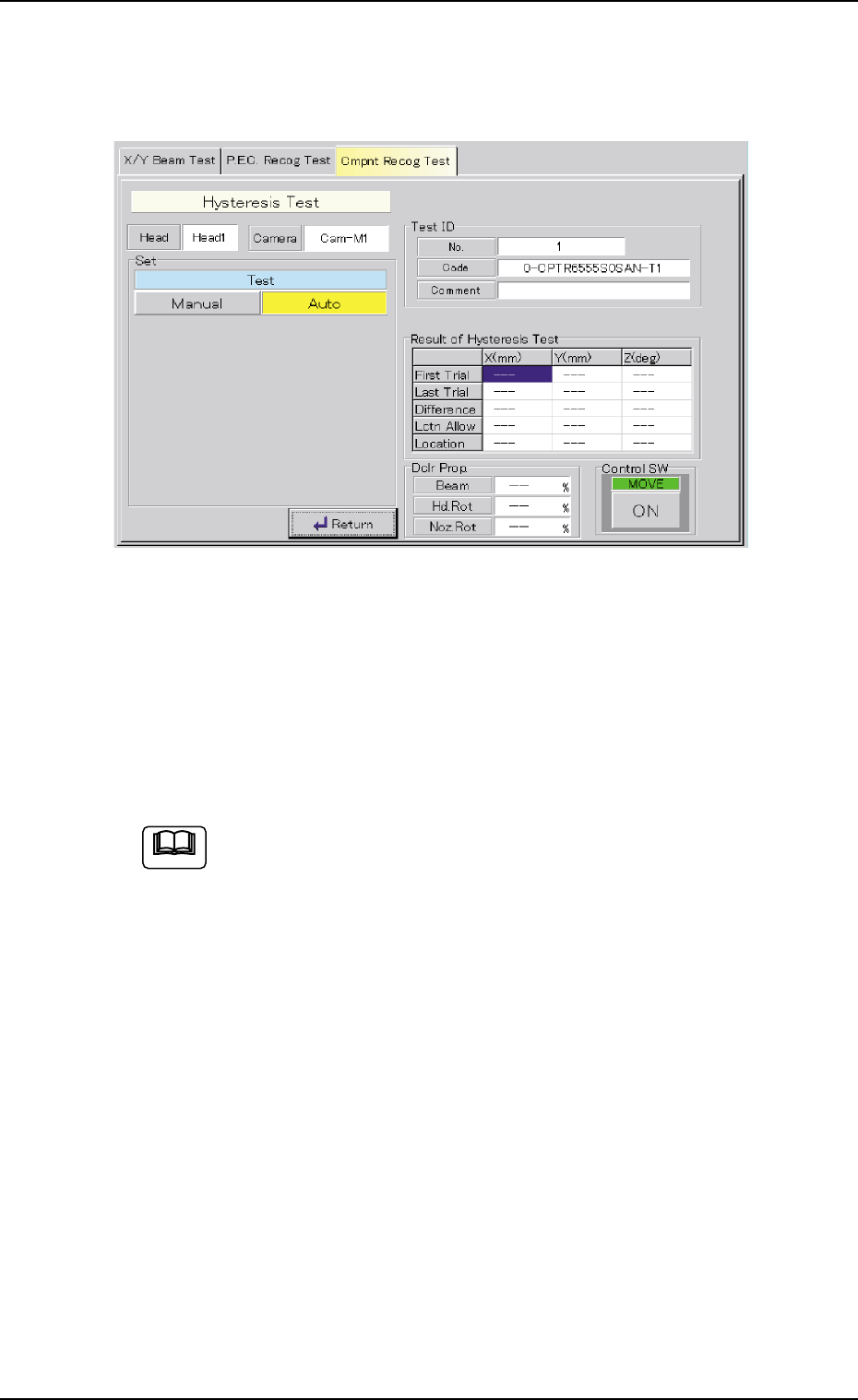
• Procedure for Automatic Test
(1) Press the [Auto] button under the title "Test" (*1).
The window changes as follows.
Fig. 2F37 "Test" Sheet
(2) When the [ENABLE] button on the operation panel is pressed in 2
seconds after the [ON] button (entitled "MOVE"), the hysteresis test
is conducted and the results of the test are displayed.
(3) When the [Return] button is pressed, the "Cmpnt Recog Test" tab
sheet resumes.
When the [Auto] button is selected as a test mode for the com-
ponents having the following characteristics, the parameters in
the "Beam", "Hd. Rot", and "Noz. Rot" text boxes in the "Dclr
Prop." group box may vary greatly every time a test is conducted.
• Components are picked up while the vacuum may likely be
leaking slightly.
• Components are picked up eccentrically (off-centered) with
big mass.
• Compared with the nozzle size, the component is relatively
large in size or big in mass.
It will be difficult to make a hysteresis test in stable condition
due to the change in the state of picked components during test
operation.
It is required to obtain the stable speed reduction data by con-
ducting the manual hysteresis test repeatedly.
3.3 "Cmpnt Recog Test" Tab
Note
0308-004 6-46

AHB01ESPP
Operation Procedure
(1) Press the [Manual] button under the title "Test" in the "Hys-
teresis Test" window.
(2) Set approximately 90% in the text boxes under the title "Speed
Data" and make a test.
(3) Increase the values (speed data) according to the situational
changes in the test.
(4) Repeat the test until the difference in the results of the test
reduces.
0206-003 6-47
3.3 "Cmpnt Recog Test" Tab