2OM-1075-002.pdf - 第290页
AHB01ESPP 4.1.2 "PCB Lct Sol Adj" T ab The corresponding tab sheet enables the operator to activate the P .C.B. locate solenoid. • Sheet Layout When the "PCB Lct Sol Adj" tab is pressed in the "C…

AHB01ESPP
*6 "Control Sw" Group Box
When the [ENABLE] button on the operation panel is pressed in two
seconds after one of the buttons in the "Operation" group box (*1) is
selected and the [ON] button (entitled "MOVE") is pressed, the ac-
tion corresponding to the selected button takes place.
• Operation Procedure
(1) Set parameters in the "Xfr Prmtr Adj" tab sheet.
(2) Select one of the buttons in the "Operation" group box (*1).
(3) Press the [ON] button (entitled "MOVE"). In 2 seconds, press the
[ENABLE] button on the operation panel.
0308-002 6-57
4.1 "Conveyor Adj" Tab
AHB01ESPP
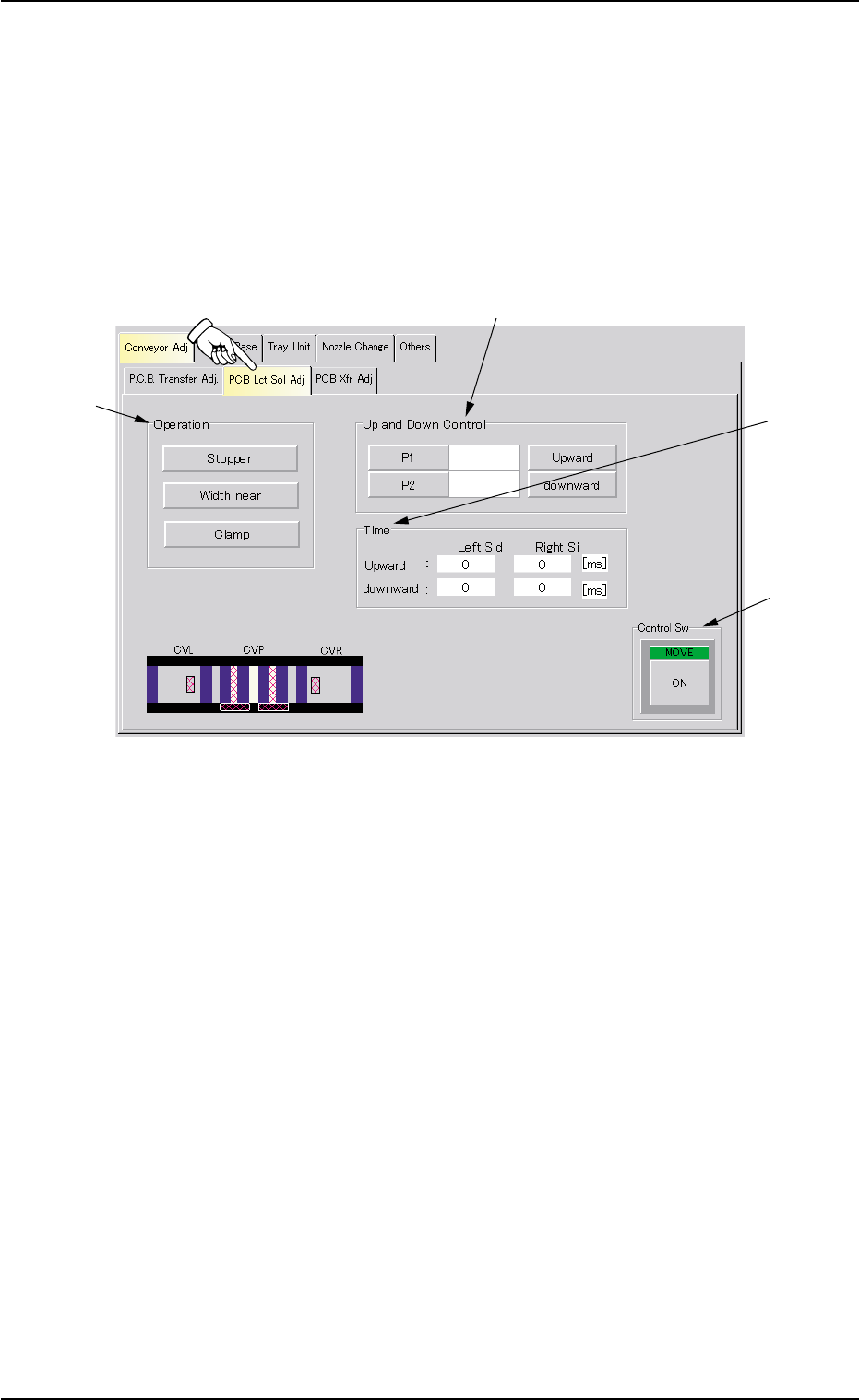
4.1.2 "PCB Lct Sol Adj" Tab
The corresponding tab sheet enables the operator to activate the P.C.B.
locate solenoid.
• Sheet Layout
When the "PCB Lct Sol Adj" tab is pressed in the "Conveyor Adj" tab
sheet, the following tab sheet appears.
Fig. 2F44 "PCB Lct Sol Adj" Tab Sheet
• Sheet Composition
*1 "Operation" Group Box
The following buttons are provided in this group box.
Select the button to be operated.
[Stopper] Button
When pressed, this button activates P.C.B. Stopper P1 or P2.
[Width near] Button
When pressed, this button narrows the conveyor width, using
the P.C.B. YL or YR pusher.
[Clamp] Button
When pressed, this button activates the P.C.B. ZL or ZR clamp.
0308-004 6-58
4.1 "Conveyor Adj" Tab
*1
*2
*4
*3

AHB01ESPP
*2 "Up and Down Control" Group Box
The following buttons are provided in this group box.
The contents of the sheet differ, depending on the button selected in
the "Operation" group box (*1).
Unit Buttons
[Stopper] Button Selected : [P1] and [P2] Buttons and Text
Boxes
[Width near] Button Selected : [YL] and [YR] Buttons and Text
Boxes
[Clamp] Button Selected : [ZL] and [ZR] Buttons and Text
Boxes
Control Buttons
[Stopper] Button Selected : [Upward] and [downward] But-
tons
[Width near] Button Selected : [Clamp ON] and [Clamp OFF]
Buttons
[Clamp] Button Selected : [Clamp ON] and [Clamp OFF]
Buttons
*3 "Time" Group Box
When the [Stopper] button is selected in the "Operation" group box
(*1), the periods of time required for upward and downward move-
ment on the R and L sides is displayed.
When the [Width near] or the [Clamp] button is selected in
the "Operation" group box (*1), the "Time" group box (*3)
disappears.
*4 "Control Sw" Group Box
When the [ENABLE] button on the operation panel is pressed in 2
seconds after some buttons in "*1" and "*2" are selected and the
[ON] button (entitled "MOVE") is pressed, the action corresponding
to the selected buttons takes place.
• Operation Procedure
(1) Select one (to be operated) of the buttons in "*1".
(2) Select one of the unit buttons and press the desired control button
in the "Up and Down Control" group box (*2).
(3) Press the [ON] button (entitled "MOVE"). In 2 seconds, press the
[ENABLE] button on the operation panel.
Note
01 12-002 6-5 9
4.1 "Conveyor Adj" Tab