2OM-1075-002.pdf - 第317页
AHB01ESPP 5.1.1 "T ape, V ib. Stick T each Pick-Up Pos. [Comp. Center Pos.]" Sheet The corresponding sheet makes it possible to perform a teaching op- eration to align the component center with the nozzle cente…

AHB01ESPP
*3 [Vib. Stick Component Data Offset] Button
When pressed, this button makes it possible to perform a teaching
operation to align the center of the vacuum nozzle with the center of
the component supplied from the vibratory stick feeder.
When this button is pressed, the "Vib. Stick Component Data Off-
set" sheet appears.
Refer to "5.1.3 "Vib. Stick Component Data Offset" Sheet" for de-
tails.
*4 Other Buttons
These buttons are optional.
5.1 "Pick-Up Location" Tab
0206-003 6-84
AHB01ESPP
5.1.1 "Tape, Vib. Stick Teach Pick-Up Pos. [Comp. Center Pos.]"
Sheet
The corresponding sheet makes it possible to perform a teaching op-
eration to align the component center with the nozzle center.
••
••
• Sheet Layout
When the [Tape, Vib. Stick Teach Pick-Up Pos. [Comp. Center Pos.]]
button is pressed in the "Pick-Up Location" tab sheet, the following sheet
appears.
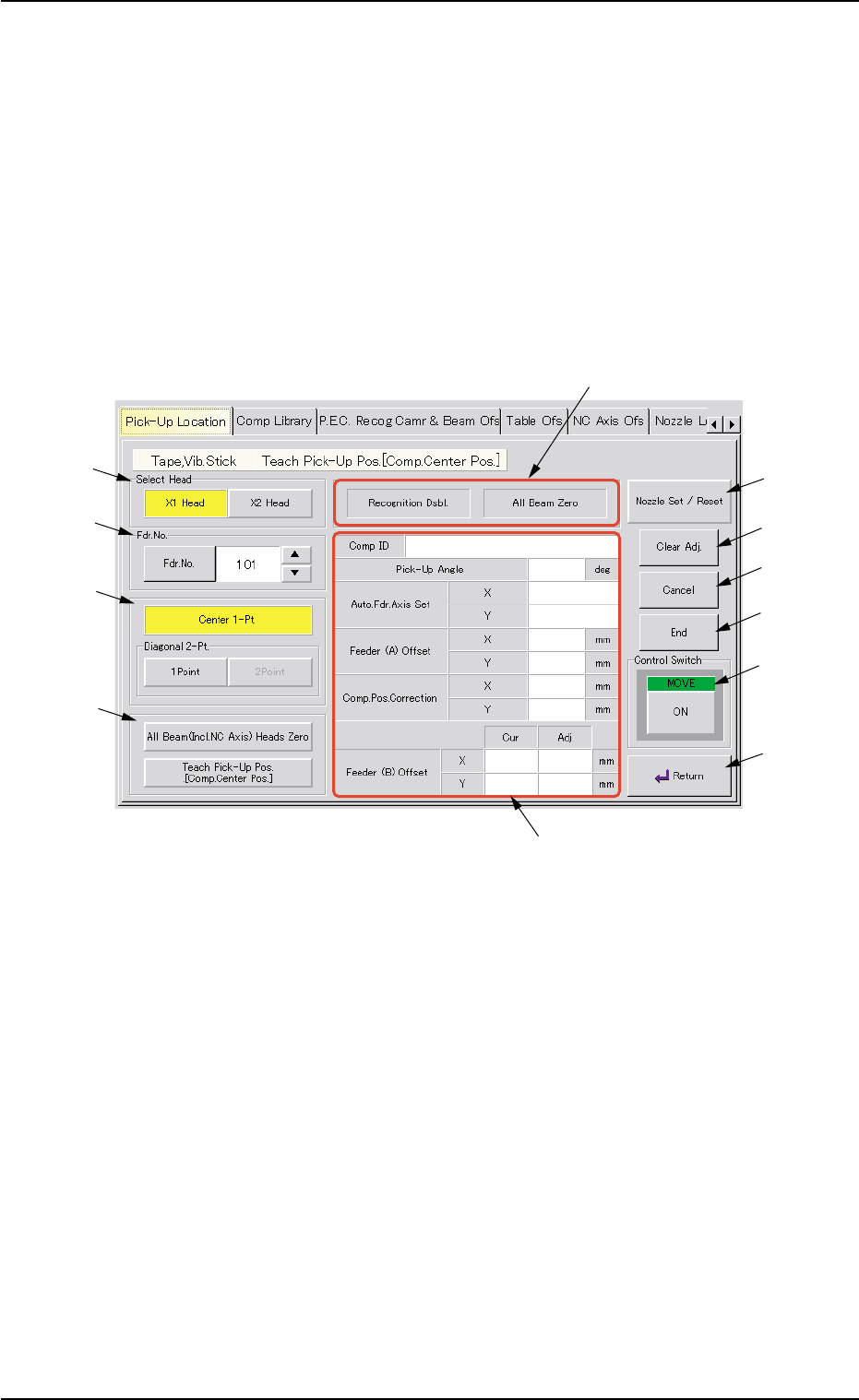
Fig. 2F58 "Tape, Vib. Stick Teach Pick-Up Pos. [Comp. Center Pos.]" Sheet
••
••
• Sheet Composition
*1 "Select Head" Group Box
Select the head to be used for teaching operations.
The following buttons are provided in this group box.
[X1 Head] Button
When this button is pressed, a teaching operation is performed,
using the X1 head.
[X2 Head] Button
When this button is pressed, a teaching operation is performed,
using the X2 head.
5.1 "Pick-Up Location" Tab
0206-003 6-85
*1
*2
*3
*4
*7
*8
*9
*10
*11
*6
*12
*5

AHB01ESPP
*2 "Fdr. No." Group Box
Set the feeder No. to be taught.
When the [Fdr. No.] button is pressed, the "Feeder No. Set" sheet
appears.
Refer to "5.1.4 "Feeder No. Set" Sheet" for details.
*3 "Destination" Group Box
The following buttons are provided in this group box.
[Center 1-Pt.] Button
When the [ENABLE] button on the operation panel is pressed in two
seconds after this button and the [ON] button (entitled "MOVE"), the
P.E.C. recognition camera moves to the component center position
(Design Position + Feeder (A) Offset + Feeder (B) Offset) of the
related feeder and captures an image.
Proceed to the operation of the pointing device and execute the
manual alignment operation.
[1Point] and [2Point] Buttons in "Diagonal 2-Pt." Group Box
These buttons are used to align the component with two diagonally-
located points.
Use these buttons when the maximum outside dimensions of the
component is "10 × 10 mm" or more (when the screen cannot cover
the whole image of the component).
*4 "Select Mode" Group Box
Various actions can be selected.
The following buttons are provided in this group box.
[All Beam (Incl. NC Axis) Heads Zero] Button
When this button is pressed, all X/Y beams are zeroed.
When the [ENABLE] button on the operation panel is pressed in 2
seconds after this button and the [ON] button (entitled "MOVE"), the
zeroing operation starts.
[Teach Pick-Up Pos. [Comp. Center Pos.]] Button
When pressed, this button makes it possible to perform a teaching
operation to align the component center with the nozzle center.
5.1 "Pick-Up Location" Tab
0206-003 6-86