2OM-1075-002.pdf - 第318页
AHB01ESPP *2 "Fdr . No." Group Box Set the feeder No. to be taught. When the [Fdr . No.] button is pressed, the "Feeder No. Set" sheet appears. Refer to "5.1.4 "Feeder No. Set" Sheet&qu…
AHB01ESPP
5.1.1 "Tape, Vib. Stick Teach Pick-Up Pos. [Comp. Center Pos.]"
Sheet
The corresponding sheet makes it possible to perform a teaching op-
eration to align the component center with the nozzle center.
••
••
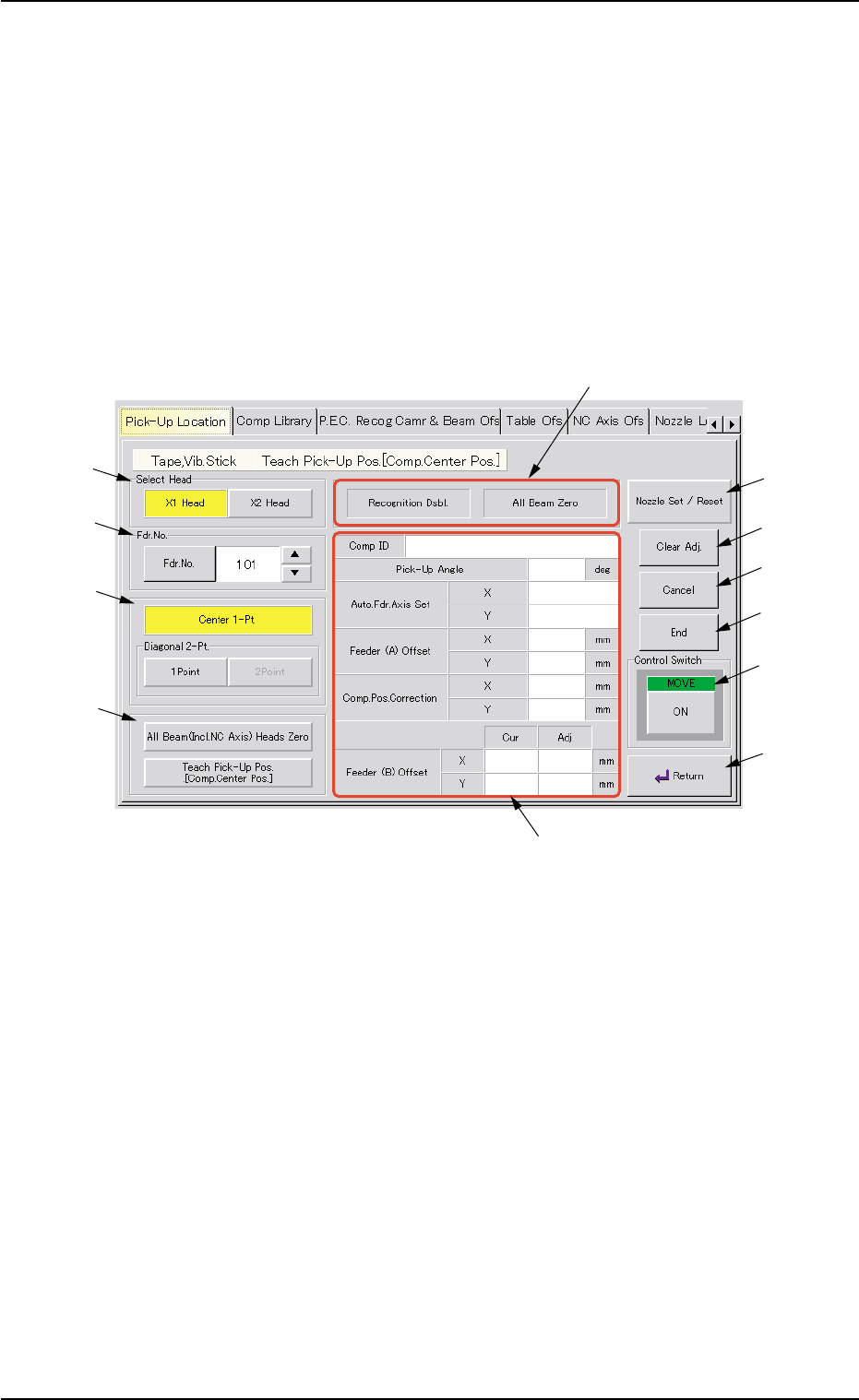
• Sheet Layout
When the [Tape, Vib. Stick Teach Pick-Up Pos. [Comp. Center Pos.]]
button is pressed in the "Pick-Up Location" tab sheet, the following sheet
appears.
Fig. 2F58 "Tape, Vib. Stick Teach Pick-Up Pos. [Comp. Center Pos.]" Sheet
••
••
• Sheet Composition
*1 "Select Head" Group Box
Select the head to be used for teaching operations.
The following buttons are provided in this group box.
[X1 Head] Button
When this button is pressed, a teaching operation is performed,
using the X1 head.
[X2 Head] Button
When this button is pressed, a teaching operation is performed,
using the X2 head.
5.1 "Pick-Up Location" Tab
0206-003 6-85
*1
*2
*3
*4
*7
*8
*9
*10
*11
*6
*12
*5

AHB01ESPP
*2 "Fdr. No." Group Box
Set the feeder No. to be taught.
When the [Fdr. No.] button is pressed, the "Feeder No. Set" sheet
appears.
Refer to "5.1.4 "Feeder No. Set" Sheet" for details.
*3 "Destination" Group Box
The following buttons are provided in this group box.
[Center 1-Pt.] Button
When the [ENABLE] button on the operation panel is pressed in two
seconds after this button and the [ON] button (entitled "MOVE"), the
P.E.C. recognition camera moves to the component center position
(Design Position + Feeder (A) Offset + Feeder (B) Offset) of the
related feeder and captures an image.
Proceed to the operation of the pointing device and execute the
manual alignment operation.
[1Point] and [2Point] Buttons in "Diagonal 2-Pt." Group Box
These buttons are used to align the component with two diagonally-
located points.
Use these buttons when the maximum outside dimensions of the
component is "10 × 10 mm" or more (when the screen cannot cover
the whole image of the component).
*4 "Select Mode" Group Box
Various actions can be selected.
The following buttons are provided in this group box.
[All Beam (Incl. NC Axis) Heads Zero] Button
When this button is pressed, all X/Y beams are zeroed.
When the [ENABLE] button on the operation panel is pressed in 2
seconds after this button and the [ON] button (entitled "MOVE"), the
zeroing operation starts.
[Teach Pick-Up Pos. [Comp. Center Pos.]] Button
When pressed, this button makes it possible to perform a teaching
operation to align the component center with the nozzle center.
5.1 "Pick-Up Location" Tab
0206-003 6-86
AHB01ESPP
*5 Set Status
When the "P.E.C. Dsbl." or the "Comp. Recognition Dsbl." check
box in the "Test Run" tab sheet is turned on (checked), the back-
ground color of "Recognition Dsbl." turns light red. (No background
color in normal cases).
No recognition processing is made even if a teaching op-
eration is performed when each check box is turned on
(checked) in the "Test Run" tab sheet. Therefore, various
teaching operations will get incorrect results.
When "All Beam (Incl. NC Axis) Heads Zero" is completed, the back-
ground color of "All Beam Zero" turns green. (Otherwise, the back-
ground has no color.)
(a) When each device is not zeroed and the teaching op-
erations are performed, note that the offset values may
not be taught correctly.
(b) Before performing a teaching operation, be sure to zero
all beams.
*6 Offset Values
Displayed are the current values and the adjusted ones after teach-
ing.
*7 [Nozzle Set/Reset] Button
When this button is pressed, the "Nozzle Set/Reset" sheet appears,
enabling the cycle operation for opening or closing the nozzle stocker
and attaching or storing a vacuum nozzle through manual opera-
tions.
Refer to "4.4 "Nozzle Change" Tab" for details.
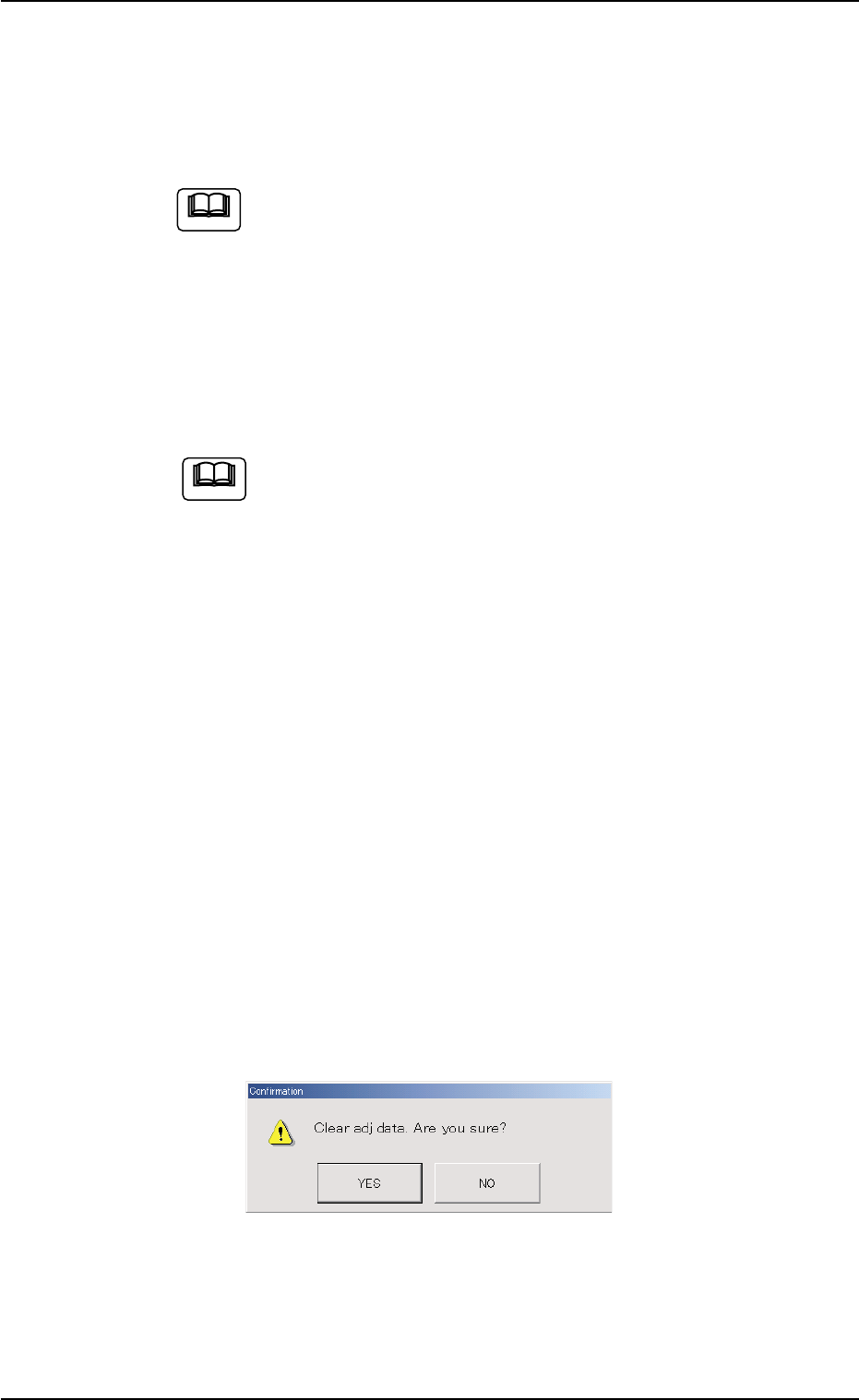
*8 [Clear Adj.] Button
When this button is pressed, the following "Confirmation" dialog box
opens.
Fig. 2F59
When the [YES] button is pressed, the adjusted values are cleared.
When the [NO] button is pressed, the adjusted values are not cleared.
5.1 "Pick-Up Location" Tab
Note
Note
0206-003 6-87