2OM-1075-002.pdf - 第351页
AHB01ESPP 5.2.4.2 "T est ID Set" Sheet • • • • • Sheet Layout When the [Modify] button is pressed in the "Comp Library" tab sheet, the following sheet appears. Fig. 2F85 • • • • • Sheet Composition *1…
AHB01ESPP
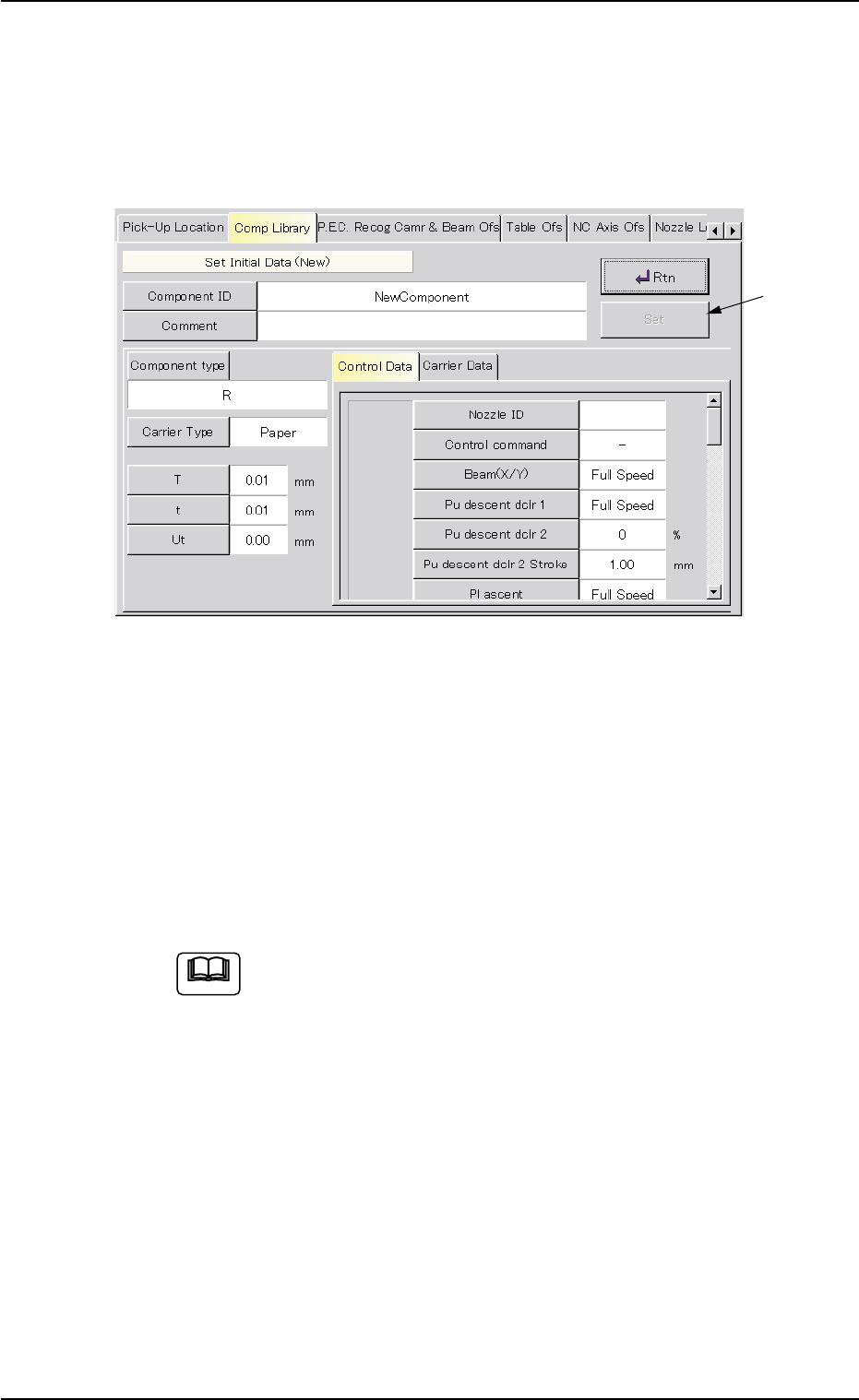
5.2.4.1 "Set Initial Data (New)" Sheet
••
••
• Sheet Layout
When the [New Creation] button is pressed in the "Comp Library" tab
sheet, the following sheet appears.
Fig. 2F84
Operation Procedure
(1) Press the [Component ID] button.
The "Component ID" window opens.
(2) Enter a component ID and press the [Set] button.
Also, enter a comment if necessary.
(3) Set the initial parameters and press the [Rtn] button.
When a component is attached by hand, it is not necessary
to enter any parameters in the "Tape width [mm]", "Tape
feed pitch [mm]", "Pickup level [mm]", and "Placement level
[mm]" text boxes and any speed data for "Selected nozzle
#1" and "Selected nozzle #2" in the "Component Library"
window.
These parameters can be edited after a teaching operation
is completed.
(4) Press the [Set] button after the initial parameter settings are com-
pleted and verified.
The "Teach Library (New)" sheet appears. Refer to "5.2.5 "Teach
Library (New)" Sheet" for details.
5.2 Library Teaching
Note
0206-003 6-118
[Set] Button
AHB01ESPP
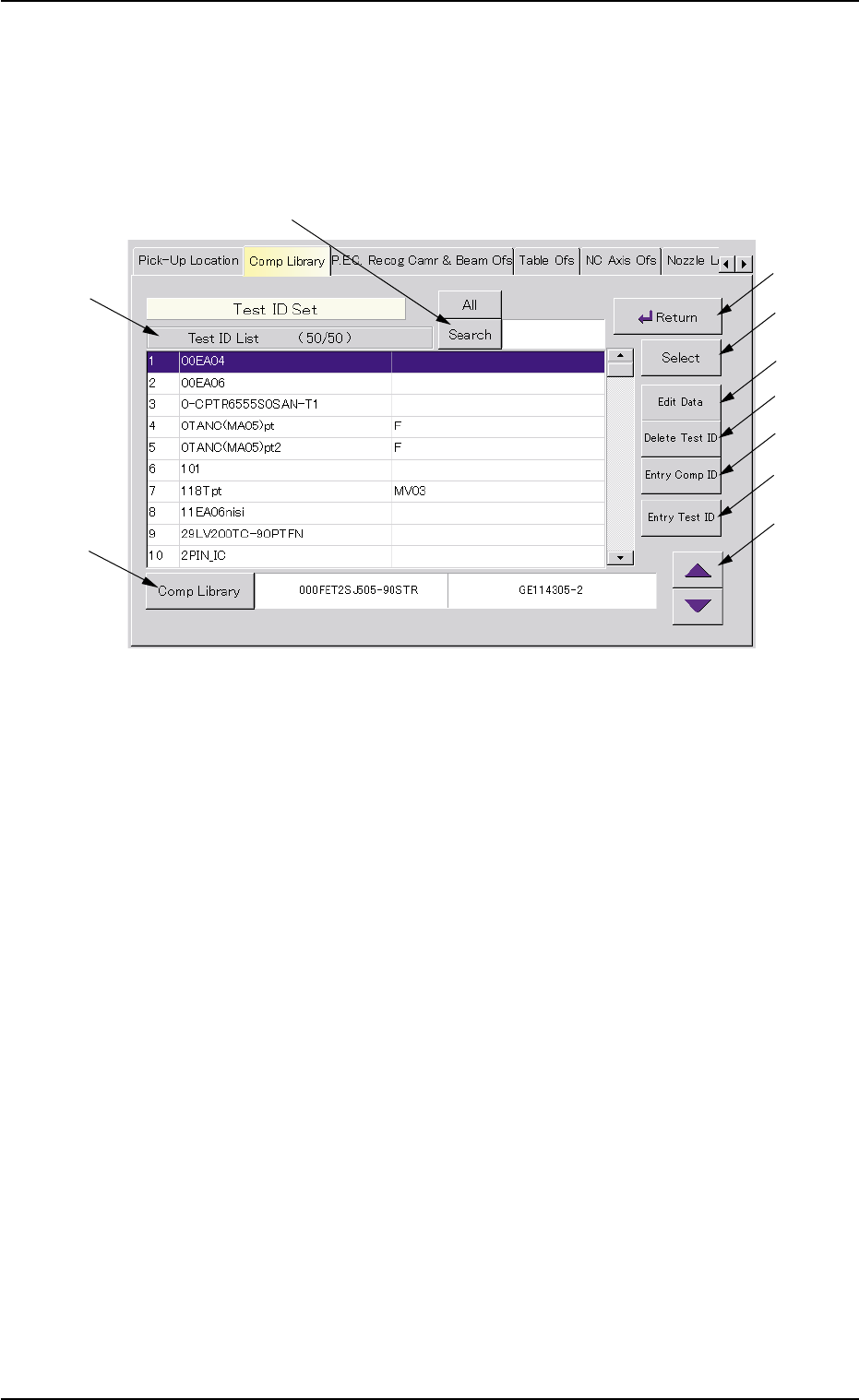
5.2.4.2 "Test ID Set" Sheet
••
••
• Sheet Layout
When the [Modify] button is pressed in the "Comp Library" tab sheet, the
following sheet appears.
Fig. 2F85
••
••
• Sheet Composition
*1 [All] and [Search] Buttons
When the [Search] button is pressed, this button makes it possible
to search a test ID among the registered ones.
When the [All] button is pressed, all test IDs appear.
*2 Test ID List
Listed are the registered test IDs.
*3 [Comp Library] Button
When pressed, this button makes it possible to register a compo-
nent ID (selected from the "Test ID List (XXXX)" list box) as a test ID.
*4 [Return] Button
When this button is pressed, the "Comp Library" tab sheet appears.
*5 [Select] Button
When pressed, this button makes it possible to select the data to be
taught from the "Test ID List (XXXX)" list box.
5.2 Library Teaching
0308-004 6-119
*1
*2
*3
*4
*5
*6
*7
*8
*9
*10

AHB01ESPP
*6 [Edit Data] Button
When pressed, this button makes it possible to correct the param-
eters for the selected component ID.
*7 [Delete Test ID] Button
When pressed, this button makes it possible to delete the test ID
(selected from the "Test ID List (XXXX)" list box).
*8 [Entry Comp ID] Button
When pressed, this button makes it possible to register the test ID
(selected from the "Test ID List (XXXX)" list box) in the component
library.
*9 [Entry Test ID] Button
When pressed, this button makes it possible to register the compo-
nent ID (selected in the "Component Library" selection window) in
the "Test ID List (XXXX)" list box.
Operation Procedure
(1) Select the component ID to be tested from the "Test ID List (XXXX)"
list box.
(2) Press the [Select] button.
The library data for the selected component ID is regarded as the
data to be set initially.
5.2 Library Teaching
0206-003 6-120