2OM-1075-002.pdf - 第429页
AHB01ESPP 5.17.1 T eaching Operation with Pointing Device Fig. 2F125 Fig. 2F126 (1) When the manual alignment and teaching operations are imple- mented, the captured image and the template for teaching appear in the reco…

AHB01ESPP
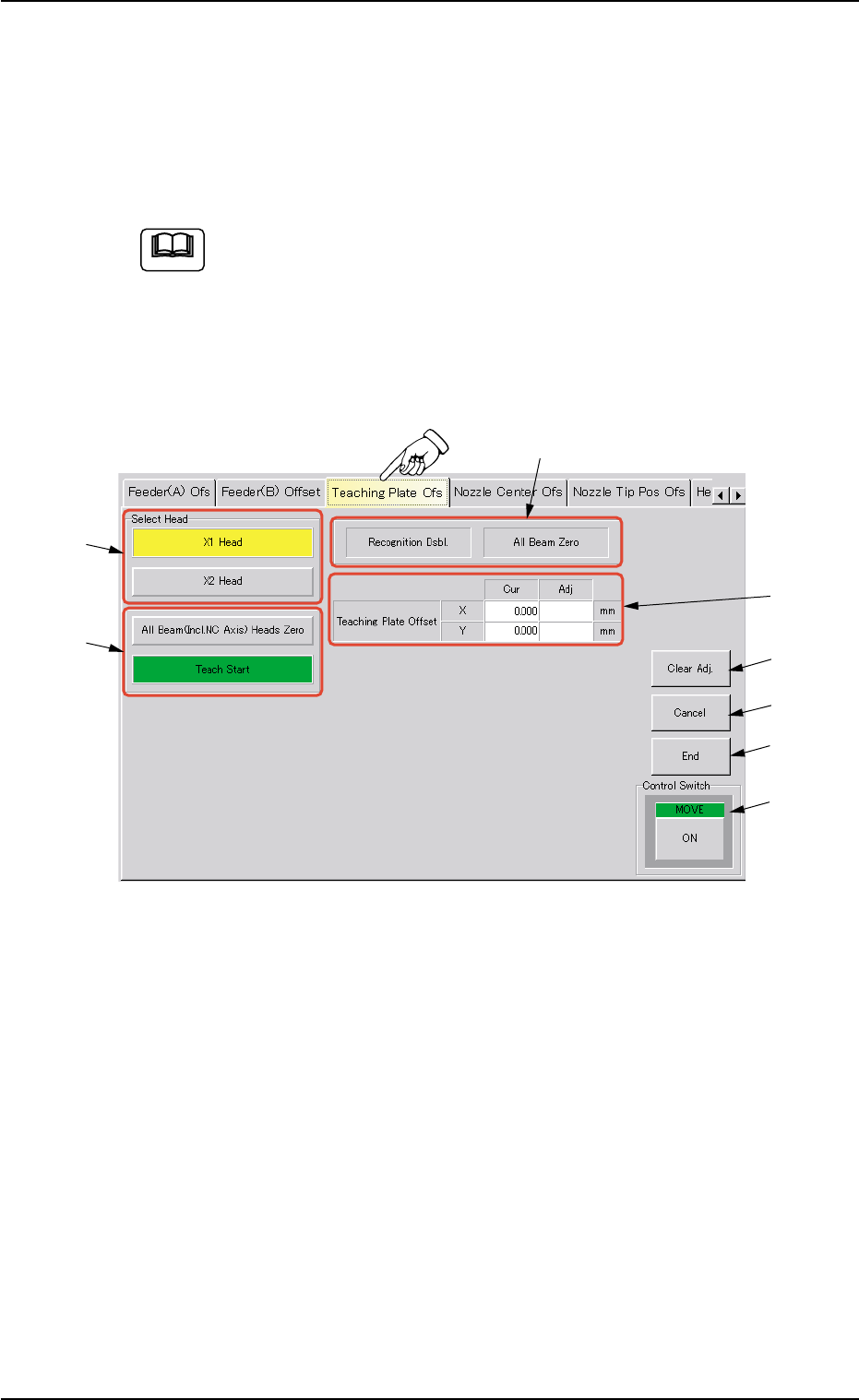
*8 [Cancel] Button
When pressed, this button ends the teaching operation without re-
flecting the teaching results on the offset data.
*9 [End] Button
When pressed, this button reflects the results of the teaching op-
eration on the offset data and exits from this session.
*10 "Control Switch" Group Box
Select the items (buttons) to be taught and press the [ON] button
entitled "MOVE". After that, press the [ENABLE] button on the op-
eration panel in two seconds. A teaching operation is performed on
the selected item.
• Preparation for Teaching Operations
Actually Used Tape Feeders
• Teaching Procedure
(1) Attach the tape feeder to be used actually to the feeder No. (Fdr.
No.) specified for the teaching operation.
(2) Press the [All Beam (Incl. NC Axis) Heads Zero] button and the [ON]
button (entitled "MOVE"). In 2 seconds, press the [ENABLE] button
on the operation panel to zero all beams.
(3) Select the head, the feeder base, and the feeder for teaching opera-
tions.
(4) Attach the feeders to be used actually to the slots (selected feeder
Nos.).
(5) Select the [Teach Start] button and press the [ON] button entitled
"MOVE". After that, press the [ENABLE] button on the operation panel
in 2 seconds.
The P.E.C. recognition camera moves to the specified feeder posi-
tion.
(6) The teaching point of the feeder appears on the recognition window.
Perform the manual alignment operation, using the pointing device.
Refer to "5.17.1 Teaching Operation with Pointing Device" for de-
tails.
(7) Press the [End] button to save the data.
0206-002 6-194
5.17 "Feeder (B) Offset" Tab
AHB01ESPP
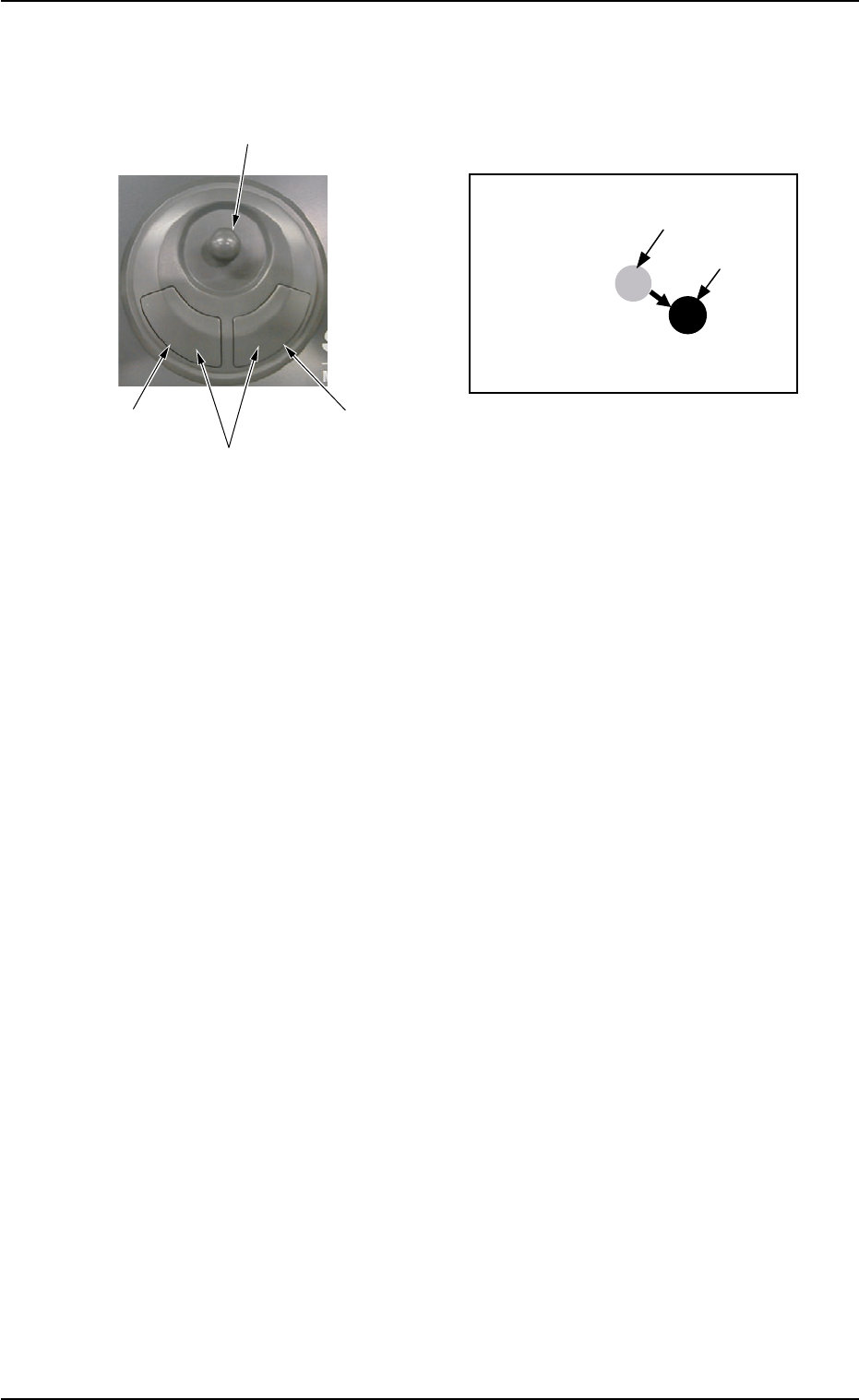
5.17.1 Teaching Operation with Pointing Device
Fig. 2F125 Fig. 2F126
(1) When the manual alignment and teaching operations are imple-
mented, the captured image and the template for teaching appear
in the recognition window.
(2) Move the image, using the joystick and align the teaching point on
the image with the template.
(3) When you press the right button of the pointing device, the image
size extends. Pressing the left button reduces the image size. ad-
just the size so that the template and the teaching point overlap
each other.
(4) Press the left and right buttons of the pointing device simultaneously.
The position is determined.
0206-002 6-195
5.17 "Feeder (B) Offset" Tab
Joystick (Template Movement)
Right Button
(Image Extension)
Left Button
(Image Reduction)
Left Button + Right Button
(Determination of Position)
Template
Image
Image and Template in Recognition Window
AHB01ESPP
5.18 "Teaching Plate Ofs" Tab
The corresponding tab enables the operator to perform the teaching
operation on the teaching plate offset data.
The offsets of the teaching plate position can be taught through the manual
alignment operation.
This teaching operation must be performed only by our service
personnel.
• Sheet Layout
When the "Teaching Plate Ofs" tab is pressed in the "TEACHING" win-
dow (submenu), the following tab sheet appears inside the window.
Fig. 2F127 "Teaching Plate Ofs" Tab Sheet
• Sheet Composition
*1 "Select Head" Group Box
The provided buttons make it possible to select the P.E.C. recogni-
tion camera to be used for teaching operations.
The following buttons are provided in this group box.
[X1 Head] and [X2 Head] Buttons
*2 "Selection of Teaching Operation" Group Box
The following buttons are provided in this group box.
[All Beam (Incl. NC Axis) Heads Zero] Button
When this button is pressed, all X/Y beams are zeroed.
[Teach Start] Button
When this button is pressed, a teaching operation is performed.
0206-002 6-196
5.18 "Teaching Plate Ofs" Tab
Note
*7
*6
*5
*8
*4
*1
*2
*3