2OM-1075-002.pdf - 第446页
AHB01ESPP 7 . 1 "Input Check" T ab When the "Input Check" tab is pressed in the "DVC. CHECK" window (submenu), the "Input Check" tab sheet appears. The "Input Check" tab …
AHB01ESPP
7. "DVC. CHECK" Window (Submenu)
• Window Layout
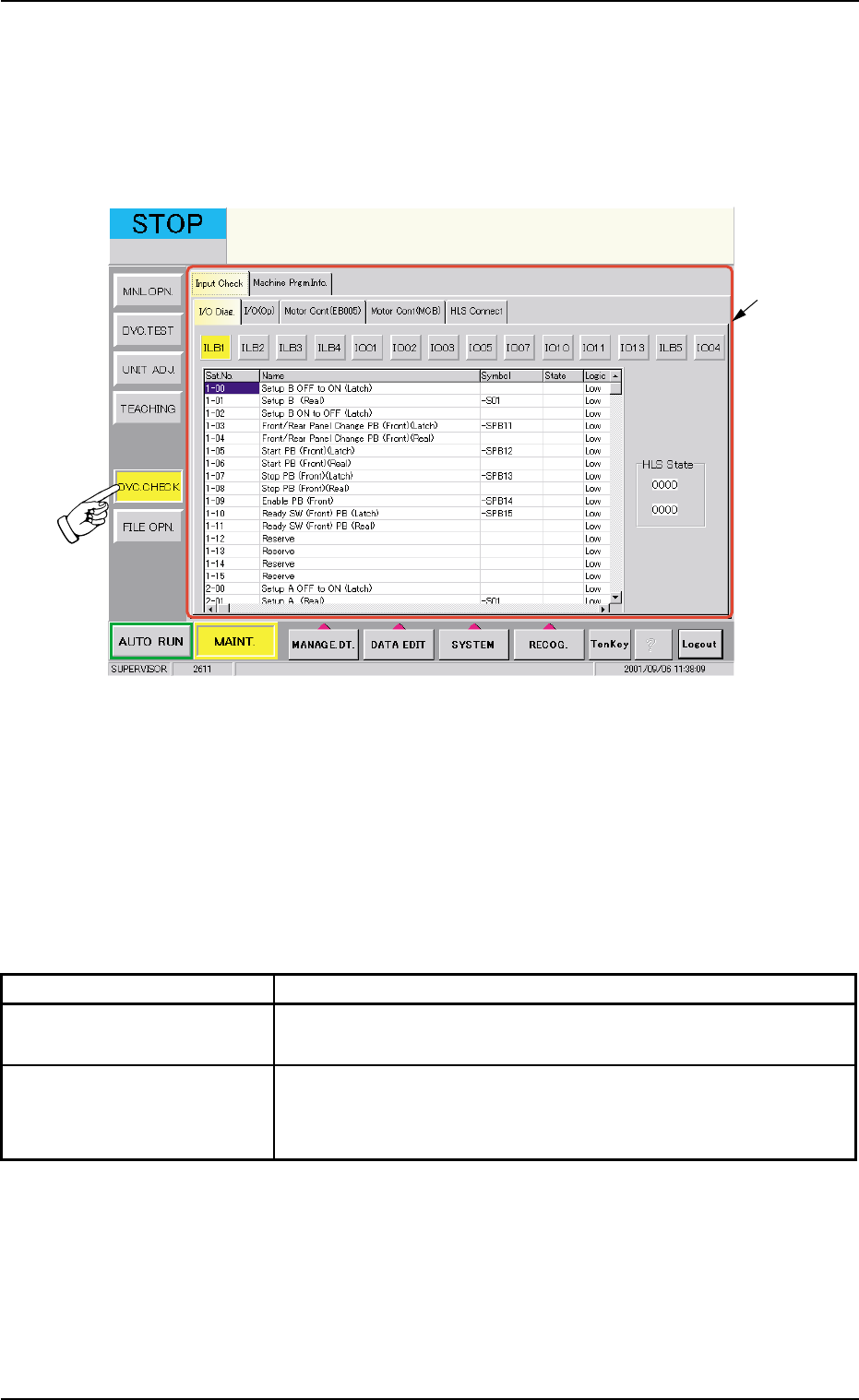
When the [DVC. CHECK] button on the submenu bar is pressed in the
"MAINT." window, the following window (submenu) opens.
Fig. 2F133 "DVC. CHECK" Window (Submenu)
• Window Composition
*1 Tabs
The "DVC. CHECK" window (submenu) is provided with the follow-
ing 2 tabs. When each tab is pressed, the corresponding tab sheet
appears.
Table 2F23
Tabs Description
Input Check The corresponding tab sheet enables the operator to check the
input status of each section.
Machine Prgm. Info. The corresponding tab sheet enables the operator to view the
software versions of the machine control system and the ver-
sions of placement heads.
7. "DVC. CHECK" Window (Submenu)
0206-003 6-207
*1
AHB01ESPP
7.1 "Input Check" Tab
When the "Input Check" tab is pressed in the "DVC. CHECK" window
(submenu), the "Input Check" tab sheet appears.
The "Input Check" tab sheet is composed of the following five tab sheets.
• "I/O Diag." Tab Sheet
• "I/O (Op)" Tab Sheet
• "Motor Cont (EB005)" Tab Sheet
• "Motor Cont (MCB)" Tab Sheet
• "HLS Connect" Tab Sheet
7.1.1 "I/O Diag." Tab
The corresponding tab sheet enables the operator to check the input/
output status of each sensor.
• Sheet Layout
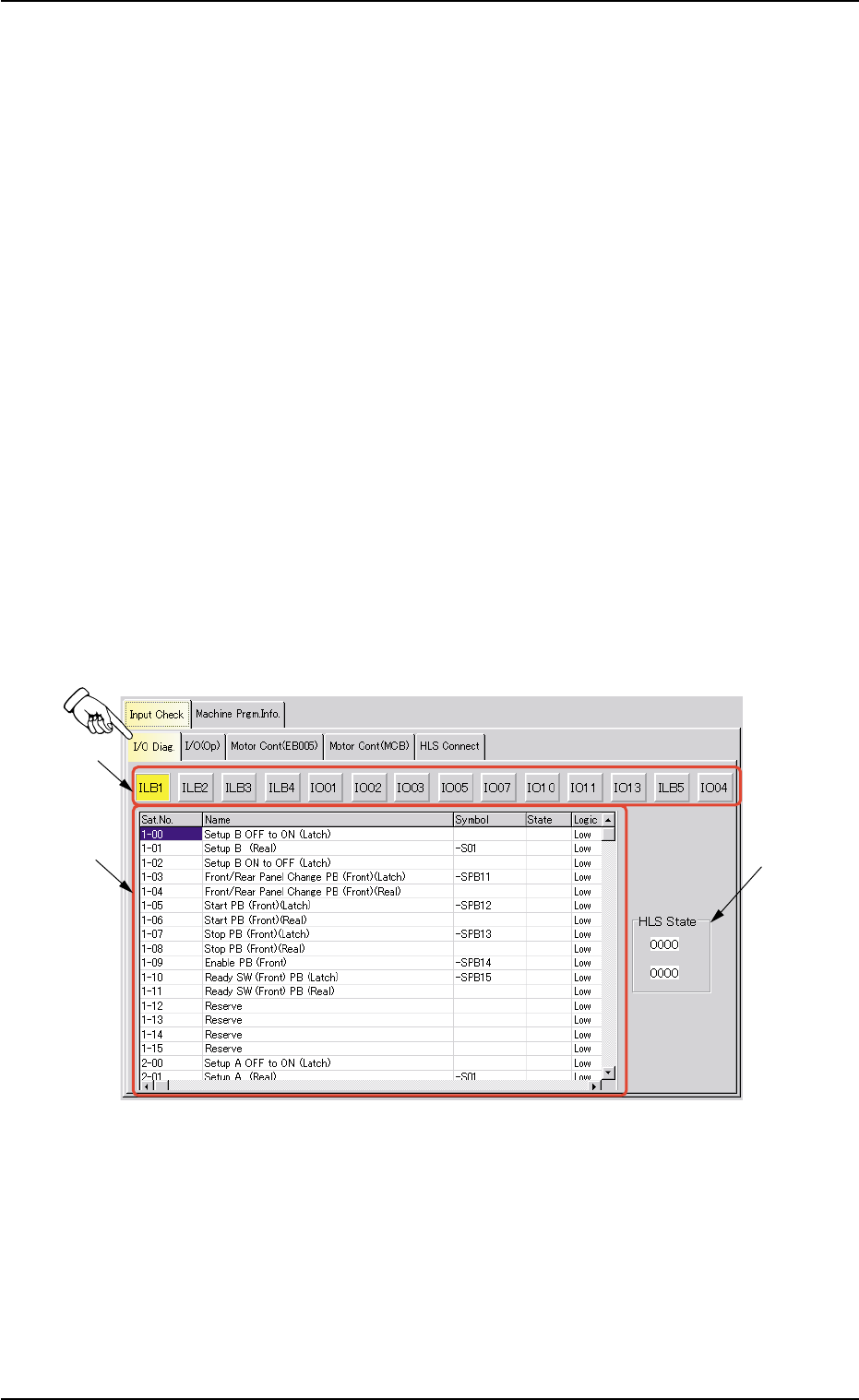
When the "I/O Diag." tab is pressed in the "Input Check" tab sheet, the
following tab sheet appears.
Fig. 2F134 "I/O Diag." Tab Sheet
0206-003 6-208
7.1 "Input Check" Tab
*1
*3
*2

AHB01ESPP
• Sheet Composition
*1 I/O Class Button
Press one of the following buttons to change the contents (status
indication) to be displayed in "*2".
[ILB1] Button, [ILB2] Button, [ILB3] Button, [ILB4] Button
[IO01] Button, [IO02] Button, [IO03] Button, [IO05] Button
[IO07] Button, [IO10] Button, [IO11] Button, [IO13] Button
[ILB5] Button, [IO04] Button
*2 Status Indication
The status of each section is indicated in this pane.
Sat. No. : Displayed are the satellite Nos.
Name : Displayed are the satellite names.
Symbol : Displayed are the satellite symbols.
State : Displayed are the satellite states.
Logic : Displayed are the satellite logical values.
*3 "HLS State" Group Box
HLS state is indicated in this group box.
0206-003 6-209
7.1 "Input Check" Tab