2OM-1075-002.pdf - 第460页
AHB01ESPP 8 . 1 "Save / Load" T ab The corresponding tab sheet enables the operator to save or load the machine data from the floppy in the drive of the service panel. • Sheet Layout When the "Save / Load&…
AHB01ESPP
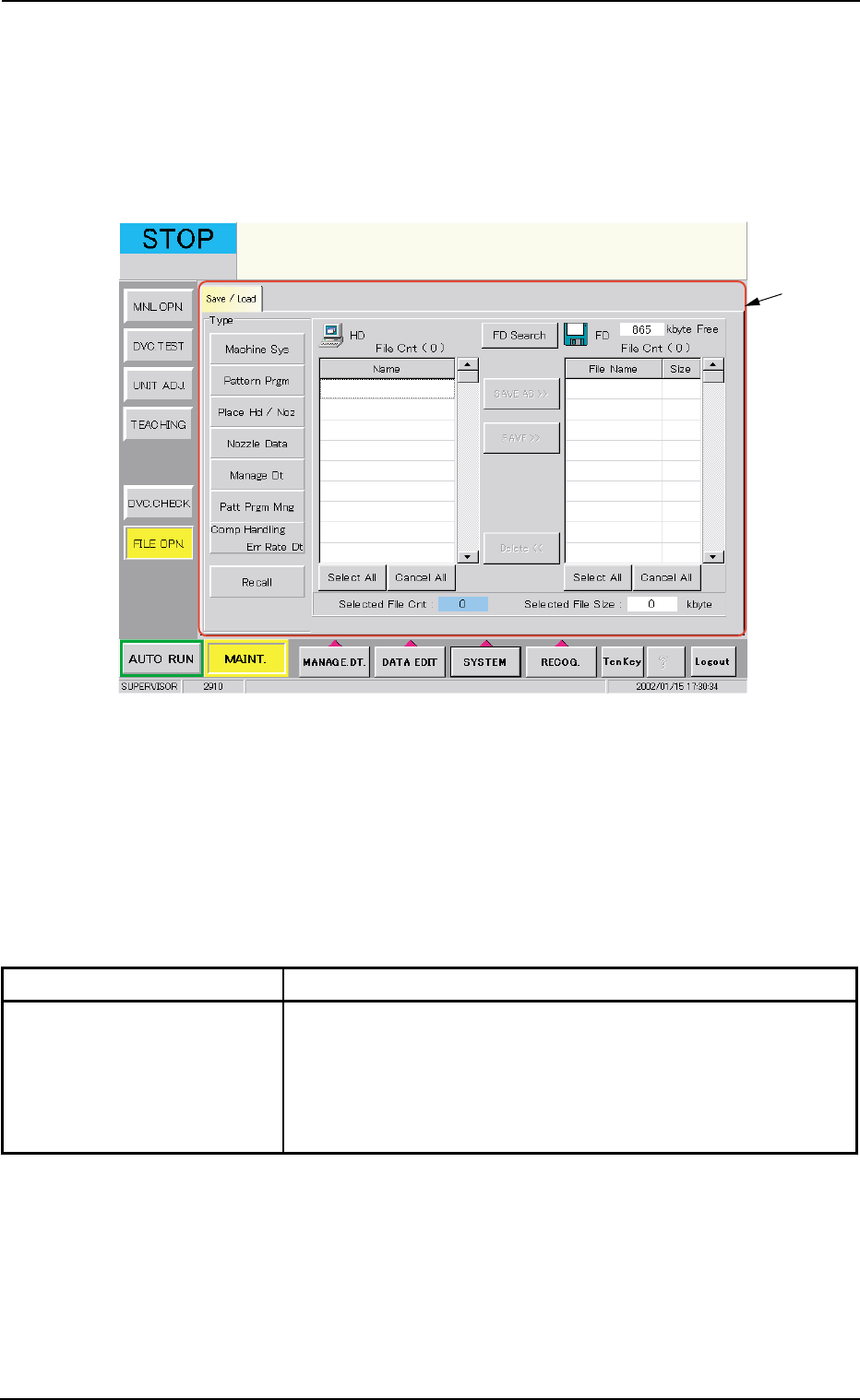
8. "FILE OPN." Window (Submenu)
• Window Layout
When the [FILE OPN.] button on the submenu bar is pressed in the
"MAINT." window, the following window (submenu) opens.
Fig. 2F145 "FILE OPN." Window (Submenu)
• Window Composition
*1 Tabs and Tab Sheets
The "FILE OPN." window (submenu) is provided with the following
tab sheet.
Table 2F24
Tab Description
Save/Load This tab sheet enables the operator to save the machine data
on a 3.5-inch floppy disk in the drive of the service panel or load
the required data from the floppy disks where the machine sys-
tem data, the pattern program data, the placement head/nozzle
data, the nozzle data, etc., are saved.
8. "FILE OPN." Window (Submenu)
0206-003 6-221
*1
AHB01ESPP
8.1 "Save / Load" Tab
The corresponding tab sheet enables the operator to save or load the
machine data from the floppy in the drive of the service panel.
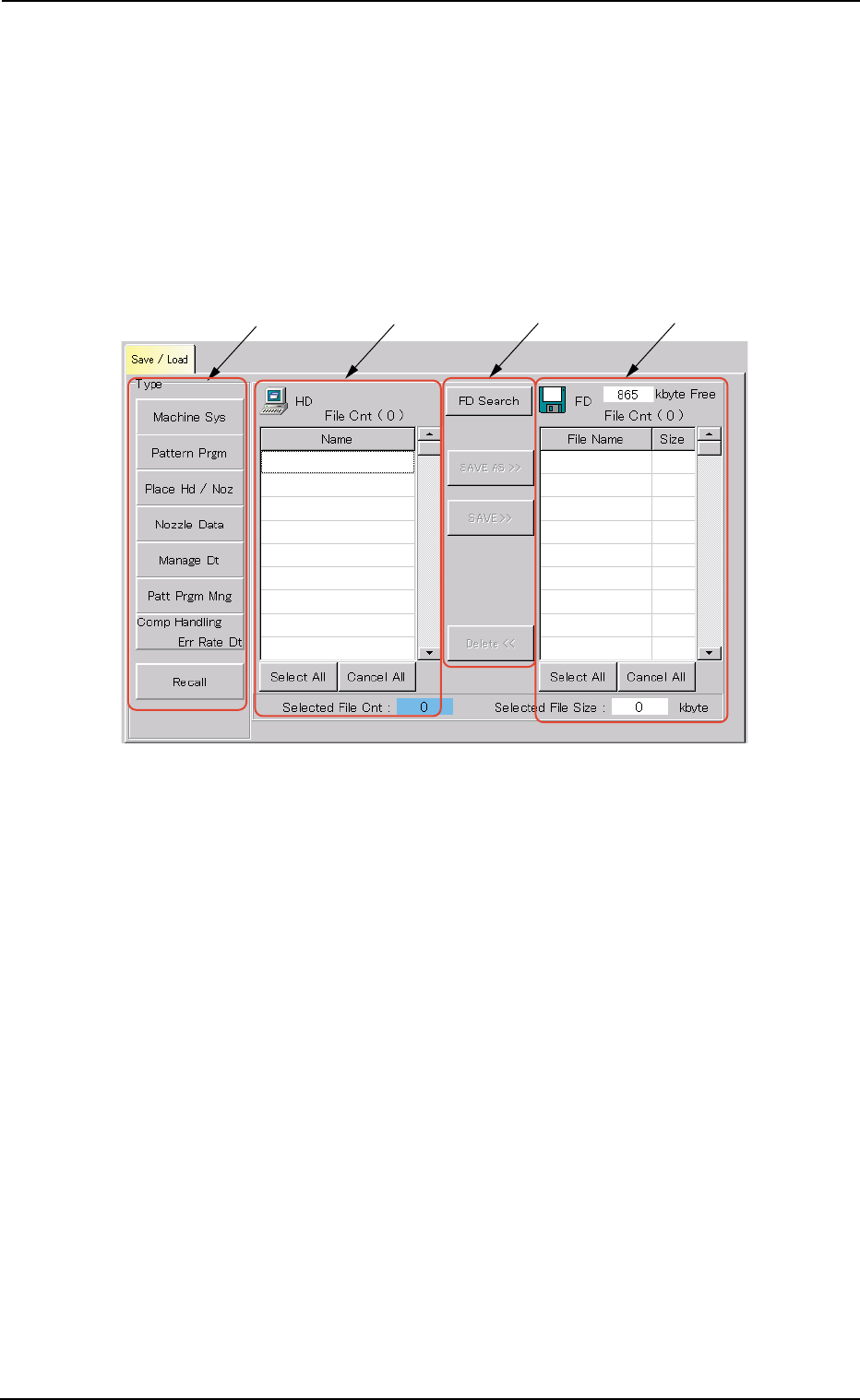
• Sheet Layout
When the "Save / Load" tab is pressed in the "FILE OPN." window
(submenu), the following tab sheet appears inside the window.
Fig. 2F146 "Save / Load" Tab Sheet
• Sheet Composition
*1 "Type" Group Box
The following buttons are provided in this group box.
[Machine Sys] Button : When pressed, this button enables the
operator to save the machine system
data on a floppy disk or load the data
from the corresponding floppy disk to
the hard disk of the machine.
[Pattern Prgm] Button : When pressed, this button enables the
operator to save the pattern program
data on a floppy disk or load the data
from the corresponding floppy disk to
the hard disk of the machine.
0206-003 6-222
8.1 "Save / Load" Tab
*1
*2
*3 *4

AHB01ESPP
[Place Hd / Noz] Button : When pressed, this button enables the
operator to save the placement head/
nozzle data on a floppy disk or load the
data from the corresponding floppy disk
to the hard disk of the machine.
[Nozzle Data] Button : When pressed, this button enables the
operator to save the nozzle data on a
floppy disk or load the data from the cor-
responding floppy disk to the hard disk
of the machine.
[Manage Dt] Button : When pressed, this button enables the
operator to save the management data
on a floppy disk.
It is impossible to load a management
data file from the corresponding floppy
disk (the disk where the management
data is saved) to the hard disk of the
machine.
[Patt Prgm Mng] Button : When pressed, this button enables the
operator to save the pattern program
management data on a floppy disk.
It is impossible to load a pattern pro-
gram management data file from the
corresponding floppy disk (the disk
where the pattern program data is
saved) to the hard disk of the machine.
[Comp Handling Err Rate Dt] Button:
When pressed, this button enables the
operator to save the component han-
dling error rate data on a floppy disk.
It is impossible to load a component
handling error rate data file from the cor-
responding floppy disk (the disk where
the component handling error rate data
is saved) to the hard disk of the ma-
chine.
[Recall] Button : When pressed, this button saves the
recalled data on a floppy disk.
The recalled data cannot be read from
the floppy disk to the machine side.
0206-002 6-223
8.1 "Save / Load" Tab