2OM-1075-002.pdf - 第72页
2.13 Feeder Alternate Function 0308-002 2 - 23 AHB01ESPP (2) Make the "Altn Fdr Mode" tab sheet appear in the "OPN. MODE" window (submenu) that opens after the [OPN. MODE] button on the submenu bar of…
• The alternate destination should be terminated. (The feeder Nos.
should not be looped.)
• Neither "S" nor "X" should be set in the "C (Control Command)" text
box of the destination feeder carriage # in the "Placement Feeder
Location" tab sheet.
• When "S" or "X" is set in the "C (Control Command)" text box of the
source feeder carriage # (Placement Feeder Location Data), the com-
ponent placement actions for this feeder No. are all bypassed. (No
components are placed.)
All alternate feeder modes designated from this feeder become in-
valid.
• It is possible to designate the same alternate destination feeder from
different feeder Nos.
• The number of alternated feeder links is not limited.
• When "Disable" is set in the "Feeder Alternate" text box for the desti-
nation feeder No., the alternate feeder mode stops working at this
feeder.
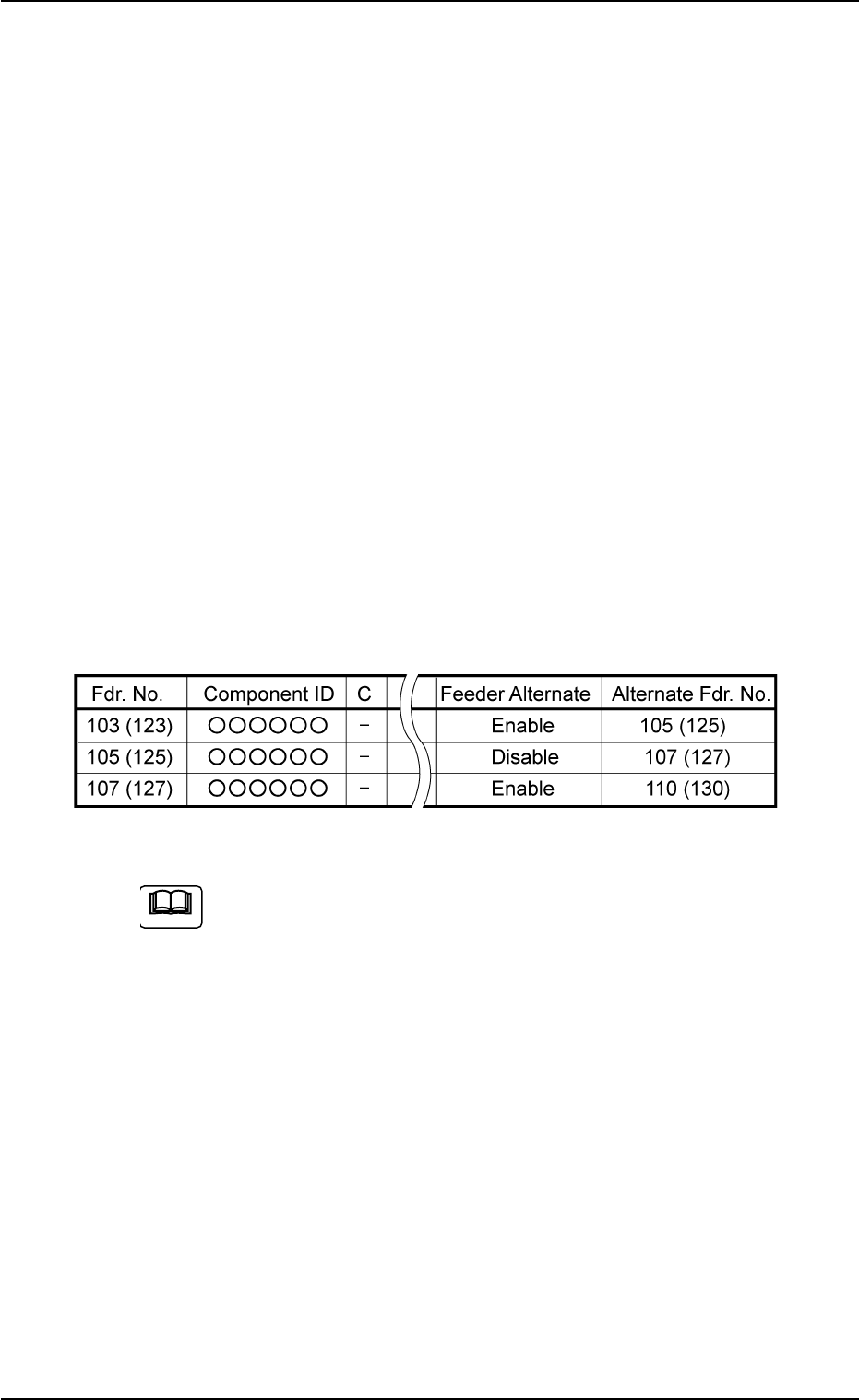
Example: In the following cases, the feeder alternate mode is termi-
nated in "Fdr. No. 103 (123)".
Fig. 2B24
When P.C.B.’s are produced using the feeders containing the
same types of components (same IDs) installed on two or more
feeders and each feeder No. is designated (dispersed feeder
designation), these feeders can be linked together by the alter-
nate feeder mode.
Load the feeders undesignated in the feeder data of the place-
ment data (P) with the same type of components (component
ID) and set them in the destination "Fdr. No." for the alternate
mode.
The machine starts automatic operation using the feeders on
the dispersed feeders. Every time a feeder becomes short of
components, the other available feeders are consolidated. Af-
ter the same types of components are used up, the machine
stops in the component shortage error condition.
2.13 Feeder Alternate Function
0206-001 2-22 AHB01ESPP
Note
2.13 Feeder Alternate Function
0308-002 2-23 AHB01ESPP
(2) Make the "Altn Fdr Mode" tab sheet appear in the "OPN. MODE"
window (submenu) that opens after the [OPN. MODE] button on the
submenu bar of the "AUTO RUN" window is pressed.
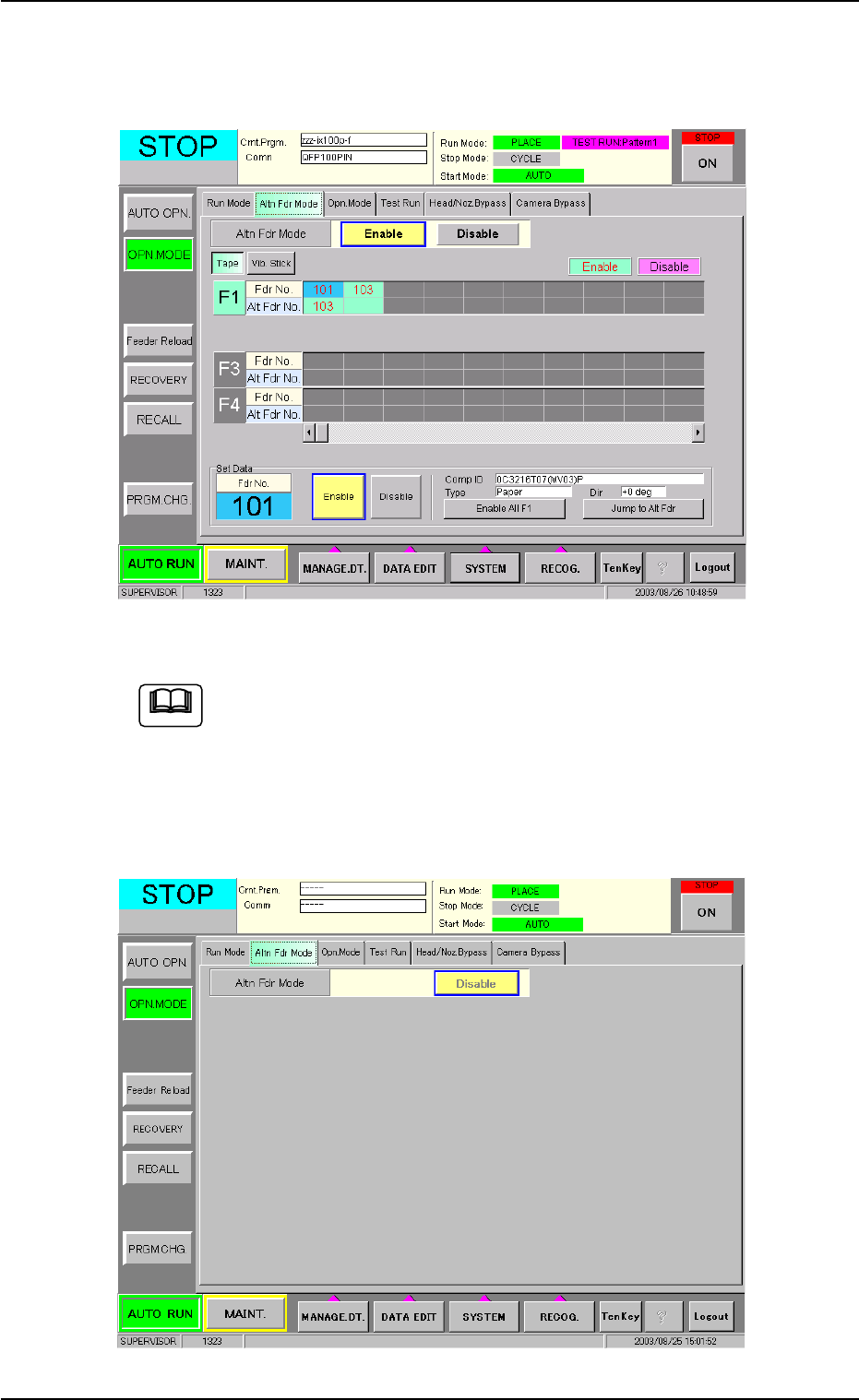
Fig. 2B25 "Altn Fdr Mode (Enable)" Tab Sheet
Fig. 2B25 shows the contents of the "Altn Fdr Mode" tab sheet
that appear when "Enable" is set in the "Feeder Alternate" text
box of the "Placement Feeder Location" tab sheet in the "Pat-
tern Program" edit window.
When "Disable" is set in the text box, the following tab sheet
appears.
Fig. 2B26 "Altn Fdr Mode (Disable)" Tab Sheet
Note

(3) Set "Enable" or "Disable" as the alternate feeder mode for each
individual feeders.
In the "Altn Fdr Mode (Enable)" tab sheet, it is possible to check how
the alternate feeder mode is working and to specify which feeders
are completed with component replenishment.
• As for the feeder No. where a component shortage error has been
detected, set "Enable" for the objective feeder No. after compo-
nent replenishment.
• Select the feeder No. for which "Enable" or "Disable" must be
changed and press the [Enable] or the [Disable] button.
• When the [Jump to Alt Fdr] button is pressed, the selected Nos.
are shifted to the destination alternate (substitute).
• When the [Enable All F1] button is pressed, "Enable" is set for all
the feeders on the selected feeder base (Feeder Base #1 in this
case).
• The set parameters ("Enable" or "Disable" (alternate feeder
modes) for each individual feeders) are saved when the [POWER
ON] or the [POWER OFF] button is pressed, the system is
cleared, or the current pattern program data is modified.
The parameters specified here become valid prior to the other
alternate-related ones that are designated in the pattern pro-
gram.
Even when "Enable" is set in the pattern program, this alternate
feeder mode (function) can be used to temporarily set "Dis-
able" in relation to preparation for the feeders.
2.13 Feeder Alternate Function
0206-001 2-24 AHB01ESPP
Note