2OM-1075-002.pdf - 第96页
Fig. 2C13 "Opn. Mode" T ab Sheet (Second Page) Confirmation and Setting of Recog Monitor Display Mode Confirm or specify the parameters for "Recog Monitor Display Mode" (*6). Confirmation and Setting …
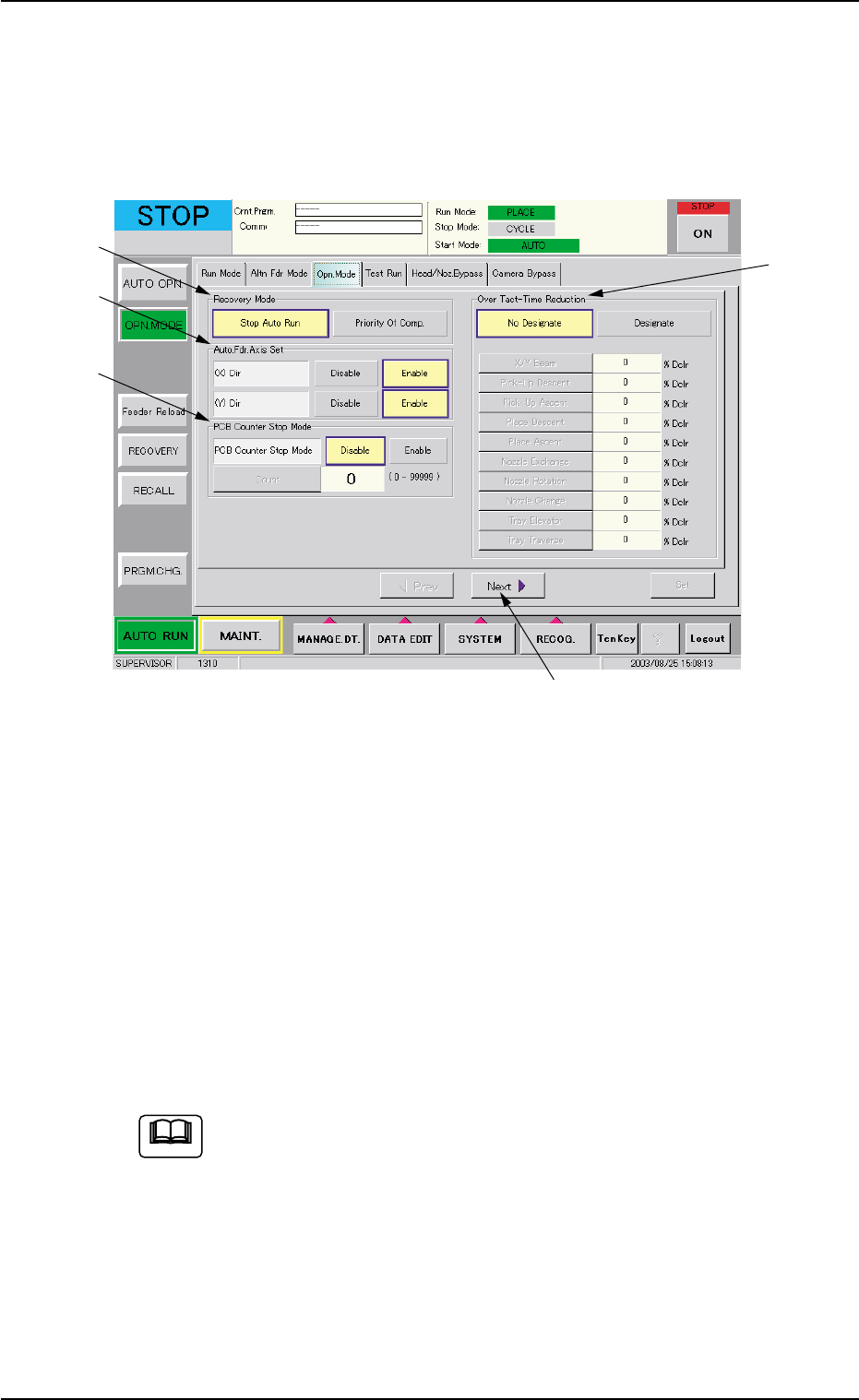
(2) Confirmation and Setting of Operation Mode Setting
Press the [OPN. MODE] button on the submenu bar and open the
"Opn. Mode" tab sheet. Confirm the setting of each function and
specify parameters if necessary.
When the [Next] button (*5) is pressed, the second page appears.
Fig. 2C12 "Opn. Mode" Tab Sheet (First Page)
Confirmation and Setting of Recovery Mode
Confirm or specify a parameter for "Recovery Mode" (*1).
Confirmation and Setting of Automatic Fdr. Axis Set
Confirm or specify a parameter for "Auto. Fdr. Axis Set" (*2).
Confirmation and Setting of PCB Counter Stop Mode
Confirm or specify a parameter for "PCB Counter Stop Mode" (*3).
Confirmation and Setting of Over Tact-Time Reduction
Confirm or specify a parameter for "Over Tact-Time Reduction" (*4).
Refer to "3.3 "Opn. Mode" Tab" in "Section 5" for details.
4. Confirmation of Component Placement
*5
*1
*2
*3
*4
0308-004 3-18 AHB01ESPP
Note
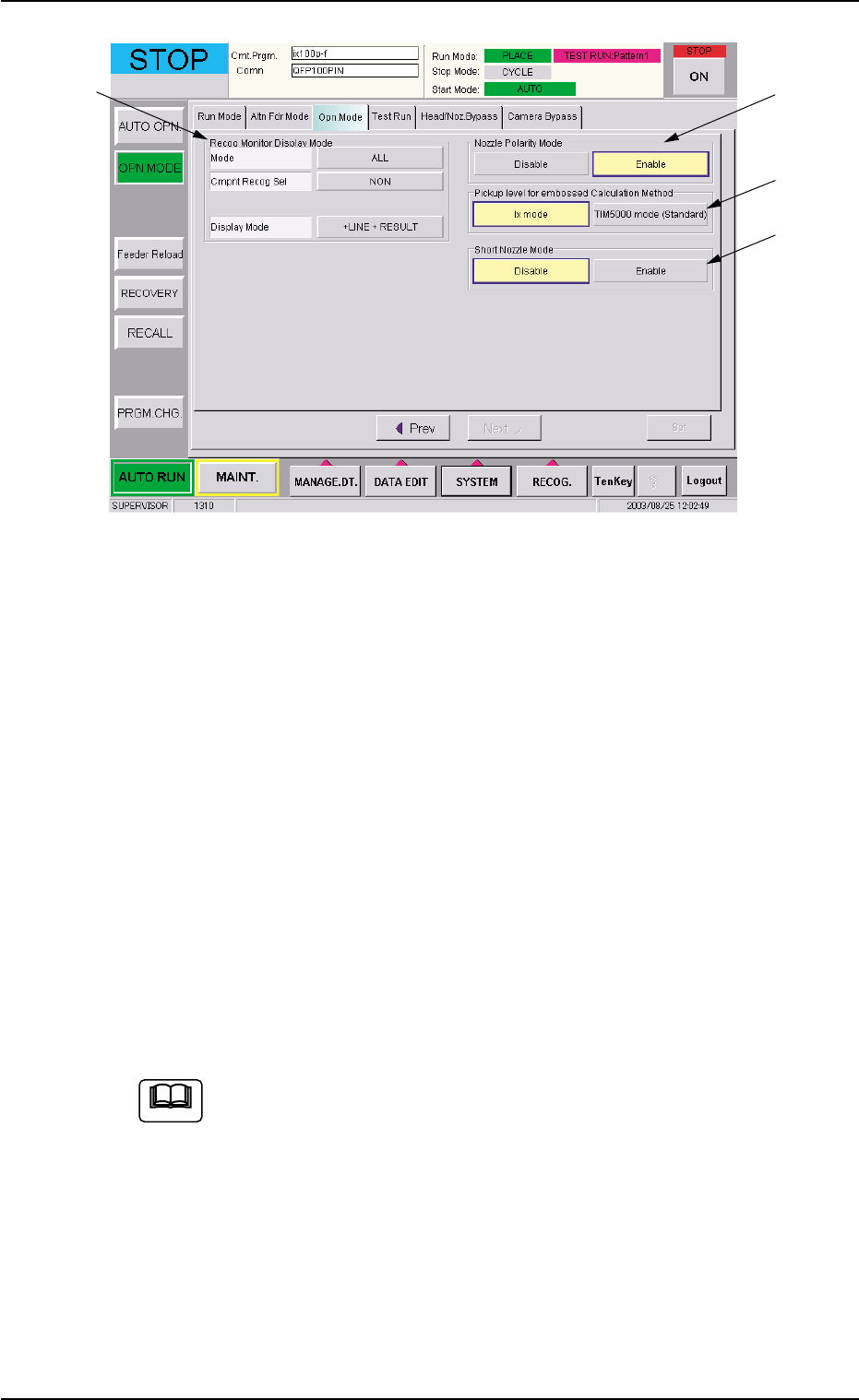
Fig. 2C13 "Opn. Mode" Tab Sheet (Second Page)
Confirmation and Setting of Recog Monitor Display Mode
Confirm or specify the parameters for "Recog Monitor Display Mode"
(*6).
Confirmation and Setting of Nozzle Polarity Mode
Confirm or specify the parameters for "Nozzle Polarity Mode" (*7).
Confirmation and Setting of Pickup level for embossed Cal-
culation Method
Confirm or specify the parameters for "Pickup level for embossed
Calculation Method" (*8).
Confirmation and Setting of Short Nozzle Mode
Confirm or specify the parameters for "Short Nozzle Mode" (*9).
Refer to "3.3 "Opn. Mode" Tab" in "Section 5" for details.
4.1 Setting of Operation Mode
*6
*7
*8
*9
0308-002 3-19 AHB01ESPP
Note

4.2 Component Placement Test
Place an actual component on the P.C.B. and confirm that the compo-
nent can be placed without any hindrance.
When the component cannot be placed accurately on the specified po-
sition, correct the pattern program.
4.2 Component Placement Test
0206-001 3-20 AHB01ESPP