LCMS_006 - 第12页
12 Timed Events Time | — : | Days Monday Saturday Tuesday Sunday Wednesday Thursday Friday Cancel [Instrument Idle Method]: 仪 器闲置 状态的 方法。 可选 择在仪 器待机 或空闲 状态下 下 载到该 仪器的 方法, 该选 项中可 以设置 一种低 流速的 方法, 以 节省流 …
11
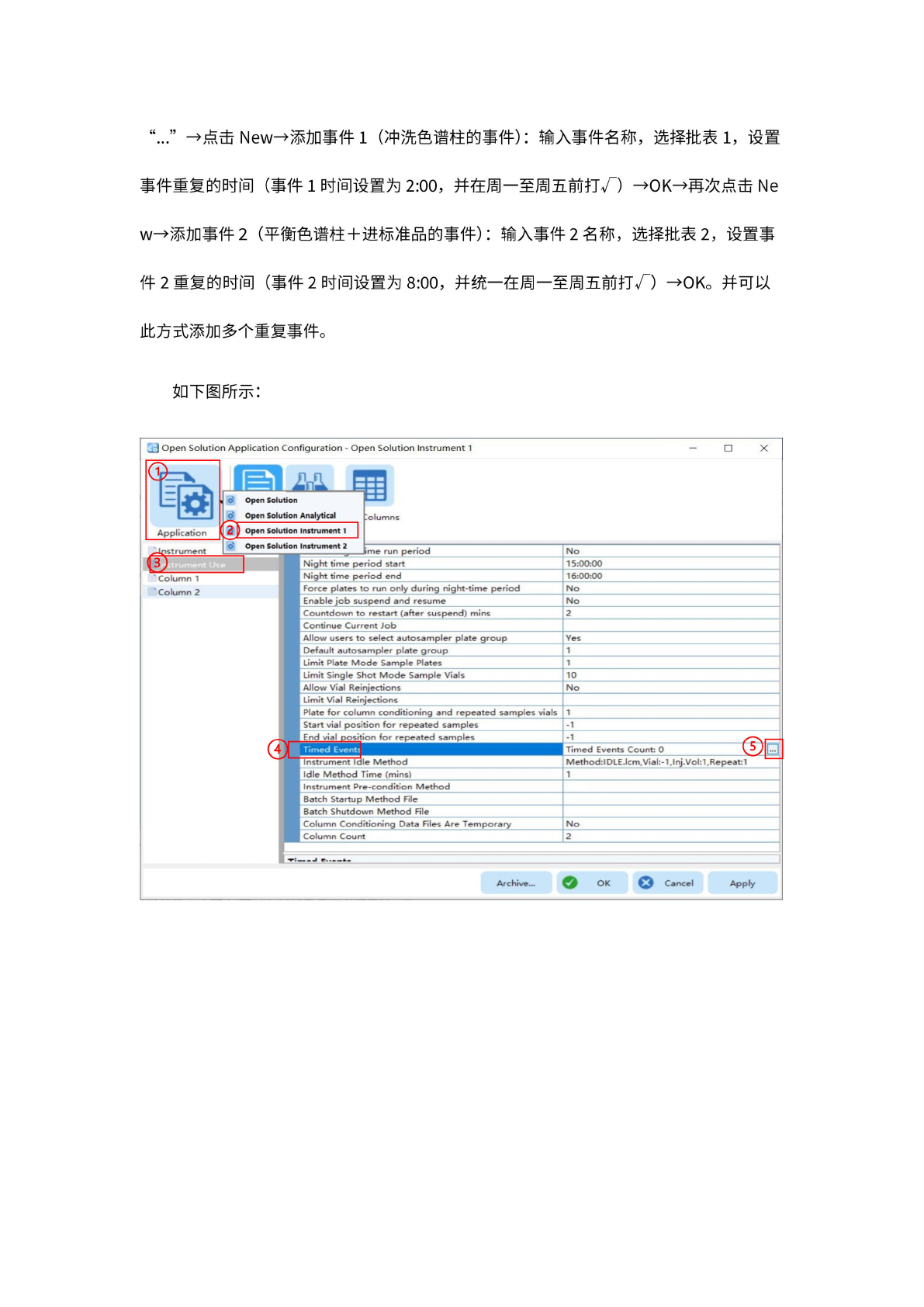
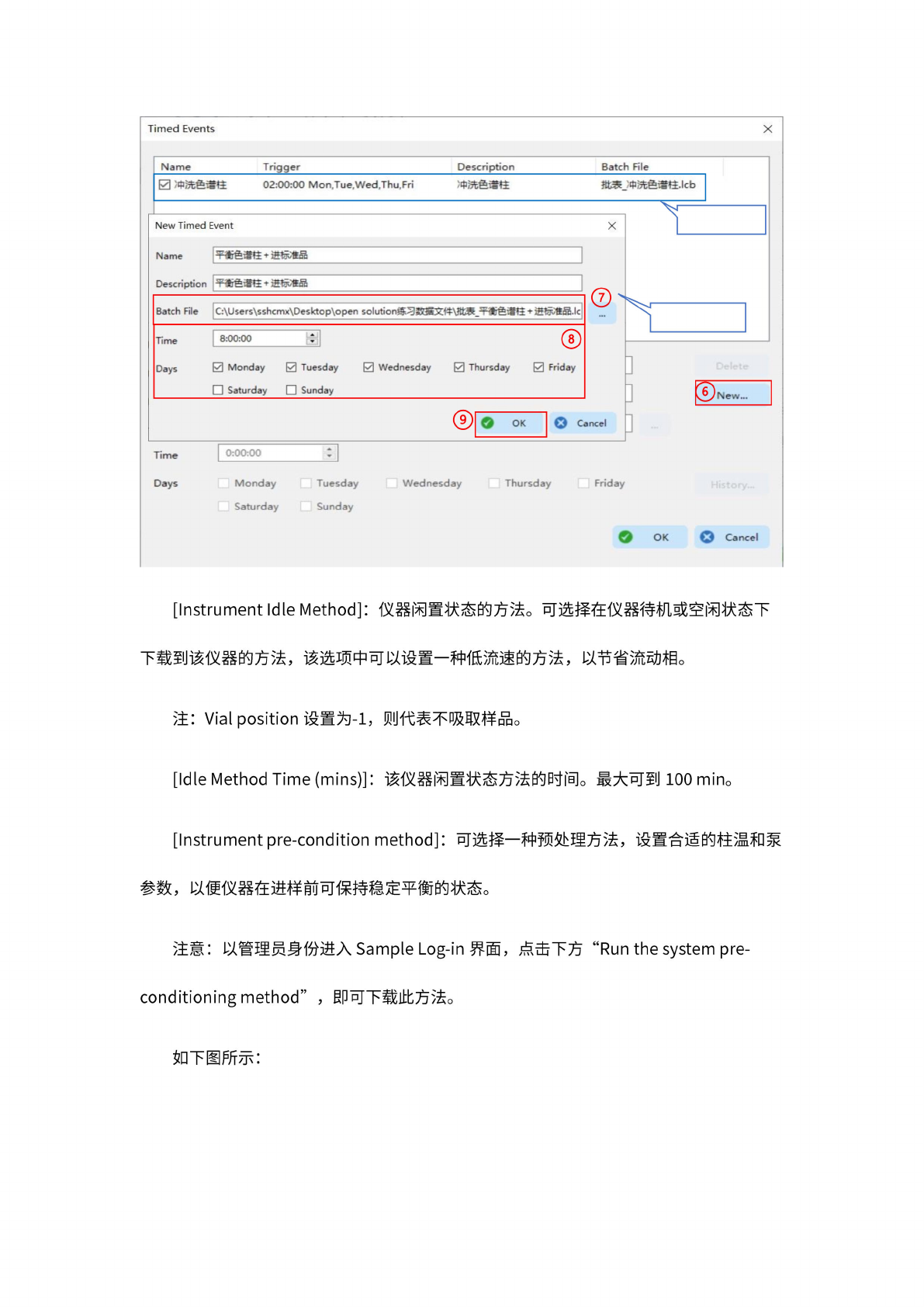
“…”
一
点击
Newf
添
加事件
1
(冲
洗色谱
柱的事
件):
输
入事件
名称,
选
择批表
1,
设置
事
件重复
的时间
(事件
1
时间
设置为
2:00,
并在周
一至周
五前打
4)
-OK-
再
次点击
Ne
wf
添
加事件
2
(平衡
色谱柱
+
进标准
品的事
件):
输
入事件
2
名称,
选
择批表
2,
设置事
件
2
重复
的时间
(事件
2
时间
设置为
8:00,
并统
一在周
一至周
五前打
一)
-OK。
并可以
此方式
添加多
个重复
事件。
如下图
所示:
J
Open
Solution
Application
Configuration
-
Open
Solution
Instrument
1
X
ition
Open
Solution
Open
Solution
Analytical
Columns
Solution
Instrument
1
Open
Solution
4
目
Column
1
Column
2
^4r>strument
Instrument
2
.
,
,
一
bma
run
period
Night
time
period
start
No
15:00:00
Night
time
period
end
16:00:00
Force
plates
to
run
only
during
night-time
period
No
Enable
job
suspend
and
resume
No
Countdown
to
restart
(after
suspend)
mins
2
Continue
Current
Job
Allow
users
to
select
autosampler
plate
group
Yes
Default
autosampler
plate
group
1
I
Limit
Plate
Mode
Sample
Plates
1
I
Limit
Single
Shot
Mode
Sample
Vials
10
Allow
Vial
Reinjections
No
Limit
Vial
Reinjections
I
Plate
for
column
conditioning
and
repeated
samples
vials
|
Start
vial
position
for
repeated
samples
1
-1
I
End
vial
po®on
for
repeated
5amp
les
[
Instrument
idle
Method
Timed
Events
Count:
0
Method:IDLE.Icm,
Vial:-1,
1
nj.Vol:1,
Repeat:
1
I
Idle
Method
Time
(mins)
1
Instrument
Pre-condition
Method
Batch
Startup
Method
File
Batch
Shutdown
Method
File
|
Column
Conditioning
Data
Files
Are
Temporary
No
Column
Count
2
IS.
Apply
Archive...
12
Timed
Events
Time
|
—
:
|
Days
Monday
Saturday
Tuesday
Sunday
Wednesday
Thursday
Friday
Cancel
[Instrument
Idle
Method]:
仪
器闲置
状态的
方法。
可选
择在仪
器待机
或空闲
状态下
下
载到该
仪器的
方法,
该选
项中可
以设置
一种低
流速的
方法,
以
节省流
动相。
注:
Vial
position
设置为
-1,
则代表
不吸取
样品。
[Idle
Method
Time
(mins)]:
该
仪器闲
置状态
方法的
时间。
最
大可到
100
min。
[Instrument
pre-condition
method]:
可选
择一种
预处理
方法,
设置合
适的柱
温和泵
参数,
以
便仪器
在进样
前可保
持稳定
平衡的
状态。
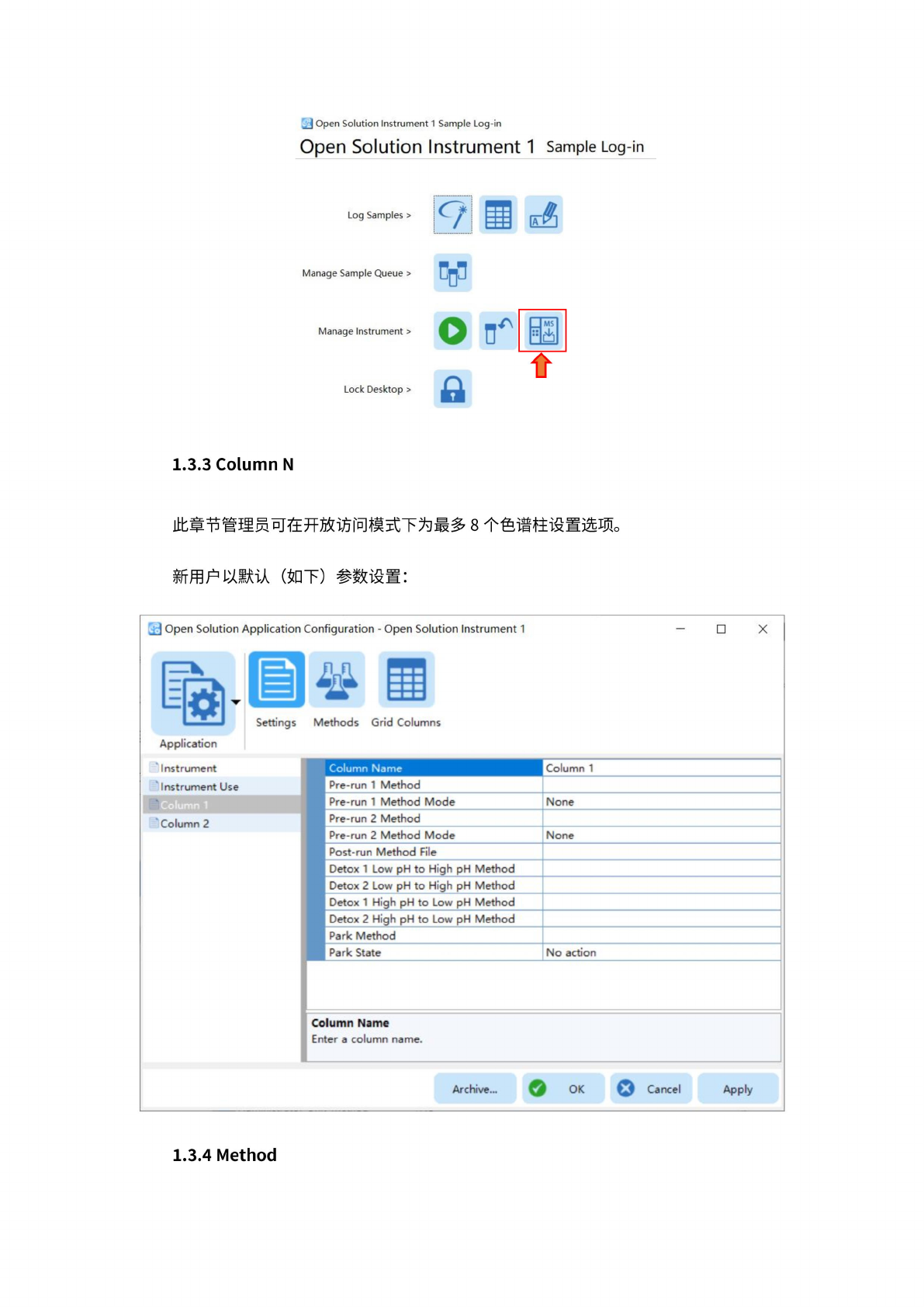
注意:
以管
理员身
份进入
Sample
Log-in
界面
,点
击下方
"Run
the
system
pre¬
conditioning
method"
,
即可
下载此
方法。
如下图
所示:
13
_J
Open
Solution
Instrument
1
Sample
Log-in
Open
Solution
Instrument
1
Sample
Log-in
Log
Samples
>
9
H
茂
Manage
Sample
Queue
>
Manage
Instrument
>
Lock
Desktop
>
0
口
c
as
一
介
1.3.3
Column
N
此章节
管理员
可在开
放访问
模式下
为最多
8
个色谱
柱设置
选项。
新用户
以默认
(如
下)
参数
设置:
」
Open
Solutior
孰
Application
Instrument
Instrument
Us(
Column
2
i
Application
Con
Iguration
-
Open
Solution
Instrument
1
於
a
?thods
Grid
Columns
X
1
J
Settings
Column
Name
Column
1
1
Pre-run
1
Method
Pre-run
1
Method
Mode
None
Pre-run
2
Method
Pre-run
2
Method
Mode
None
Post-run
Method
File
Detox
1
Low
pH
to
High
pH
Method
Detox
2
Low
pH
to
High
pH
Method
Detox
1
High
pH
to
Low
pH
Method
Detox
2
High
pH
to
Low
pH
Method
Park
Method
Park
State
No
action
lumn
Name
ter
a
column
name.
Archive...
0
)
OK
Cancel
Apply
1.3.4
Method