LCMS_006 - 第18页
18 J Open Solution Instrument 1 Sample Log-in X Open Solution Instrument 1 Sample Log-in 3 2 Vial# Method Name Plate # Inj. Vol. Descri| Target Mass 采 集方法 4 XZ 102022021101001 10 采 集方法 4 XZ 10 20220211 01 002 10 0 采 集方法 …
17
3
Log-in
(登
样)
-使
用者界
面介绍
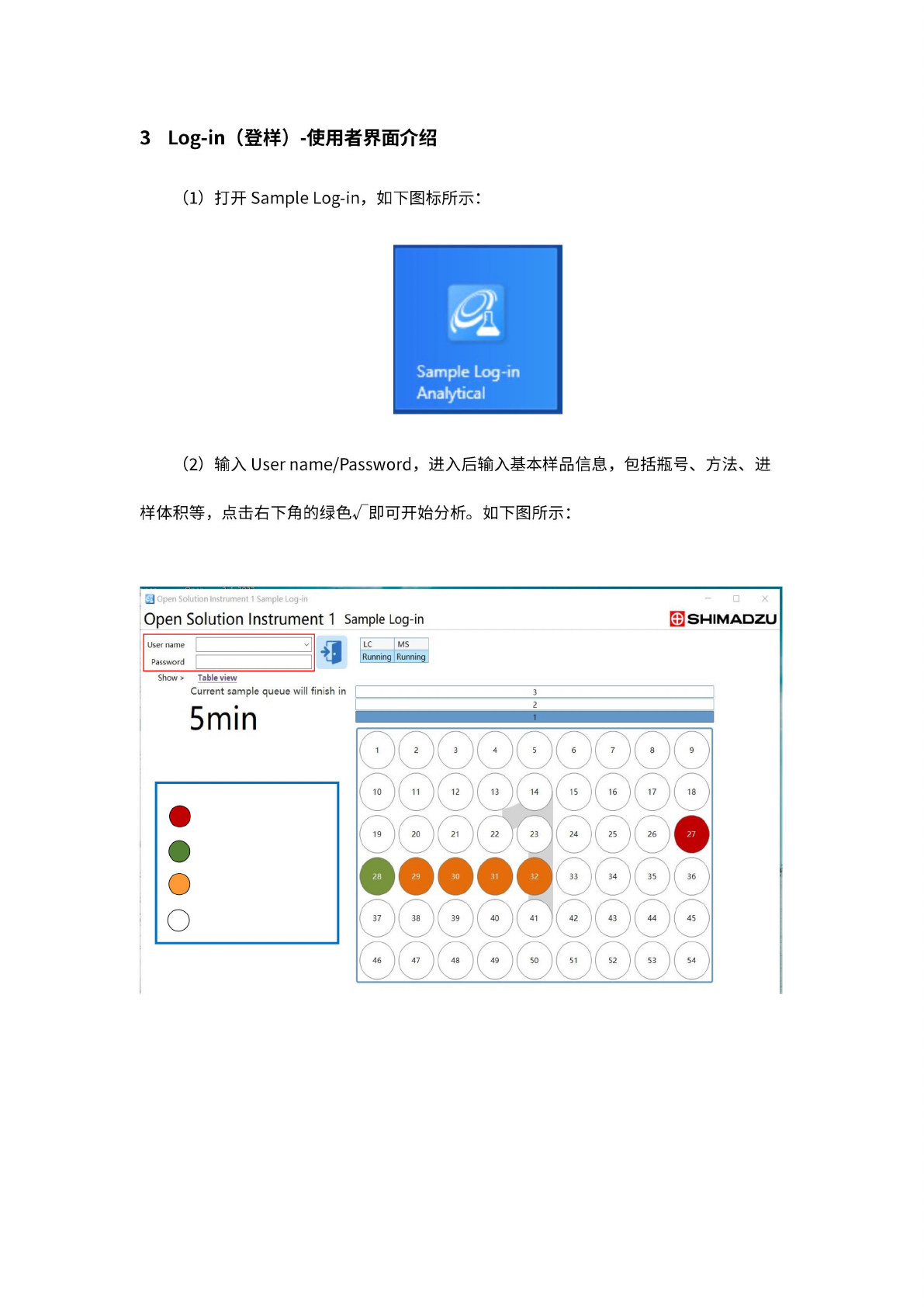
打开
Sample
Log-in,
如
下图标
所示:
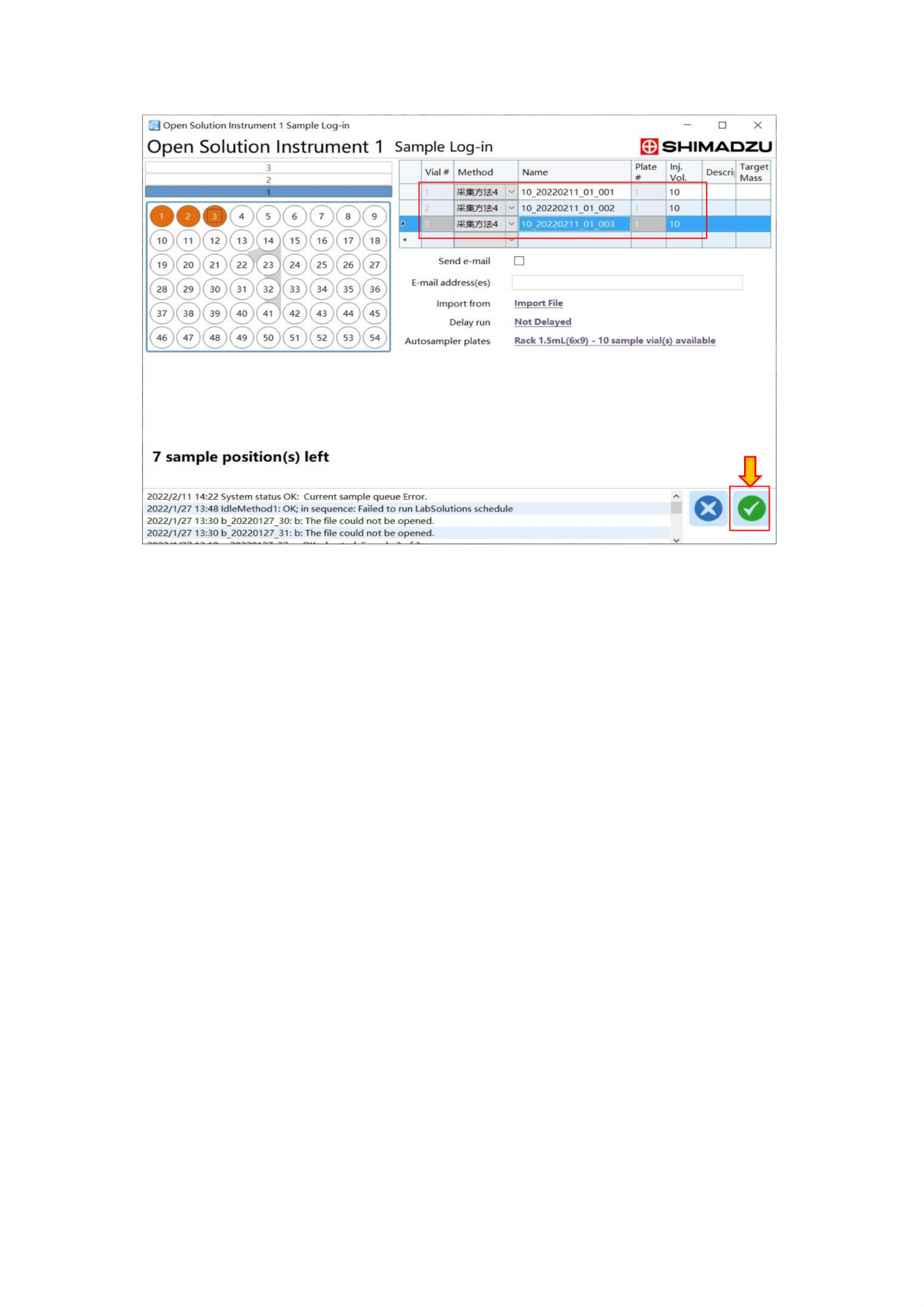
(2)
输入
Username/Password,
进入后
输入基
本样品
信息,
包括
瓶号、
方法、
进
样体
积等,
点
击右下
角的绿
色g即
可开始
分析。
如下图
所示:
困
Open
Solution
Instrument
1
Sample
Log-in
Open
Solution
Instrument
1
Sample
Log-in
-
x
^SHIMADZU
Show
>
Table
view
18
J
Open
Solution
Instrument
1
Sample
Log-in
X
Open
Solution
Instrument
1
Sample
Log-in
3
2
Vial#
Method
Name
Plate
#
Inj.
Vol.
Descri|
Target
Mass
采
集方法
4
XZ
102022021101001
10
采
集方法
4
XZ
10
20220211
01
002
10
0
采
集方法
4
\z
10
20220211
01
003
10
I
r
J
r
Send
e-mail
E-mail
address(es)
Import
from
Import
File
Delay
run
Not
Delayed
Autosampler
plates
Rack
1.5mL(6x9)
-
10
sample
vial(s)
available
7
sample
position(s)
left
2022/2/1
1
14:22
System
status
OK:
Current
sample
queue
Error.
2022/1/27
13:48
IdleMethodl
:
OK;
in
sequence:
Failed
to
run
LabSolutions
schedule
2022/1/27
13:30
b_20220127_30:
b:
The
file
could
not
be
opened.
2022/1/27
13:30
b_20220127_31:
b:
The
file
could
not
be
opened.
A
o
19
4
典型
Q&A
问答
集汇总
Q1:
如何一
次登样
实现多
个不同
方法的
选择?
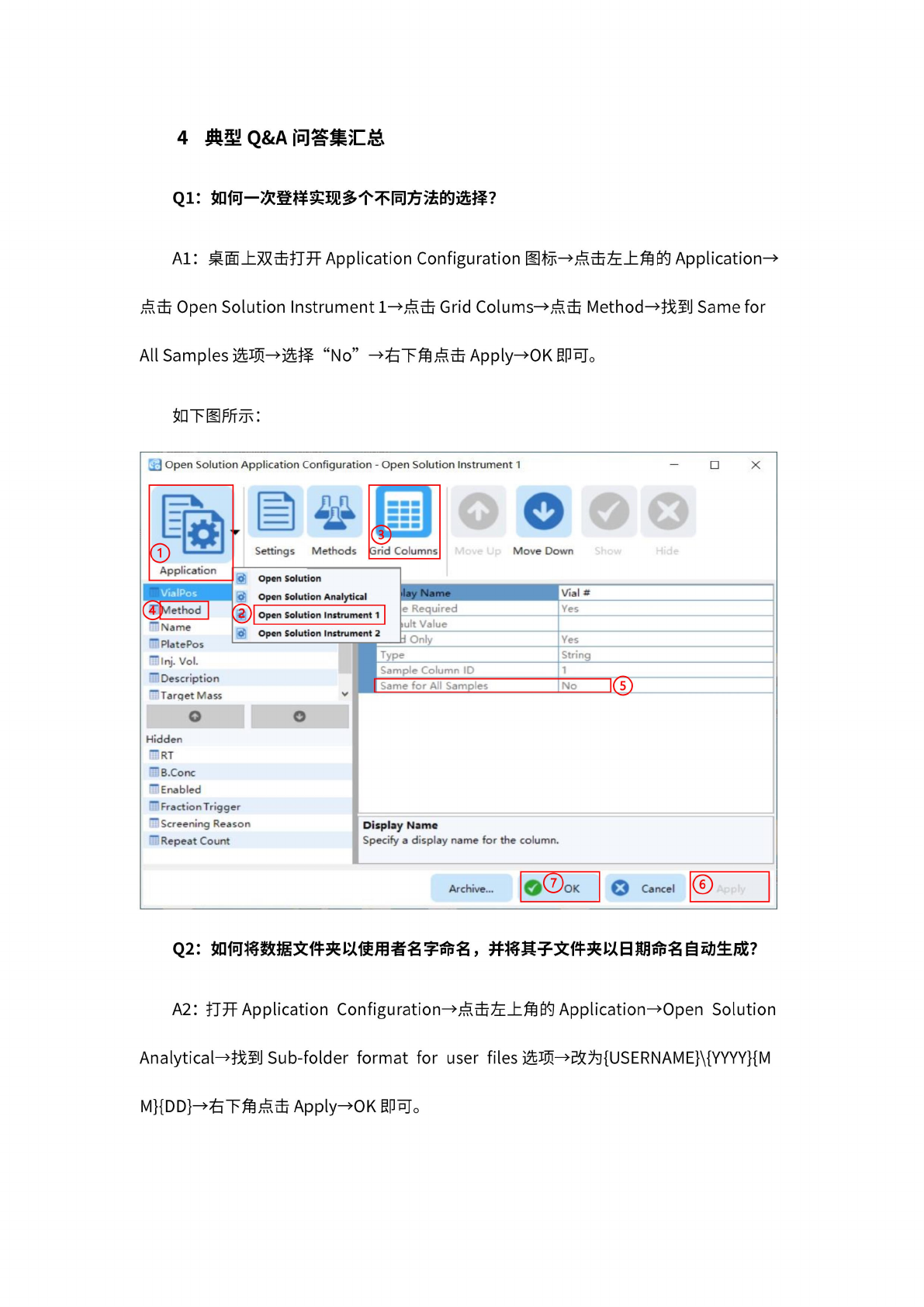
A1:
桌
面上双
击打开
Application
Configuration
图标—
点击左
上角的
Application—
点击
Open
Solution
Instrument
1—
点击
Grid
Colums—
点击
Method—
找至
U
Same
for
AH
Samples
选项
¬选择
“No"
f
右下
角点击
Applyi
OK
即可。
如下图
所示:
工
Open
Solution
Application
Configuration
-
Open
Solution
Instrument
1
0
融.
目
I
I
Settings
Methods
Move
Down
Application
Vial
#
Type
>ample
Column
ID
]
o
o
Archive...
VialPos
Display
Name
Specify
a
display
name
for
the
column.
.ame
for
All
Samples
Hidden
因
RT
—
B.Conc
F
Enabled
「
Fraction
T
rigger
「
Screening
Reason
—
Repeat
Count
e
Required
Value
—
Name
MPIatePos
前何.
Vol.
—
Description
""Target
Mass
@
Open
Solution
O
Open
Solution
Analytical
Open
Solution
Instrument
1
|
o'
Open
Solution
Instrument
2
Yes
String
1
-
No
Q2:
如何
将数据
文件夹
以使用
者名字
命名,
并将
其子文
件夹以
日期命
名自动
生成?
A2:
打开
Application
Configuration—
点击左
上角的
Application—
Open
Solution
Analytical—
找到
Sub-folder
format
for
user
files
选项
—改为
{USERNAME}\{YYYY}{M
M}{DD}-
右下
角点击
Applyi
OK
即可。