LCMS_006 - 第22页
22 Q5: 如 何防止 合成人 员进入 LabSolutions 界面 操作? A5: 以管 理员身 份进入 Sample Log-in 界面 一点击 Lock 图标 即可。 解 锁可按 相同步 骤 操作。 注意: LabSolutions 未启 动时, 将 在分析 开始时 启动。 此时请 勿操作 LabSolutions 的 窗口。 困 Open Solution Instrument 1 Sample Log-in Open So…
21
I
0
20220127
共享
查看
文件
J
->
V
>
open
solution
练习数
据文件
>
b
>
20220127
才
快
速访问
4
S
下载
4
国文档
4
国图片
4
20220126
20220127
a
open
solution
练习数
据文件
OneDrive
-
Personal
电
此电脑
Jl
3D
对象
名称
修
改日期
大小
b_20220127_32
2022/1/27
13:30
Shimadzu
Open
...
52
KB
b_20220127_32
2022/1/27
13:30
Shimadzu
Open
...
1
KB
bJ20220127_32
2022/1/27
13:29
Shimadzu
LabSo...|
2,564
KB
b_20220127_36
2022/1/27
13:37
Shimadzu
O|^A..
54
KB
b_20220127_36
2022/1/27
13:39
Shimadzu
。仇
4
...
1
KB
心
b_20220127_36
2022/1/27
13:37
Shimadzu
LabSo...
2,520
KB
j
b_20220127_37
2022/1/27
13:39
Shimadzu
Open
...
54
KB
M
b_20220127_37
2022/1/27
13:39
Shimadzu
LabSo...
2,512
KB
b_20220127_38
2022/1/27
13:45
Shimadzu
Open
...
54
KB
b_20220127_38
2022/1/27
13:47
Shimadzu
Open
...
1
KB
心
b_20220127_38
2022/1/27
13:44
Shimadzu
LabSo...
2,520
KB
]
b_20220127_39
2022/1/27
13:47
Shimadzu
Open
...
53
KB
4
b
20220127
39
2022/1/27
13:46
Shimadzu
LabSo...
2,536
KB
Q4:
样
品结束
分析一
段时间
后软件
如何自
动执行
停机?
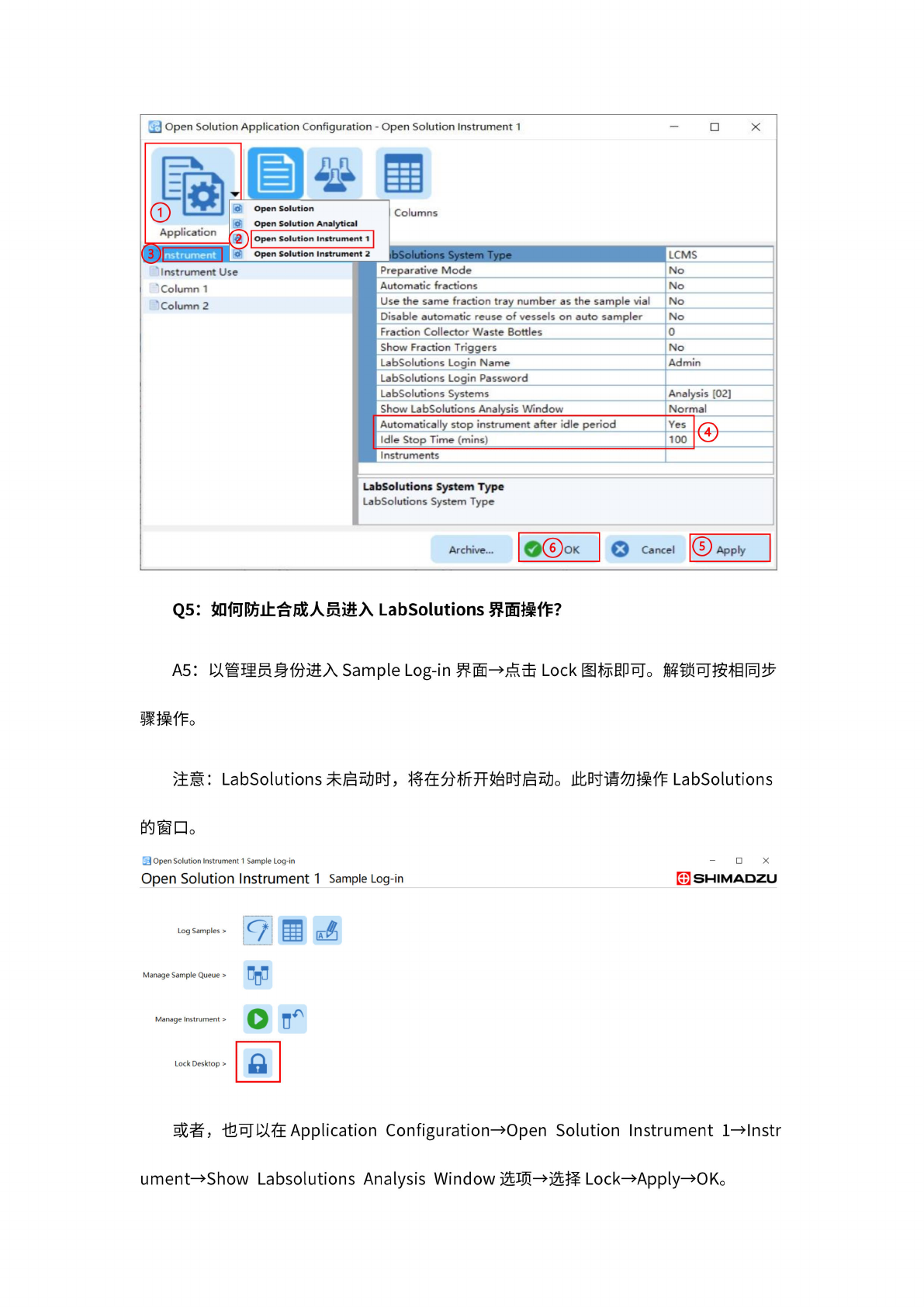
A4:
打开
Application
Configuration—
点击左
上角的
Application—
点击
Open
Solution
Instrument
1
一
点击
Instrument^
找
至!]
[Automatically
stop
instrument
after
idle
period]
选项
-选择
Yes-
[Idle
Stop
Time]
选项
一
输入停
机前待
机时间
(最
大到
100min)
—右下
角点击
Applyf
0K
即可。
如下图
所示:
22
Q5:
如
何防止
合成人
员进入
LabSolutions
界面
操作?
A5:
以管
理员身
份进入
Sample
Log-in
界面
一点击
Lock
图标
即可。
解
锁可按
相同步
骤
操作。
注意:
LabSolutions
未启
动时,
将
在分析
开始时
启动。
此时请
勿操作
LabSolutions
的
窗口。
困
Open
Solution
Instrument
1
Sample
Log-in
Open
Solution
Instrument
1
Sample
Log-in
Manage
Sample
Queue
>
Manage
Instrument
>
O
u
c
Lock
Desktop
>
s
X
冏
SHIMADZU
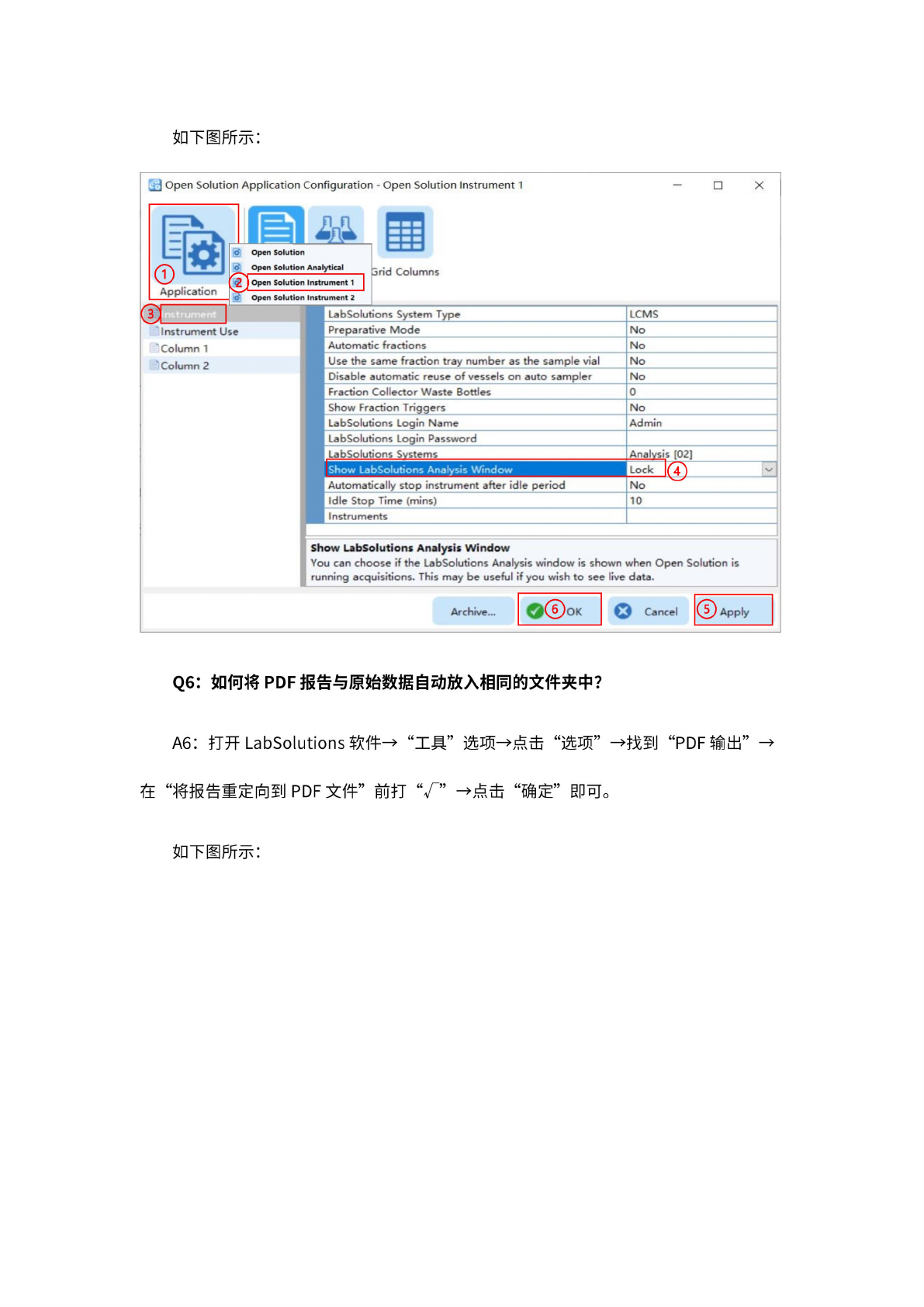
或者,
也
可以在
Application
Configuration
一
Open
Solution
Instrument
Wlnstr
umentfShow
Labsolutions
Analysis
Window
选项
一选择
Lock—
Apply
一
OK。
23
如下图
所示:
J
Open
Solution
Application
Configuration
-
Open
Solution
Instrument
1
X
*
B
o'
Open
Solution
o
Open
Solution
Analytical
Columns
<2
I
Open
Solution
Instrument
1
Instrument
2
Column
1
'
Column
2
昌
Show
LabSolutions
Analysis
Window
You
can
choose
if
the
LabSolutions
Analysis
window
is
shown
when
Open
Solution
is
running
acquisitions.
This
may
be
useful
if
you
wish
to
see
live
data.
Application
用
4时
加
.
Instrument
Use
LabSolutions
System
Type
LCMS
Preparative
Mode
No
Automatic
fractions
No
Use
the
same
fraction
tray
number
as
the
sample
vial
No
Disable
automatic
reuse
of
vessels
on
auto
sampler
No
Fraction
Collector
Waste
Bottles
0
Show
Fraction
Triggers
No
LabSolutions
Login
Name
Admin
LabSolutions
Login
Password
LabSolutions
Systems
Analysis
[02]
Show
LabSolutions
Analysis
Window
Lock
a')
Automatically
stop
instrument
after
idle
period
No
Idle
Stop
Time
(mins)
10
Instruments
Archive...
❷⑥
OK
Cancel
Apply
Q6:
如何将
PDF
报
告与原
始数据
自动放
入相同
的文件
夹中?
A6:
打开
LabSolutions
软件-
“工
具”
选项
一点击
“选
项”
一找到
“PDF
输出”
一
在
“将
报告重
定向到
PDF
文件”
前打
一点击
“确定
”即
可。
如下图
所示: