LCMS_006 - 第25页
25 j Open Solution Application Configuration - Open Solution Instrument 1 Move Up Move Down Solution Analytical Application Mame d Open Solution Cancel Archive... Name PlatePos "VialPos — Method Display Name Specify…
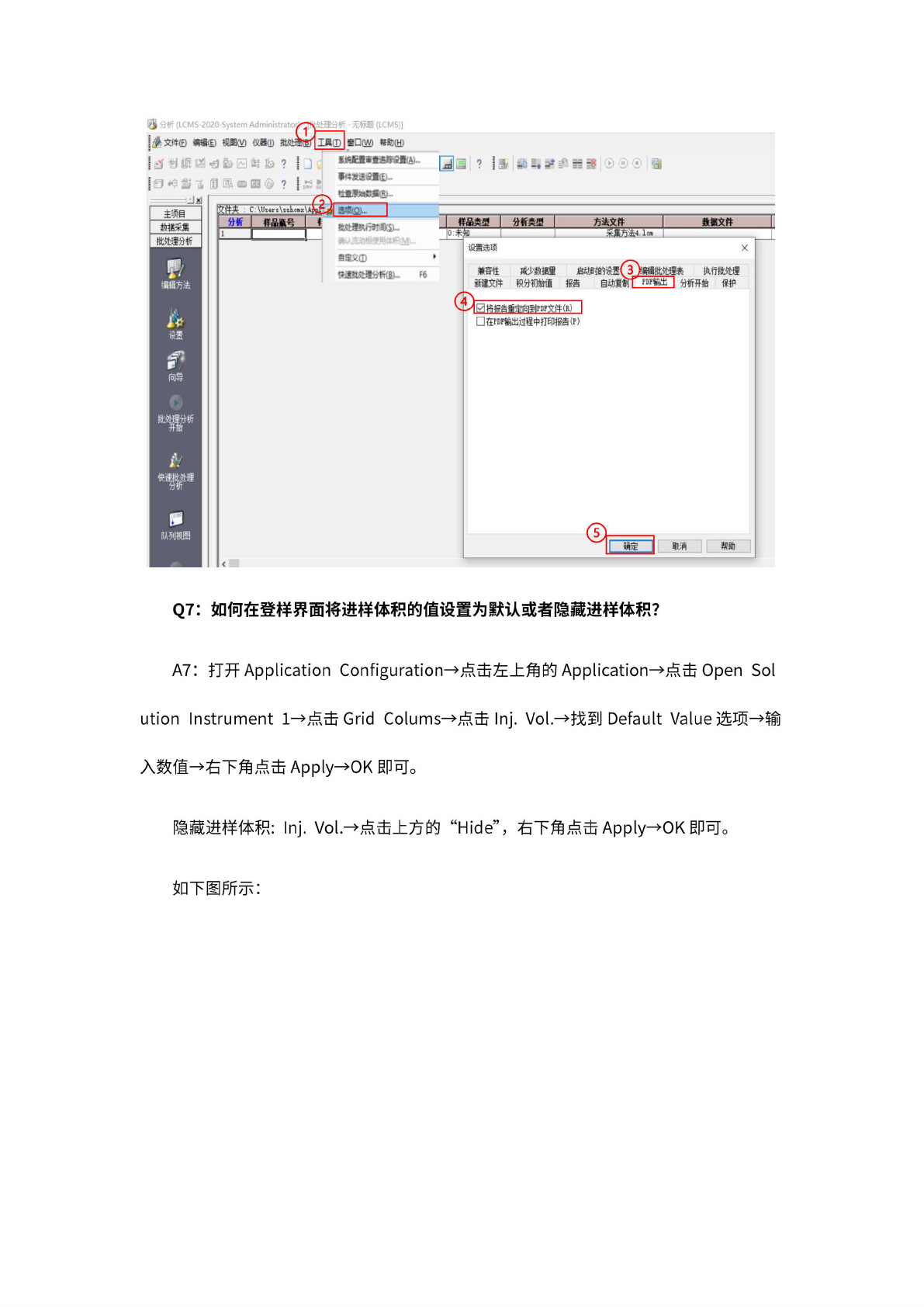
24
IBo
窗
口业)
帮助
(H)
文件夹
:
c
:\uuGVI
主项目
I
分
析类里
I
样
品类型
数
据文件
:知
娟
相方法
向导
快幽
悔理
队
列视图
分析
港
U
—
来
第方法
4.
1cm
自啦①
快速班
建分析
心.
F6
数
据采集
批处
理分析
露
J
回啄
国雷@
?
Jxl
「
—
»^ElSt£^fi(Ai...
团二?
|
密
M
I
.
弓
分析
(LCMS-2020-System
Administrato^jt#
处
理分析
-
无标题
(LCMS)]
博文
WD
缩㈤
悭
M
仪
B0)
被
bK
Q7:
如
何在登
样界面
将进样
体积的
值设置
为默认
或者隐
藏进样
体积?
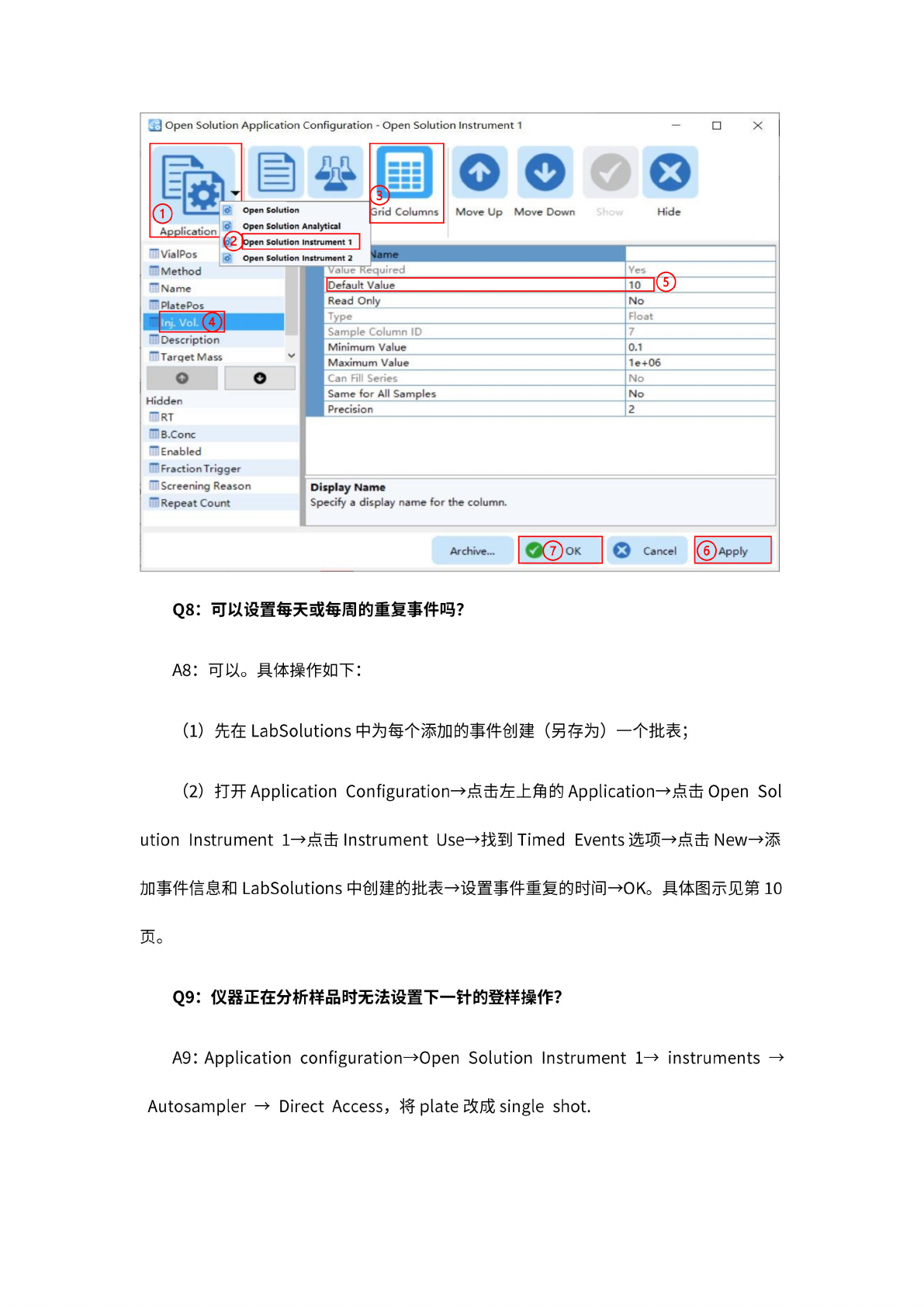
A7:
打开
Application
Configuration
一
点击左
上角的
Application—
点击
Open
Sol
ution
Instrument
1—
点击
Grid
Colums—
点击
Inj.
Vol.—
找至!
]
Default
Value
选
项—输
入数值
一右下
角点击
Applyf
OK
即可。
隐藏进
样体积
:
Inj.
Vol.一
点击
上方的
“Hide”,
右下
角点击
Applyf
OK
即可。
如下图
所示:
25
j
Open
Solution
Application
Configuration
-
Open
Solution
Instrument
1
Move
Up
Move
Down
Solution
Analytical
Application
Mame
d
Open
Solution
Cancel
Archive...
Name
PlatePos
"VialPos
—
Method
Display
Name
Specify
a
display
name
for
the
column.
Hidden
~RT
一
B.Conc
Enabled
—
Fraction
Trigger
—
Screening
Reason
—
Repeat
Count
(4)
"Description
""Target
Mass
I
°
Oxn
Solution
3rid
Columns
Move
Up
Move
Doia
O
Open
Solution
Analytical
$2
Jopen
Solution
Instrument
1
I
Value
Required
[Default
Value
W_J@
Read
Only
No
Type
Float
Sample
Column
ID
7
Minimum
Value
ai
Maximum
Value
1e+06
Can
Fill
Series
No
Same
for
All
Samples
No
Precision
2
Q8:
可
以设置
每夭或
每周的
重复事
件吗?
A8:
可以。
具
体操作
如下:
先在
LabSolutions
中为
每个添
加的事
件创建
(另
存为)
一个
批表;
(2)
打开
Application
Configuration—
点击左
上角的
Application—
点击
Open
Sol
ution
Instrument
1—
点击
Instrument
Use—
找至
[]
Timed
Events
选项
—点击
New—
添
加事件
信息和
LabSolutions
中创建
的批表
¬
设置事
件重复
的时间
fOK。
具体图
示见第
10
页。
Q9:
仪
器正在
分析样
品时无
法设置
下一针
的登样
操作?
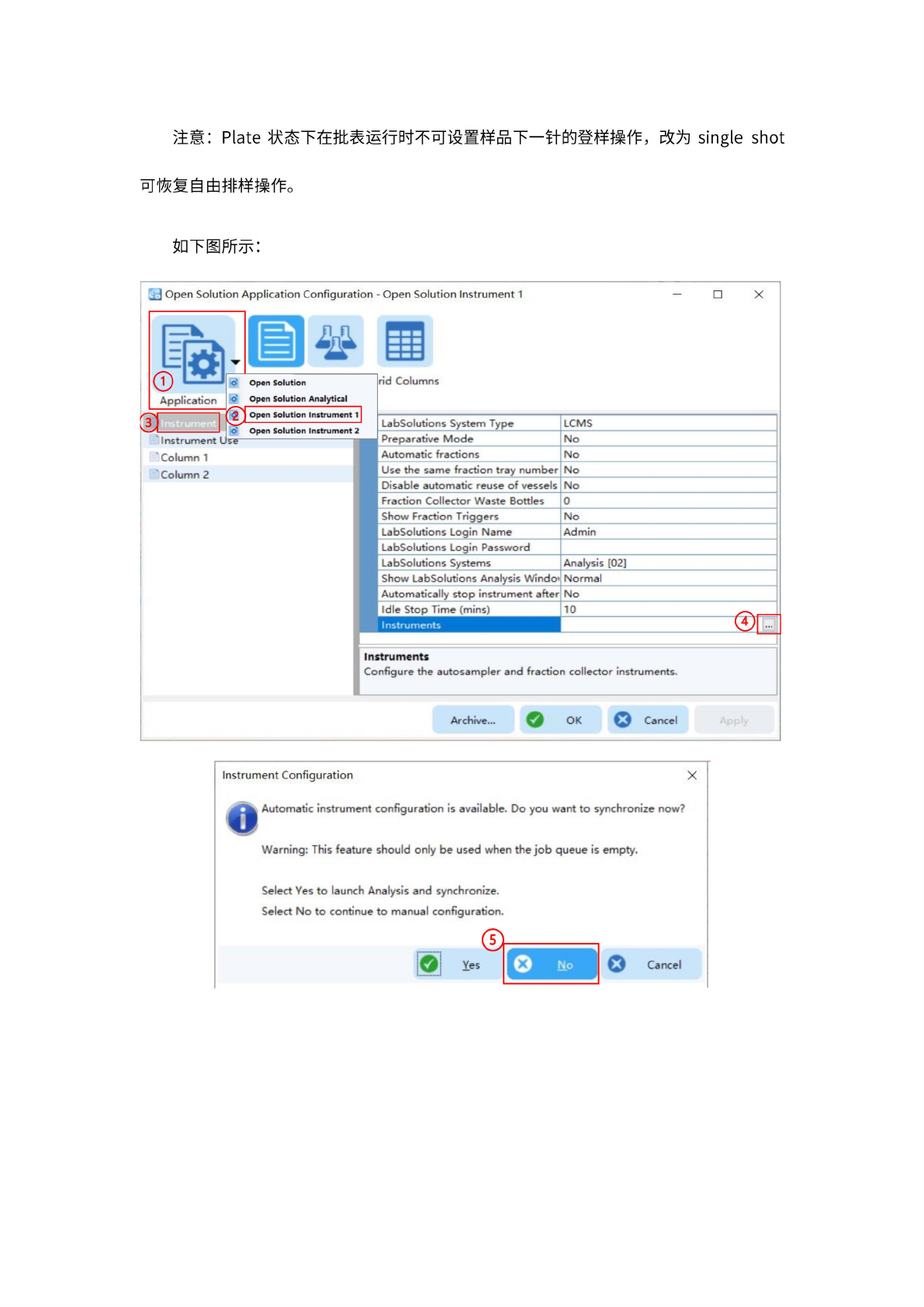
A9:
Application
configuration—
Open
Solution
Instrument
1
一
instruments
一
Autosampler
—
Direct
Access,
将
plate
改成
single
shot.
26
注意:
Plate
状态下
在批表
运行时
不可设
置样品
下一针
的登样
操作,
改为
single
shot
可
恢复自
由排样
操作。
如下图
所示:
J
Open
Solution
Application
Configuration
-
Open
Solution
Instrument
1
X
缚
a
Solution
Application
|l<»
Open
SoQtion
Analytical
Cancel
Archive...
Instrument
Configuration
X
Cancel
Instruments
Configure
the
autosampler
and
fraction
collector
instruments.
Instrument
Column
1
'
Column
2
Select
Yes
to
launch
Analysis
and
synchronize.
Select
No
to
continue
to
manual
configuration.
(D
Yes
、
匾
Open
Automatic
instrument
configuration
is
available.
Do
you
want
to
synchronize
now?
Warning:
This
feature
should
only
be
used
when
the
job
queue
is
empty.
更
]
Open
Solution
Instrument
1
Open
Solution
Instrument
2
rid
Columns
LabSolutions
System
Type
LCMS
Preparative
Mode
No
I
Automatic
fractions
No
I
Use
the
same
fraction
tray
number
No
I
Disable
automatic
reuse
of
vessels
No
I
Fraction
Collector
Waste
Bottles
0
I
Show
Fraction
Triggers
No
I
LabSolutions
Login
Name
Admin
I
LabSolutions
Login
Password
I
LabSolutions
Systems
Analysis
[02]
I
Show
LabSolutions
Analysis
Windo»
Normal
I
Automatically
stop
instrument
after
No
I
Idle
Stop
Time
(mins)
10
!
Instruments
•••