00197458-01_UG_EDM_V2.2_en - 第14页
EDM V2.2 / U ser Guid e Ausgabe 10/2013 E dition 14 EDM will block a s hutdown / s ystem r eboot in the f ollowing c ases: – a Comm ent dialog is d isplayed – the configurat ion has u nsaved cha nges – the Clearing Pool …

EDM V2.2 / User Guide Ausgabe 10/2013 Edition
13
3 Starting And Terminating SIPLACE EDM
3.1 Starting SIPLACE EDM
The EDM Master and Client services are implemented as Windows services that start automatically
when the system is started.
The single EDM components can be started in the following ways:
► Start the desired EDM component from the Windows® Start menu under Programs –
SIPLACE EDM.
Or
► Double-click on the icon of the desired EDM component on the desktop.
The following icons are available on the desktop in order to run the single EDM components:
EDM Client
EDM Clearing Pool
EDM Configuration
EDM-Data Transfer Manager (push mode)
EDM Tool
3.2 Terminating SIPLACE EDM
The EDM services terminate automatically when the system is terminated.
The single EDM components can be terminated in the following ways:
► Terminate the EDM component via the File – Close tab.
Or
► Click on the cross in the upper edge to the right in the EDM component view.
EDM V2.2 / User Guide Ausgabe 10/2013 Edition
14
EDM will block a shutdown / system reboot in the following cases:
– a Comment dialog is displayed
– the configuration has unsaved changes
– the Clearing Pool is performing a push, merge, accept or reject operation
3.3 Restarting the EDM Services
The EDM Tool provides a Restart EDM Service command. The user access control (UAC) facility
introduced in Windows Vista requests administrators with restricted access to grant enhanced
permissions before the service is restarted by the operating system. A regular user has the option
of logging in as an administrator temporarily to restart the EDM service.
EDM V2.2 / User Guide Ausgabe 10/2013 Edition
15
4 Working with SIPLACE EDM
This chapter describes the typical SIPLACE EDM workflow.
4.1 EDM Master Service
The EDM master service is the server component of EDM. It replies to queries from EDM line
services and distributes the data in the central SIPLACE Pro database among the lines.
In return, the EDM Master Service accepts change notifications and collects them in the EDM
database. The Clearing Pool can be selectively bypassed (see section 5.1.7).
4.2 EDM Client
The EDM Client enables user interaction on the line. It implements customer specific data
distribution. This user interface implements pull mode and forced pull mode. The push mode
workflow, on the other hand, is based on the EDM Data Transfer Manager and is described in
section 4.3.
4.2.1 Getting Data from the Master (Pull Mode)
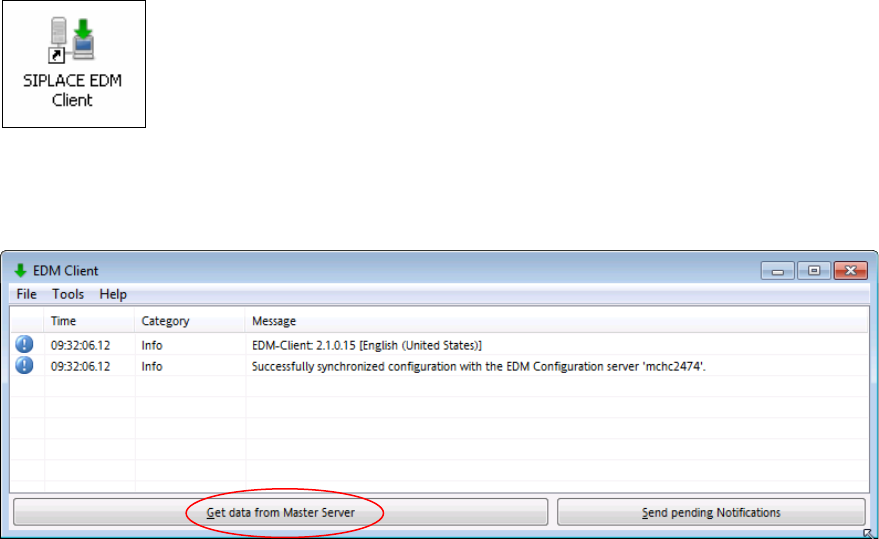
► Double click the icon on your desktop to start the EDM Client.
The EDM Client opens:
Figure 4-1: EDM Client
► Click the Get data from Master Server button.