00197458-01_UG_EDM_V2.2_en - 第29页
EDM V2.2 / U ser Guid e Ausgabe 10/2013 E dition 29 4.3.3 A utom atic Push i n t he Clearing Pool If Auto Push is enabled, a push d ata pack age is creat ed autom atically by the Clear ing Pool and sent to the line if ch…
EDM V2.2 / User Guide Ausgabe 10/2013 Edition
28
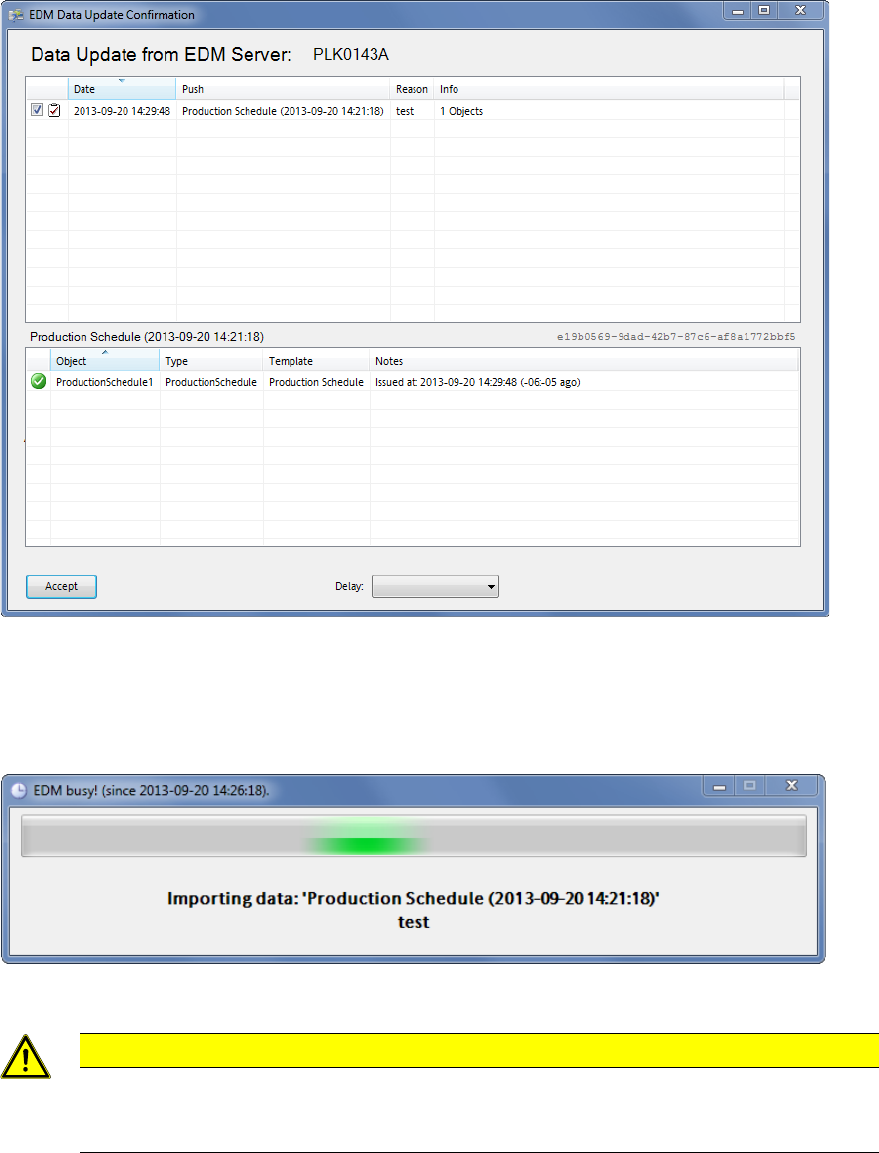
Figure 4-17: Accepting the push data packages
4.3.2.2 Importing the Objects
After the user has confirmed the dialog box on the Line Server, the objects transferred are imported
into SIPLACE Pro.
Figure 4-18: Importing the objects
CAUTION
Although Push Mode and Pull Mode are not mutually exclusive, concurrent SIPLACE
Pro export and import data models (e.g. an import data model in SIPLACE Pro Desk and
"pulling" with the EDM Client) should be avoided on the same EDM computer.
As soon as this dialog box closes, transfer is complete and the objects are available in the
SIPLACE Pro instance of the Line Server for further usage.
EDM V2.2 / User Guide Ausgabe 10/2013 Edition
29
4.3.3 Automatic Push in the Clearing Pool
If Auto Push is enabled, a push data package is created automatically by the Clearing Pool and
sent to the line if changes are completely rejected. This ensures that the most recent data is
available on the Line Server.
The configuration options are described in section 6.2.7.
4.4 EDM Clearing Pool
In the EDM Clearing Pool, the change notifications of the single lines are collected to examine
them in terms of their relevance and, if necessary, return them to the SIPLACE Pro Master
Database. With the functionality already available in SIPLACE Pro, individual objects of a certain
type (components, component shapes, boards, placement lists, support pins, support pin lists) can
be compared attribute-by-attribute, and changes can be applied at this finely granulated level.
As of the EDM 2.1 version, the presentation of the change notifications has been improved:
● The previously "technical" content of the change notifications has been substituted by
significant descriptions of the actions that have been actually performed in SIPLACE Pro Desk
or at the machine.
● The changes made by a user can now be definitely assigned to the edited objects (Editors) in
SIPLACE Pro Desk.
Example: Movement of a feeder within a setup will now be displayed in the setup context and
not as a general change at the tables anymore.
The Clearing Pool can be installed independently of the EDM master service on a separate
workstation computer.
EDM V2.2 / User Guide Ausgabe 10/2013 Edition
30
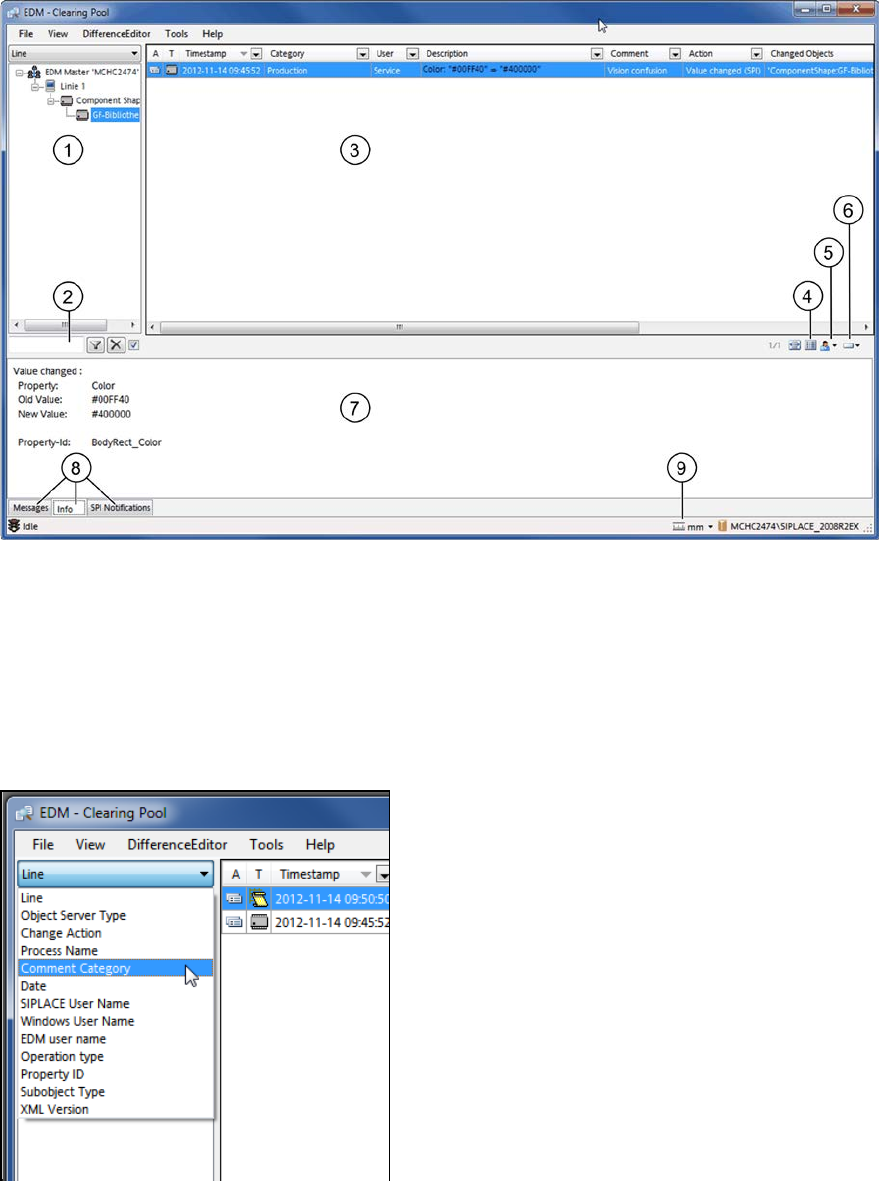
Figure 4-19: Clearing Pool
An overview of the changed objects is displayed in the tree view to the left in the Clearing Pool (1).
In the drop-down list above the tree view you can switch between different views.
Additional Grouping Options
In an EDM environment with several lines it may happen that one and the same object is changed
on more than one line and by different users. For a better overview, some additional grouping
options are available to change the hierarchy of the tree view:
Figure 4-20: Grouping options
Depending on the number of the existing change notifications in the Clearing Pool and the selected
grouping, building the tree may take some time.
The entry field (2) beneath the tree view allows you to filter by a specific object name.
The change notifications of the selected object in the tree view are displayed as user actions to the
right in the Clearing Pool (3).