00197458-01_UG_EDM_V2.2_en - 第40页
EDM V2.2 / U ser Guid e Ausgabe 10/2013 E dition 40 4.8 ED M Filte r R ules C AUT IO N These s ettings are v ery sensiti ve. Please check the used valu es accur ately. If "i ncorrec t" values ar e set, im porta…
EDM V2.2 / User Guide Ausgabe 10/2013 Edition
39
This will generate EDM Line Alias entries from the following nodes:
● Nodes generated by the Line Control Adapter (during download).
The SPI Line will be used as associated line. The line name (without path) will be used as EDM
Line Alias and the host name of the first "OIB LineControlService" endpoint (in the hierarchy)
will be used as host.
● All nodes that have a "SIPLACE.Pro.SPI" service assigned to them. All direct child workcells
with "SIPLACEProObjectType" of "Line" will be used as associated lines.
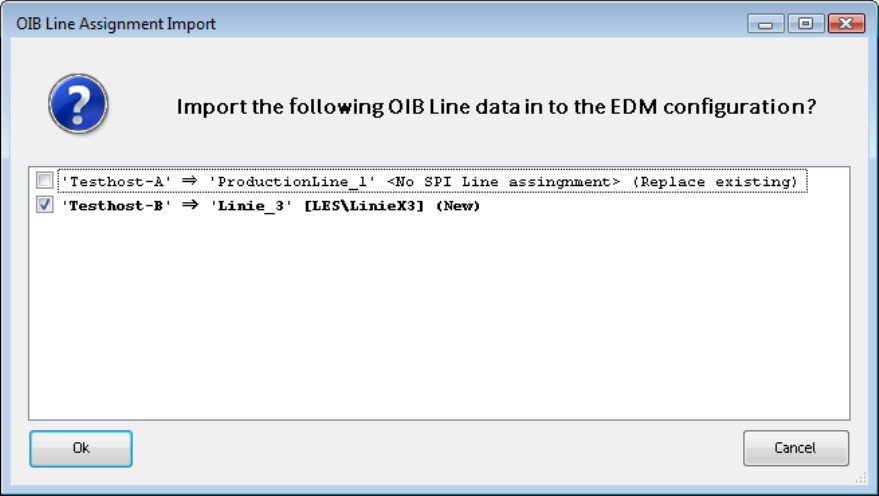
A list of all importable entries is displayed and the used can select the entries to be used.
Figure 4-34: Importable OIB Line data
A detailed description of the EDM Configuration Manager with its options and user interface can be
found in section 5.1.
4.7 EDM Line Service
The EDM Line Service is the counterpart to the EDM Master Service and performs the following
tasks:
● The EDM Line Service monitors the changes made by users to the local SIPLACE Pro
database, documents the changes and sends them to the master service for entry in the
Clearing Pool.
● The EDM Line Service sends requests to the master service, receives requests from it and
forwards them for processing to the EDM Client.
● The EDM Line Service receives and processes push data packages and supplies status
information to the EDM master.
EDM V2.2 / User Guide Ausgabe 10/2013 Edition
40
4.8 EDM Filter Rules
CAUTION
These settings are very sensitive. Please check the used values accurately. If "incorrect"
values are set, important change notifications might get lost or too many change
notifications might cause a jam in the Clearing Pool.
On a Line Server a multitude of processes take place, all of them producing change notifications.
However, all change notifications will not be of equal interest for you. By default, most of the
change notifications are transferred to the Master Server.
EDM 2.x provides pre-defined rules that may be adjusted or completed by newly defined rules
according to your requirements. The change notifications are automatically filtered according to
these rules and may be further processed depending on their relevance. In this way, it is possible
to sort out notifications that are not of interest for you and only transfer the important notifications to
the Clearing Pool on the Master Server.
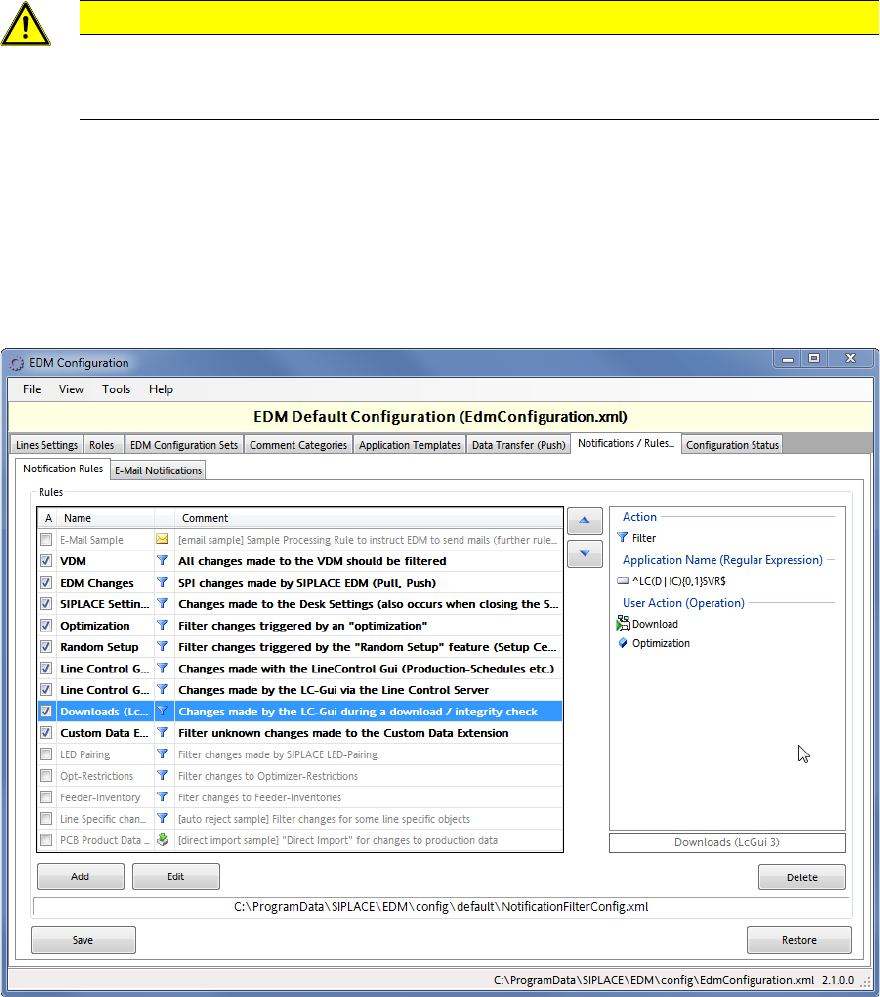
Figure 4-35: Overview of notification rules
This figure displays an overview of the provided rules. The rules that are currently in use are
activated to the left. The rules are presented as follows:
Bold:
Active filter rule that filters the changes directly at the EDM Line Server
Gray:
Inactive rule
Italic:
Active processing rule
Normal: Active rule that does not fulfill any of the other conditions
(e.g. Auto Reject and Direct Import rules)
In the display range to the right, the content of the currently marked rule is displayed.

EDM V2.2 / User Guide Ausgabe 10/2013 Edition
41
You can create a new rule by clicking on the Add button and modify the marked rule by clicking on
the Edit button. With the arrow buttons (up / down) you can change the order in which the rules are
executed. The order of the rules is crucial if several search criteria apply to a change notification. In
this case, the corresponding action of the first applicable rule will be performed.
If the hit is a filter rule, the search for further applicable rules will be terminated.
For processing rules, the contained action will be performed and the search for further applicable
rules will then continue.
Tip:
With a double-click on an entry in the overview, a rule will open to be edited in the suitable editor
Each rule consists of search criteria and the actions to be performed.
● Search criteria
All criteria used within a rule are linked to each other with an AND relation.
Change notifications can be filtered according to the following criteria:
– Name of the (context) object
– Object type of the context object
– User action
– Name of the Line Server
– Windows / SIPLACE Pro user name
– Application name
– Comment category
– Comment text
– Suggestion: as comment category and comment text based on filter rules usually require
the entry of a comment, these should be defined as "Auto Reject".
– RAW-SPI Notification Event Data (the old EDM filter criteria)
– Name of the actually changed object (as FullTypePath)
– Properties
– Sub object type
– Associated Deletes
– Event type
● Actions
Here you define the treatment of the change notification.
– Transfer the change notification to the Clearing Pool?
– Open the dialog to enter a comment or use a pre-defined comment?
– Inform recipients by mail about this change notification and – if yes – which of them?
NOTICE
The format of the change notifications in previous EDM versions is not compatible with
the format of the new change notifications as of the EDM V2.1 version. Therefore,
change notifications of previous EDM versions have to be converted to the new format.
A description of how to convert data of previous EDM versions can be found in the EDM Installation
Manual. Detailed information about creating and using the rules can be found in section 5.1.7.