00197458-01_UG_EDM_V2.2_en - 第55页
EDM V2.2 / U ser Guid e Ausgabe 10/2013 E dition 55 General d istribution list The genera l distrib ution list reacts to no tifications from all lines sim ultaneous ly, but is oth erwise the same as normal distr ibution …
EDM V2.2 / User Guide Ausgabe 10/2013 Edition
54
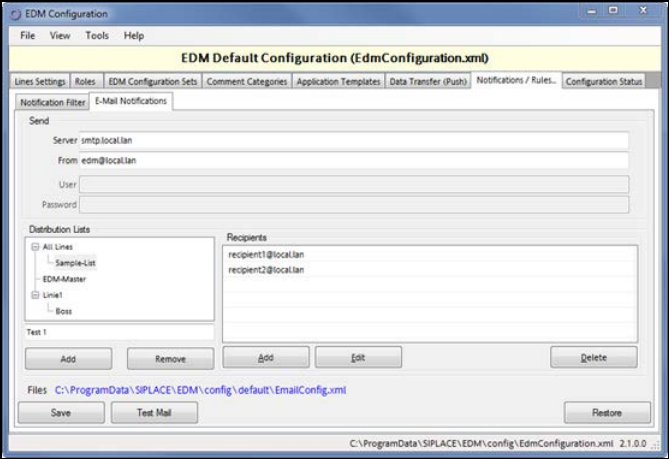
5.1.7.3 E-mail Configuration
EDM e-mail notification uses SMTP to distribute notifications arriving at the Master Server. The
following must be configured:
● The network address of the SMTP server (Server)
● User and password: These fields are only active, if UseSmtpAuthentication in Advanced
Settings is set to True. The password used for SMPT authentication is saved in the
configuration files, using basic encryption.
● The sender to be entered in the message (From)
● A set of distribution lists
E-mail distribution lists make it possible to keep e-mail traffic to a minimum and to send the e-mails
to precisely the person(s) responsible. A distribution list only responds to notifications from a
specific line.
The storage location of the configuration file is specified for informational purposes and must not be
changed. Direct manipulation of the configuration file should be avoided.
Distribution Lists
A line must be selected before a new distribution list can be added. A name and a comment are
assigned to each new list.
Managing distribution lists
After a distribution list has been selected, the e-mail addresses of the recipients can be entered. All
recipients on the distribution list receive e-mails regarding notifications that refer to one of the
selected object types. Only those notifications that originate from the line for which the distribution
list was created are taken into account.
Figure 5-12: Configuration of e-mail distribution lists
EDM V2.2 / User Guide Ausgabe 10/2013 Edition
55
General distribution list
The general distribution list reacts to notifications from all lines simultaneously, but is otherwise the
same as normal distribution lists.
NOTICE
As the rule actions define the conditions for sending e-mail messages, line-based
recipient lists should be avoided.
Instead, use recipient lists based on "All Lines" to profit from the recipient list association
to the EDM rule actions.
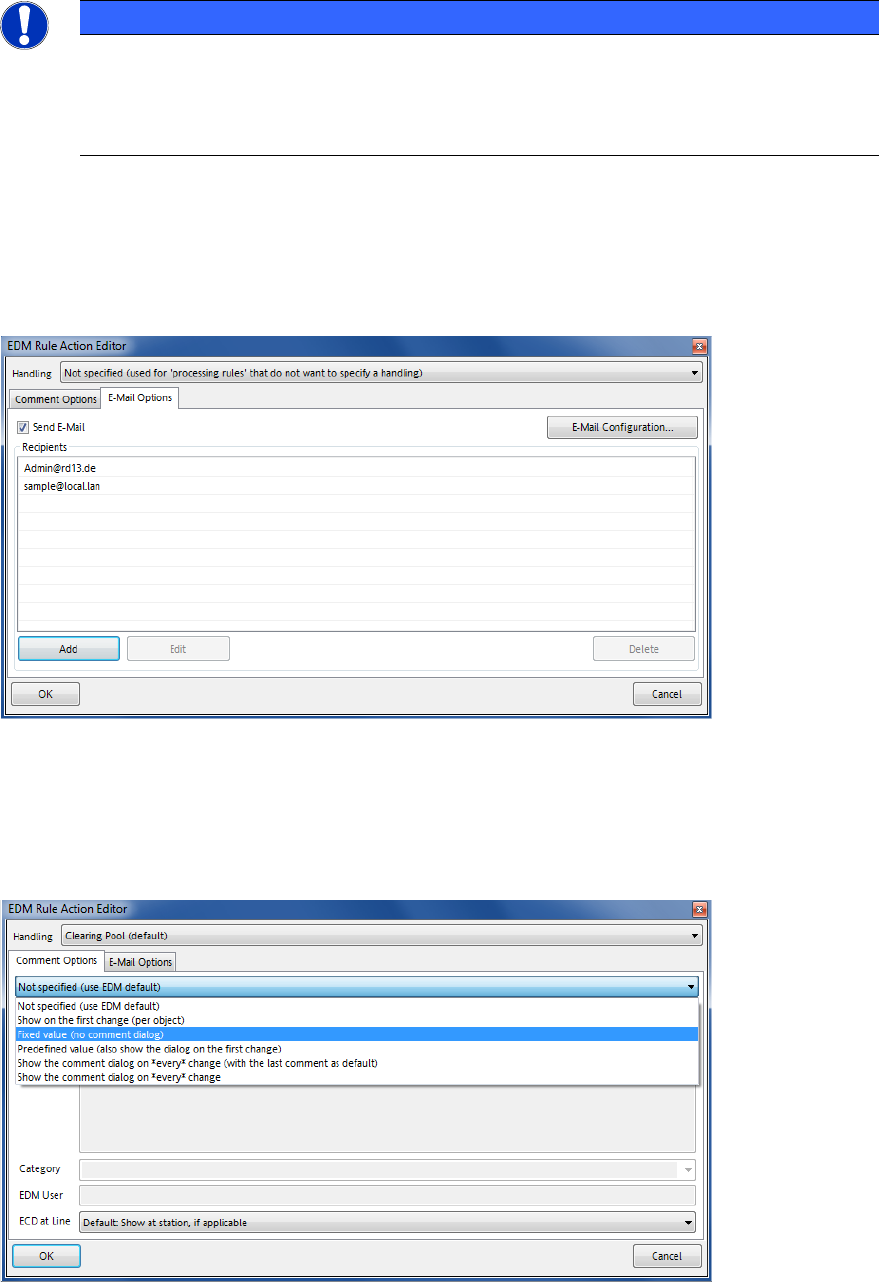
Rule Action Editor E-Mail Options
A list of e-mail recipients can be associated to each notification rule. On matching rule patterns, if
the Send E-Mail checkbox is active, an e-mail message is sent to each recipient listed in the
Recipients list. The Recipients list may contain distribution list names as defined in the e-mail
distribution list editor as well as individual e-mail addresses.
Figure 5-13: Rule Action Editor – E-Mail Options
Rule Action Editor Comment Options
Any EDM rule contains an instruction to handle the comment dialog on the EDM Line on matching
patterns. The last matching rule whose comment option is not Not specified determines whether
to show the dialog and whether to provide predefined values for the comment fields.
Figure 5-14: Rule Action Editor – Comment Options
EDM V2.2 / User Guide Ausgabe 10/2013 Edition
56
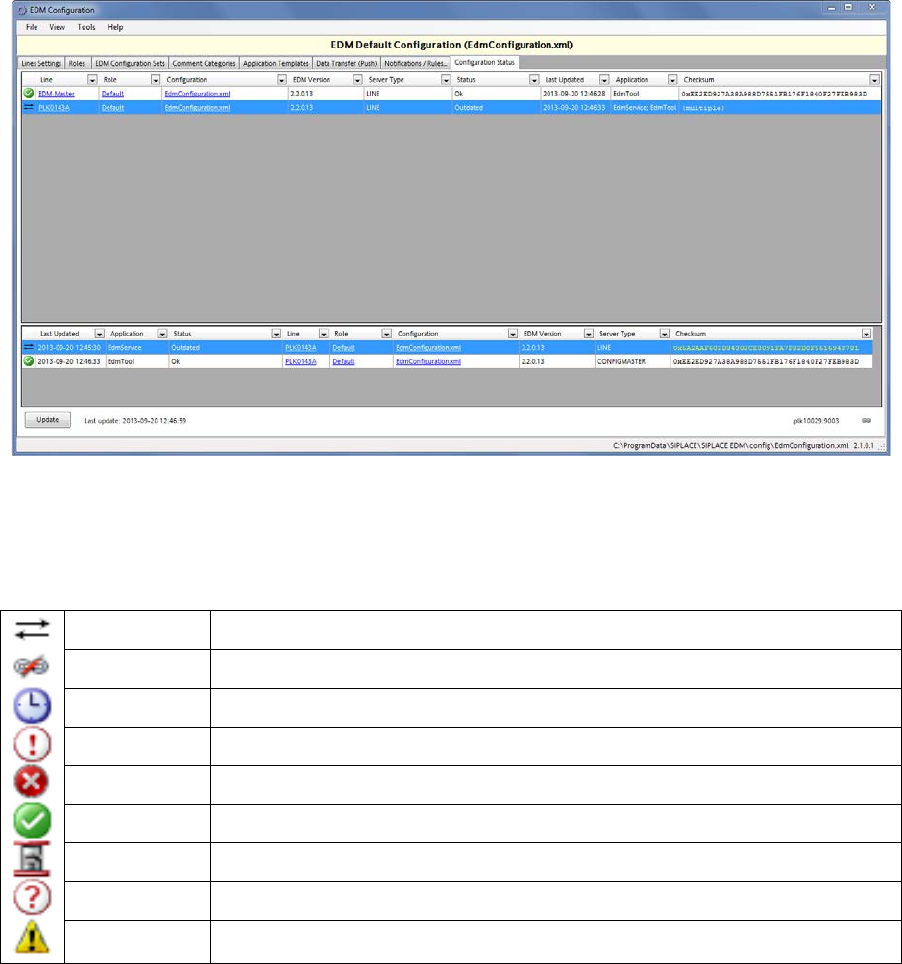
5.1.8 Configuration Status Monitor
Figure 5-15: Configuration Status
The Configuration Status tab gives some information about the status of the EDM Client
computers (upper pane) and their EDM applications (lower pane). The possible icons are listed in
the following table:
Outdated The configuration is outdated and synchronization is required
Offline No network connection to the client
Timeout The connection to the client has timed out
Unknown The state of the client is unknown / unsupported
Error Unexpected error (see log files)
Ok The client is running and its configuration is up to date
Updating The client is currently applying a new configuration
No Data The client is probably offline or configured incorrectly.
Invalid The client has an invalid configuration
Table 5-1: Configuration status icons
Context menu Send to Line Server
sends a configuration update request (with the current configuration data for this client) to the
selected EDM configuration client. If the client accepts the data may depend on the state of the
application.
Context menu Send all pending changes
sends a configuration update request to all outdated EDM configuration clients.