00197458-01_UG_EDM_V2.2_en - 第89页
EDM V2.2 / U ser Guid e Ausgabe 10/2013 E dition 89 A dditional C onfigurati on Some of the modules requir e that you spec ify ad ditional sett ings. T he affect ed modules are la beled according ly in Figure 6-1 . T he …

EDM V2.2 / User Guide Ausgabe 10/2013 Edition
88
Example of a transition with parameters (some details omitted)
<transition name="removeRestoredObjectsFromClearingPool" ... >
<parameter key="ignoreFailedDeletions" value="true" />
...
</transition>
6.3.2.2 Workflow Modules
Basics
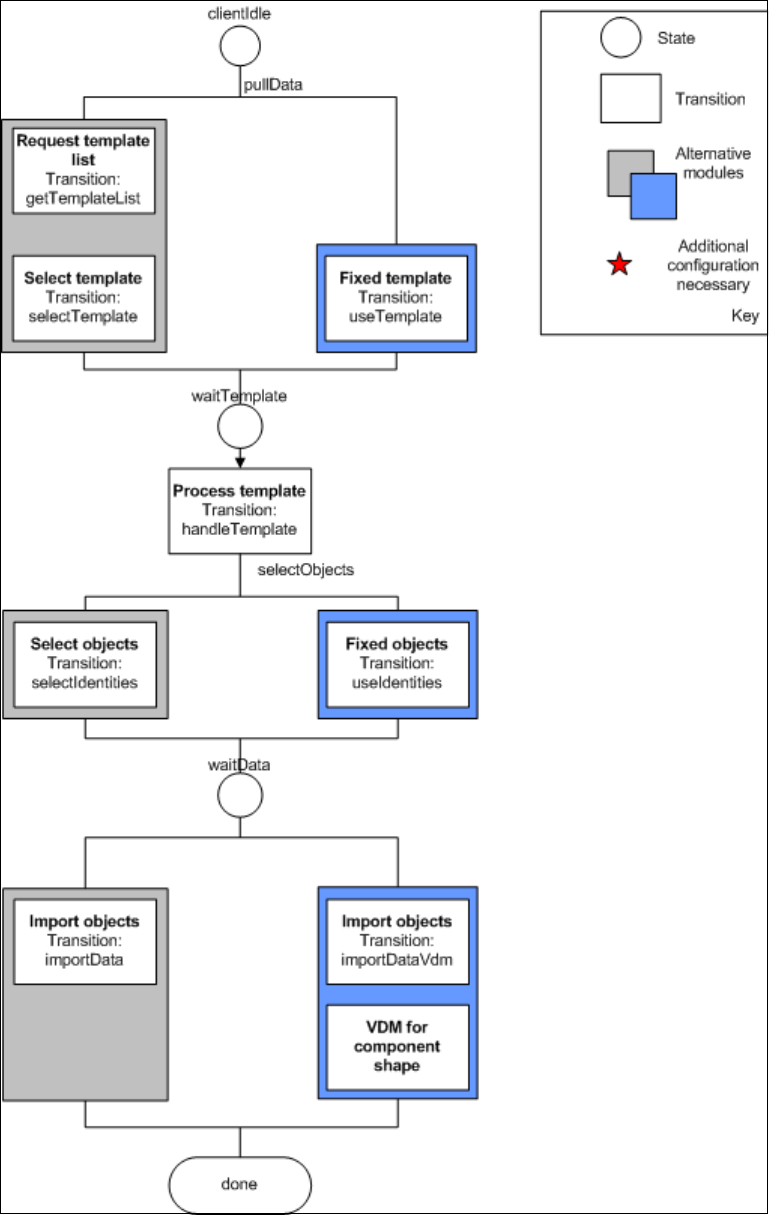
Figure 6-1 shows all currently available modules that can be used to form a workflow. However,
since future requirements with respect to designing processes are difficult to assess, it was decided
to follow an implementation path that allows flexible extension and configuration.
To simplify reconfiguring the system on-site, all possible states, even those that are not used, as
well as all events and transitions are contained in the standard configuration. Those transitions that
must be executed (shown in the figure without a colored border) as well as those for the standard
flow (highlighted in gray in the figure) are activated. These transitions can be replaced by any
alternative found in the same level of the flow chart. To do this, the "old" transition is commented
out and the new one is commented in. If several transitions belong to a module, then all these
transitions are to be commented in or out accordingly.
An example is shown below to clarify this. The standard flow for the selected objects in the default
configuration appears as follows:
Example of the standard flow
<transition name="selectIdentities" currentState="selectObjects"
event="selectIds"
class="Siemens.SiplacePro.EDM.DataExchange.Actions.SelectIdentities
Action,DataExchange">
…
</transition>
<!-- Pull workflow variants -->
<!-- Use fixed selection
<transition name="useIdentities" currentState="selectObjects"
event="selectIds"
class="Siemens.SiplacePro.EDM.DataExchange.Actions.UseConfiguredI
dentitiesAction,DataExchange">
…
</transition> -->
This must now be converted to a fixed set of objects to be transferred. This means that the
configuration must be adapted as follows:
Example of an adapted configuration
<!--
<transition name="selectIdentities" currentState="selectObjects"
event="selectIds"
class="Siemens.SiplacePro.EDM.DataExchange.Actions.SelectIdentitiesAction
,DataExchange">
…
</transition> -->
<!-- Use fixed selection -->
<transition name="useIdentities" currentState="selectObjects"
event="selectIds"
class="Siemens.SiplacePro.EDM.DataExchange.Actions.UseConfiguredIdentitie
sAction,DataExchange">
…
</transition>
EDM V2.2 / User Guide Ausgabe 10/2013 Edition
89
Additional Configuration
Some of the modules require that you specify additional settings. The affected modules are labeled
accordingly in Figure 6-1. The custom section of the application configuration was used to make
room for the additional configuration attributes.
The module VDM for CS adds the VDM BLOB handling option to each application template that
affects component shapes. When this module is activated, the Vision data is also transferred for
each component shape pulled.
Module: VDM for CS
Key Form Contents
Configure VDM as described.
Table 6-15: Additional settings for "VDM for CS"
Module: Fixed Template
Key Form Contents
templateName String Name of the application
template to be used
Table 6-16: Additional settings for "fixed templates"
Example for Table 6-16:
<customConfig>
<add key="templateName" value="All Component Shapes"/>
</customConfig>
Module: Fixed Objects
Key Form Contents
objectNames A semicolon-separated (";"), full SIPLACE
Pro path. The following generalized
constructs are allowed for the object names:
Type:* - All objects of this type
Type:Path\* - All objects of this type in this
path (not in subfolders of this
path)
List containing the names
of the objects to be
transferred.
Table 6-17: Additional settings for "fixed objects"
Example for Table 6-17:
<customConfig>
<add key="objectNames" value="Import\100.gf;System\12.gf;System\100*"/>
</customConfig>
EDM V2.2 / User Guide Ausgabe 10/2013 Edition
90
Figure 6-1: Current configuration options for client workflows