00191017-01.pdf - 第520页
17.3 Description of Components and PCBs User ’s Manual Line Computer UNIX 17.3.2 PCB 2: Focus on Package Form Description Software V ersion 403.xx Edition 06/ 97 17 - 22 FILE Save Openin g Pac kage Form Editor Defin ing …
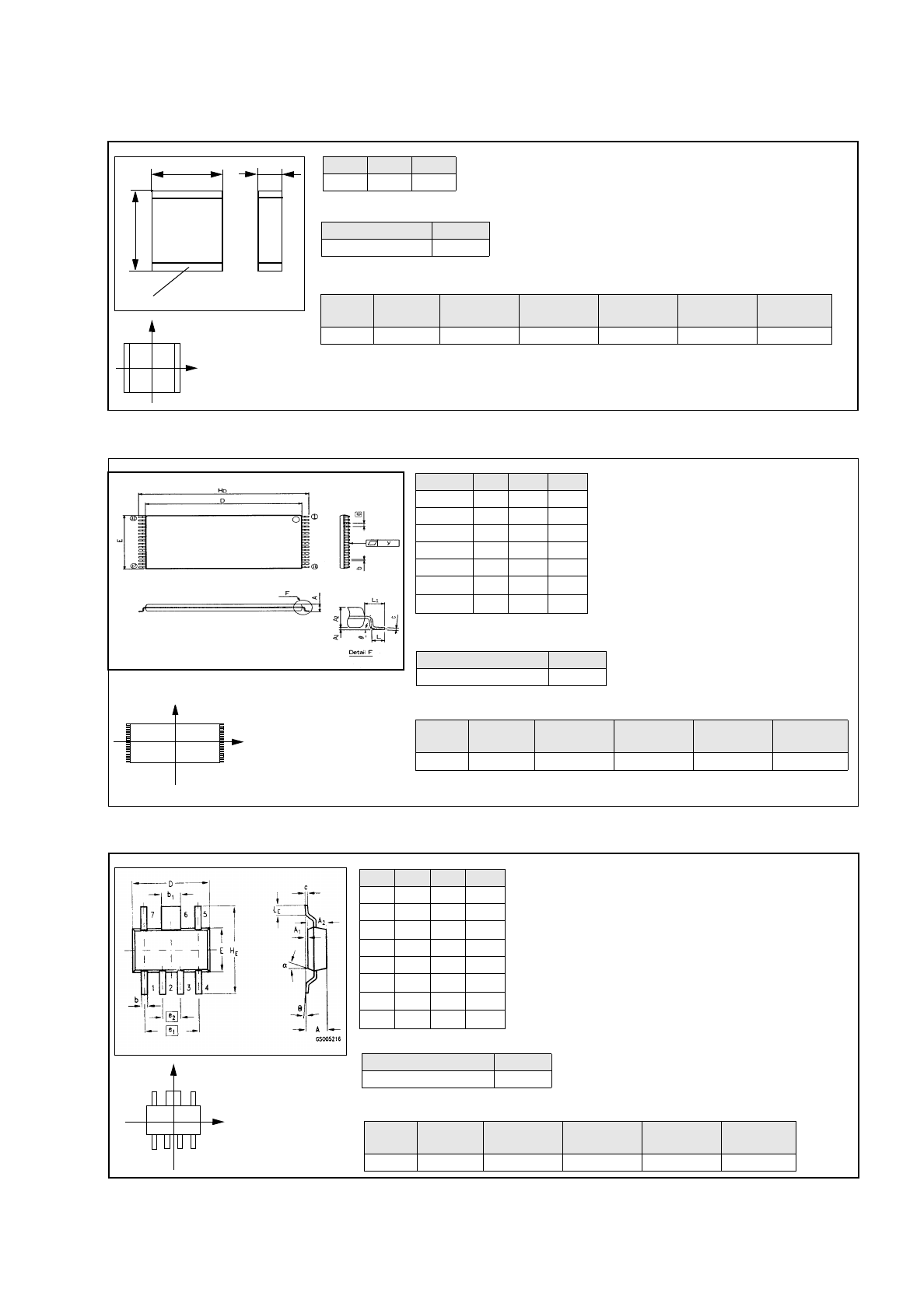
User’s Manual Line Computer UNIX 17.3 Description of Components and PCBs
Software Version 403.xx Edition 06/97 17.3.2 PCB 2: Focus on Package Form Description
17 - 21
s
b
l
Bonding
Nozzles
Sensor
type
Placing
force
Processing Placem. head Centering Feeder
615, 618 9 2 Placing Turret head in head 12 mm tape
Pack. form type GF-No.
PDC 1503.gf
l
mm
b
mm
s
mm
5,7 5,0 1,7
Y
X
Component
coordinate system
X
Y
Component
coordinate system
Pack. form type GF-No.
irregular FDC 1503.gf
Dim min. typ. max.
A--1.8
b 0.55 0.60 0.70
b
1
1.82 1.87 1.97
D 6.3 6.5 6.7
E 3.3 3.5 3.7
e
1
-3.81-
e
2
-1.27-
H
E
6.7 7.0 7.3
The pin group offset BG
Off
and the pin length B
L
are not indi-
cated and must be calculated from the following formulae (see
Fig. in On-line Help:
Nozzles
Sensor
type
Processing Placem. head Centering Feeder
615, 618 9 Placing Turret head in head 12 mm tape
BL
Width HE Width E
–
2
---------------------------------------------------------=
BGOff
Width HE PinLength BL
–
2
-------------------------------------------------------------------------=
Y
X
Component
coordinate system
Comp5.be: Plastic 32pin 8x20mm TSOP
Symbol Min Nom Max
A--1.2
b 0.15 0.2 0.3
D 18.3 18.4 18.5
E7.98.08.1
e-0.5-
H
D
19.8 20.0 20.2
L
1
-0.8-
Package form type GF-No.
regular FDC 1502.gf
The pin group offset BG
Off
is not indicated and
must be calculated using the following formula
(see Fig. in On-line Help):
BGOff
Width HE PinLength B
L
–
2
------------------------------------------------------------------------
-
=
Nozzle
Sensor
type
Processing
Placem.
head
Centering Feeder
416 7 Placing IC-head external 32 mm tape
Comp6.be: Micro-X / MW
Comp4.be: Multi-Layer Capacitor, Type 2220
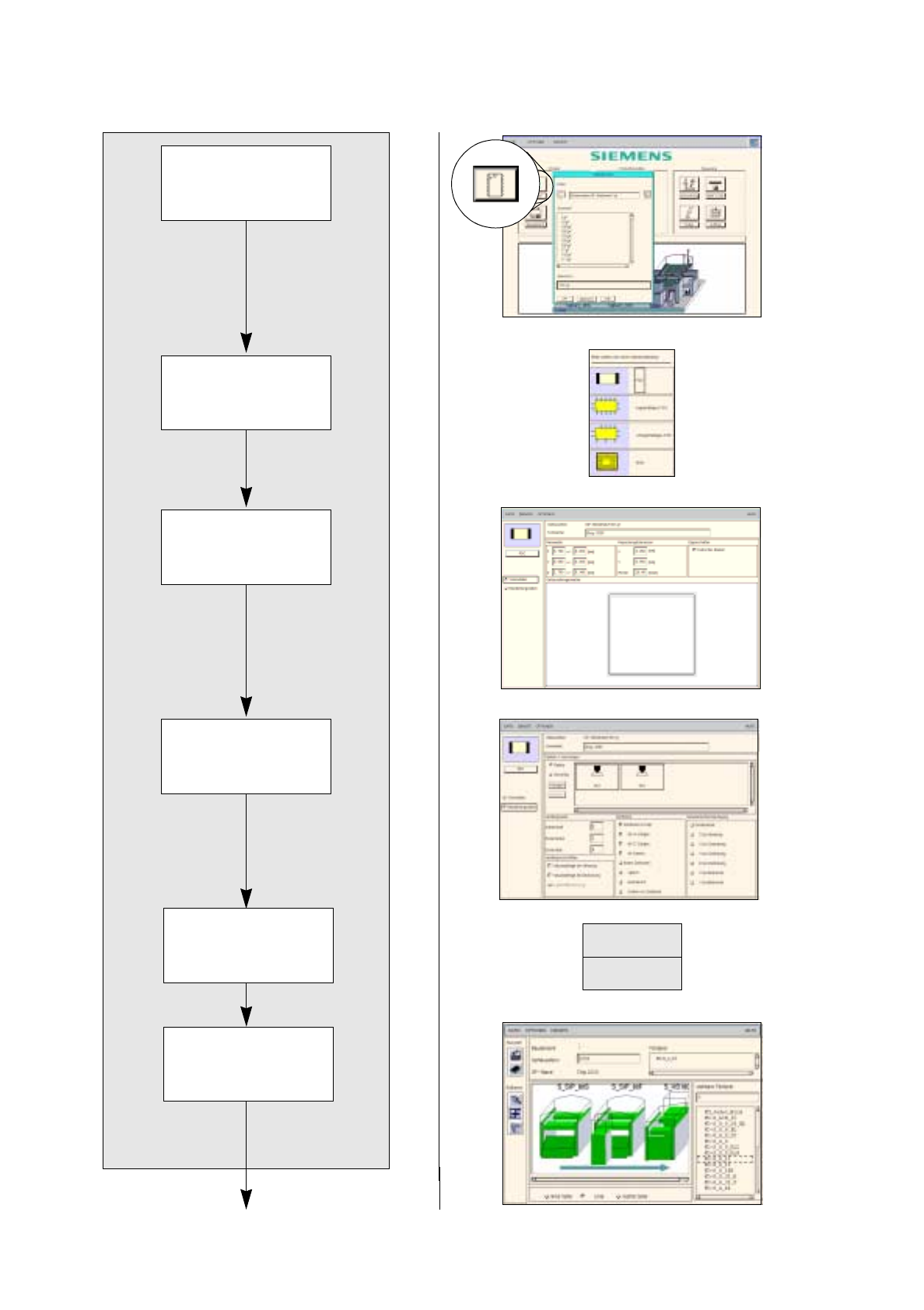
17.3 Description of Components and PCBs User’s Manual Line Computer UNIX
17.3.2 PCB 2: Focus on Package Form Description Software Version 403.xx Edition 06/97
17 - 22
FILE
Save
Opening Package
Form Editor
Defining package
form type
Entering dimensions
Allocating package
form to a feeder
Entering handling
data
Package form description for package form 1501
continued on page 17-24
Saving
package form data
User’s Manual Line Computer UNIX 17.3 Description of Components and PCBs
Software Version 403.xx Edition 06/97 17.3.2 PCB 2: Focus on Package Form Description
17 - 23
17.2.2.1 Package Form Description
A) Description of a PDC using package form 1501 as an example
To open the Package Form Editor for package form 1501, proceed as follows:
1. On the desktop click on the icon of the Package Form Editor .
The file selection window is opened.
2. Click on the
Selection
editing field.
3. Enter the package form number, here:
1501.gf
and click on the
OK
button.
The Package Form Editor with the package form type selection window is opened.
To define the package form type „PDC“ for package form 1501, proceed as follows:
4. In the package form type selection window click on the type
PDC
.
The selection window is closed.
5. In the Package Form Editor click on the
Comment
editing field, enter a unique comment
,
here:
Chip
2220
.
To enter the dimensions for package form 1501, proceed as follows:
6. In the
Nominal Dimensions
editing area enter the dimensions of the package form (click on the editing
field, enter value, confirm by pressing the Enter key), here: see chart:
The tolerances are entered automatically.
The package form is displayed with the tolerance range.
7. For this example the default values of the editing areas Packaging tolerances and Features are adopted,
no entries are required.
To enter the handling data for package form 1501, proceed as follows:
8. Activate the
Handling data
button.
The selection areas are displayed for entering the handling data.
9. Activate the
Nozzle
button in the Nozzles/Sensor types selection area.
10. Click on the
Create
button.
The Nozzle type selection window containing a list of the nozzle types is loaded.
11. Click on a nozzle
,
here:
615
.
The selection window is closed, the nozzle is accepted.
12. Select all other nozzles required accordingly, here:
618
.
13. Activate the
Sensor type
button.
14. Click on the
Create
button.
The
Sensor type
selection window containing a list of the sensor types is opened.
15. Click on a sensor type, here:
9
.
The selection window is closed, the sensor type is accepted.
16. Click on the
Placing force
editing field in the
Handling values
selection area, enter a value, here:
2
.
17. In the Centering selection area activate the appropriate button, here:
Centering in head
.
18. For this example the default values of the editing areas
Handling instructions
and
Reduced accelera-
tion
can be adopted, no entries are required.
19. Click on the
Save
option on the
FILE
menu.
The data are now saved.
To allocate a feeder to package form 1501, proceed as follows:
20. Click on the
Starting Feeder Editor
option on the
SERVICES
menu.
The Feeder Editor is opened.
21. Activate the
Allocate
icon .
X
(Length l)
Y
(Width b)
Z
(Height s)
5.7 5 1.7