00191017-01.pdf - 第64页
2 General Information on Using the P rogram User’s Manual Line Co mputer UNIX 2.5 Menu Bar in the Application Window Software Version 403.xx Edition 06/97 2 - 34 - History Ev er y Help t opic y ou ha v e pre viou sly di …
User’s Manual Line Computer UNIX 2 General Information on Using the Program
Software Version 403.xx Edition 06/97 2.5 Menu Bar in the Application Window
2 - 33
Using the bookmarks:
●
Click on the menu
Bookmark
-->
<Bookmark name>
.
The help text about the topic defined by the bookmark is displayed.
Deleting a bookmark:
●
Select the menu
Bookmark
-->
Define
...
●
Select the bookmark you want to delete from the list of defined bookmarks.
●
Click on the
Delete
button.
The dialog box is closed, and the name of the bookmark is removed from the "Bookmark" menu.
Command Line
The command line contains buttons by means of which the user can navigate through the Help Index.
●
Click on the desired button.
The selected action is executed.
-
Contents
An overview of the Help topics is displayed.
-
Search
The window for entering or selecting a search word is opened.
●
Click on the
Search
button.
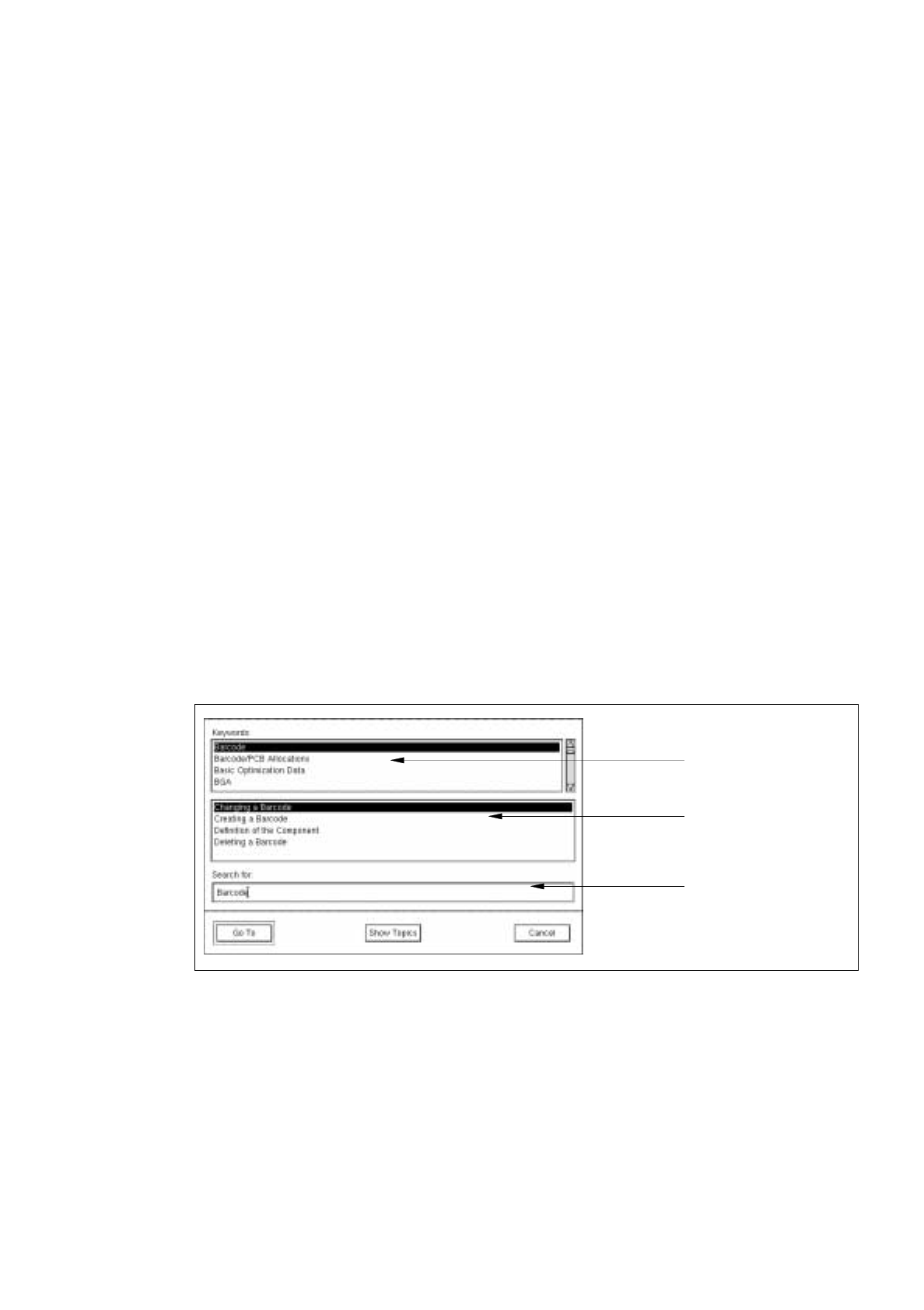
The following window is opened.
●
Enter search word (keyword) in the editing field, or select a term from the "Keyword" selection list.
The term is displayed in the editing field.
●
Click on the
Show Topics
button.
All topics related to the selected term are now listed in the "Topics" selection list.
●
Select the desired topic.
●
Click on the
Go To
button.
The window is closed. The help window now contains the information about the selected topic.
selection list
selection list
editing field
"Keywords"
"Topics"
2 General Information on Using the Program User’s Manual Line Computer UNIX
2.5 Menu Bar in the Application Window Software Version 403.xx Edition 06/97
2 - 34
-
History
Every Help topic you have previously displayed is listed in a box.
-
Back
The Help topic you saw most recently is displayed.
-
<<
Lets you scroll the Help Index in upward direction.
-
>>
Lets you scroll the Help Index in downward direction.
-
Text Search
The window for entering a search text is opened.
●
Click on the
Text Search
button.
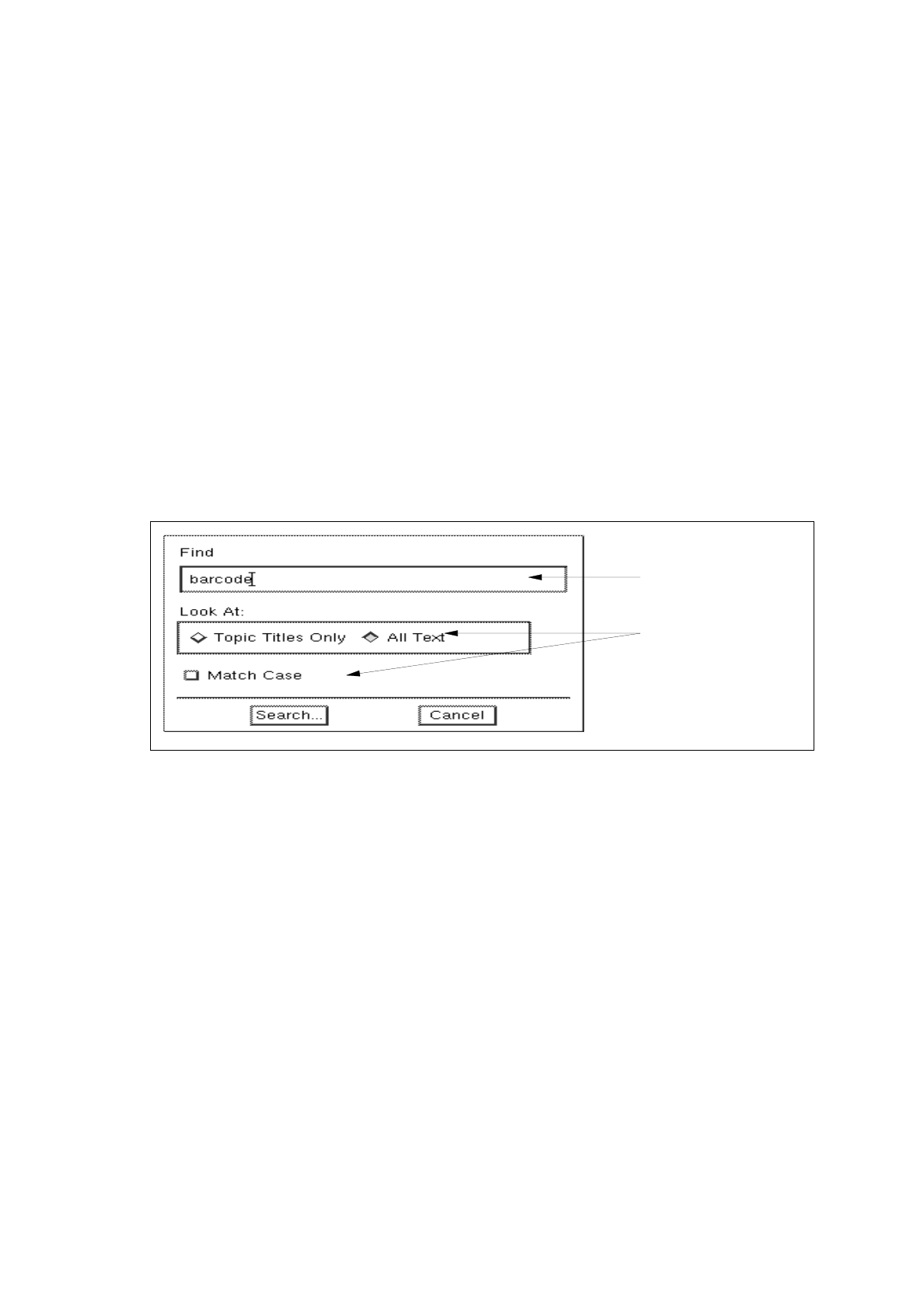
The following window is opened.
●
Enter the search text in the editing field.
●
Activate the button(s) for the search criterion by clicking on it.
The window is closed.
●
Click on the
Search...
button.
The number of matches found are added up and displayed in a box.
Once the search is complete, the box is closed and all topics containing the search text are listed
in a separate window.
If no match of the search text has been found, a message box will be displayed informing you of
this.
editing field
search criteria

User’s Manual Line Computer UNIX
Software Version 403.xx Edition 06/97
3 - I
Contents
Page
Desktop (Root Window)
3.1 Introduction. . . . . . . . . . . . . . . . . . . . . . . . . . . . . . . . . . . . . . . . . . . . . . . . . . . . . . . . . . . . . . 3 - 1
3.1.1 Layout of the Desktop. . . . . . . . . . . . . . . . . . . . . . . . . . . . . . . . . . . . . . . . . . . . . . . . . . . . . . .3 - 1
3.2 Desktop User Interface . . . . . . . . . . . . . . . . . . . . . . . . . . . . . . . . . . . . . . . . . . . . . . . . . . . .3 - 5
3.2.1 Desktop Menu Bar . . . . . . . . . . . . . . . . . . . . . . . . . . . . . . . . . . . . . . . . . . . . . . . . . . . . . . . . .3 - 5
3.2.1.1 FILE Menu . . . . . . . . . . . . . . . . . . . . . . . . . . . . . . . . . . . . . . . . . . . . . . . . . . . . . . . . . . . . . . . 3 - 5
3.2.1.2 OPTIONS Menu . . . . . . . . . . . . . . . . . . . . . . . . . . . . . . . . . . . . . . . . . . . . . . . . . . . . . . . . . . .3 - 6
3.2.1.3 SERVICES Menu . . . . . . . . . . . . . . . . . . . . . . . . . . . . . . . . . . . . . . . . . . . . . . . . . . . . . . . . .3 - 17
3.2.1.4 PRODUCT Menu . . . . . . . . . . . . . . . . . . . . . . . . . . . . . . . . . . . . . . . . . . . . . . . . . . . . . . . . .3 - 18
3.2.1.5 PRODUCTION TOOLS Menu . . . . . . . . . . . . . . . . . . . . . . . . . . . . . . . . . . . . . . . . . . . . . . .3 - 20
3.2.2 Main Groups. . . . . . . . . . . . . . . . . . . . . . . . . . . . . . . . . . . . . . . . . . . . . . . . . . . . . . . . . . . . . 3 - 20
3.2.2.1 "Control" Group . . . . . . . . . . . . . . . . . . . . . . . . . . . . . . . . . . . . . . . . . . . . . . . . . . . . . . . . . . 3 - 21
3.2.3 Line Selection Button and Display Area. . . . . . . . . . . . . . . . . . . . . . . . . . . . . . . . . . . . . . . .3 - 22
3.2.3.1 Line Selection Button . . . . . . . . . . . . . . . . . . . . . . . . . . . . . . . . . . . . . . . . . . . . . . . . . . . . . .3 - 22
3.2.3.2 View Area. . . . . . . . . . . . . . . . . . . . . . . . . . . . . . . . . . . . . . . . . . . . . . . . . . . . . . . . . . . . . . . 3 - 23
3.2.4 Main Menu . . . . . . . . . . . . . . . . . . . . . . . . . . . . . . . . . . . . . . . . . . . . . . . . . . . . . . . . . . . . . .3 - 23