7OM-1603-006_w - 第102页
7OM-1603 Chapter 2 : 3. Product Change Menu 2-33 3.2.3 "PU Pos Ofst T ch" Window [2] [1] [3] [4] [5] [6] [8] [7] "PU Pos Ofst Tch" window F7B27 [1] Feeder No. T ray Set Display The Feeder No. where th…

7OM-1603
2-32
Chapter 2 : 3. Product Change Menu
[6] [Move & Adjust] Button
When this button is pressed, the recognition window appears and the manual
alignment operation is enabled.
[7] [OK], [CANCEL] Button
Using these buttons, the set parameters are reected on the machine
operation or cancelled.
[8] [Storage] Button
When this button is pressed, the tray drawn out in [3] is stored.
[9] Feeder (B) Offset
Displayed are the current values that indicate the pickup position. After a
teaching operation is performed, the results appear in the text boxes entitled
"Adj".
Before
: Values before Teaching Operation
After
: Results of Teaching Operation
1102-003
7OM-1603
Chapter 2 : 3. Product Change Menu
2-33
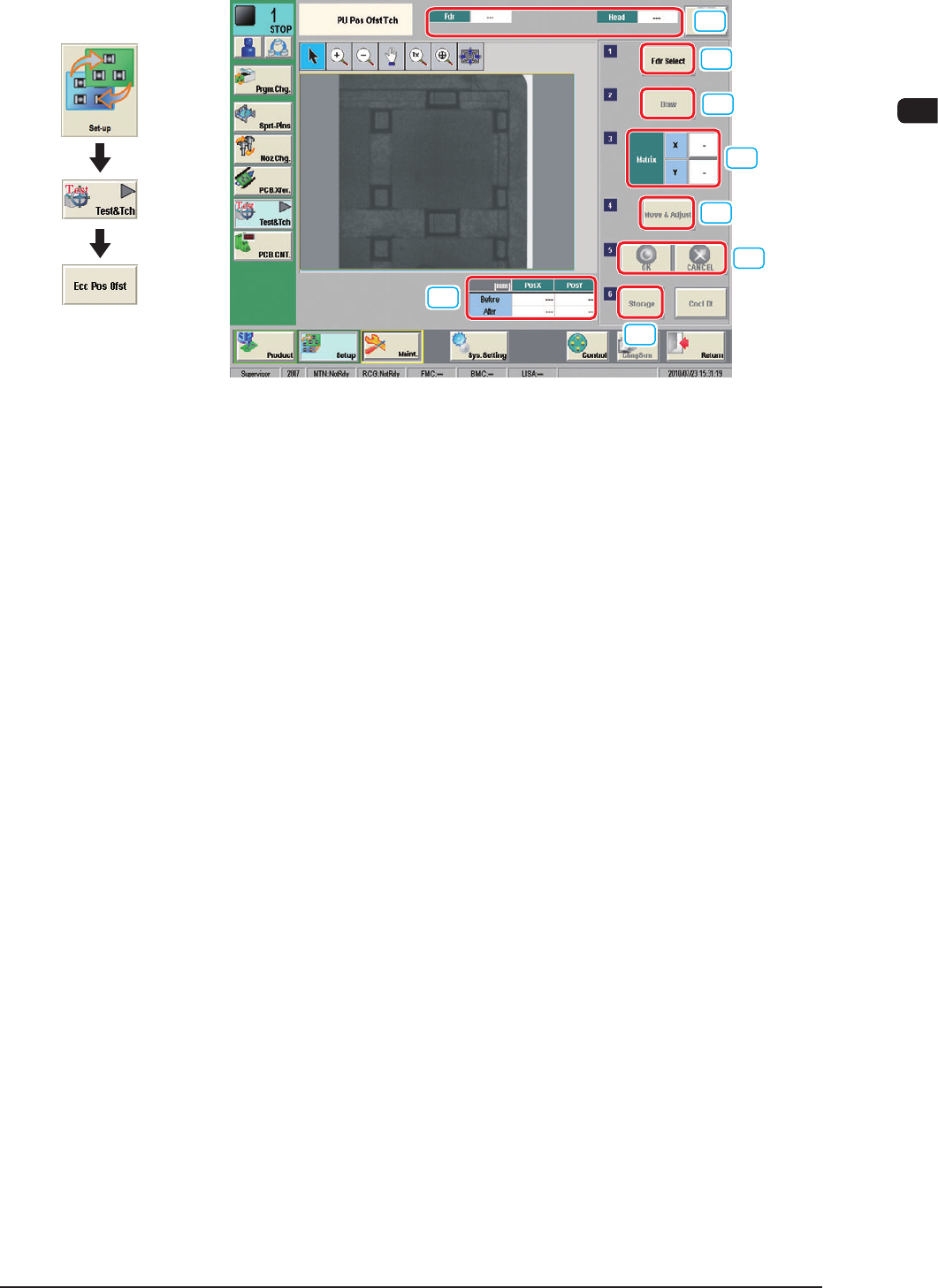
3.2.3 "PU Pos Ofst Tch" Window
[2]
[1]
[3]
[4]
[5]
[6]
[8]
[7]
"PU Pos Ofst Tch" window F7B27
[1] Feeder No. Tray Set Display
The Feeder No. where the components are picked up, magazine, setup, block
and head are displayed in this pane.
[2] [Fdr Select] Button
When this button is pressed, the feeder to be taught is selected.
[3] [Draw] Button
When the multi-layer tray feeder has been selected in [2], using this button,
the tray is drawn out from the elevator unit.
[4] Matrix
The matrix to be taught is set in this group box.
[5] [Move & Adjust] Button
When this button is pressed, the recognition window appears and the manual
alignment operation is enabled.
[6] [OK], [CANCEL] Button
Using these buttons, the set parameters are reected on the machine
operation or cancelled.
[7] [Storage] Button
The tray drawn out in [3] is stored.
[8] Feeder (B) Offset
Displayed are the current values that indicate the pickup position. After a
teaching operation is performed, the results appear in the text boxes entitled
"Adj".
Before
: Values before Teaching Operation
After
: Results of Teaching Operation
1102-004
Graphic
Development

7OM-1603
2-34
Chapter 2 : 3. Product Change Menu
1109-001