7OM-1603-006_w - 第125页
7OM-1603 3-20 Chapter 3 : 2. Menus for System Setting [3] T raverse Chk Pos [mm] T raverse Axis [mm] This offset data is used to adjust the chuck position. [4] Magazine #1, 2 [mm] The lower magazine in the elevator unit …
7OM-1603
Chapter 3 : 2. Menus for System Setting
3-19
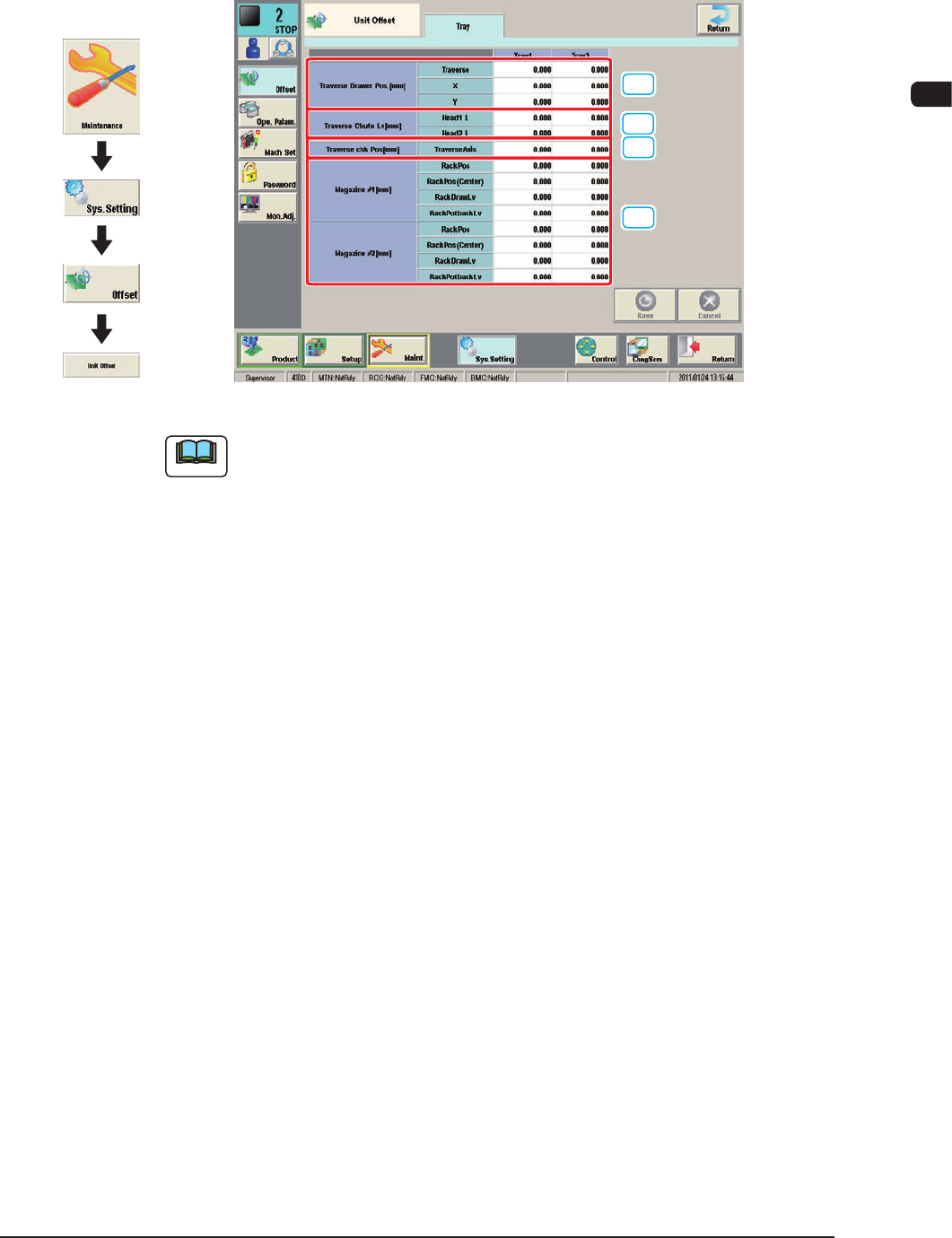
2.1.2 "Unit Offset" Window
When the "Unit Offset" tab is pressed in the "Offset" tab sheet and the "Tray" tab
is further pressed, the following subtab sheet appears.
[1]
[2]
[3]
[4]
"Tray" sub-tab sheet (Multi-Layer Tray Feeder #1 used) F7C19
Note
The displayed tab sheet will look different, depending on which option is
selected.
[1] Traverse Drawer Pos
These offset data is used to adjust the position where a pallet is drawn out by
the traverse shafts.
Traverse [mm]
When a pallet is drawn out, the traverse shafts move as far as the specied
distance where the parameter set in this text box is added.
X [mm] (Horizontal)
The set parameter is added to the beam travel when components are picked
up.
Y [mm] (Vertical)
The set parameter is added to the beam travel when components are picked
up.
[2] Traverse Shoot Lv [mm]
L [mm] (Height)
This offset data is used to adjust the level (height) of the pallet drawing
chute.
When a level lower than the design height is set, a plus value must be entered
in the text box.
1102-004
Graphic
Development
7OM-1603
3-20
Chapter 3 : 2. Menus for System Setting
[3] Traverse Chk Pos [mm]
Traverse Axis [mm]
This offset data is used to adjust the chuck position.
[4] Magazine #1, 2 [mm]
The lower magazine in the elevator unit can be adjusted.
Parameters can be specied in the "RackPos [mm]", "RackPos (Center)
[mm]", "RackDrawLv [mm]", and "RackPutbackLv [mm]" text boxes as
Magazine #1 Offsets.
RackPos [mm]
Observe the position where the elevator shaft has moved to the setup position
and enter proper values.
Note
To set the elevator position in a higher level, a minus value must be entered
in the text box.
RackPos(Center) [mm]
This offset data can be used to adjust the magazine change position.
Note
Follow the same adjustment as taken for the setup position to obtain the
numerical values and perform the adjustment based on the obtained values.
RackDrawLv [mm]
This offset data is used to align the traverse chute in height with the step of
the tray when a pallet is drawn from Magazine #1 to the traverse chute.
The entered offset value is reected on the travel of the elevator shaft when
the elevator is moved for the alignment of the pallet drawing step (pallet
drawing from Magazine #1).
In the following cases, the drawing/returning level teaching should be
performed.
•
The multi-layer tray is mounted on the main machine.
•
The main machine is stopped for a long time with the multi-layer tray
mounted on it.
The drawing/returning level teaching is performed by means of zeroing
operation using the [Tray Attach Order] button or [Tray Transfer Tch] button
in the "Unit Chg." window (Operation Sequence: Maintenance -> select
"Unit Chg." in the maintenance menu).
Note
To set the elevator position in a higher level, a plus value must be entered
in the text box.
1102-003
7OM-1603
Chapter 3 : 2. Menus for System Setting
3-21
RackPutbackLv [mm]
This offset data is used to align the traverse chute in height with the step of
the tray when a pallet is put back from the traverse chute to Magazine #1.
The entered offset value is reected on the travel of the elevator shaft when
the elevator is moved for the alignment of the pallet returning step (pallet put
back to Magazine #1).
In the following cases, the drawing/returning level teaching should be
performed.
•
The multi-layer tray is mounted on the main machine.
•
The main machine is stopped for a long time with the multi-layer tray
mounted on it.
The drawing/returning level teaching is performed by means of zeroing
operation using the [Tray Attach Order] button or [Tray Transfer Tch] button
in the "Unit Chg." window (Operation Sequence: Maintenance -> select
"Unit Chg." in the maintenance menu).
Note
To set the elevator position in a higher level, a plus value must be entered
in the text box.
1102-003