6241f.pdf - 第16页
Page 8 GS-394-02 Sample CAD File Format Notes 1. Maximum file width can not exceed 256 columns. 2. Headerlines, often output by the CAD system, may be used. The CAD Translator allows the user to define the quantity of li…
Page 7GS-394-02
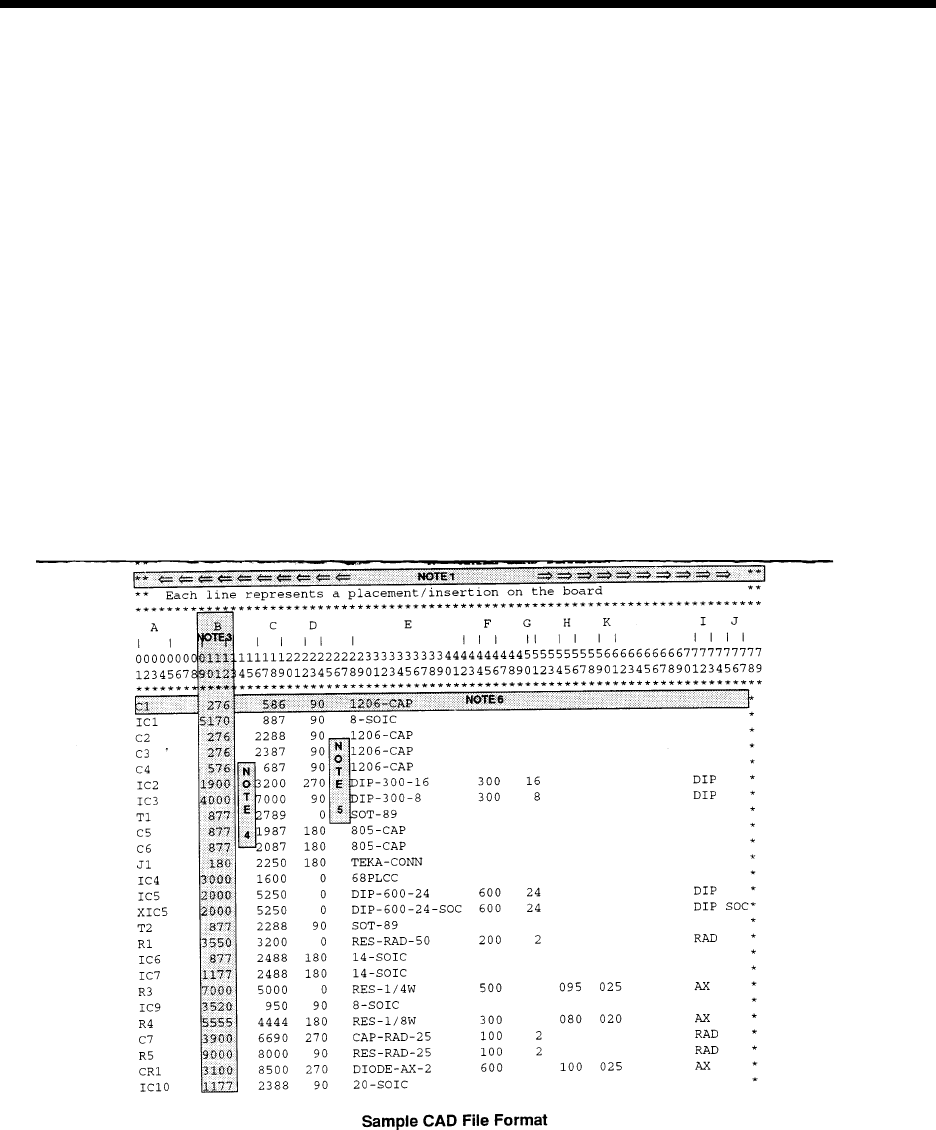
This is a typical CAD file which may be output from a wide variety of different CAD systems.
This file includes SMC and IMC information, with component information stored for the IMC components.
The component information for Surface Mount components will be obtained from the master .DEF files.
IMC component information will be obtained from this file and placed into the Component Library.
Information in the CAD file:
A = REFERENCE DESIGNATOR F = SPAN
B = X COMPONENT CENTROID COORDINATE G = NUMBER OF LEADS
C = Y COMPONENT CENTROID COORDINATE H = AXIAL BODY DIAMETER
D = ORIENTATION I = MACHINE TYPE
E = PART NUMBER/COMP ID J = DIP SOCKET
K = AXIAL LEAD DIAMETER

Page 8 GS-394-02
Sample CAD File Format Notes
1. Maximum file width can not exceed 256 columns.
2. Headerlines, often output by the CAD system, may be used.
The CAD Translator allows the user to define the quantity of
lines containing the file header. This information is for operator
use only and is not used by the CAD Translator.
3. Format Type: The format of file. This can be either Table or
Separator format (Table is the default).
Table format uses predefined columns for each data type. For example,
the reference ID column may be defined as 10 characters. The actual
reference ID in the CAD file can contain up to 10 characters. It does not
matter if there is data in every column.
Separator format uses a character (comma, space, dash, etc.) to
separate data fields. Each line of data must contain the same data
types in order for auto detect to work.
# of Fields: The number of fields in the file.
# of Lines: The total number of lines in the file.
4. The CAD file must be devoid of all special control characters
such as Tabs. (Note that special characters shown are for
illustration purposes only and cannot be contained in the
actual CAD file. These characters include boxes, arrows.)
5. CAD data is limited to one component per data file line or
row. Additional components are specified on additional lines
of the CAD file. There must be no blank lines or rows
between any rows of CAD data. Markers such as {EOF}
must not be present at the end of the CAD file.
Additional APE Features
• Import of Existing UICS Patterns — UICS patterns are con-
verted to IM-UPS products.
• Program Optimization — Optimization via “Nearest Neighbor”
insertion path.
• Component Identifier (part number) and Reference Designator
are now included in Product Information — the addition of
component identifier and reference designator in programs
supports improved status message reporting and management
data tracking by component identifier.

Page 9GS-394-02
Off-Line Pattern Programming
Specifications
The creation of a "product" (pattern program) can be completed on-
line, utilizing the machine's embedded P.C., or off-line, using a
suitable stand-alone P.C. loaded with IM-UPS software.
Note: IM-UPS software supplied with the machine is licensed
only for use in the machine. Software for use in an off-line
P.C. is available at an extra cost option.
Universal recommends pattern programming be generated off-line
to eliminate production interruptions. This can be done in one of two
ways:
• Dedicated P.C. running the OS/2 operating system and
Universal's IM-UPS software.
• A standard Windows P.C. with Universal's Virtual P.C. (VPC)
and IM-UPS.
The Virtual P.C. option is a Windows application that creates and
emulated P.C. using software. This emulated P.C. runs OS/2 and
IM-UPS just as a standard P.C. would. VPC runs, along with other
standard Windows applications such as the Microsoft Office suite,
on a standard desktop PC. Some of the advantages to this are;
• OS/2 and IM-UPS can run along with standard Windows
applications on the same P.C.
• No complex configuration (partitioning and dual boot) is
required.
The VPC option is available from Universal as a software package
that can be installed on any P.C. meeting the minimum standards
described below. Universal also offers a package that includes a
new P.C. with the Virtual P.C. and IM-UPS pre-installed.
Minimum Requirements for a Dedicated (OS/2) only P.C.:
Minimum P.C. requirements for creating the product off-line
(pattern programming) include:
• 486 processor
• 12 megabyte memory
• CD-ROM drive
• IBM OS/2 Warp 4.0
• 200 megabyte available disc space, on OS/2-compatible
partition