00196093-01_OIS_SIS_Install_de_en.pdf - 第26页
Installationsanleitung OIS Client, OIS Server, SIS Server Version 5.2 Installation Manual 1 Lieferumfang SIPLACE OIS Applikation V5.2 (in " Basic Software Package SIPLACE Pro 5. 2 ", Artikelnummer 00116682-02 u…
OIS Client, OIS Server, SIS Server Version 5.2 Installationsanleitung
Installation manual
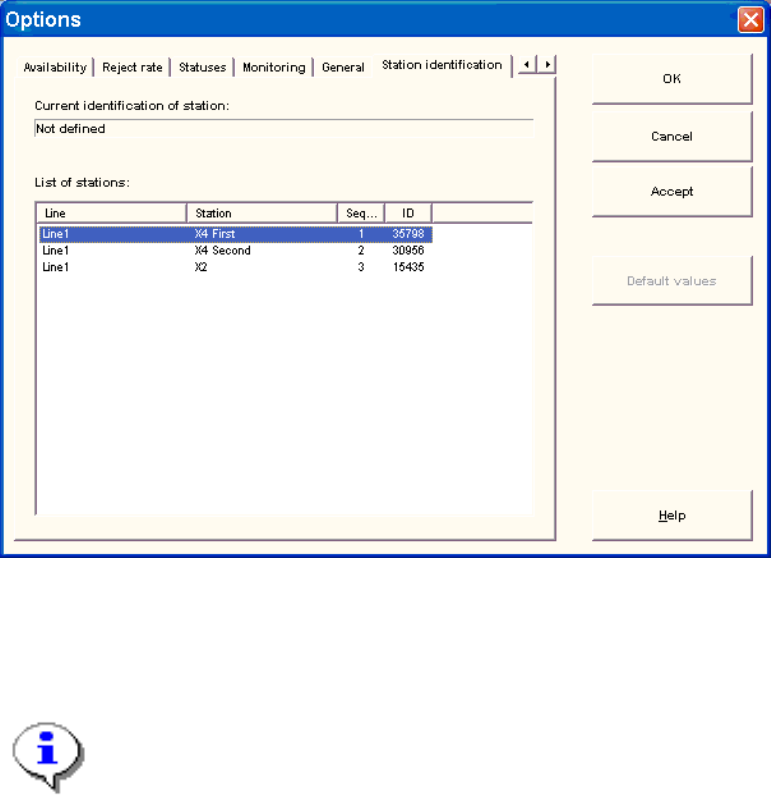
3.7 Identify Station (only OIS client)
For a station to be monitored, it must be identified.
For a station with station software version 70X, the identification of station is not necessary.
¾ Select the Station identification item from the Options menu.
¾ Select the appropriate station in the OIS client from the list.
¾ Double-click the station to identify it.
¾ Close the dialog by clicking OK.
Note:
To select the station, the line configuration must be created first on the OIS server using
OIS Line Config, see the Administration Guide (item number 00196091-01).
25 von 50

Installationsanleitung OIS Client, OIS Server, SIS Server Version 5.2
Installation Manual
1 Lieferumfang
SIPLACE OIS Applikation V5.2 (in "Basic Software Package SIPLACE Pro 5.2", Artikelnummer
00116682-02 und in "Upgrade Software Package SIPLACE Pro 5.2", Artikelnummer 00386900-02
enthalten) enthält:
Anzahl Artikel
1 CD-ROM mit OIS und SIS Software V5.2
1 Installationsanleitung (00196093-01)
1 DVD Support Media
Hinweis zur Support Media DVD:
Bitte verwenden Sie das Dokument “Navigation Guide for the Installation Procedure of
SIPLACE Software Systems” (Art. Nr. 00195050-xx) zum Navigieren durch die
Dokumentation.
Der Navigation Guide sowie alle Dokumente, auf die verwiesen wird, sind auf der Support
Media DVD (Art. Nr. 00383100-xx) verfügbar, die mit jedem Software Produkt ausgeliefert wird.
26 von 50
OIS Client, OIS Server, SIS Server Version 5.2 Installationsanleitung
Installation manual
2 Voraussetzungen
2.1 OIS/SIS Server
• Eines der folgenden empfohlenen Betriebssysteme:
• Windows XP Professional mit Service Pack 2
• Windows Server 2003 mit Service Pack 2
• Windows Vista (mit oder ohne SP1)
• Auf der Festplatte ist mindestens 200 MB freier Speicherplatz vorhanden.
• Einer der folgenden Microsoft SQL-Server-Versionen:
• Microsoft SQL-Server 2000 (Version 8.0) mit SP4
• Microsoft SQL-Server 2005 (Version 9.0) mit SP1 oder SP2
• DVD-ROM Laufwerk
• SIPLACE Pro V4.1 oder höher
• TimeSync ist installiert.
2.2 OIS Client
• Das empfohlene Betriebssystem:
• Windows XP Professional mit Service Pack 2
• Windows Vista (mit oder ohne SP1)
• Internet Explorer 4.01 SP2 oder höher ist installiert.
• Auf der Festplatte ist mindestens 20 MB freier Speicherplatz vorhanden.
• Bei Betrieb auf einer SIPLACE Maschine ist der Hauptspeicher des Stationsrechners mindestens
128 MB groß.
• Ein OIS Server ist bereits installiert.
• Der installierte OIS Server hat dieselbe oder eine höhere Version als der OIS Client.
Hinweis: OIS Client ist nicht kompatibel zu OIS Server einer früheren Version.
• Die TCP/IP-Adresse bzw. der UNC-Name (z.B. \\Server-Name) des OIS Servers ist bekannt.
• Es ist eine entsprechende Stationssoftware-Version installiert (siehe Kap. 3. Schnittstellen).
• Es besteht eine Netzwerkverbindung zum OIS Server.
• TimeSync ist installiert.
27 von 50