SIPLACE Line Computer UNIX.pdf - 第293页
User Manual Line Computer UNIX 9 Production Tools / Feeders Software Version 502.xx 10/2000 Issue 9. 1 Feeder Editor 291 I t I I ● Cl ick on the d esired alt ernative fe eder in the lis t with the a lternative fee der na…
9 Production Tools / Feeders User Manual Line Computer UNIX
9.1 Feeder Editor Software Version 502.xx 10/2000 Issue
290
I
t I I
- (Maximum number of feeders)
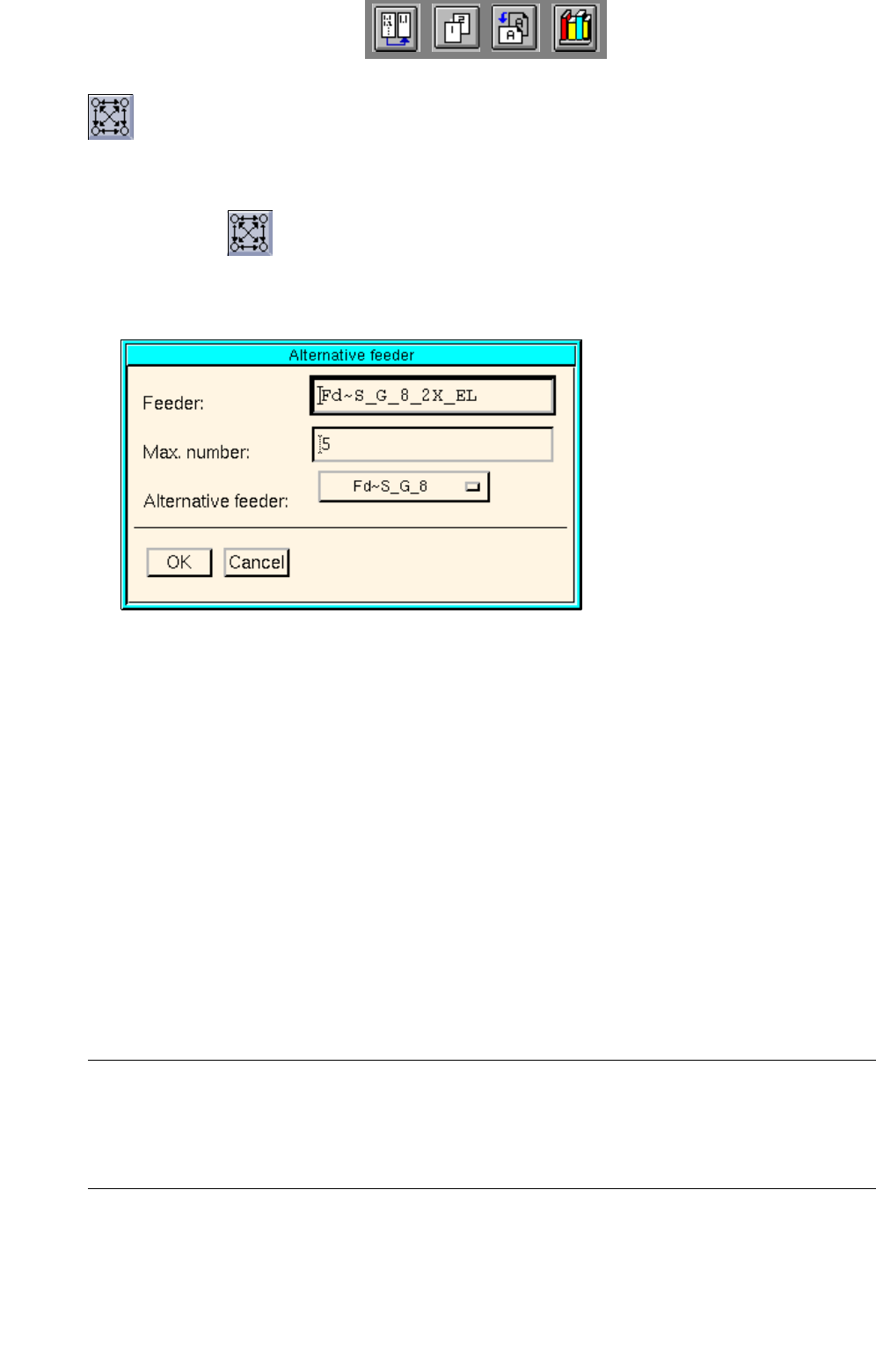
When this icon is active, the maximum number of feeders of the selected feeder type and an alterna-
tive feeder may be specified.
● Click on icon in the command area.
● Select feeders in the selection box "placeable feeders".
The window below opens.
Meaning of the boxes
- Feeder:
Name of the default feeder
- Max. number:
Maximum number of the feeders of the selected feeder type
- Alternative feeder:
Name of the alternative feeder
● Enter the maximum number in the "Max. number:" editing box.
● Click on the button in the "Alternative feeder:" box.
A list of feeders of the same category as the default feeder opens.
NOTE
An alternative feeder may also be selected for a feeder that itself was already designated as an alter-
native feeder, but the feeder for which it served as an alternative cannot be selected. This feeder is
therefore not included on the selection list of alternative feeders.
User Manual Line Computer UNIX 9 Production Tools / Feeders
Software Version 502.xx 10/2000 Issue 9.1 Feeder Editor
291
I
t I I
● Click on the desired alternative feeder in the list with the alternative feeder names.
The list box closes, and the name of the feeder is displayed in the "Alternative feeder:" box.
● Click on OK to accept the entries.
In the selection box "placeable feeders" the respective number will be displayed after the entry of
the feeder whose number was limited. In the case of a company-specific type, the number
appears in brackets.
- (Delete)
When this icon is active, the editor is in the deletion mode. In this mode it is possible to delete allocati-
ons and "customer-specific types" from the selection fields.
NOTE
In the selection field "Placeable feeders" only created "customer-specific types" (see ) can be deleted.
If an attempt is made to delete a SIEMENS-defined type (feeder or waffle pack tray), a
corresponding error message is displayed.
● Click on icon in the command area.
● Select the allocation to be deleted in the selection field "Feeder", or the entry of a customer-speci-
fic type from the selection field "Placeable feeders". The selected entry is deleted from the se-lec-
tion field.
NOTE
If the customer-specific type in the ".ri"-file is still being used (i.e. it is still allocated to other compon-
ents or package forms), a message contained in a dialog box appears to inform the operator of this
fact. If the operator deletes the customer-specific type nevertheless, all allocations to the customer-
specific type will be lost.

9 Production Tools / Feeders User Manual Line Computer UNIX
9.1 Feeder Editor Software Version 502.xx 10/2000 Issue
292
I
t I I
9.1.4 Creating Allocations
This section explains the procedure to be followed for the creation of allocations, on the basis of examples "A"
and "B".
Example "A" describes the allocation of "Package form --> Feeder" and
example "B" describes the allocation of "Component --> Feeder".
Example "A" for package form "704"
Task:
1. Components with the package form "704" are to be set up in the customer-specific type "FM_PLCC" (waffle-
pack tray) on the waffle pack tray carrier"FT~S_Typ_1", on all feeder parts of the line where the customer-
specific type "FM_PLCC" can be set up.
Steps to be performed:
1. Setting the Feeder Editor for editing package form "704"
● Click on editing field "Package form", enter package form number 704 and complete the entry by
pressing RETURN.
The comment ("PLCC68") entered in the Package Form Editor is displayed in the "GF name" field.
2. Creating customer-specific type "FM_PLCC" and editing waffle pack tray data
● Activate icon or icon in the command area.
● Select entry FM~(1x1) for the waffle pack tray in the selection field "Placeable feeders" by
double-clicking. The sub-editor "Waffle Pack Tray" for the definition of the customer-specific type
is opened (name, dimensions, carrier).