SIPLACE Line Computer UNIX.pdf - 第390页
13 Production Tools / Set-Up User Manual Line Compu ter UNIX 13.1 Set-Up E ditor (Feeder Part and WPC/MTC Editors) Software V ersion 502.xx 10/2000 Issue 388 I t I I 13.1. 2.1 Starting th e WP C/MTC E ditor The WPC/MTC E…

User Manual Line Computer UNIX 13 Production Tools / Set-Up
Software Version 502.xx 10/2000 Issue 13.1 Set-Up Editor (Feeder Part and WPC/MTC Editors)
387
I
t I I
Display area
In the display area, the feeder part of a station with the individual tracks is displayed symbolically (see
Fig. 13.1.2).
If feeders or waffle pack trays have already been defined for the feeder part displayed, these will be displayed
on their respective tracks when the Feeder Part Editor is opened.
The tracks are displayed in gray and white. The black dots symbolize the spherical caps of the feeder part.
The track number is indicated at the right edge of the feeder part. By moving the lower scroll bar toward the
right this area becomes visible.
The feeders are represented in gray with blue contours. The divisions are shown as small boxes.
If components have already been defined, the names of the components are displayed at the right edge.
At the upper and lower border of the feeder part six tracks each are highlighted in green, they are located outside
the normal feeder part. This area can only be occupied on an HS180 machine, and only by the component
camera.
Filter field "Component filter"
In the "Component filter" field it is possible to limit the list of components contained in the "Components" selection
field. This may be useful when searching for a given component. When so doing, a character string is to be
entered and subsequently the Enter key to be pressed. The "*" character serves as wildcard character and
stands for any other characters, whatever they may be.
Examples: *6 Only components whose last character is a 6 are displayed.
13* Only components whose first characters are 13 are displayed.
* All components are displayed.
If a filter was entered which limits the selection too much, the result may also be an empty list. In this case,
more characters must be added to the previously entered filter.
Selection field "Components"
All defined components are listed in the selection field "Components". Moving the scroll car allows components
to be displayed that are located further down on the list. By means of the component filter the display can be
limited to given components.
If the component library is modified in the Data Manager while the Set-Up Editor is open, these changes are
not automatically transferred to the open Set-Up Editor. Only when the editor is closed and re-started, will the
changes be adopted.
13.1.2 WPC/MTC Editor
The WPC/MTC Editor is used for the creation of set-ups for a Waffle Pack Changer or Matrix Tray Changer.
13 Production Tools / Set-Up User Manual Line Computer UNIX
13.1 Set-Up Editor (Feeder Part and WPC/MTC Editors) Software Version 502.xx 10/2000 Issue
388
I
t I I
13.1.2.1 Starting the WPC/MTC Editor
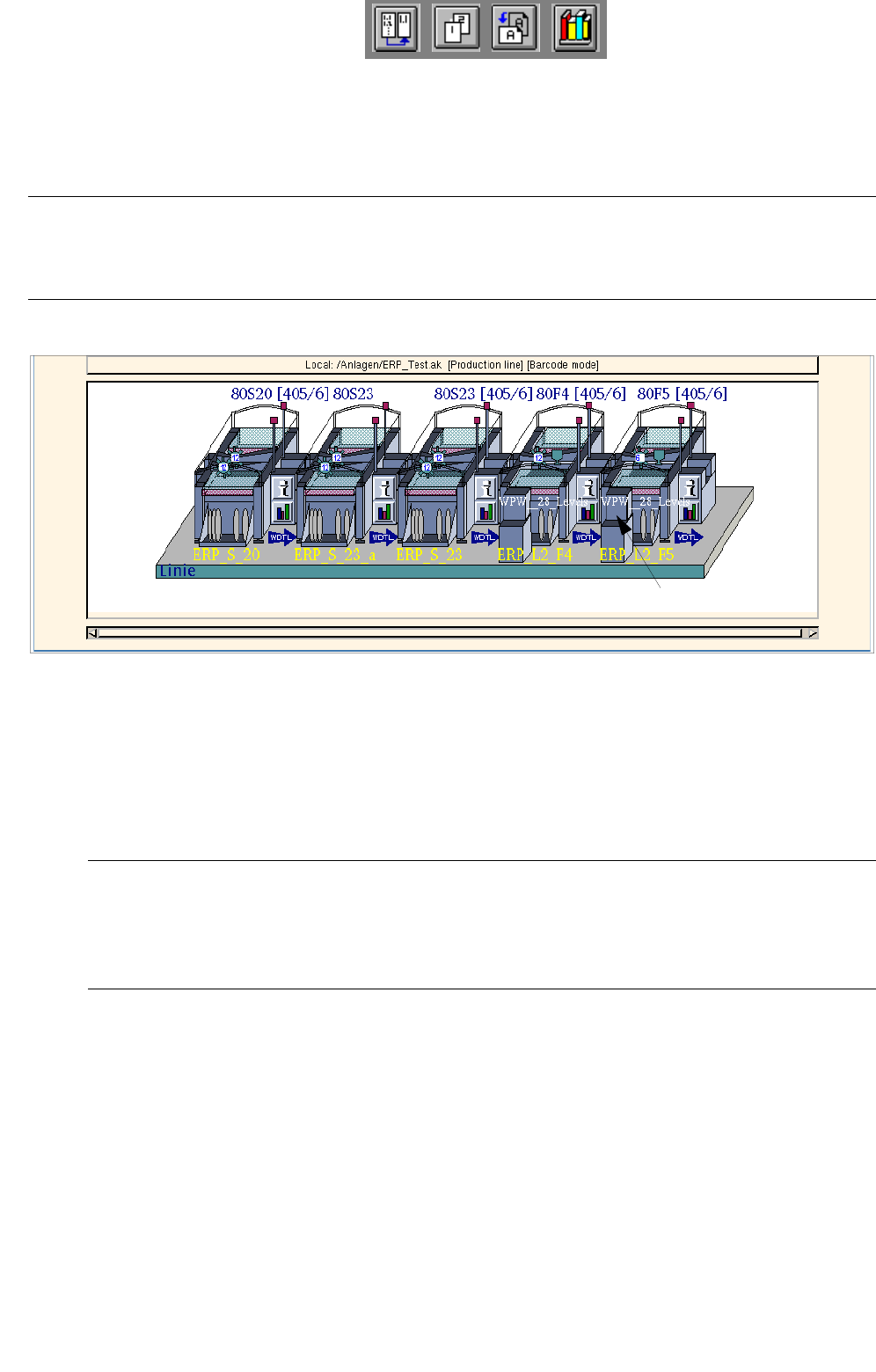
The WPC/MTC Editor is started from the desktop by clicking on a Waffle Pack Changer or Matrix Tray Changer
(see Fig. 13.1.3).
NOTE
If no Waffle Pack Changer or Matrix Tray Changer was set up upon the configuration of the station, it may
subsequently be allocated via the "options list" in the Feeder Part Editor.
Fig. 13.1.3 Starting the WPC/MTC Editor
● Click on the Waffle Pack Changer or Matrix Tray Changer.
The FSB containing the file selection "Set-up selection" is opened.
● Select a set-up from the list or enter a name (xx.ar), click on OK.
The WPC/MTC Editor is opened.
NOTE
The WPC/MTC Editor will open for the selected Waffle Pack Changer or Matrix Tray Changer .
To be able to edit the setup of another Waffle Pack Changer or Matrix Tray Changer in the line, the
WPC/MTC Editor must be open as well.
13.1.2.2 Main Window of WPC/MTC Editor
The WPC/MTC Editor is opened for the Waffle Pack Changer or Matrix Tray Changer that was clicked on upon
starting. Upon opening, the first level is always displayed.
If waffle pack trays have already been defined, these are displayed at the individual levels in the display area
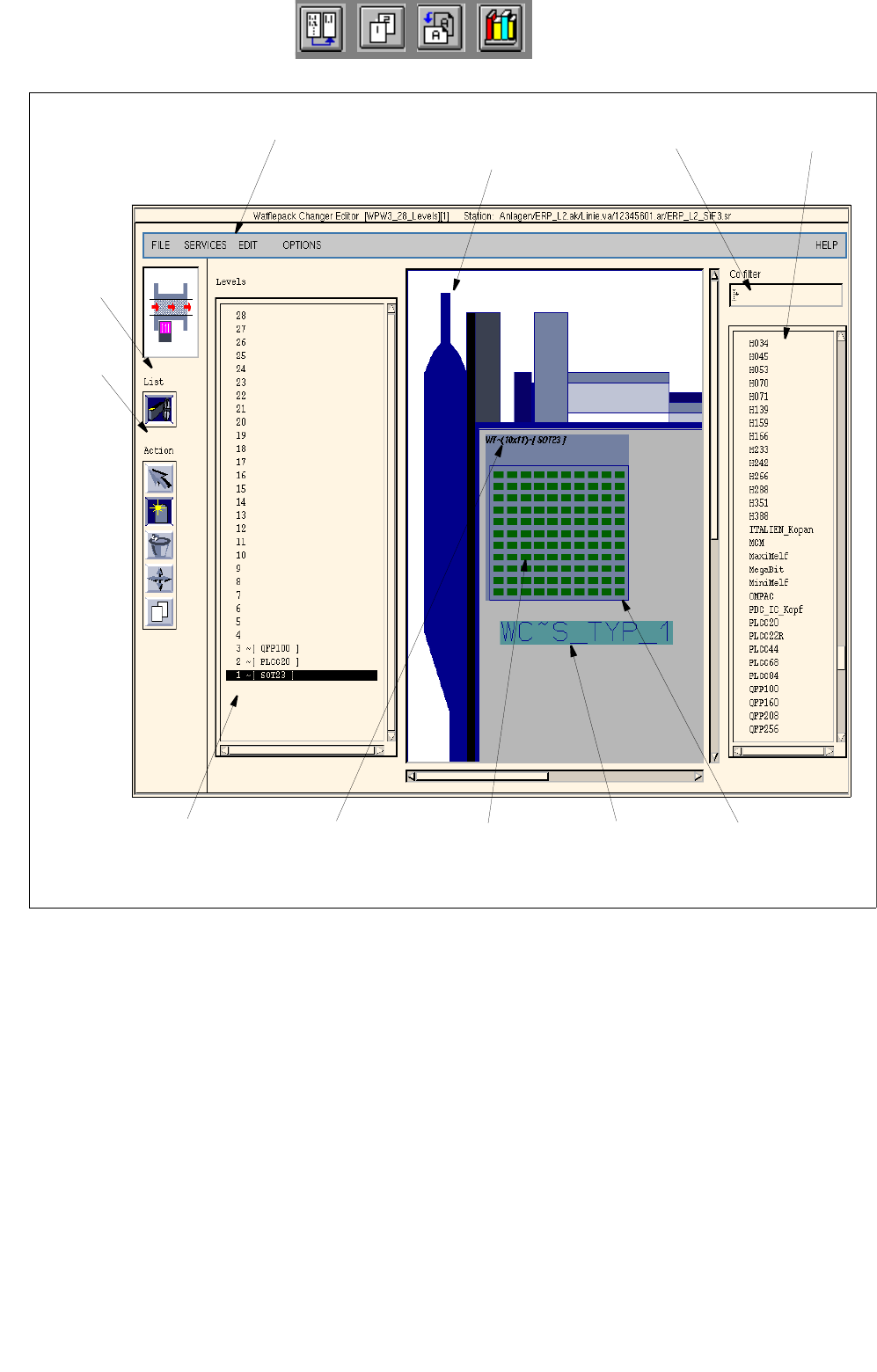
"Levels". By clicking on the individual levels, they are displayed in the "WPC/MTC" display area (see Fig. 13.1.4).
waffle pack changer
User Manual Line Computer UNIX 13 Production Tools / Set-Up
Software Version 502.xx 10/2000 Issue 13.1 Set-Up Editor (Feeder Part and WPC/MTC Editors)
389
I
t I I
Fig. 13.1.4 Main Window of WPC/MTC Editor
The main window of the WPC/MTC Editor is subdivided into the following areas:
- Menu bar
- Command area "Lists"
- Command area "Action"
- Display area "Levels"
- Display area "WPC/MTC"
- Filter field "Component filter"
- Selection field "Components"
selection field
"Components"
filter field
"Component filter"
menu bar
command
area "Lists"
command
area
display area
"Levels"
Entry of spacing waffle pack
tray carrier
waffle pack tray
display area
WPW/MTC
division of the
waffle pack tray
(here: 10x11) and
component
(here: SOT23)
"Action"
(level 1)