SIPLACE Line Computer UNIX.pdf - 第474页
14 Control / Control Modules User Manual Line Computer UNIX 14.5 Set-Up M odification Generator Software Version 502.xx 10/2000 Issue 472 I t I I 14.5.4.3 Command Area NOTE The but tons in the c ommand ar ea cannot be se…
User Manual Line Computer UNIX 14 Control / Control Modules
Software Version 502.xx 10/2000 Issue 14.5 Set-Up Modification Generator
471
I
t I I
- Iconifying the Set-Up Modification Generator
NOTE
This menu item cannot
be selected when the Set-Up Modification Generator was opened automati-
cally by a station controller (initiated by a requesting program).
● Select FILE --> Iconify.
The Set-Up Modification Generator is reduced to an icon on the desktop, it is, however, still
active. Upon clicking on the icon, the main window of the Set-Up Modification Generator is
redisplayed.
- Quitting the Set-Up Modification Generator
NOTE
This menu item cannot
be selected when the Set-Up Modification Generator was opened automati-
cally by a station controller (initiated by a requesting program). In this case, when exiting from the
Set-Up Modification Generator, the note on page 14 - 474 is to be observed.
● Select menu item FILE --> Quit.
The main window is closed. The Set-Up Modification Generator is reduced to an icon on the
desktop.
14.5.4.2 SERVICES Menu
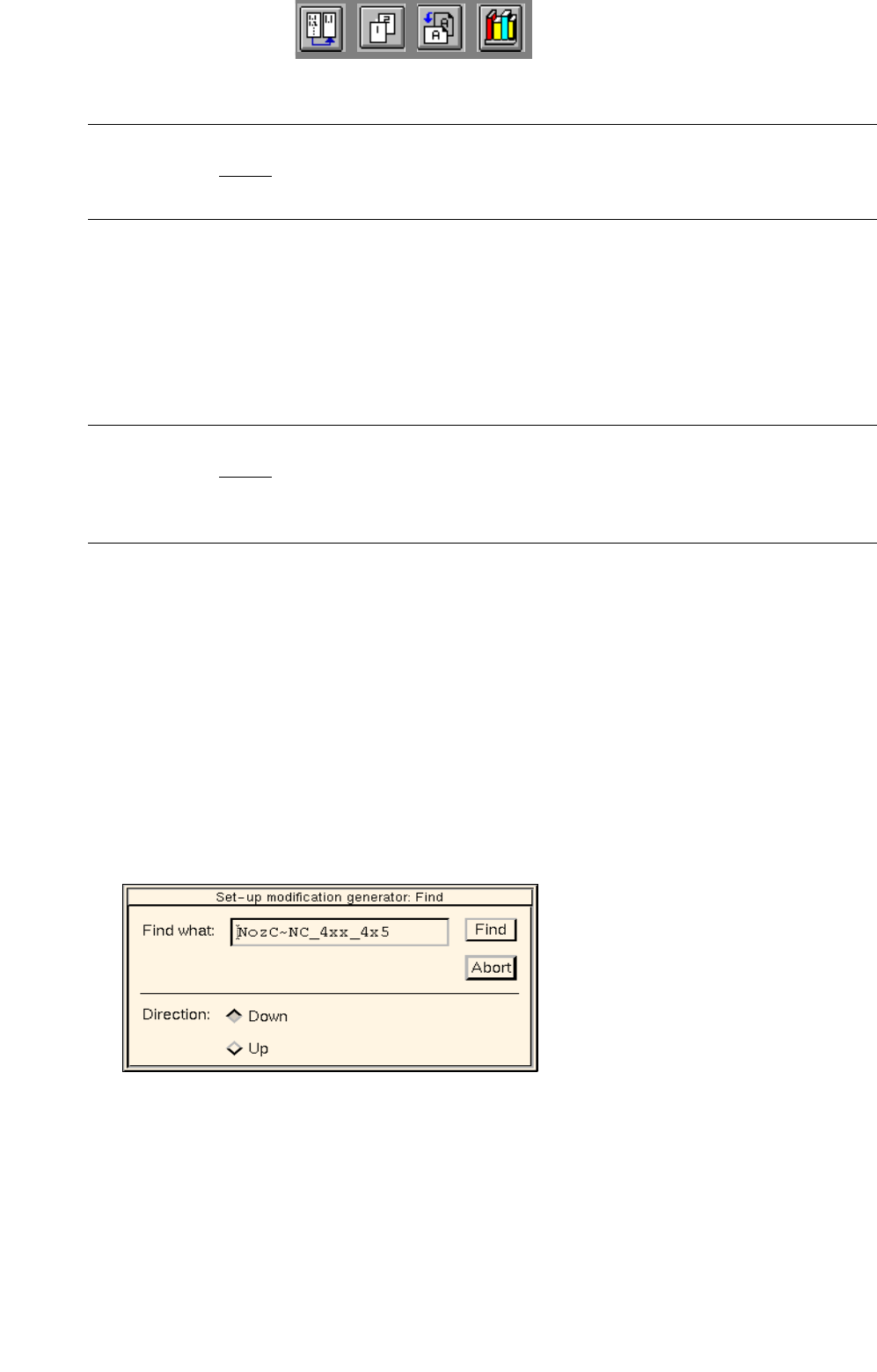
- Find
This function permits entered character strings to be searched for in texts that are displayed in the dis-
play area of the main window.
● Select menu item SERVICES --> FIND.
The dialog box below is displayed.
● Enter the desired search argument in the editing box.
● Click on the Find button.
The search argument entered in the editing box is searched for in the display area.
An occurrence of the search argument is highlighted dark.
Every additional time the "Find" button is clicked on, the search process is continued until the end
of the search area is reached.
● Click on Ok in the info box that now appears and then activate, if necessary, the button for the
opposite search direction.
● Click on the Abort button to close the dialog box.

14 Control / Control Modules User Manual Line Computer UNIX
14.5 Set-Up Modification Generator Software Version 502.xx 10/2000 Issue
472
I
t I I
14.5.4.3 Command Area
NOTE
The buttons in the command area cannot be selected if Set-up or PCB-specific part of set-up has been
selected in the selection window.
In the following, the functions of the commands and the procedure for the execution of the commands are
explained with the "Siplace_2" station serving as an example:
- Viewing the initial set-up of the "Siplace_2" station
● From the selection field "Sublines" select the subline containing the desired "Siplace_2" station.
● Select station Siplace_2 from the "Stations" selection field.
● Click on button Initial set-up. The initial set-up for station "Siplace_2" is displayed in the display
area.
Only in cases where the changeover request originated from the station controller or the Data
Manager is this the current set-up, or when the operator has made his selection in the selection
window based on the current set-up.
- Viewing the follow-up set-up for the "Siplace_2" station
● Click on button Follow-up set-up.
The follow-up set-up for the "Siplace_2" station that was initíally selected from the FSB or created
by the Set-Up Modification Generator (see
section 14.5.3.2) displayed.
- Viewing the Target set-up for a station
● Click on button Target set-up.
The target set-up for the "Siplace_2" station initially selected from the FSB (see
section 14.5.3.2)
is displayed.
NOTE
The button Target set-up" can only be selected when Current set-up --> PCB-specific set-up or
Set-up --> PCB-specific set-up has been selected from the selection window, i.e. changeover
instructions for the production of a specific PCB type are to be generated.
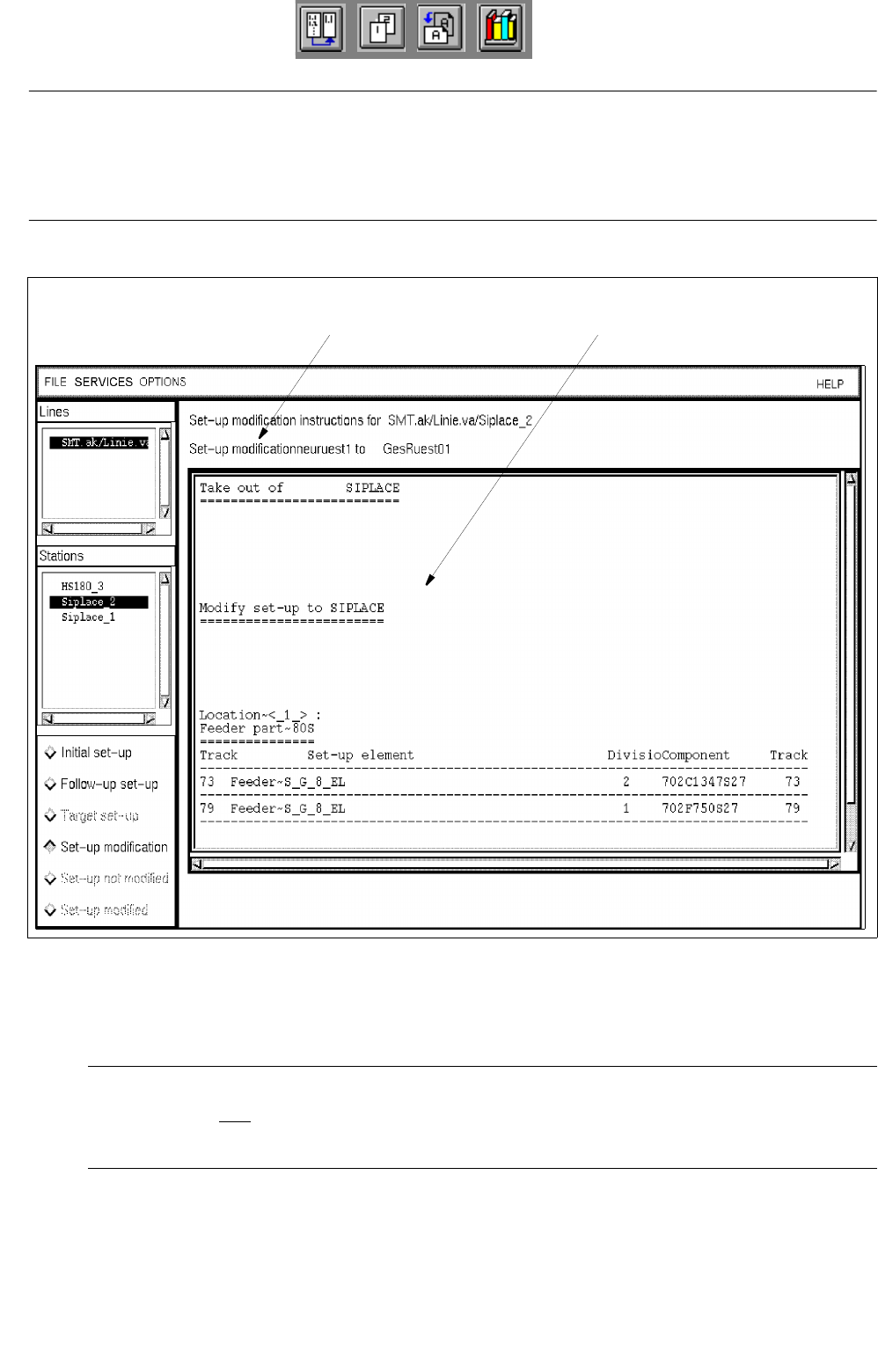
- Creating and viewing changeover instructions (Set-up modification) (see Fig. 14.5.3)
● Click on button Set-up modification.
Depending on the set-up changeover selection made from the selection window (see
Fig. 14.5.1), instructions for changeover - created by the Set-Up Modification Generator - from the
initial set-up to the selected set-up or a follow-up set-up created by the Set-Up Modification Gene-
rator (see
section 14.5.3.2) are displayed for the "Siplace_2" station.
When the Set-Up Modification Generator was opened by a station controller, changeover instruc-
tions for the changeover from the current set-up on the station to the follow-up set-up are created
and displayed.
User Manual Line Computer UNIX 14 Control / Control Modules
Software Version 502.xx 10/2000 Issue 14.5 Set-Up Modification Generator
473
I
t I I
NOTE
If during the creation of changeover instructions for a PCB-specific set-up one realizes that certain set-up
elements (e.g. components) are missing in the selected target set-up, an error message is displayed for each
of the missing elements.
Fig. 14.5.3 Display of Changeover Instructions for the Station "SIPLACE_2"
- Set-up not modified
NOTE
This button can only be selected when the Set-Up Modification Generator was opened by a station
controller (initiated by a requesting program).
The operator clicks on this button when he was not able to physically modify the selected station for
any reason.
message line display area