SIPLACE Line Computer UNIX.pdf - 第475页
User Manual Line Computer UNIX 14 Control / Control Modules Software Vers ion 502.xx 10/2000 Issue 14.5 Set-Up M odification Generator 473 I t I I NOTE If duri ng the creati on of cha ngeover in structi ons for a PC B-sp…

14 Control / Control Modules User Manual Line Computer UNIX
14.5 Set-Up Modification Generator Software Version 502.xx 10/2000 Issue
472
I
t I I
14.5.4.3 Command Area
NOTE
The buttons in the command area cannot be selected if Set-up or PCB-specific part of set-up has been
selected in the selection window.
In the following, the functions of the commands and the procedure for the execution of the commands are
explained with the "Siplace_2" station serving as an example:
- Viewing the initial set-up of the "Siplace_2" station
● From the selection field "Sublines" select the subline containing the desired "Siplace_2" station.
● Select station Siplace_2 from the "Stations" selection field.
● Click on button Initial set-up. The initial set-up for station "Siplace_2" is displayed in the display
area.
Only in cases where the changeover request originated from the station controller or the Data
Manager is this the current set-up, or when the operator has made his selection in the selection
window based on the current set-up.
- Viewing the follow-up set-up for the "Siplace_2" station
● Click on button Follow-up set-up.
The follow-up set-up for the "Siplace_2" station that was initíally selected from the FSB or created
by the Set-Up Modification Generator (see
section 14.5.3.2) displayed.
- Viewing the Target set-up for a station
● Click on button Target set-up.
The target set-up for the "Siplace_2" station initially selected from the FSB (see
section 14.5.3.2)
is displayed.
NOTE
The button Target set-up" can only be selected when Current set-up --> PCB-specific set-up or
Set-up --> PCB-specific set-up has been selected from the selection window, i.e. changeover
instructions for the production of a specific PCB type are to be generated.
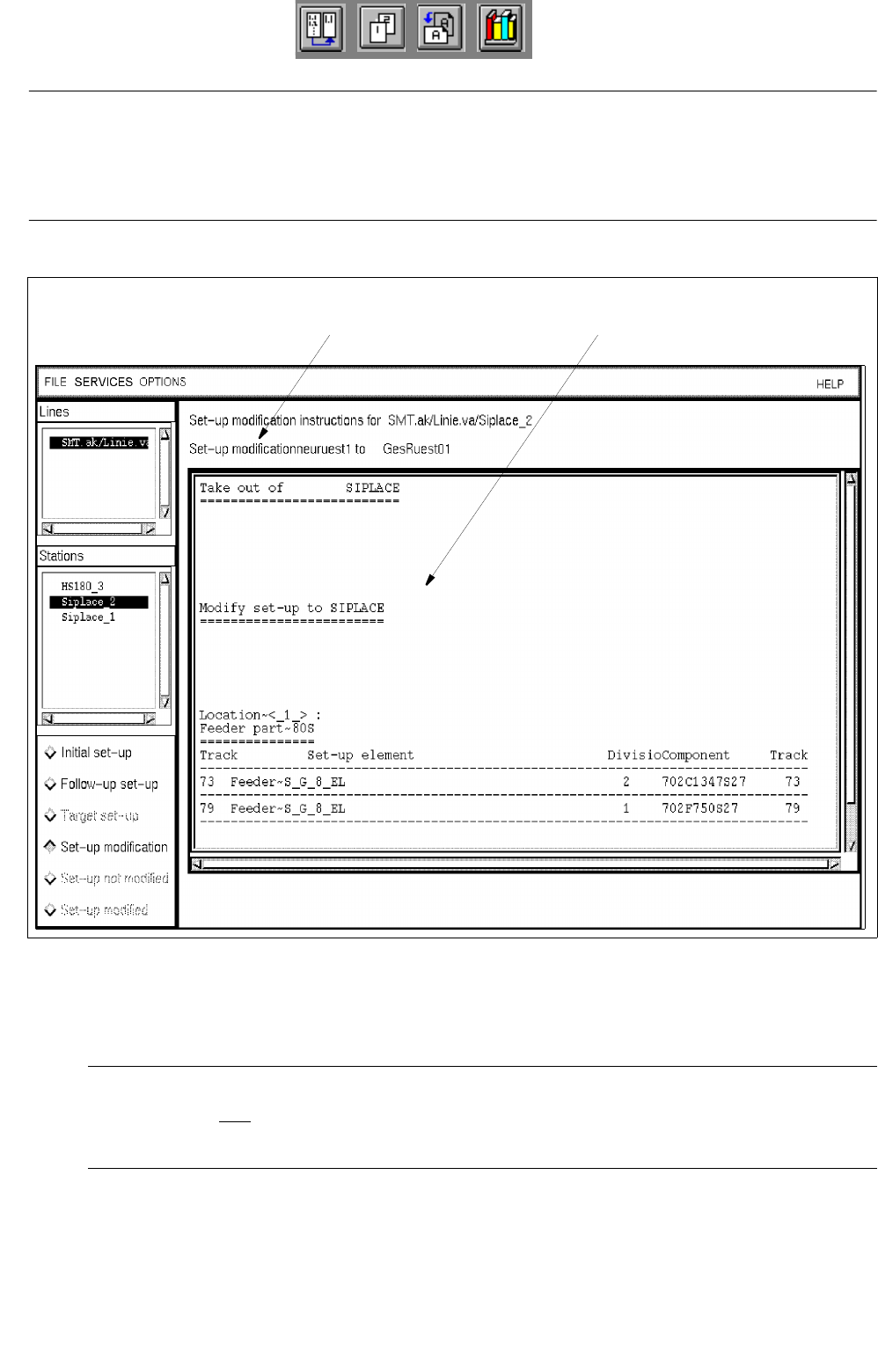
- Creating and viewing changeover instructions (Set-up modification) (see Fig. 14.5.3)
● Click on button Set-up modification.
Depending on the set-up changeover selection made from the selection window (see
Fig. 14.5.1), instructions for changeover - created by the Set-Up Modification Generator - from the
initial set-up to the selected set-up or a follow-up set-up created by the Set-Up Modification Gene-
rator (see
section 14.5.3.2) are displayed for the "Siplace_2" station.
When the Set-Up Modification Generator was opened by a station controller, changeover instruc-
tions for the changeover from the current set-up on the station to the follow-up set-up are created
and displayed.
User Manual Line Computer UNIX 14 Control / Control Modules
Software Version 502.xx 10/2000 Issue 14.5 Set-Up Modification Generator
473
I
t I I
NOTE
If during the creation of changeover instructions for a PCB-specific set-up one realizes that certain set-up
elements (e.g. components) are missing in the selected target set-up, an error message is displayed for each
of the missing elements.
Fig. 14.5.3 Display of Changeover Instructions for the Station "SIPLACE_2"
- Set-up not modified
NOTE
This button can only be selected when the Set-Up Modification Generator was opened by a station
controller (initiated by a requesting program).
The operator clicks on this button when he was not able to physically modify the selected station for
any reason.
message line display area
14 Control / Control Modules User Manual Line Computer UNIX
14.5 Set-Up Modification Generator Software Version 502.xx 10/2000 Issue
474
I
t I I
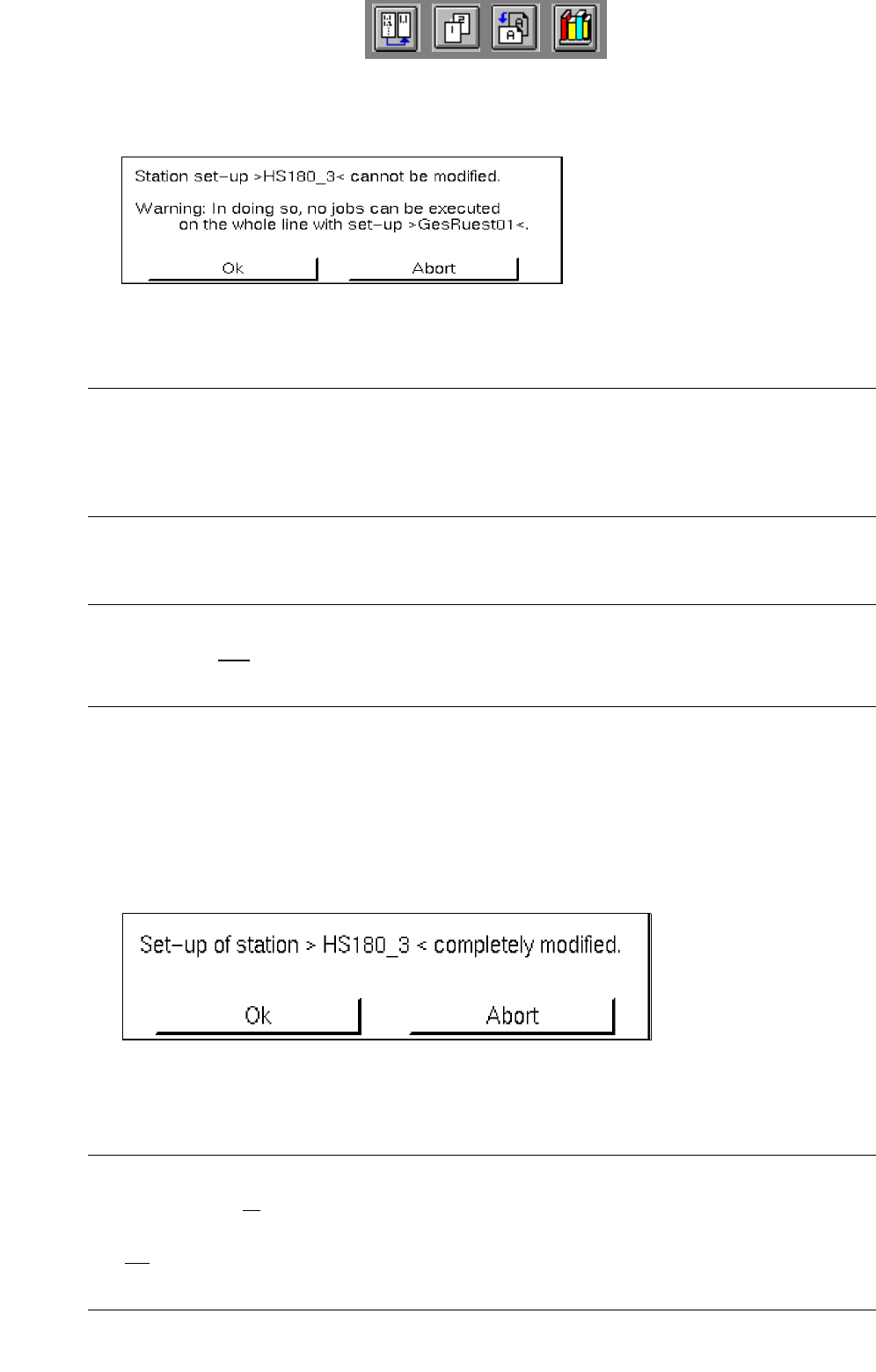
● Click on button Set-up not modified.
A dialog box containing the following warning message is displayed:
● Confirm the dialog box with Ok.
NOTE
If the set-up of only one station of the subline could not be changed over, it is not possible to produce
any PCB type on the entire subline for which the follow-up set-up displayed has been specified in the
job data for the production of this PCB type.
- Set-up modified
NOTE
This button can only be selected when the Set-Up Modification Generator was opened by a station
controller (initated by a requesting program).
This enables the operator to confirm the physical set-up changeover of a station.
This button is clicked on whenever a station selected from the selection field "Stations" has been reset
in accordance with the corresponding changeover instructions.
● Click on button Set-up modified.
If no station was selected, a corresponding prompt requesting the selection of a station is dis-
played, otherwise the following dialog box is opened:
● Confirm the dialog box with Ok.
The dialog box is closed and the station where set-up changeover has been completed (confir-
med) is no longer displayed in the selection field "Stations".
NOTE
When the set-up of all stations of the subline has been changed over and when the completed chan-
geover has been confirmed for each station, the Set-Up Modification Generator is automatically closed.
It is not possible to prematurely close the Set-Up Modification Generator via the menu using menu
option Quit!