SIPLACE Line Computer UNIX.pdf - 第481页
User Manual Line Computer UNIX 16 MaDaMaS Software Version 502.xx 10/2000 Issue 16.1 Introduction 479 I t I I 16 MaDaMaS 16.1 Introductio n Apart f rom tech nical ma lfunction s occurr ing in SMD pr oductio n, mainly pro…
15 Control / Error Message System User Manual Line Computer UNIX
15.1 Error Message System Software Version 502.xx 10/2000 Issue
478
I
t I I
- Filter
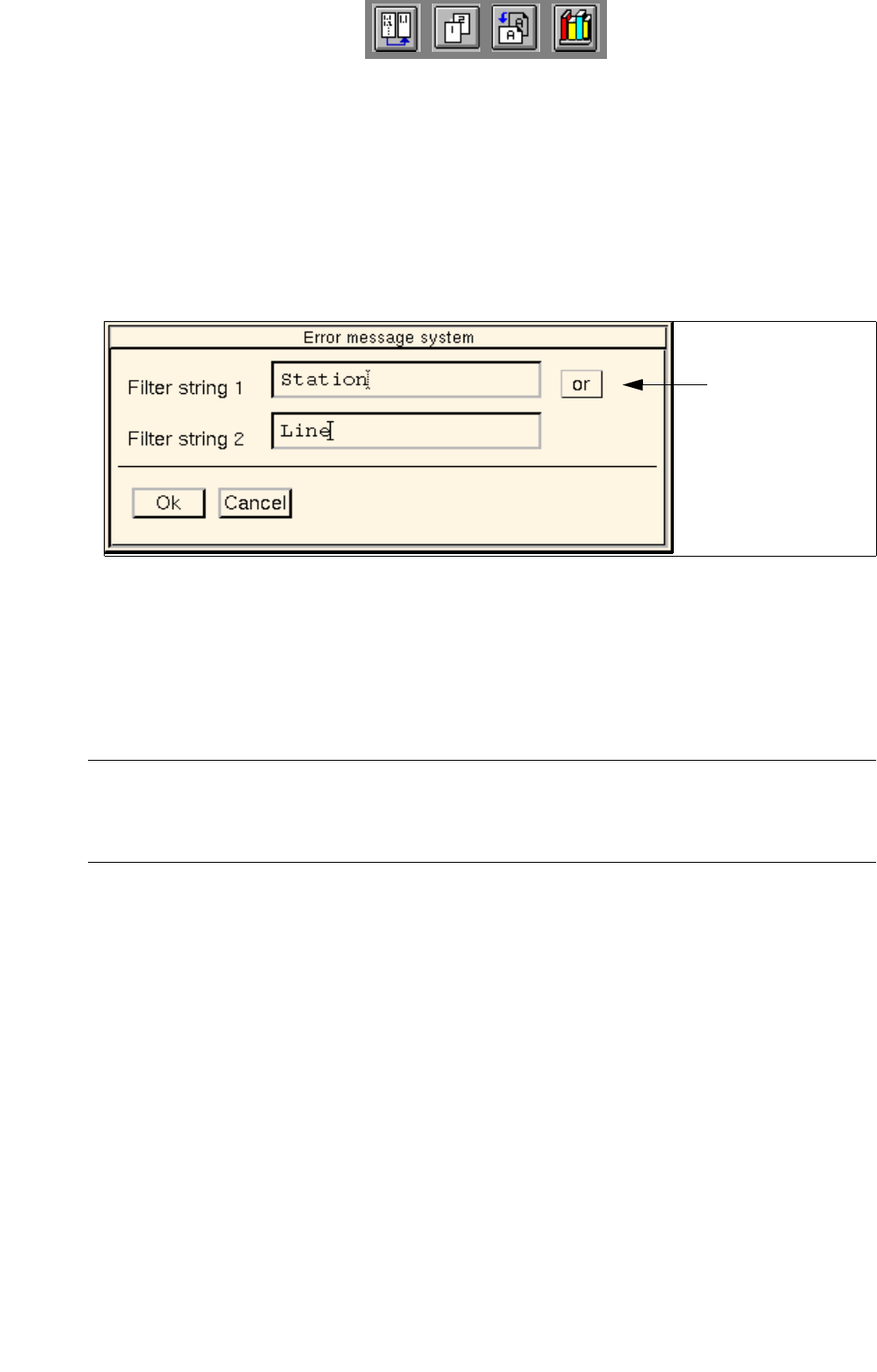
By means of this menu item it is possible - by entering up to two character strings which may may be
linked by an "and/or" operation - to limit the displayed messages according to given criteria.
° Filter means that the filter is deactivated.
¤ Filter means that the filter is activated.
● Click on FILE --> Filter --> Description on the menu bar.
The window below opens for entering the filter.
● In the "Filter-String 1" editing box enter the first character string according to which the displayed
messages are to be filtered.
● If necessary, enter a second character string in the "Filter-String 2" editing box.
● Click on the software switch ’and’ or ’or’ to select the desired operation.
NOTE
If "and" is set, the message texts are filtered according to the two character strings entered; if "or" is
set, the message texts are filtered either according to the first or the second character string entered.
● Confirm the filter settings with Ok.
● Click on FILE --> Filter --> on.
The set filter is now active.
To switch off the filter again,
● click on FILE --> Filter --> off.
Software switch
and/or operation

User Manual Line Computer UNIX 16 MaDaMaS
Software Version 502.xx 10/2000 Issue 16.1 Introduction
479
I
t I I
16 MaDaMaS
16.1 Introduction
Apart from technical malfunctions occurring in SMD production, mainly problems originating in the organizational
environment are likely to arise. These frequently result from missing components, inadequate information flow
and imbalances in the workload on the stations of a line. Prerequisite for the efficient elimination of these weak
spots is a profound knowledge of their underlying causes which can only be determined through continuous
automatic monitoring of the system.
The Ma
chine Data Management System (MaDaMaS) collects all relevant data of the line and offers the
possibility of a graphical representation of the production line status. It is thus possible - as soon as a PCB has
exited the line - to obtain a current display of the operational status of a complete line or individual stations.
This allows the user to swiftly take appropriate corrective action in the case of malfunctions, errors or
imbalances.
The present MaDaMaS version allows all logged production data to be evaluated taking one of the following
three time intervals (time base) as the basis:
- Evaluation from the time of the last set-up changeover to the present
- Evaluation from the time of the last PCB type changeover to the present
- Evaluation from the time of the last reset to the present
The evaluated data allow assessments to be made related to the following subject areas:
- placement performance (track errors, "good" placements)
- breakdown of the total processing time of a PCB into different status classes
(running, waiting, blocked, interrupted, failed)
- logging of automatically detected malfunctions
Each station automatically collects all data of "good" placements as well as track errors occurring during the
assembly of a PCB. Moreover, specific machine states are recorded with the aid of time meters.

16 MaDaMaS User Manual Line Computer UNIX
16.1 Introduction Software Version 502.xx 10/2000 Issue
480
I
t I I
16.1.1 Definition of the Times Collected by the Station
The station captures data both on malfunctions and normal machine statuses. Since several events can occur
simultaneously, priorities are assigned to the individual events. The events are classified into 4 groups with
group 4 having the highest and group 1 the lowest priority.
16.1.1.1 Type of Events
The events are recorded and then displayed on the MaDaMaS evaluation user interface (see section 16.2.8.5)
under the terms (causes) explained in the following description of the individual groups.
Group 1 Interruptions:
This group contains all shutdown causes logged on the machine that resulted from operator interven-
tion.
Within group 1 the malfunction occurring first is always given top priority. As long as this malfunction
is not eliminated (by pressing the Start button or Continue placement), any subsequently occurring
malfunctions are not taken into account.
Type of event: Status:
Abort button actuated Interrupted
Single function / Vision Menu Interrupted
Stop button actuated InterruptedI
Emergency stop actuated / compressed air failure Interrupted
Step mode active Interrupted
Protective cover open Interrupted
Waiting for Start button Interrupted
Waiting for Control ON Interrupted
Waiting for protective cover to be closed Interrupted
Group 2 Machine States During Normal Operation:
This group contains all states the machine is able to assume during a normal placement (glueing) cycle.
Within group 2 the status is given highest priority that has been assumed last. The currently active
status is thus terminated.
Type of event: Status:
Data supply Waiting
Waiting for PCB in input conveyor Waiting
Waiting for PCB in center conveyor Waiting
Wait until output conveyor/center conveyor is clear Blocked
Placement / glueing Running