SIPLACE Line Computer UNIX.pdf - 第540页
17 Practical Tips on Using the LC UNIX User Manual Line Computer UNIX 17.3 Description of Com ponents and PC Bs Software Version 5 02.xx 10 /2000 Issue 538 I t I I FIL E Save FIL E Save FILE Quit Package form descripti o…
User Manual Line Computer UNIX 17 Practical Tips on Using the LC UNIX
Software Version 502.xx 10/2000 Issue 17.3 Description of Components and PCBs
537
I
t I I
22. Activate a button for the line or a feeder part, here: Line.
The entire line is highlighted in light-green.
23. Click on the appropriate feeder on the list of placeable feeders, here: FD~ S_G_12.
The feeder is transferred to the Feeder selection field.
24. In the Feeder Editor click on the Save option on the FILE menu.
The data are now saved.
25. Click on the Quit option on the FILE menu.
The Feeder Editor is closed.
26. In the Package Form Editor click on the Quit option on the FILE menu.
The Package Form Editor is closed. The description of package form 1501 is terminated.
B) Description of a regular FDC using package form 1502 as an example
To open the Package Form Editor for package form 1502, proceed as follows:
27. On the desktop click on the icon of the Package Form Editor .
The file selection window is opened.
28. Activate the Selection editing field.
29. Enter the package form number, here: 1502.gf and click on the OK button.
The Package Form Editor containing the Package form type selection window is opened.
To define the package form type „regular FDC“ for package form 1502, proceed as follows:
30. Click on the Regular FDC type in the Package form type selection window.
The selection window is closed.
31. In the Package Form Editor click on the Comment editing field, enter a unique comment, here: TSOP32.
To enter the dimensions for package form 1502, proceed as follows:
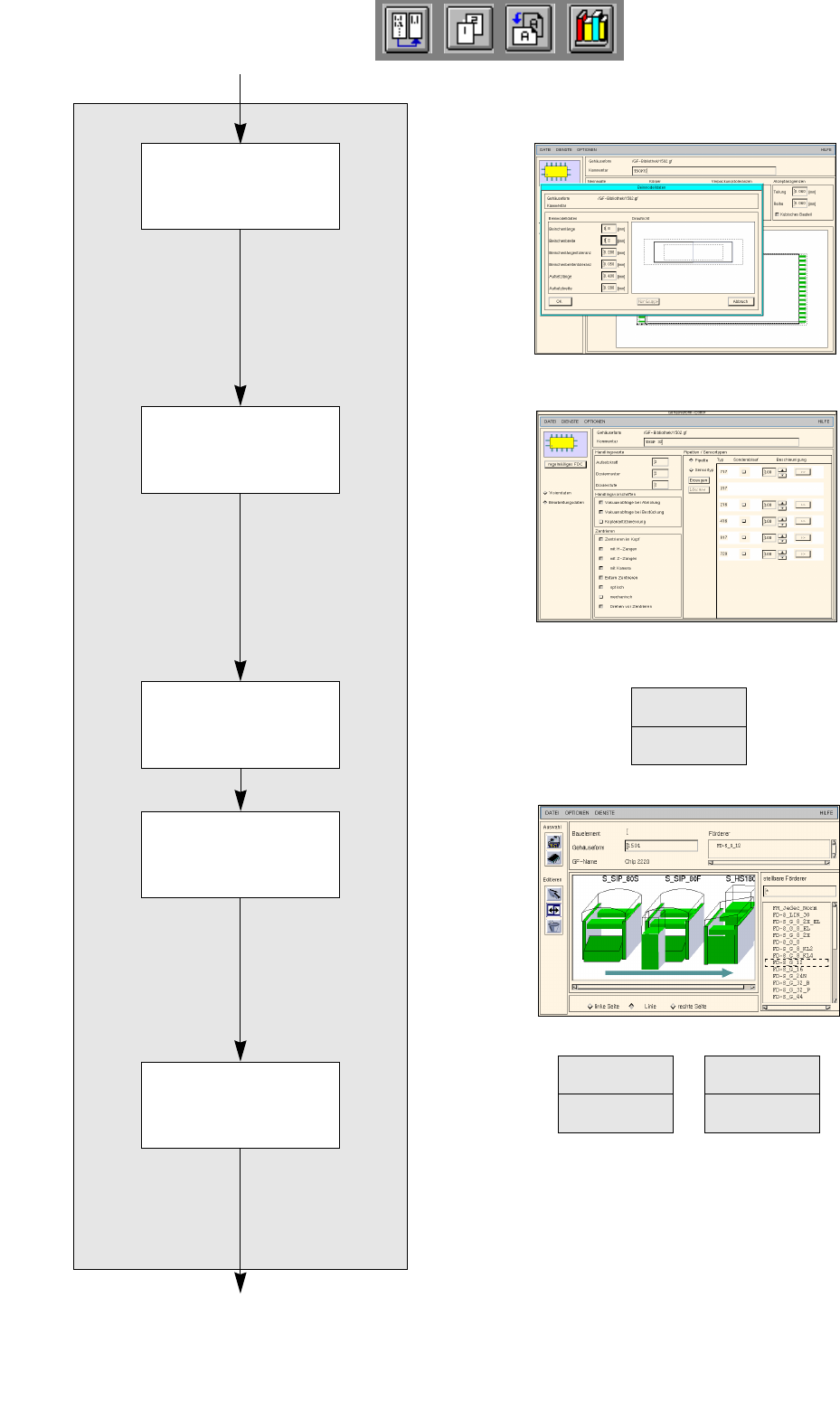
32. In the Nominal dimensions editing area enter the dimensions of the package form with pins and confirm
by pressing the Enter key, here: see chart:
The tolerances are entered automatically.
The package form is displayed with the tolerance range.
33. In the Body editing area enter the dimensions of the package form without pins and confirm by pressing
the Enter key, here: see chart:
(These entries are only required for the display).
The display of the package form is adapted.
34. In this example, the default values of the editing areas Packaging tolerances and Features are adopted,
no entries are required.
To create the pin groups for package form 1502, proceed as follows:
35. Click on the Create button.
The Group data window is opened. At the top and bottom side of the component a predefined pin group
with three pins each (gray areas) is displayed.
36. Overwrite the default values in the editing fields with the pin group data for package form 1502 (see dis-
plays in On-line Help) and confirm by pressing the Enter key, here: see chart:
Every time the Enter key is pressed, the display of the pin group (gray areas) is updated, the pin groups
are now displayed at the left and right sides of the component.
37. Click on the OK button.
The Group data window is closed.
X
(Width H
D
)
Y
(Length E)
Z
(Height A)
20 8 1.2
X
(Width D)
Y
(Length E)
18.4 8
No. of pins Spacing Pin angle
X (BG
Off
) Y (BG
Off
)
16 0.5 0 9.6 0
17 Practical Tips on Using the LC UNIX User Manual Line Computer UNIX
17.3 Description of Components and PCBs Software Version 502.xx 10/2000 Issue
538
I
t I I
FILE
Save
FILE
Save
FILE
Quit
Package form description for package form 1502
continued from page 17-24
continued on page 17-28
Allocating a package
form to a feeder
Defining pin model
Entering handling
data
Saving package form
to feeder allocation
Saving package form
data
User Manual Line Computer UNIX 17 Practical Tips on Using the LC UNIX
Software Version 502.xx 10/2000 Issue 17.3 Description of Components and PCBs
539
I
t I I
To define the pin model for package form 1502, proceed as follows:
38. Select one of the two pin groups by clicking on it.
39. Click on the Pin/Ball button.
The Pin model data window is opened.
40. Enter the pin model data,
confirm by pressing the Enter key, here:see chart:
The automatically calculated values of the other editing fields can be adopted.
Every time the Enter key is pressed, the display of the pin model is updated.
41. Click on the OK button.
The Pin model data window is closed. The package form with pins is displayed.
To enter the handling data for package form 1502, proceed as follows:
42. Activate the Handling data button.
The screen for entering the handling data is displayed.
43. Activate the Nozzle button in the command area.
44. Click on the Create button.
The Nozzle type selection window containing a list of the nozzle types is loaded.
45. Click on a nozzle, here: 416.
The selection window closes, the nozzle is transferred to the view area.
46. Activate the Sensor type button.
47. Click on the Create button.
The Sensor type selection window containing a list of the sensor types is opened.
48. Click on a sensor type, here: 7.
The selection window closes, the sensor type is transferred to the view area.
49. In the ’Handling values’ editing area, enter the applicable value in the Placement force field, here: 2.
50. In the ’Centering’ selection box, activate the applicable buttons, here: External centering.
51. In this example, the preselected settings for the handling values, the handling instructions and the ’Acce-
leration’ special handling option can be accepted as they are. No changes are required.
52. Click on the Save option on the FILE menu.
The data are now saved.
To allocate a feeder to package form 1502:
53. Click on the Starting Feeder Editor option on the SERVICES menu.
The Feeder Editor is opened.
54. Activate the Allocate icon .
55. Activate a button for the line or a feeder part, here: Line.
The entire line is highlighted in light-green.
56. Click on the appropriate feeder on the list of placeable feeders, here: FD~S_G_32_III.
The feeder is transferred to the Feeder selection field.
57. In the Feeder Editor click on the Save option on the FILE menu.
The data are now saved.
58. Click on the Quit option on the FILE menu.
The Feeder Editor is closed.
59. In the Package Form Editor click on the Quit option on the FILE menu.
The Package Form Editor is closed.
Pin length L
1
Pin width b
0.8 0.2