00197191-02_IM_SIPLACE_Pro_10.1_EN.pdf - 第15页
2 System components and configuratio ns Installation Manual Edition 09/2012 SIPLACE Pro 10.1 13 2.2.1.1 Logical Layout When the particip ating computer is well integrated into the customer network, then it is possible to…

Installation Manual 2 System components and configurations
SIPLACE Pro 10.1 Edition 09/2012
12
2.2 Standard Configuration (Client/Server)
If installing on separate computers, you work with one computer as the dedicated server and one
or more other computers as clients.
Example of a client/server configuration:
MS SQL Server, SIPLACE Pro Database, Line Control Server and SIPLACE Pro Server are in-
stalled on the server computer. One or more clients can work with this server computer. SIPLACE
Pro Desk, SIPLACE Pro Interface and Line Control GUI are installed on the client computers.
Note
This configuration is not mandatory. For example, you can also install Line Control Server on a
client computer or a separate computer.
It is also possible to change the configuration subsequently. 2
Note
Installation on separate computers cannot be performed via the network. Install the individual
components on separate computers by calling up the setup function for the components locally on
each destination computer. 2
2.2.1 General
– In this configuration, the Service Department integrates a SIPLACE server into the cus-
tomer's network. The customer has to order integration resources for this to be done.
– The customer's network must meet certain requirements.
– This configuration permits clients of the various SIPLACE software products to be integrated
into the customer's network.
– A new SIPLACE Pro Server will be installed and the database of a SQL based SIPLACE Pro
Server will be migrated.
2 System components and configurations Installation Manual
Edition 09/2012 SIPLACE Pro 10.1
13
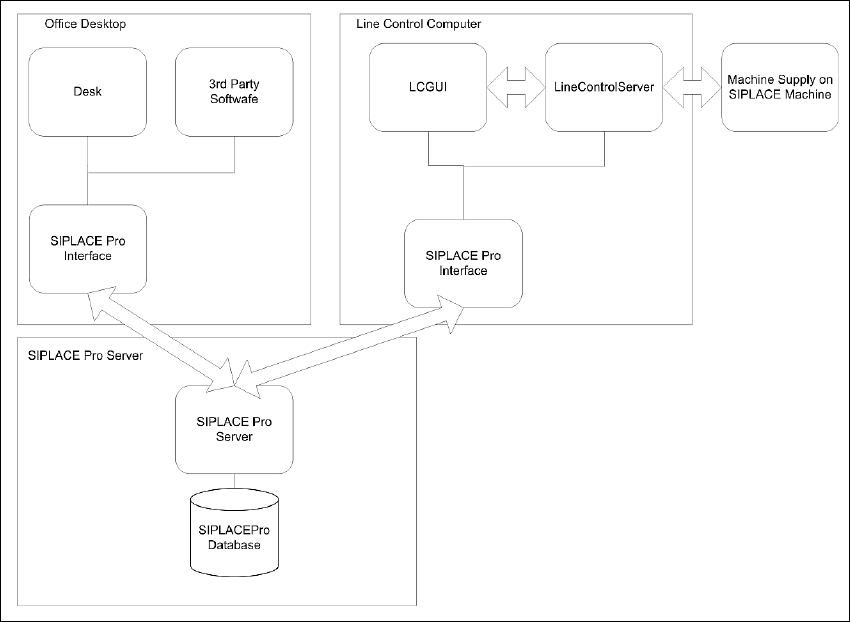
2.2.1.1 Logical Layout
When the participating computer is well integrated into the customer network, then it is possible
to split SIPLACE Pro client components onto different computer to suit the customer needs. Here
we have a dedicated SIPLACE Pro Server and Client operating as Programming System or Line
Control System.
2
Fig. 2.2 - 1 Standard Configuration - Logical Layout
Installation Manual 2 System components and configurations
SIPLACE Pro 10.1 Edition 09/2012
14
2.2.1.2 Physical Layout
2
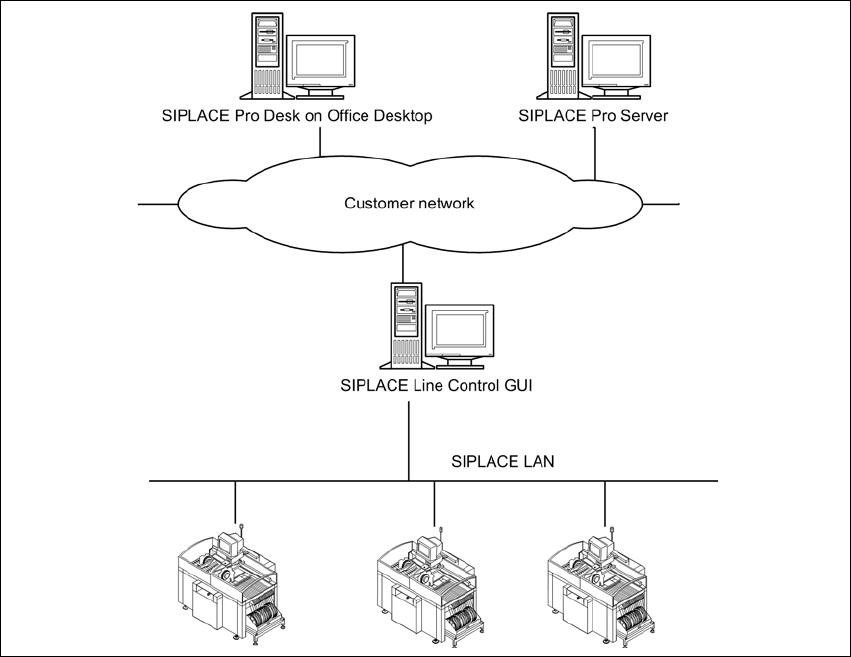
Fig. 2.2 - 2 Standard Configuration - Physical Layout
2.2.2 Characteristics
– SIPLACE Pro Server will be installed on Windows Server Version.
– SIPLACE Pro Server will be migrated into customer domain configuration.
– SIPLACE Pro Client machines can be connected, if they are either in the same domain or in
a domain with a trust relation to the domain where the server resides.
– The SIPLACE Pro server must be part of the customer network.
– A WINS or DNS Server from the customer network infrastructure is necessary.
– If the customer network is segmented by routers, it must be possible to integrate the routing
device into customer routing configuration.
– Security inside SIPLACE Pro is possible.
– Operation of the SIPLACE Pro systems depends on the customer infrastructure.
– Using a router of a Windows PC as a routing device to separate network traffic from the SI-
PLACE LAN from the customer LAN.