Panasonic NPM Feeder 操作手册.pdf - 第86页
Intelligent Feeder Check Unit 6. 1 iTFMJSj^tm&lT - 6.1. 7 «W»gM»HfrS S IT F chec k resul t conten t i s Searc h ; i Petio a [2005/06/0 7 f Pas t on e wee k r Pas t on e mont h T o ! 2005/06/0 7 Case l Case2 : EJW2A-0…
Intelligent
Feeder Check
Unit
4.2 $m?jy£
3IHChecker
Ver.1.00.00 Install Microsoft Internet Explorer
Fie
Ed*
View Favorites Tools Help
'-•p--yy-
\&j
E:\HtmT\FrevVire.htrrJ
*
Q
Go
mm***.
11
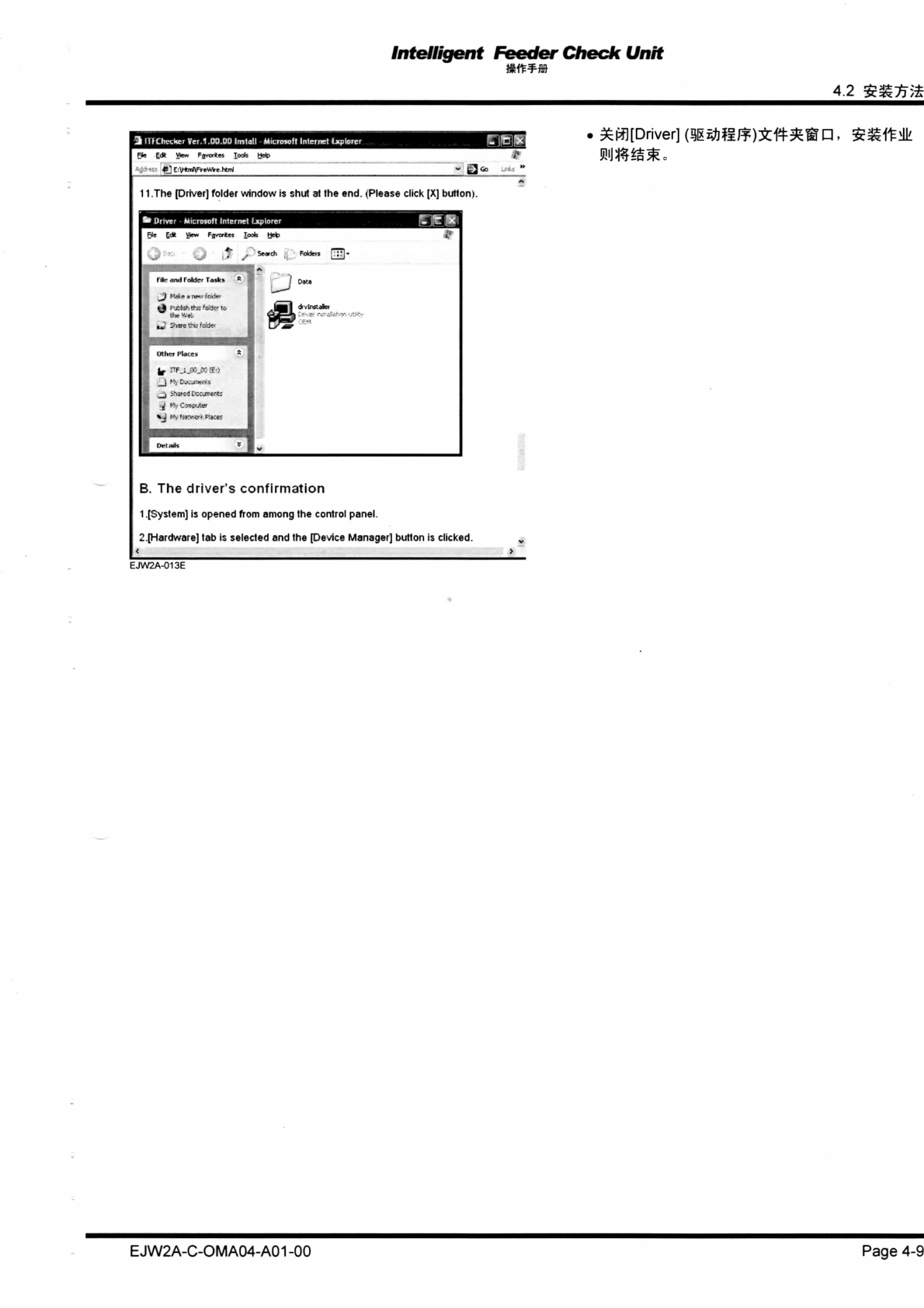
.The [Driver] folder window is shut at the end. (Please click [X] button).
*•
Driver
-
Microsoft Internet
Explorer
WWM¥
RJe
£0*
View Favorites Toots Help
Jf
Search Folders j •.'
j
-
f lie <iiw|
f
oW'r: FrtSks
*
1
Data
rrj
hMftrtttflMftfto
.IfVB
1
r>v
Ins?
after
ir
"f.;.--Vso
• rVCw^nertt
_j irared tvccjrrar*:
^ r*yCTOjter
*J
r*.
N»-*or*
F-^CfT
Del rW>
V
B. The driver's confirmation
1.
[System] is opened from among the control panel.
2.
[Hardware] tab is selected and the [Device Manager] button is clicked.
EJW2A-013E
EJW2A-C-OMA04-A01 -00 Page 4-9
Intelligent
Feeder Check
Unit
6.1 iTFMJSj^tm&lT-
6.1.7
«W»gM»HfrSS
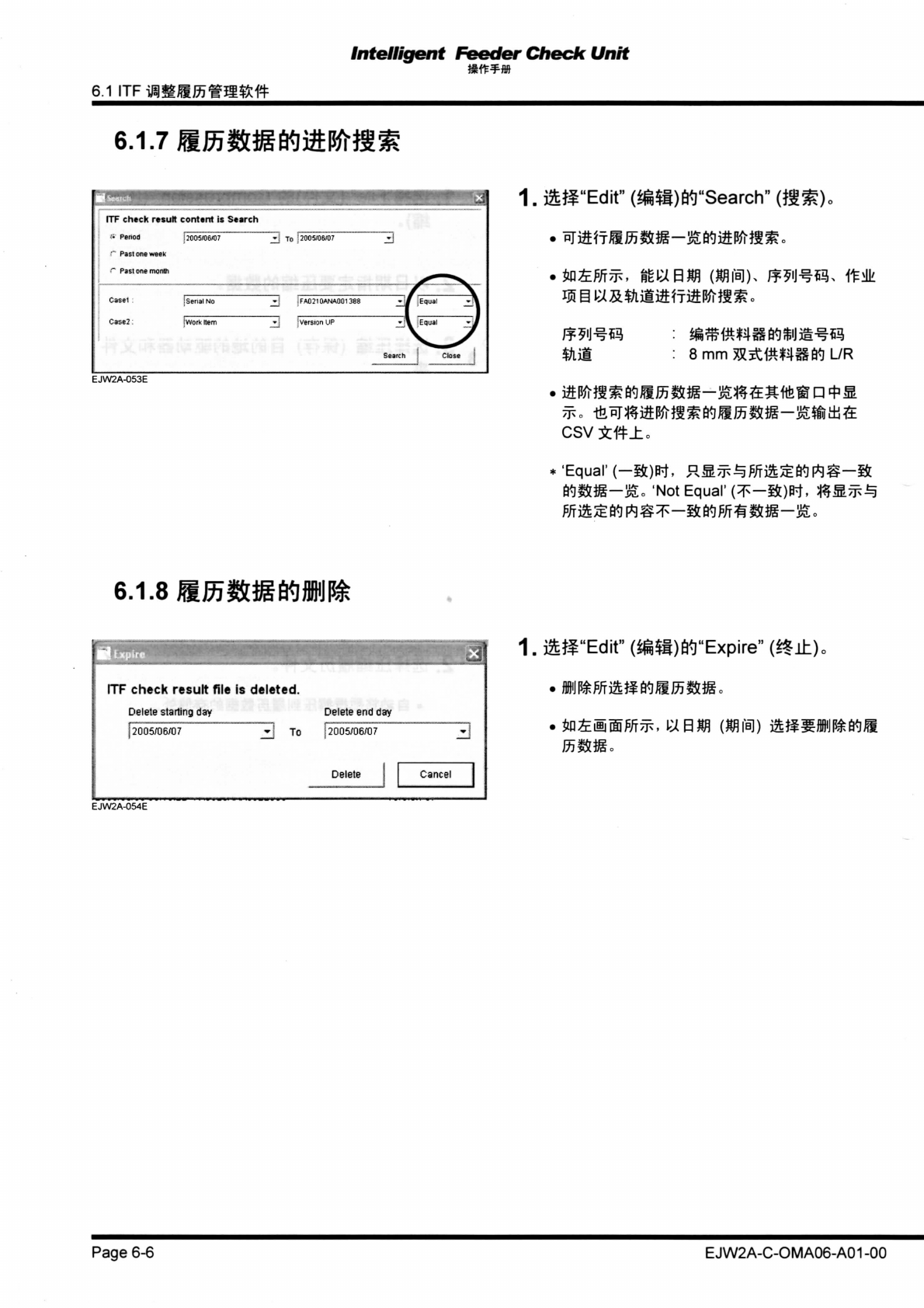
ITF check result content
is
Search
;i Petioa [2005/06/07
f
Past one week
r Past one month
To
!
2005/06/07
Casel
Case2:
EJW2A-053E
i Serial
No
[Work Hem
!FA02I0ANA001388 [Equal
[Equal
1.
iSfe^-Edit"
(^$I)^"Search"
(ft^)0
8 mm JR^tt^lSW
L/R
csv*#±.
•'Equal'(-ifc)W. RS^fln££Wrtg-Bt
W^-^o 'Not Equal"
(*-S0*t.
&MJp*i
6.1.8
aW^Wffl^
ITF
check
result
file is
deleted.
Delete starting
day
[2005/06/07
- To
Delete end day
[2005/06/07
Delete
|
Cancel
1.
ftg-Edtf
(*6$t)M"Expire"
(*t±).
EJW2A-054E
Page 6-6
EJW2A-C-OMA06-A01 -00
Intelligent
Feeder
Check
Unit
4.2 $£7r;£
2.
mixsm
3
nrCbedtei Ver.1.00.00 Install
•
Microsoft
Internet
Explorer
File Edit View Favorites Tools
Hop
f-.-;;r.'.~:-
\l
0 1.
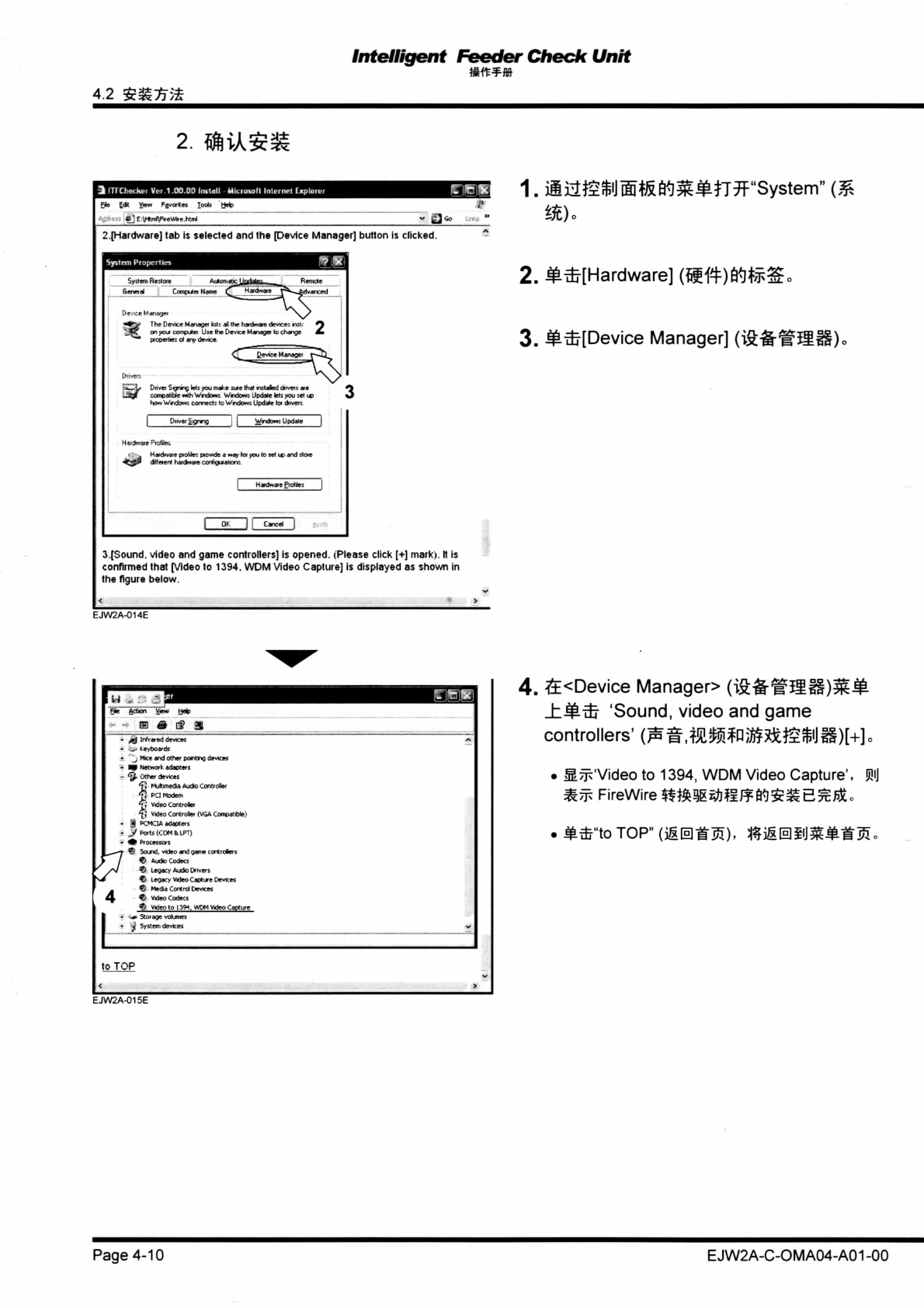
iia^SiJ®tefi^^tT?r:''Systerri''
2.[Hardware] tab
is
selected and the pevice Manager] button
is
clicked.
System
Properties
•jy;tem Re:lc*e AuKi-iiVr ''.yi^e.-.
<
F••e?.-.:«e
&ene>ei
Cnrxii«
Nanv Hajdwaie ^^^^rtv.vn-.l
•#*V The Device Manager tr.tr all the hardware device.- n;t<-
*y
^.*C on ycut compLite* Use the Device Manage* to change
pfopertier
oi
any device.
2.
j£f£[Hardware]
3.
^[Device Manager] (iftfcgaS).
Diiver Signing let; you make ;t*e that nrjaled driven aie
Haidrvcite ptotile: ptovide
a
way let you to sal up and ;toie
dtfeient hatdwaie conlguiaticrr..
HatdwaftPtoltlei
3.[Sound, video and game controllers]
is
opened. (Please click [+] mark).
It is
confirmed that [Video
to
1394. WDM Video Capture]
is
displayed
as
shown
in
the figure below.
EJW2A-014E
H
v "
:Z
m
Fi*e Action View Help
IF.
3 i
•
'BBS
j Infrared devices
-•
keyboards
j Mice and other poncing devices
pi Network adaoters
\r devices
lfl Multimedia Aucfci Controtei
•Jj
PCI Modem
m Video Controler
Video Controler (VGA Corrcatfcle)
| DOiCIA adapters
f Ports (COM
&.
LPT)
> Processors
• Sound, video and gar
<?> Aucfco Codecs
&j
Legacy Audio Drivers
Legacy Video Capture Devices
Media Control Devices
9j
Video Codecs
Video to 139^ WDM Video Capture
•>
Storage volumes
I
System devices
to TOP
4.
£<Device
Manager>
(igfef
SSS)^
±.||-DJ
'Sound,
video and game
controllers'
MW$W^ViW)\+\.
. MJjVVideo to 1394, WDM Video Capture',
®J
^TF
FireWire
mmmmM£%E%!$.o
. mfJj"toTOP" (jr&mm^). l§i£@§Um£-i"35o
EJW2A-015E
Page 4-10
EJW2A-C-OMA04-A01 -00