00195655-04_SM_X-Series_FSE_en.pdf - 第53页
Service Work 3.3.5 Replacing the X Drive (Primary) [03039726- xx] Gantries Service Manual (internal ver sion) SIPLACE HF and X Series 53 Installing the scale ► Insert the new scale behind the head plate. ► Attach the new…
Service Work
Gantries 3.3.4 Replacing the X Axis Scale [03003745-xx]
52 Service Manual (internal version) SIPLACE HF and X Series
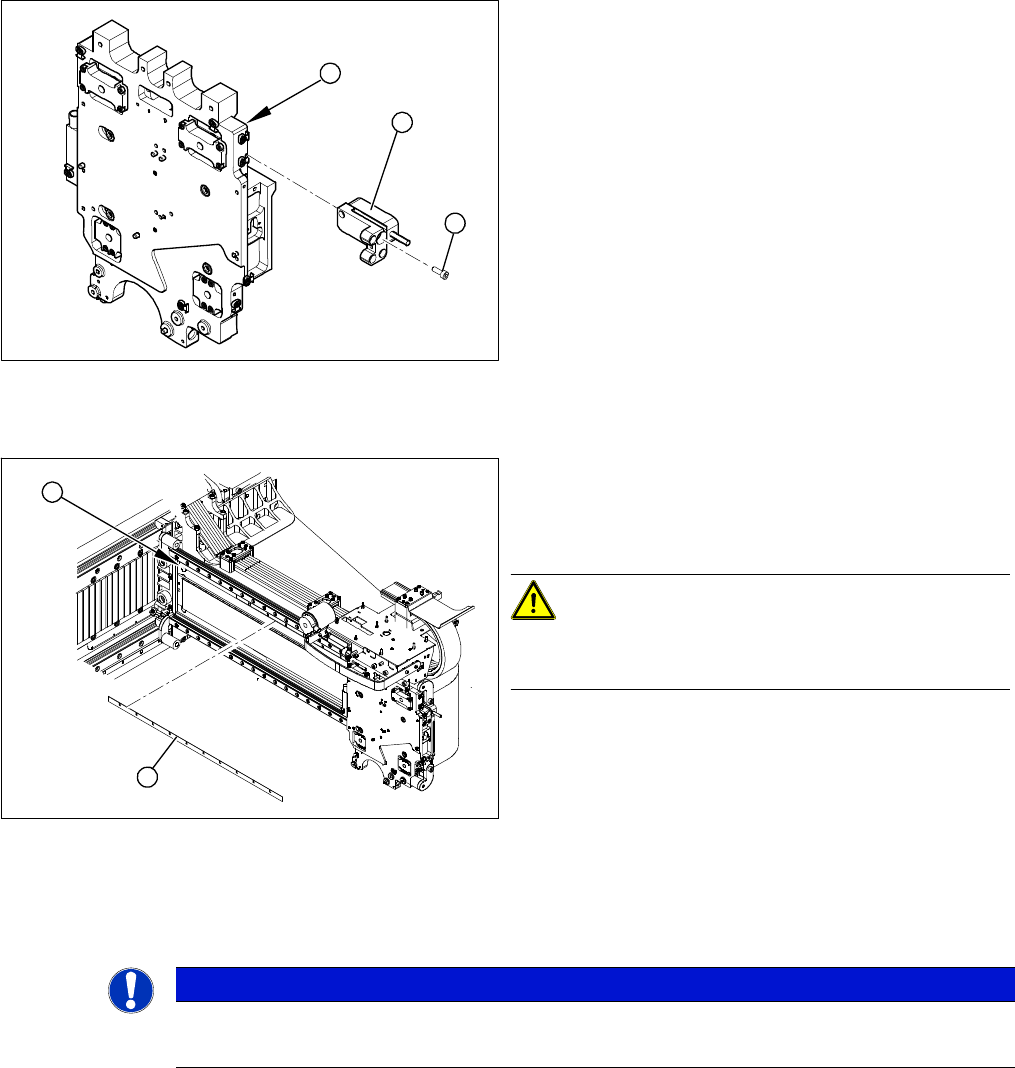
Removing the incremental encoder
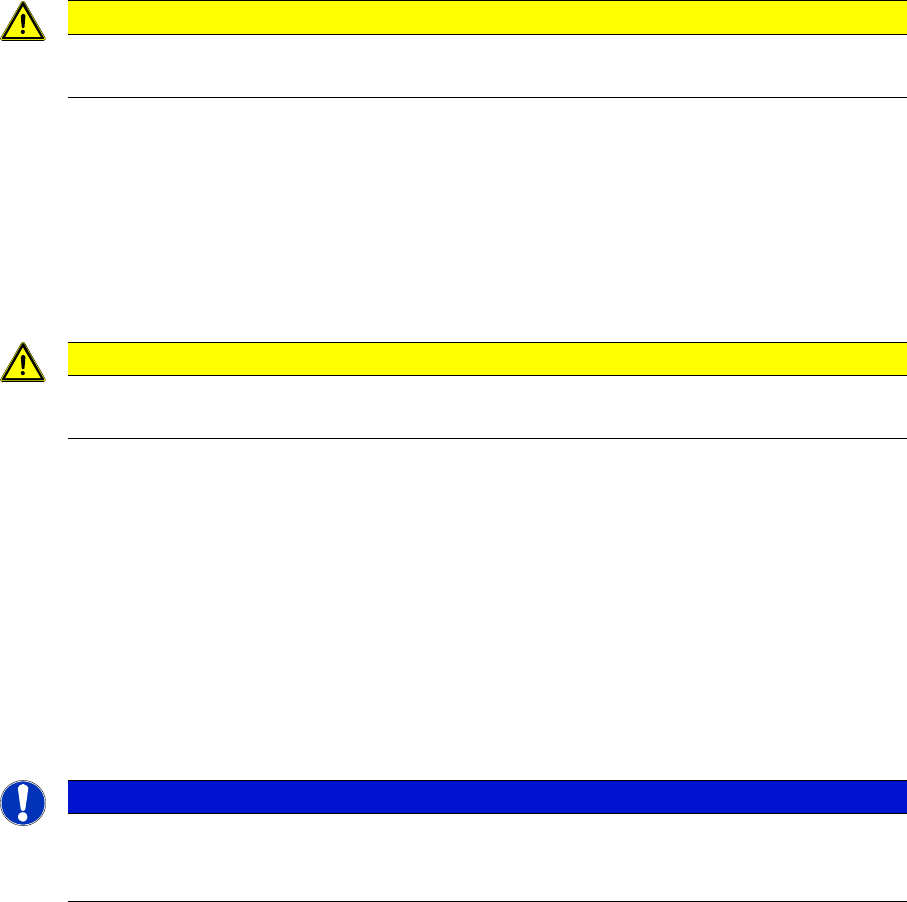
Removing the scale
► Place the new scale on a clean work surface.
► Attach the double-sided adhesive tape to the back of the new scale. The surface to be fixed down
must be clean and free of grease.
1. Head plate - front view
2. Incremental encoder
3. 3 x fastening screws
► Loosen the three screws (3) fastening the incremen
-
tal encoder (2) of the X axis and carefully lift off the
incremental encoder.
► Temporarily fasten the incremental encoder in a suit
-
able position.
3
1
2
► Mark the original position (1) of the scale (2) with a
scribing iron. This ensures that the new scale can be
fixed in the exact position to the right and left end
stop.
CAUTION!
Do not damage the gantry.
Make sure that the gantry coating is not damaged.
► Carefully lever the scale upwards on one side with
the scriber and then gently extract the scale.
► Remove any adhesive residues with ethanol. The
surface to be fixed down must be clean and free of
grease.
2
1
NOTICE
Cover strip on scale
► A cover strip protects the front of the scale. Remove this cover strip AFTER installation.
Service Work
3.3.5 Replacing the X Drive (Primary) [03039726-xx] Gantries
Service Manual (internal version) SIPLACE HF and X Series 53
Installing the scale
► Insert the new scale behind the head plate.
► Attach the new scale exactly to the lay-on edge on the gantry.
► Pull part of the cover strip off the adhesive strip and place the front end of the scale on the marked
position. The scale must be positioned at the lay-on edge.
► Now pull away the cover strip "bit by bit" and firmly fix the scale (to about halfway along the gantry).
► Move the head plate so that you can fix the rest of the scale.
► Press the scale down with a soft, clean cloth.
► Carefully pull off the cover strip.
► Use ethanol to wipe the scale and remove any adhesive residues or dirt.
► Fit the incremental encoder. This procedure is described in Chapter "Replacing the X Axis Incremen
-
tal Encoder".
See also
3.3.6 Replacing the X Axis Incremental Encoder [ ➙ 58]
3.3.5
3.3.5 Replacing the X Drive (Primary) [03039726-xx]
Replacing the X Drive (Primary) [03039726-xx]
Required equipment
▪ Service pack X drive [00377437-xx] for SIPLACE HF/X machines
–X drive
– 4 x dismantling screws
– 8 x lock screws (M4x60)
– Templates for TwinHead and DLM2
– 6 grub screws M4x6-ST
– Plastic thickness gauge 0.4 mm (approx. 50 cm long and 10 cm wide)
– Foam rest 500 mm x 50 mm x 20 mm
▪ Xenon flashlight (non-magnetic)
▪ Torque wrench with socket-head adapter
▪ Loctite 241
CAUTION
Take care when handling the incremental scale.
Do not touch the incremental tracks with bare fingers.
CAUTION
Make sure that no blisters or uneven areas are formed.
If this does occur, the scale must be removed and replaced with a new scale.
NOTICE
Only for HF machines up to machine number A219.
The service pack for the X drive [00375245-01] only fits HF machines up to machine number
A219.
Service Work
Gantries 3.3.5 Replacing the X Drive (Primary) [03039726-xx]
54 Service Manual (internal version) SIPLACE HF and X Series
Removal
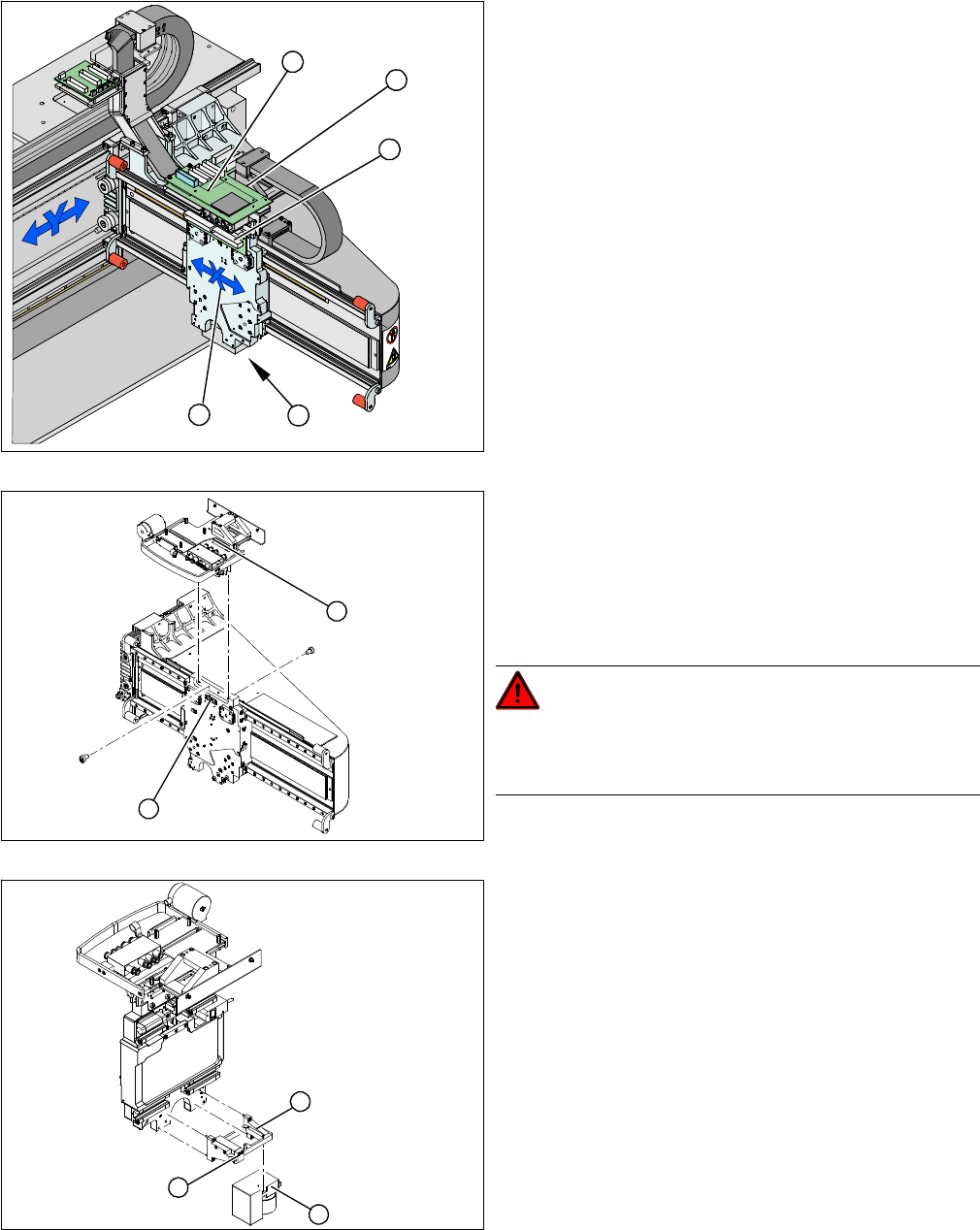
1. X drive (primary) with head mount
2. X mount with trailing cable
3. Head adapter board
4. Mount with PCB camera
5. Head board
► Dismantle the placement head.
► Remove the head adapter board (3). The X mount fix
-
tures (2) are now accessible.
► Unplug the following cables from the head board (5)
and remove them from the X mount (2):
⇨ X motor cable
⇨ The Y axis incremental encoder
⇨ Temperature sensor
► Unplug the proximity switch cable (2) and pull it for
-
wards, out of the head mount.
► Undo the 8 screws (4 x at front/ 4x at back) fastening
the X mount (1) and pull these up and out, together
with the trailing cable.
► Fasten the X mount at a suitable point.
DANGER!
Make sure that the flat ribbon cable and the pneumatic
hoses are not rubbed against any parts or folded. Look
out for sharp edges.
► Undo the 4 screws fastening the PCB camera mount
(1). Remove the complete unit, including PCB cam
-
era (3) and damping bracket (2).
► Fix the mount (1) to a suitable point on the machine
base. Take care not to damage the camera.
5
5
1 4
3
2
2
1
1
3
2