00195655-04_SM_X-Series_FSE_en.pdf - 第77页
Service Work 3.4.2 Replacing the Stepping Motor of the Width Adjustment Syst em [00367174-xx] Modular PCB Conveyor System Service Manual (internal ver sion) SIPLACE HF and X Series 77 Removal/Installation ► Unplug the co…
Service Work
Modular PCB Conveyor System 3.4.2 Replacing the Stepping Motor of the Width Adjustment System [00367174-
76 Service Manual (internal version) SIPLACE HF and X Series
► Tension the drive toothed belt.
Position the measuring point of the belt tension device at the strand center in placement area 1 of
the drive toothed belt.
► Set the tension of the drive toothed belt according to the following values.
3.4.1.1
3.4.1.1 Restoring the Parallelism of the Adjustment Unit
Restoring the Parallelism of the Adjustment Unit
If a recirculating spindle has still twisted out of position with an adjustment unit (preventing the conveyor
from running parallel), the following fix can be performed:
3.4.2
3.4.2 Replacing the Stepping Motor of the Width Adjustment System [00367174-xx]
Replacing the Stepping Motor of the Width Adjustment System [00367174-xx]
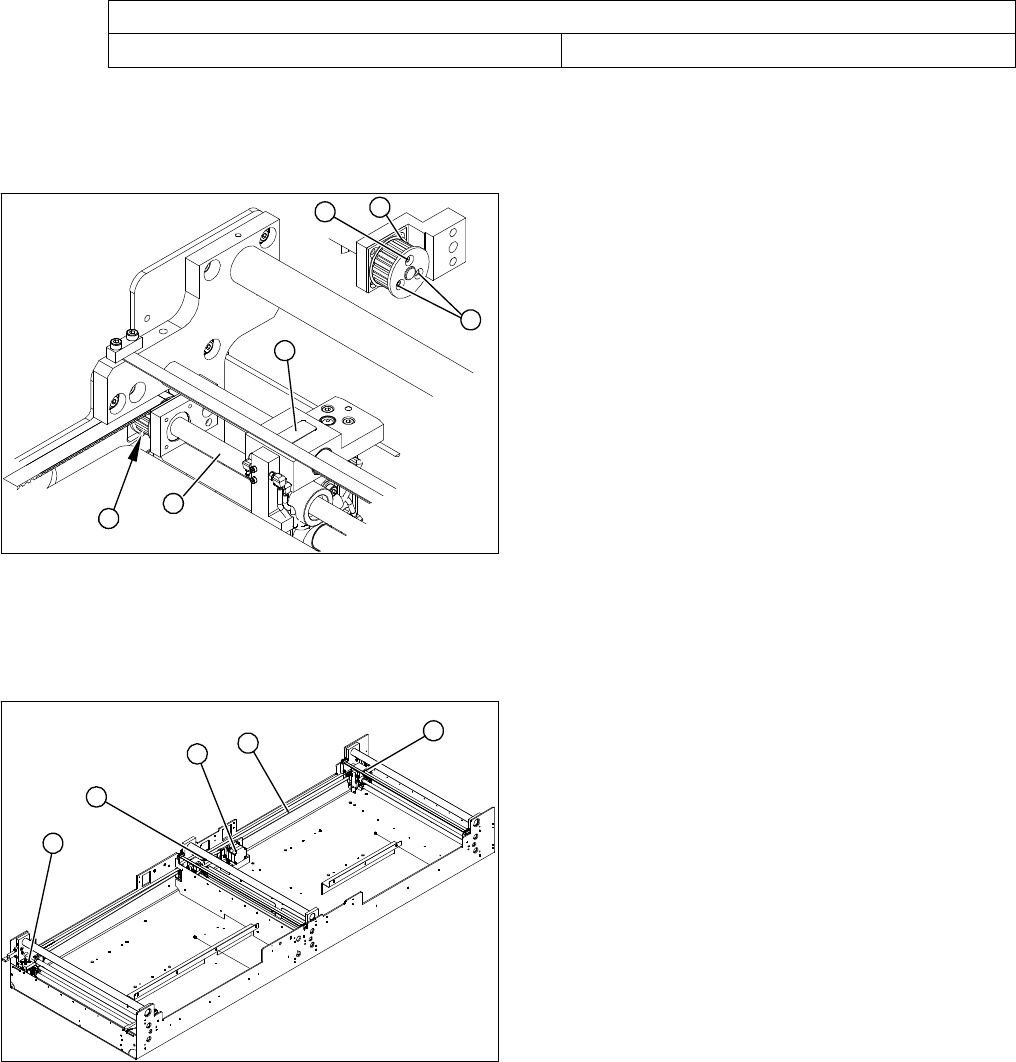
Overview
Belt tension- width adjustment
Toothed belt for the drive 30 Hz +/- 2 Hz
► Open the three screws (2) fastening the toothed
wheel (1).
The recirculating spindle (3) and adjustment unit (4)
can now be rotated by hand (hold the toothed wheel
in place and turn the recirculating spindle).
► Measure the distance of a fixed adjustment unit to the
fixed conveyor edge.
► Rotate the loose recirculating spindle (3) until the ad
-
justment unit (4) is set to this value.
► Fix this position with the 3 fastening screws (2) on the
toothed wheel (1).
1
1
2
4
3
2
1. Width adjustment stepping motor
2. Toothed belt for the drive
3. Adjustment unit 1, 2 and 3
3
3
1
3
2
Service Work
3.4.2 Replacing the Stepping Motor of the Width Adjustment System [00367174-xx] Modular PCB Conveyor System
Service Manual (internal version) SIPLACE HF and X Series 77
Removal/Installation
► Unplug the connection cable in the cable duct.
► Fit the new stepping motor and reconnect the system to the electrical system.
► Tension the drive toothed belt.
Position the measuring point of the belt tension device at the strand center (i.e. the longest distance
between two toothed disks) of the conveyor toothed belt.
► Set the tension of the drive toothed belt according to the following values.
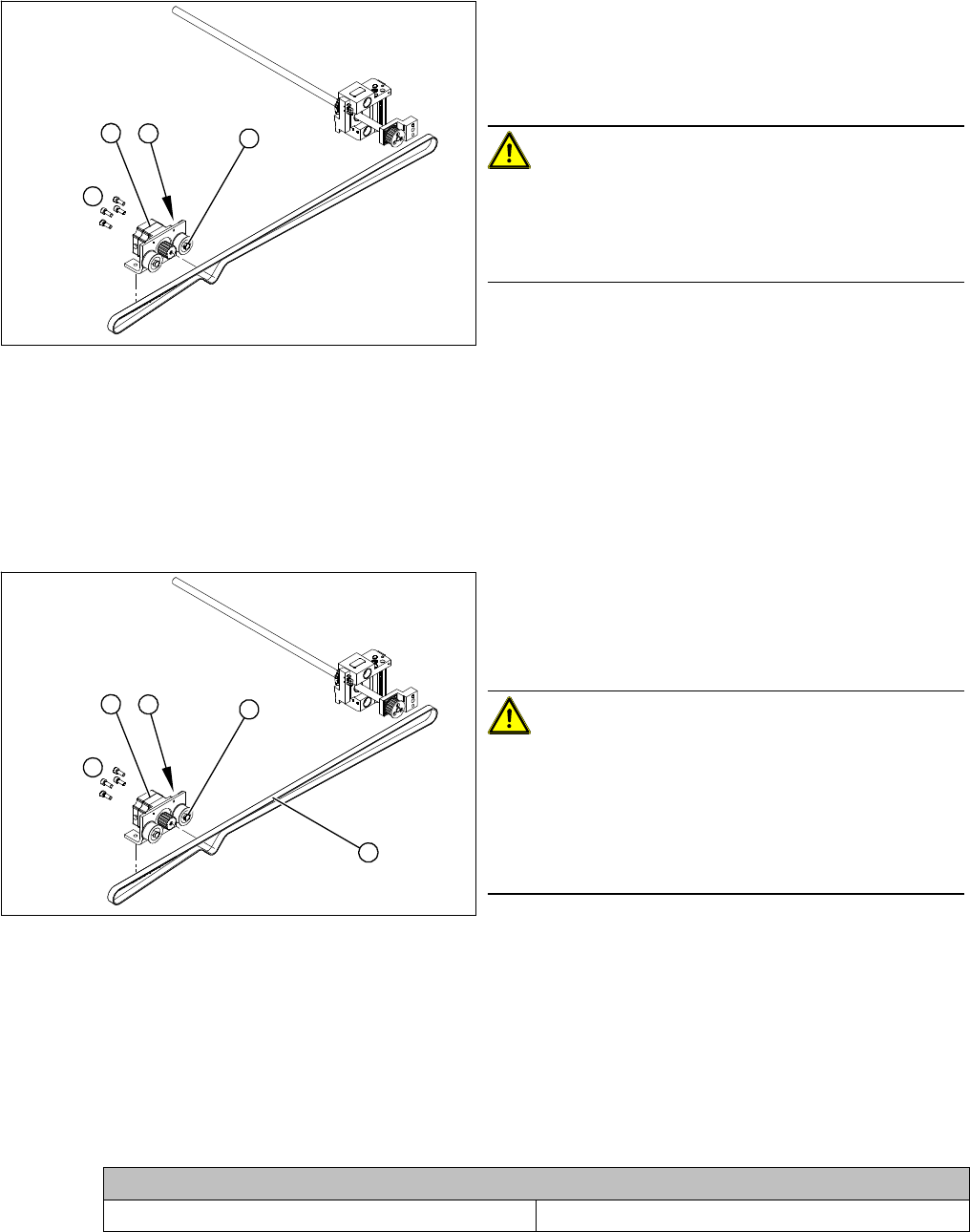
1. Loosening the eccentric axle on the deflection pulley
2. Locknut on the eccentric axle
3. Fastening screws for stepping motor
4. Stepping motor
CAUTION!
Do not damage the toothed belt!
During the following removal and installation of the motor,
the toothed belt for the width adjustment drive must not
be stretched or kinked!
► Move the PCB conveyor to the position which gives
you best access to the stepping motor of the width
adjustment system.
► Move the Y gantries into the area outside the PCB
conveyor.
► Switch off the machine and secure it to prevent unau
-
thorized reactivation.
4
1
3
2
► Loosen the screws fastening the lifting table plate and
remove the lifting table plate from the lifting table unit.
► Loosen the eccentric axle (1) on the deflection pulley
and relieve the tension on the drive toothed belt (5).
CAUTION!
Toothed belt must not come off!
When relaxing the toothed belt, make sure the belt does
not come off (skip) the toothed disks at the 3 adjustment
units. This would cause incorrect alignment of the adjust
-
ment units. Secure these positions with a suitable tool
(screw clamp etc.).
► Remove the 4 fastening screws (3) and then lift out
the stepping motor (4).
4
5
1
3
2
Belt tension- width adjustment
Toothed belt for the drive 24 Hz +/- 2 Hz
Service Work
Modular PCB Conveyor System 3.4.3 Replacing the Solenoid Valve for the Adjustment Unit [00332940-xx]
78 Service Manual (internal version) SIPLACE HF and X Series
3.4.3
3.4.3 Replacing the Solenoid Valve for the Adjustment Unit [00332940-xx]
Replacing the Solenoid Valve for the Adjustment Unit [00332940-xx]
Parts
▪ Solenoid valve with cable, for adjustment unit 1 and 2 [00332940-xx]
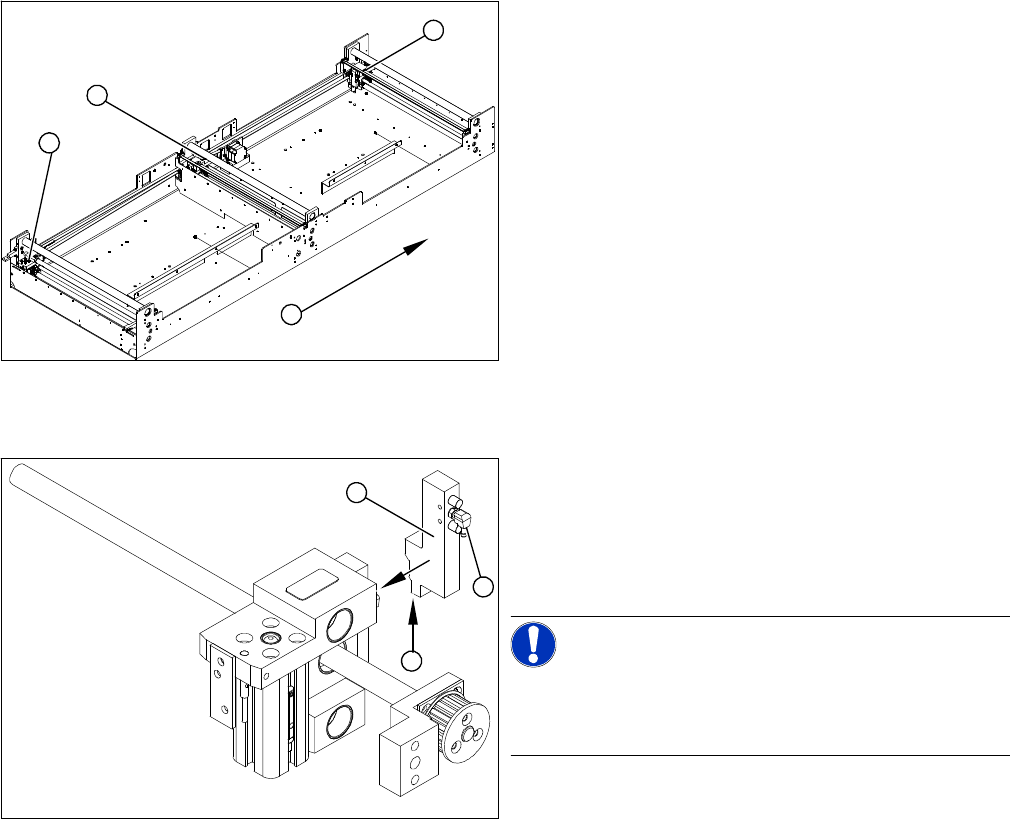
Overview
Removal/Installation
1. Adjustment unit 1
2. Adjustment unit 3
3. Adjustment unit 2
4. Transport direction
► Move the PCB conveyor to the position which gives
you best access to the adjustment system.
► Move the Y gantries into the area outside the PCB
conveyor.
► Switch off the machine and secure it to prevent unau
-
thorized reactivation.
► Switch off the compressed air supply.
3
4
1
2
► Disconnect from the compressed air system (2).
► Loosen the two fastening screws and remove the so
-
lenoid valve (3) from the short-stroke cylinder.
► Unthread the connection cable (1) as far as the rele
-
vant assembly tub conversion board and unplug.
NOTICE!
This might be somewhat complicated depending on the
routing of cables inside the machine base. You may wish
to contact SIPLACE service team regarding this work.
► Fit the new solenoid valve (3) and reconnect the sys
-
tem to the electrical (1) and compressed air (2) sup
-
plies.
1
3
2