00194474-0702_AI_HeadReconfig_X_605_DE+EN.pdf - 第192页
2 Assembly Instructions - SIPLACE X-Series Head Reconfiguration Kits Head Reconfiguration Kits 07/2010 Edition 192 2 2 2 2 Hotlink cables th at are not being used MUST NOT be plugged in. Do not confuse the hotlink cabl e…
Head Reconfiguration Kits 2 Assembly Instructions - SIPLACE X-Series Head Reconfiguration Kits
07/2010 Edition
191
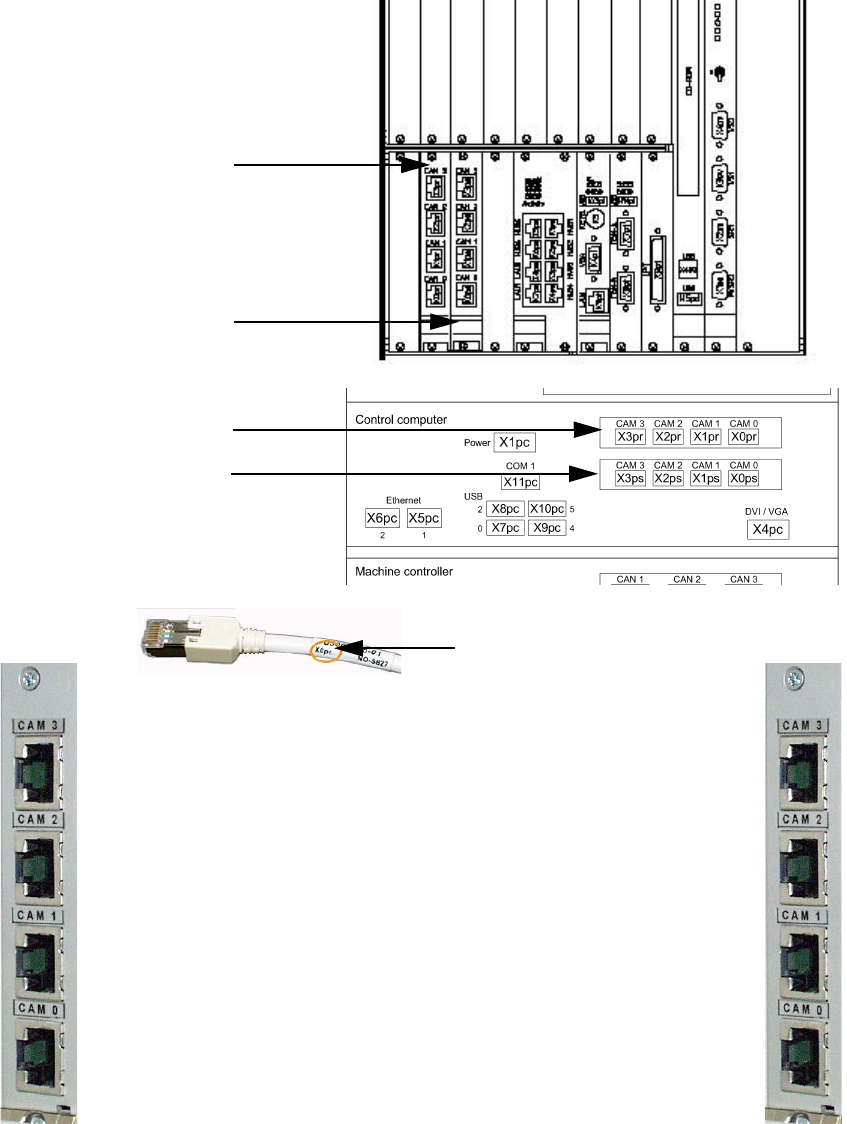
2.11.6 Hotlink card connections (computer unit + box PC)
Hotlink card for
cameras in PA 1
Hotlink card for
cameras in PA 2
Hotlink cable labeling
IC / FC camera in PA 1
X3pr
PCB/CO cameras in PA 1
Gantry 1, X0pr
PCB/CO cameras in PA 1
Gantry 4, X1pr
IC camera in PA 1
X2pr
IC / FC camera in PA 2
X3ps
IC camera in PA 2
X2ps
PCB/CO cameras in PA 2
Gantry 3, X1ps
PCB/CO cameras in PA 2
Gantry 2, X1ps
Hotlink card for
cameras in PA 1
Hotlink card for
cameras in PA 2

2 Assembly Instructions - SIPLACE X-Series Head Reconfiguration Kits Head Reconfiguration Kits
07/2010 Edition
192
2
2
2
2
Hotlink cables that are not being used MUST NOT be plugged in.
Do not confuse the hotlink cable with twisted pair cables!!!
2
2.11.7 Configuring the C&P - 6/12 head in SITEST
Detailed instructions for configuring the placement head can be found in the SITEST online help
under Settings / Settings for the placement head. 2
Head Reconfiguration Kits 2 Assembly Instructions - SIPLACE X-Series Head Reconfiguration Kits
07/2010 Edition
193
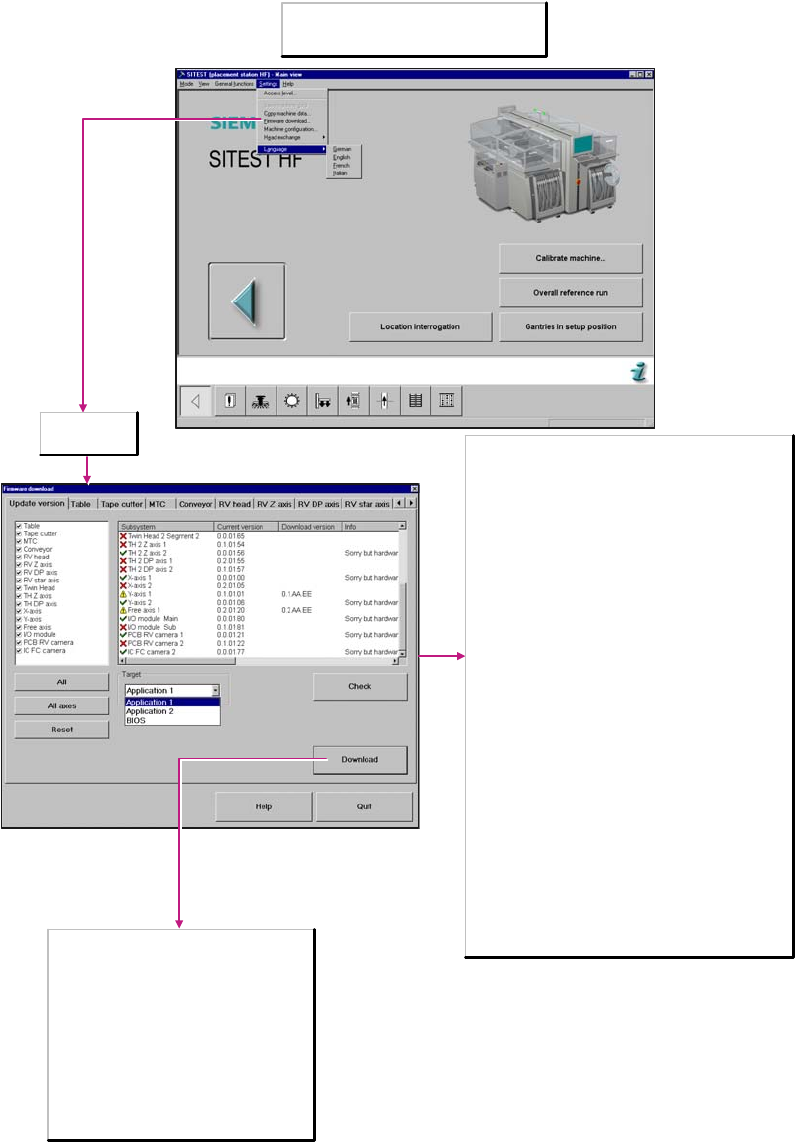
2.11.8 Firmware download
: Download the C&P head firmware.
Note
You can only perform a download if you have
logged in at the Service (SIPLACE) a
ccess level.
Update version
tab selected
Download
The download is started with all selected settings.
The process moves the old firmware files to the
directory C:\SRProgramme\CanFWPool, the newly
downloaded files are now located in the directory
C:\SRProgramme\CanFW.
Target
Application 1/2
When activated, the firmware that controls the
actions of the subsystem is loaded.
BIOS
When activated, the operating system for the
subsystems is loaded.
Subsystem
Machine components
Current version
Firmware version available on the individual machine
components.
Download version
Version that can be loaded. This is located in the directory
C:\SRProgramme\CanFW.
Info
Additional information, for example, about the hardware status
of the various machine components.
Check
Reads the current firmware version from the subsystems.
These versions are stored in the directory
C:\SRProgramme\CanFW. This directory may contain a
maximum of one version for each of the subsystems. If there
are a number of versions available for a subsystem, one of
these versions must be moved into the directory
C:\SRProgramme\CanFWPool. If you do not do so, an error
message will be issued as a result of a conflicting version, and
the download cannot be executed.
Subsystem
Here you can select the subsystems.
Select the subsystem for which the download is to be
performed.
All
All subsystems are activated.
Reset
All components are deactivated.
All axes
All axes are activated.