00195166-0402_SM_D4_EN.pdf - 第141页
Service W ork Replacing the Light Barriers for Tr ansmitter and Receiver Modules [00370063] Modular Conveyor Service Manual SIPLACE D4 141 4.4.16.3 Replacing the Light Barriers for the Intermediate Con veyor Transmitter:…

Service Work
Modular Conveyor Replacing the Light Barriers for Transmitter and Receiver Modules [00370063]
140 Service Manual SIPLACE D4
4.4.16.2 Replacing the Transmitter or Receiver for the Input or Output Conveyor
Receiver:
X Remove the stop rail.
X Remove the short guide rail.
X Dismantle the holder and the receiver.
X Dismantle the receiver from the holder.
X Unthread the connection cable as far as the relevant conversion board of the conveyor side.
X Unplug the conversion board of the conveyor side.
X Rerun the connection cable accordingly and reconnect the conversion board of the conveyor side to
the power supply.
X Fix the receiver at the holder.
X Fix the holder, together with the receiver, to the base so that the holder lies flat on the base.
X Mount the short guide rail and align it.
X Mount the stop rail.
Transmitter:
X Dismantle the holder and the receiver.
X Dismantle the receiver from the holder.
X Unthread the connection cable as far as the relevant conversion board of the conveyor side.
X Unplug the conversion board of the conveyor side.
X Rerun the connection cable accordingly and reconnect the conversion board of the conveyor side to
the power supply.
X Fix the new light barrier in the original position.
NOTE:
The transmitters on the input and output conveyors are freely accessible. The bracket must be
loosened and the screws fastening the light barrier removed.
X
NOTE:
Otherwise check whether you can run the cable through the opening by removing the contacts
in the connection plug.

Service Work
Replacing the Light Barriers for Transmitter and Receiver Modules [00370063] Modular Conveyor
Service Manual SIPLACE D4
141
4.4.16.3 Replacing the Light Barriers for the Intermediate Conveyor
Transmitter:
X Dismantle the holder and the receiver.
X Dismantle the receiver from the holder.
X Unthread the connection cable as far as the relevant conversion board of the conveyor side.
X Unplug the conversion board of the conveyor side.
X Rerun the connection cable accordingly and reconnect the conversion board of the conveyor side to
the power supply.
X Fix the new light barrier in the original position.
Receiver:
X Remove the stop rail.
X Remove the short guide rail.
X Dismantle the holder and the receiver.
X Dismantle the receiver from the holder.
X Unthread the connection cable as far as the relevant conversion board of the conveyor side.
X Unplug the conversion board of the conveyor side.
X Rerun the connection cable accordingly and reconnect the conversion board of the conveyor side to
the power supply.
X Fix the receiver at the holder.
X Fix the holder, together with the receiver, to the base so that the holder lies flat on the base.
X Mount the short guide rail and align it.
X Mount the stop rail.
NOTE:
The transmitter on the intermediate conveyor is freely accessible. The bracket must be loosened
and the screws fastening the light barrier removed.
Service Work
Modular Conveyor Replacing the Laser Light Barriers for Stopper Positions [00370385]
142 Service Manual SIPLACE D4
4.4.17 Replacing the Laser Light Barriers for Stopper Positions [00370385]
Parts
Laser light barrier transmitter module PA1 assembly [00370385-xx]
Laser light barrier transmitter module PA2 assembly [00370386-xx]
Laser light barrier - receiver module PA1 [00365772-xx]
Laser light barrier - receiver module PA2 [00365774-xx]
Overview
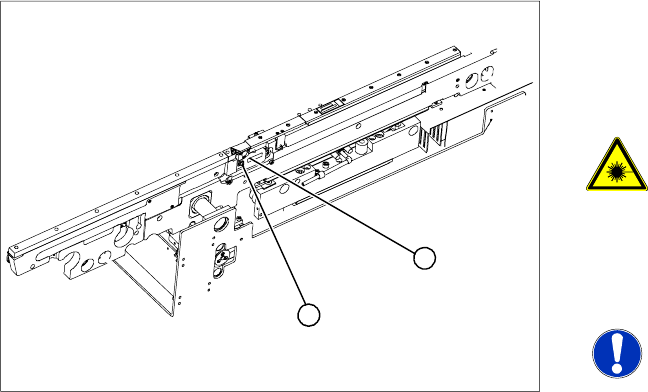
Legend
1. Transmitter module (amplifier) with 2 screws
2. Transmitter module (round laser diode) with 3
screws
DANGER: The laser light barrier
emits class 2 laser beams (from its
transmitter).
You therefore do not require additional
protective measures!
X Keep your eyes away from the laser
beam!
NOTE:
After setting the laser light barrier you
must check or re-teach the PCB
reference corner!
X Move the PCB conveyor to the position which
gives you best access to the laser light barrier.
X Move the Y gantries into the area outside the
PCB conveyor.
X Switch off the machine and secure it to prevent
unauthorized reactivation.
1
2