00195166-0402_SM_D4_EN.pdf - 第157页
Service W ork Replacing the DP Rocker C&P12 P lacement Head Service Manual SIPLACE D4 157 Installation X Fit the drive arm (3) with drive whe el back on the swivel-in ball bearing. X Swivel the rocker arm on the moto…
Service Work
C&P12 Placement Head Replacing the DP Rocker
156 Service Manual SIPLACE D4
4.5.6 Replacing the DP Rocker
The swivel-in rocker of the DP station has been fitted with 2 cones from version 7 onwards. The DP
station [00320041-05] can be upgraded to accommodate this improvement by simply replacing the old
part.
Tools and Equipment
Standard tool
Retrofit assembly for rocker [03063649S01]
Belt tensioning device for DP station
Removal
X Carefully disconnect the toothed belt from the
motor toothed wheel.
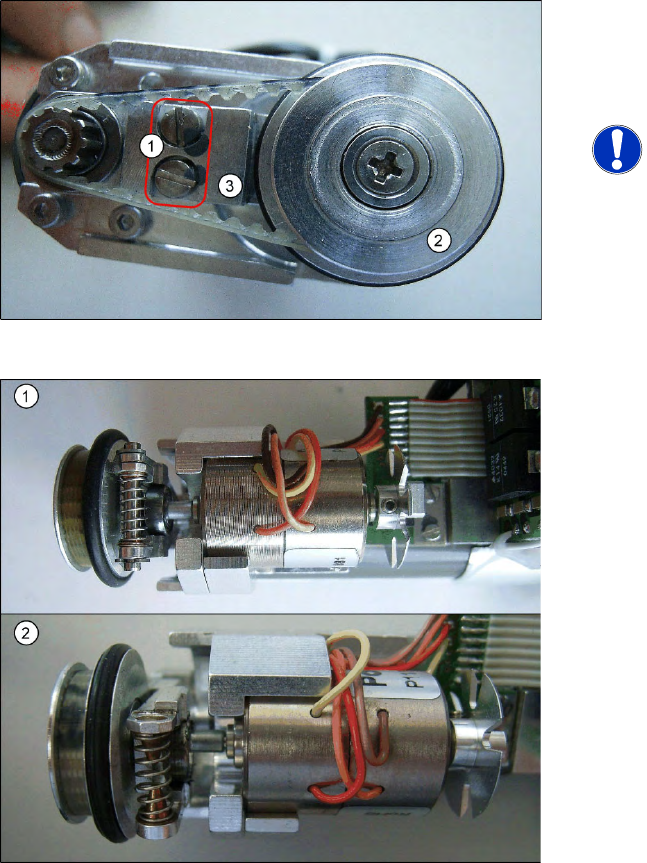
X Loosen the two screwed fittings on the rocker
arm.
NOTE:
The rocker arm is located under the
drive arm (3). The drive arm is fixed to
the rocker arm with the two screws (1).
X Swing the rocker arm on the motor to one side
and remove the rocker arm with drive wheel
(2) from the swivel-in ball bearing.
The adjacent diagram shows a comparison of the
spring mechanism on the DP rocker with version 5
(1) and version 7 (2) plus 2 cones.
Service Work
Replacing the DP Rocker C&P12 Placement Head
Service Manual SIPLACE D4
157
Installation
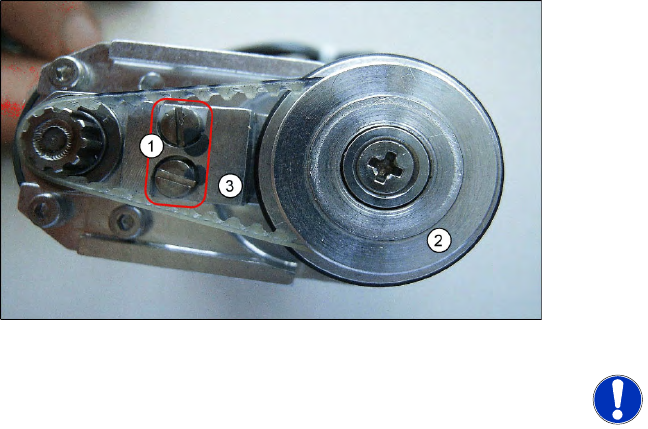
X Fit the drive arm (3) with drive wheel back on
the swivel-in ball bearing.
X Swivel the rocker arm on the motor back and
refit the M2x3.5 screws.
X See also section (4.5.7 Replacing the Toothed
Belt for the DLM Turning Station (from version
07) [00320041-xx]
J
158 ) for the following
tasks.
X Place the belt back on the drive wheel and pull
it over the motor toothed wheel.
X Fit the belt tensioning device for the DP
station.
X Tighten the two screws.
NOTE:
X When replacing the DP rocker, you
also need to replace the drive
toothed belt.
X The version 7 DP station with new
rocker should be available from early
2009 onwards.
Service Work
C&P12 Placement Head Replacing the Toothed Belt for the DLM Turning Station (from version 07)
158 Service Manual SIPLACE D4
4.5.7 Replacing the Toothed Belt for the DLM Turning Station (from version 07)
[00320041-xx]
Removal/Installation
NOTE:
The version 7 turning station should be available from early 2009 onwards.
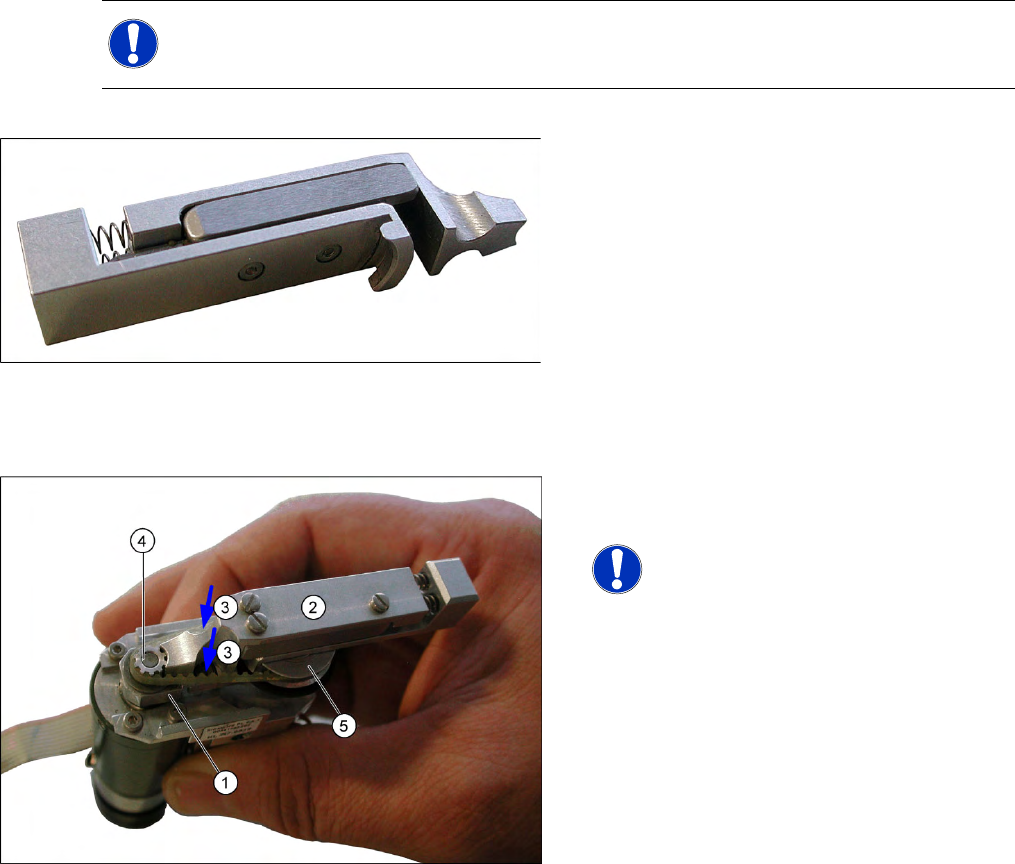
4-42: Belt tensioning device for turning station DLM
Tools and equipment
Standard tool
Belt tensioning device for DLM turning station
Item No. [03063649-01]
Lubricant Isoflex Topas NCA52
Spare part: Synchroflex toothed belt 2.5 T2/90
[00320041-01]
X Remove the turning station as described in the
previous chapter.
NOTE:
X To loosen or tighten the fastening
screw on the rocker, hold the DP
station between your thumb and
index finger so that the swivel-in
rocker (1) can be moved to the left
and right.
X Remove the defective toothed belt.
X Loosen the two fastening screws (3) with a
size 0 screwdriver. Do not fully remove these
screws - leave them in the unit.
X Grease the new toothed belt slightly with
Isoflex Topas NCA52.
X Fit the new toothed belt onto the toothed
wheels.
X Fit the adjustment aid (2) between the motor
drive toothed wheel (4) and the sleeve drive
wheel (5). The tension of the steel spring in the
tool sets the belt to the correct tension.
X Now tighten the two screws fastening (3) the
rocker with a size 0 screwdriver.
X Check the axis dynamics according to the
setting instructions for the machine and
relevant placement head..
X Refit the turning station as described in the
previous chapter.