00195166-0402_SM_D4_EN.pdf - 第240页
Settings Component Handling Tape Cutter Contr ol Un it 240 Serv ice Manual SIPLACE D4 6.4.2 T ape Cutter Control Unit The jumper for the CAN bus addressing must be set according to the corresponding location in the machi…
Settings
Setting the COT Basic Height Component Handling
Service Manual SIPLACE D4
239
6.4.1.3 Adjusting the Component Trolley Height
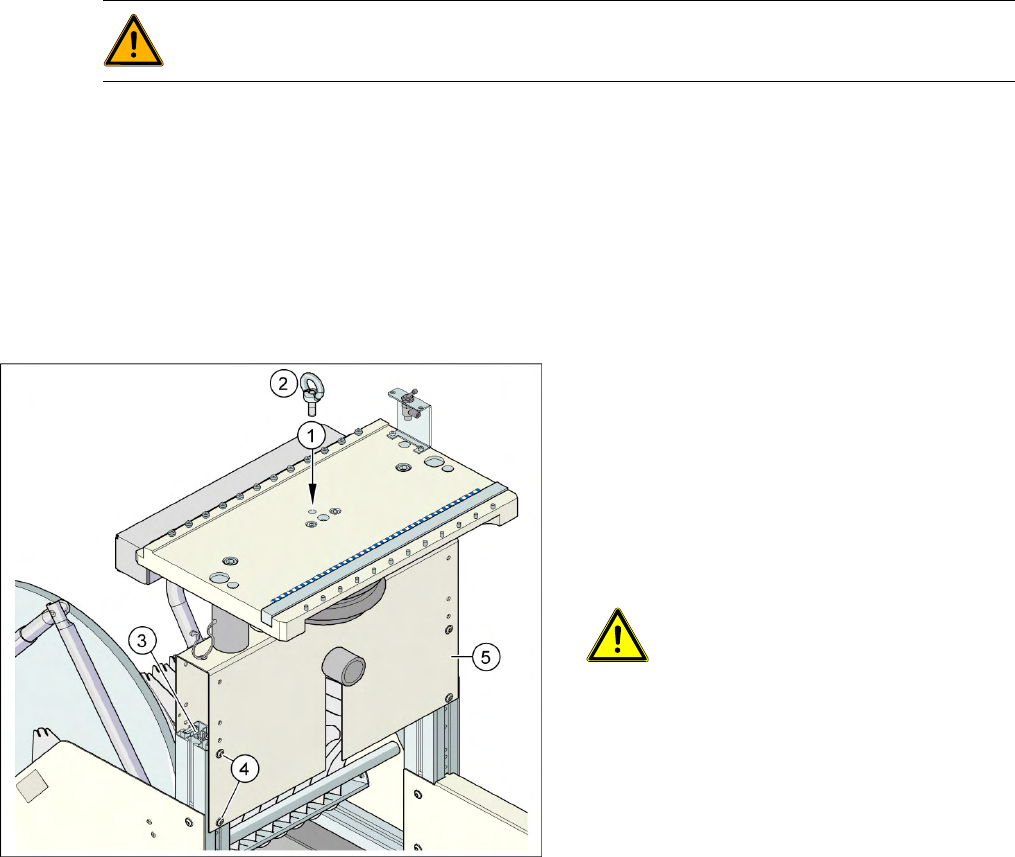
X Screw the eyebolt into the M12 hole provided (1) on the component trolley table.
X Hook the leverage device into the eyebolt (2).
X Tighten the rope of the leverage device.
X Loosen the 8 hexagon socket-head screws, M6x12 (4).
X Lift or lower the component trolley table to the required height. Make sure that the hole for the
required height in the bridge (5) is level with the top hole in the vertical profile bar (3).
X Fasten the bridge (5) to the vertical profile bar (3) with the 8 hexagon socket-head screws M6x12 (4).
X Unscrew the eyebolt from the component trolley table.
WARNING:
Lift all feeder modules off the component trolley table plate.
6-23: Position of eyebolt on component trolley
Legend
1. M12 hole drilled for eyebolt
2. Eyebolt DIN 580 M12-St
3. Vertical profile bar
4. 8 x hexagon socket-head screw SN 62355,
M6x12
5. Bridge
CAUTION:
Always use the fit-up aid (screwed
eyelet) to fix the table plate,
irrespective of whether you want to
raise or lower the component trolley.
Settings
Component Handling Tape Cutter Control Unit
240 Service Manual SIPLACE D4
6.4.2 Tape Cutter Control Unit
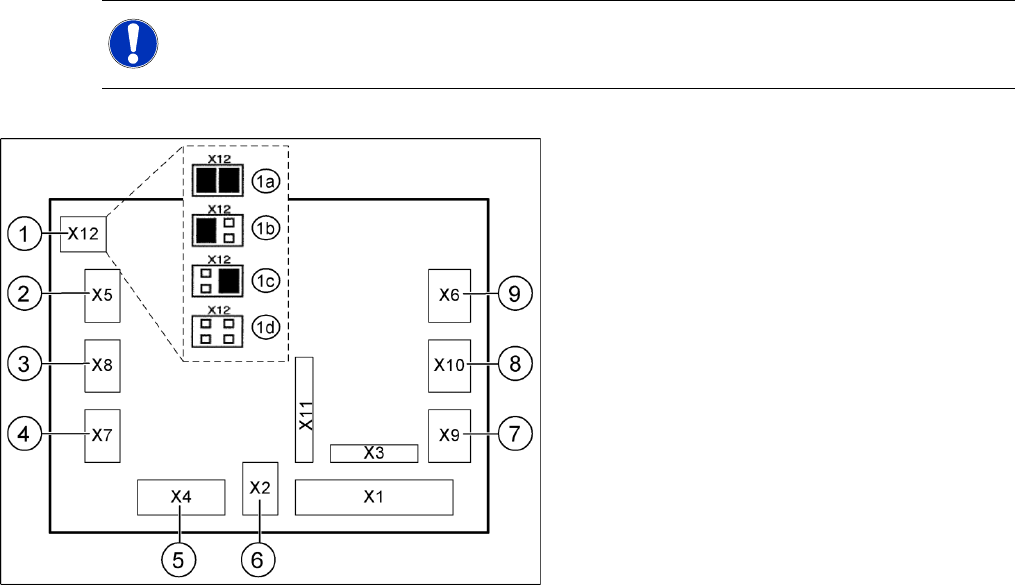
The jumper for the CAN bus addressing must be set according to the corresponding location in the
machine.
NOTE: Control unit [03006411-xx] is replaced by CAN node module.
This version is replaced by the backwards compatible CAN node [03052027-xx] module.
6-24: Jumper setting on the tape cutter unit (example of D4 shown)
Legend
1. X12 – Jumper for location code of cutter:
1a: Gantry 1
1b: Gantry 2
1c: Gantry 3
1d: Gantry 4
2. X5 – Voltage supply to valve (left)
3. X8 – Proximity switch for stroke cylinder out
(left)
4. X7 – Proximity switch for stroke cylinder in
(left)
5. X4 – CAN bus connection
6. X2 – Voltage supply for cutter +24 V and +5 V
7. X9 – Proximity switch for stroke cylinder in
(left)
8. X10 – Proximity switch for stroke cylinder out
(right)
9. X6 – Voltage supply to valve (right)
Settings
Check the gap between the empty-tape baffle, inside and the leading edge of the tape deflector. Component Handling
Service Manual SIPLACE D4
241
6.4.3 Check the gap between the empty-tape baffle, inside and the leading edge of the
tape deflector.
X With the feeler gauge, check:
The distance between the empty-tape baffle and the leading edge of the tape deflector must again
be within the TARGET distance 1.0 to 1.5 mm over the entire length.
If the gap is not OK.
X Loosen the screws holding the empty-tape duct once again and correct the position of the duct in the
holes.
X If this is not enough, you may assume that the cutter was already not in the optimal position before
the empty-tape duct was replaced:
In this case, correct the position of the cutter in the holes of the retaining brackets as described in
section (4.3.2.5 Exchanging the Pneumatic Cutter
J
87 ) .
X Perform the appropriate “Final Steps”.
See also:
J
Tightening Torques for Cutter Screws [
J
87]
J
4.3.2.14 Final Steps [
J
114]
WARNING:
The following check can only be conducted from the bottom of the cutter after it has been
installed in the machine. Wear thick protective gloves;
there is a risk of injury from the blades and the edge of the tape deflector.
NOTE:
For the adjustments it is the best, if a second person is available
CAUTION:
X Tighten the screws to the correct torque.