00195166-0402_SM_D4_EN.pdf - 第61页
Service W ork Axis Unit Electrical System Service Manual SIPLACE D4 61 Firmware download Replacing the Servo Card 4-9: Overview of firmware downloa d X Start SITEST. X Download the firmware for the re levant axes . To do…
Service Work
Electrical System Axis Unit
60 Service Manual SIPLACE D4
Replacing the A364 Axis Card
X End all placement operations with the machine.
X Switch the placement system off at the main switch.
X You can now access the axis unit at the required location (1/4 or 2/3).
X Loosen the screws holding the relevant axis card.
X Remove the axis card from the unit by moving the release lever up and down.
X Insert the new axis card and push the assembly in (you will feel a slight resistance) until it engages
and then tighten the two fastening screws.
X Switch the machine on again.
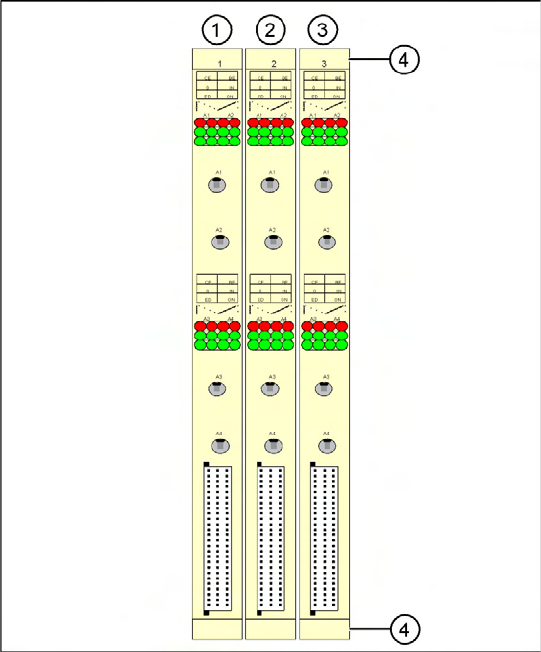
4-8: A364 axis cards on the D2/D4
Legend for D4
Gantry numbers for PA1 (in brackets for PA2)
1. X ,Y , star and Z axis for gantry 1 (2)
2. X ,Y , star and Z axis for gantry 4 (2)
3. DP axis for gantry 1 and 4 (2 and 3)
4. Release lever with screwed connection
Service Work
Axis Unit Electrical System
Service Manual SIPLACE D4
61
Firmware download
Replacing the Servo Card
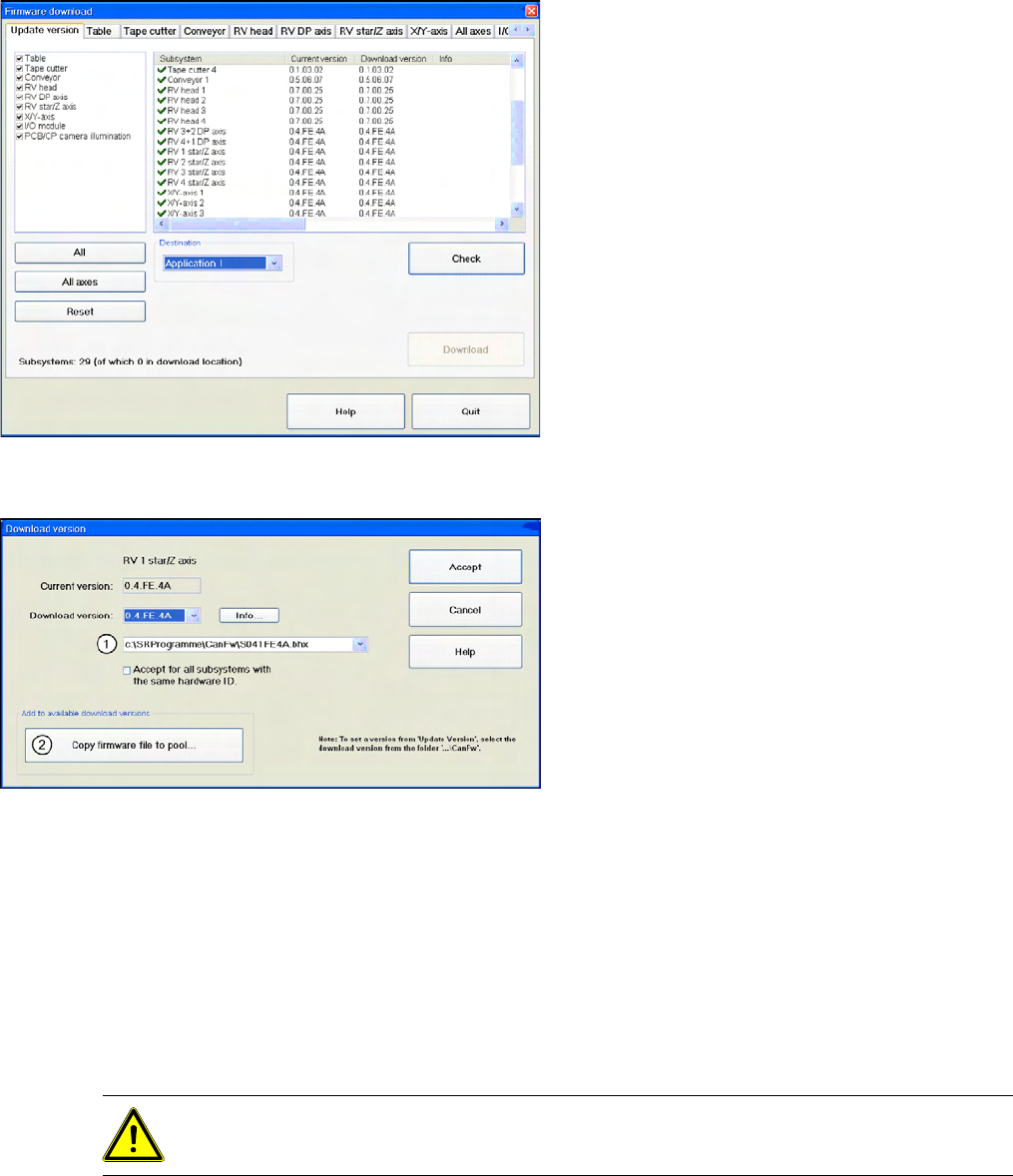
4-9: Overview of firmware download
X Start SITEST.
X Download the firmware for the relevant axes.
To do this, select "Settings" from the SITEST
menu bar and then "Firmware Download".
4-10: Firmware download
In the CAN FW folder there are all current
Firmware versions of all axes, tables etc.
Legend
1. The system checks this folder, to see whether
there is a newer version of the firmware for the
respective axis, table etc.. If there exist a new
firmware version, this new version will be
offered and could be downloaded for example
to the star- axis.
2. You can also copy a new firmware version
manually into the CAN FW folder. Click on
Copy firmware file to pool
. An Explorer menu
will open, in which you can directly copy the
new firmware version from a USB stick etc.
into the CAN FW folder. The firmware version
you selected will now be available in the
selection menu (see item (1)).
CAUTION:
TBS servo for the star axis of the DLM3 head.

Service Work
Gantry Preparations for Service Work
62 Service Manual SIPLACE D4
4.2 Gantry
4.2.1 Preparations for Service Work
X End all placement operations on the placement system.
X Disconnect the changeover table of the gantry concerned, if necessary.
X Switch the placement system off at the main switch.
X Wait until the operating system has shut down and the UPS has switched off.
X Disconnect the machine from the power supply.
X Disconnect the placement system from the compressed air supply.
X Switch off the motor contactor in the power supply and secure it with a padlock.
4.2.2 Replacing the Elastomeric Spring [00301040-01]
4.2.2.1 Tools and Equipment
Set of DIN 911 Allen keys
4.2.2.2 Parts
Elastomeric spring 25 x 10.5 x 50 [00301040-01]
WARNING:
To avoid damaging the Collect&Place head, ALWAYS observe the following points when
moving the gantry:
X NEVER move the gantry by pushing with your hands against the Collect&Place head.
X NEVER push the gantry while the Z axis is lowered.
X Take hold of the cast iron part of the X-axis - ideally near the X-axis toothed belt deflection
pulley - and then move the gantry.