00196428-0102_AI_Reconfig_Kit_X-Serie_CPP_DE EN - 第121页
Head Reconfiguration Kit 2 Assembly Instructions Head Reconfiguration Kit CPP fo r the SIPLACE X Ser ies Issue 03/2010 2.8 Removing the Placement Head 121 2.8.6 Removing the Nozzle St ation When switching to a C&P 20…
2 Assembly Instructions Head Reconfiguration Kit CPP for the SIPLACE X Series Head Reconfiguration Kit
2.8 Removing the Placement Head Issue 03/2010
120
2.8.5 Removing the Servo Cards
X Remove the servo amplifier star, Z axis and the DC/DC converter for the DP drives.
See also Section 2.7.5 "Replacing the Servo Cards" on page 100
When switching to a C&P20 head, the servo card star axis and the DC/DC converter can be
reused.
The servo amplifier of the Z axis must be removed in any case.
2
Head Reconfiguration Kit 2 Assembly Instructions Head Reconfiguration Kit CPP for the SIPLACE X Series
Issue 03/2010 2.8 Removing the Placement Head
121
2.8.6 Removing the Nozzle Station
When switching to a C&P 20 head the "nozzle station CPx cplt." X-Series" [03073328-xx] can be
reused. 2
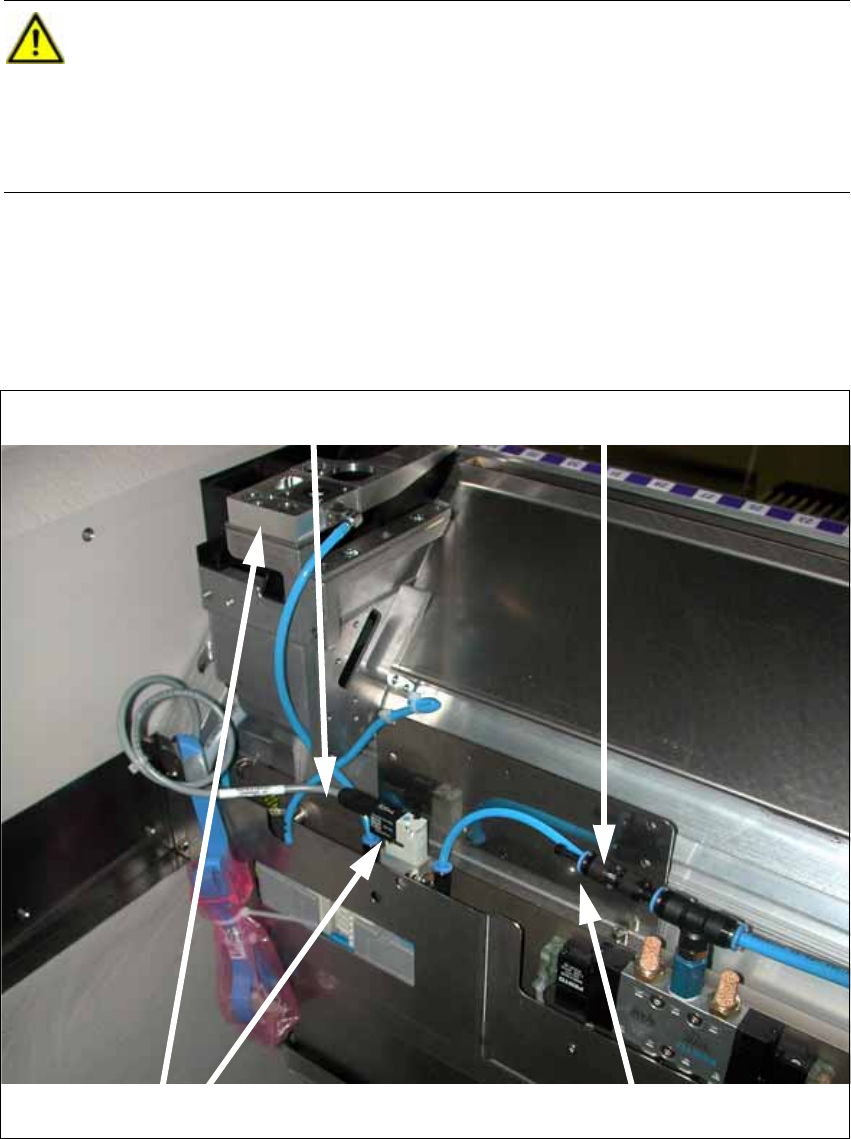
X Disconnect the cable from the solenoid valve (see photo below).
X Disconnect the Y distributor at the solenoid valve of the component trolley docking unit (see
photo below).
X Remove the nozzle station and the solenoid valve (see photo below).
X Close the T piece of the pneumatic supply with a plug QSC-4H [00330249-xx]
CAUTION:
Depending on the installation location (single gantry placement area) the component
trolley docking unit must be released and pushed outwards. To do this, it is absolutely
necessary to read the relevant Service Manual.
When the work is completed refit the component trolley docking unit and calibrate all
add-on parts (nozzle changer). 2
Cable at the solenoid valve
Disconnecting the Y distributor
Removing the nozzle station and the solenoid valve
Closing the T piece
2 Assembly Instructions Head Reconfiguration Kit CPP for the SIPLACE X Series Head Reconfiguration Kit
2.8 Removing the Placement Head Issue 03/2010
122
2.8.7 Removing the "Nozzle Station" Option
X For removing
the nozzle changer, refer to the Assembly Instructions for Nozzle Changer X-Series
[00196432-xx].
2.8.8 Removing the "Reject Bin Sensor" Option
2.8.9 Removing the "Stationary Camera" Option
2.8.10 Removing the "MTC" Option
If the CPP is operated with an MTC, the Y stop must be installed on the MTC side with an exten-
sion. 2
With a TwinHead, no extensions are necessary. 2
CAUTION: Danger of crashing
Always operate the placement heads with the appropriate nozzle changer for the rele-
vant head and the correct magazines. There is a danger of crashing when a false nozzle
changer is used.
When switching to a C&P20 head it suffices to change the magazines. 2
NOTE:
The nozzle changer of the CPP head can only be operated on machines with CAN
nodes. 2
NOTE:
When using the reject bin sensor option, an additional sensor for the large component
reject bin must be installed [03079030-xx]. 2
For details on the reject bin sensor option, refer to the Assembly Instructions "Reject Bin
Sensor SIPLACE / X-Series / D3 " [
00194716-xx]. 2
NOTE:
For details on the stationary camera, refer to the Assembly Instructions "Stationary Cam-
era SIPLACE X-Series" [
00194554-03]. 2